tencent cloud

TDMQ for Apache Pulsar

Release Notes and Announcements
Release Notes
Cluster Version Updates
Product Announcements
Product Introduction
Introduction and Selection of the TDMQ Product Series
What Is TDMQ for Apache Pulsar
Strengths
Scenarios
How It Works
Product Series
Version Support Instructions for Open-Source Apache Pulsar
Comparison with Open-Source Apache Pulsar
High Availability
Quotas and Limits
Basic Concepts
Billing
Billing Overview
Pricing
Billing Examples
Renewal
Viewing Consumption Details
Overdue Payments
Refund
Getting Started
Getting Started Guide
Preparations
Using the SDK to Send and Receive General Messages
Using the SDK to Send and Receive Advanced Feature Messages
User Guide
Usage Process Guide
Configuring the Account Permission
Creating a Cluster
Configuring the Namespace
Configuring the Topic
Connecting to a Cluster
Managing the Cluster
Querying Messages and Traces
Cross-Region Replication
Viewing Monitoring Data and Configuring Alarm Rules
Use Cases
Client Usage
Abnormal Consumer Isolation
Traffic Throttling Mechanisms
Transaction Reconciliation
Message Idempotence
Message Compression
Migration Guide
Single-Write Multiple-Read Cluster Migration Solutions
Hitless Migration from Virtual Cluster to Pro Cluster
SDK Reference
API Overview
SDK Reference
SDK Overview
Recommended SDK Configuration Parameters
TCP Protocol (Apache Pulsar)
Security and Compliance
Permission Management
Deletion Protection
CloudAudit
FAQs
Monitoring
Clients
Agreements
Service Level Agreement
TDMQ Policy
Contact Us
Glossary

Renewal

PDF
Focus Mode
Font Size
Last updated: 2025-12-24 14:52:52
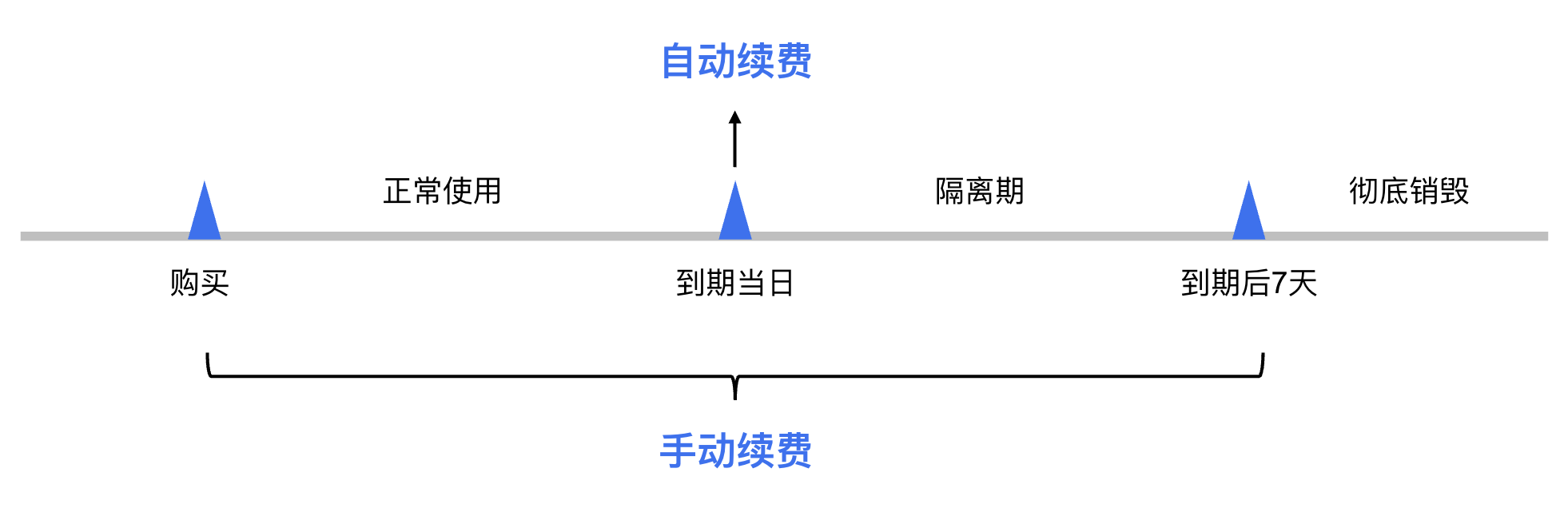
If you do not renew a yearly/monthly subscription cluster in advance or have insufficient account balance to complete auto-renewal before the expiration date, the cluster will enter an isolated state. You need to complete the renewal promptly to restore the cluster to the normal state. If renewal is not completed during the isolation period, the system will automatically release cluster resources after the isolation period ends. All data will be cleared and cannot be recovered.
Note:
Pay-as-you-go clusters do not require renewal. You only need to ensure a sufficient available account balance. For specific steps to top up your account, see Online Top-up.

Renewal

Two renewal methods are supported: manual renewal and auto-renewal. The details are as follows:
Manual renewal: For a yearly/monthly subscription cluster, you can manually renew it at any time from the time of purchase until it is completely deleted to extend its service period.
Auto-renewal: After you enabled auto-renewal for a yearly/monthly subscription cluster, if the account balance is sufficient, the cluster will be automatically renewed on the expiration date.
Note:
For detailed status descriptions after cluster expiration, see Overdue Payments.


Manual Renewal

Manual Renewal in the TDMQ for Apache Pulsar Console

2. In the left sidebar, choose Cluster, select the target region, and then choose More > Renew in the operation column of the target cluster.
3. In the pop-up window, select the renewal duration. At this point, you can also choose to enableauto-renewal for the cluster.
4. Click OK. After you complete the payment on the order payment page, the renewal will be completed.

Manual Renewal in Billing Center

2. In the upper-right corner of the page, hover the pointer over Billing Center and click Renewal Management in the drop-down list to go to Billing Center.
3. On the Renewal Management page, select the expiration time range, search for and select Tencent Distributed Message Queue (TDMQ). On the Manual Renewal tab, select the sub-product TDMQ for Apache Pulsar to manually renew your clusters.
Renew a single cluster: Click Renew in the operation column of the target cluster.
Renew multiple clusters at a time: Select the clusters that you want to renew and then click Batch Renewal in the upper-left corner.
4. In the pop-up window, select the renewal duration and click OK. After you complete the payment on the order payment page, the renewal will be completed.

Auto-Renewal

Auto-renewal reduces the management overhead of manual renewal and prevents clusters from being automatically deleted due to missed manual renewals.

Enabling Auto-Renewal When Purchasing a Cluster

You can choose to enable auto-renewal on the purchase page for Pulsar clusters. For detailed steps on purchasing a cluster, see Creating a Cluster.

Enabling Auto-Renewal in Billing Center

If you did not enable auto-renewal when purchasing the cluster, you can choose to enable auto-renewal for the cluster when it has not expired and is in the Running state. The procedure is as follows:
2. In the upper-right corner of the page, hover the pointer over Billing Center and click Renewal Management in the drop-down list to go to Billing Center.
3. On the Renewal Management page, select the expiration time range, search for and select TDMQ. On the Manual Renewal tab, select the sub-product TDMQ for Apache Pulsar to enable auto-renewal for your clusters.
Enable auto-renewal for a single cluster: Click Set as Auto-renewal in the operation column of the target cluster.
Enable auto-renewal for multiple clusters at a time: Select the clusters and click Set as Auto-renewal in the upper-left corner.
4. In the pop-up window, select I have read and agree to the Auto-renewal Rules and click OK to complete enabling auto-renewal.

Setting a Unified Expiration Date

If you have multiple Pulsar clusters with different expiration dates, you can set their expiration dates to the same date for easier daily management and renewal.
For specific operations, see Setting a Unified Expiration Date.


Help and Support

Was this page helpful?

Help us improve! Rate your documentation experience in 5 mins.

Feedback