tencent cloud

TDMQ for Apache Pulsar

Release Notes and Announcements
Release Notes
Cluster Version Updates
Product Announcements
Product Introduction
Introduction and Selection of the TDMQ Product Series
What Is TDMQ for Apache Pulsar
Strengths
Scenarios
How It Works
Product Series
Version Support Instructions for Open-Source Apache Pulsar
Comparison with Open-Source Apache Pulsar
High Availability
Quotas and Limits
Basic Concepts
Billing
Billing Overview
Pricing
Billing Examples
Renewal
Viewing Consumption Details
Overdue Payments
Refund
Getting Started
Getting Started Guide
Preparations
Using the SDK to Send and Receive General Messages
Using the SDK to Send and Receive Advanced Feature Messages
User Guide
Usage Process Guide
Configuring the Account Permission
Creating a Cluster
Configuring the Namespace
Configuring the Topic
Connecting to a Cluster
Managing the Cluster
Querying Messages and Traces
Cross-Region Replication
Viewing Monitoring Data and Configuring Alarm Rules
Use Cases
Client Usage
Abnormal Consumer Isolation
Traffic Throttling Mechanisms
Transaction Reconciliation
Message Idempotence
Message Compression
Migration Guide
Single-Write Multiple-Read Cluster Migration Solutions
Hitless Migration from Virtual Cluster to Pro Cluster
SDK Reference
API Overview
SDK Reference
SDK Overview
Recommended SDK Configuration Parameters
TCP Protocol (Apache Pulsar)
Security and Compliance
Permission Management
Deletion Protection
CloudAudit
FAQs
Monitoring
Clients
Agreements
Service Level Agreement
TDMQ Policy
Contact Us
Glossary

SDK Overview

PDF
Focus Mode
Font Size
Last updated: 2025-12-24 15:07:56
Tencent Cloud TDMQ for Apache Pulsar is fully compatible with open-source Apache Pulsar, with higher versions maintaining complete backward compatibility with lower versions. This document describes how to collect connection information for TDMQ for Apache Pulsar clusters, such as obtaining cluster access points, usernames, and passwords for cluster access, and provides demo examples and usage instructions for SDKs in various programming languages.
Note:
To better align with the Pulsar open-source community, Tencent Cloud SDK discontinued feature updates starting from April 30, 2021. For TDMQ for Apache Pulsar, it is recommended to use the Apache Pulsar SDK.
Protocol Type
Language or Framework
Demo Address
Reference Documentation
TCP Protocol (Apache Pulsar)
Spring Boot Starter
Java
Go
C++
Python
Node.js
/
For recommended versions and usage methods of each SDK, see SDK Reference. For recommended parameter configurations in client development, see Recommended SDK Configuration Parameters. For FAQs, see Clients.

Client Network Environment Description

Clients can connect to and access a Pulsar cluster through the following three network methods:
1. Direct access within the same Virtual Private Cloud (VPC)
Clients and the Pulsar cluster are deployed within the same VPC, and the network is interconnected by default. You can directly use the VPC access point for network access.
2. Cross-VPC communication through Cloud Connect Network (CCN)
Clients and the Pulsar cluster are deployed in different VPCs. Since VPCs are logically isolated from each other, they cannot communicate directly. To enable cross-network communication, you can use CCN to achieve VPC interconnection across different regions under the same account.
3. Public network access
Clients deployed in other network environments or in different regions from the Pulsar cluster can establish a public network route to access the cluster through the public network access point.
For more information about network environments, see Network Connection Instructions.

Obtaining Connection Information

You need to log in to the TDMQ for Apache Pulsar console to obtain the following connection information.
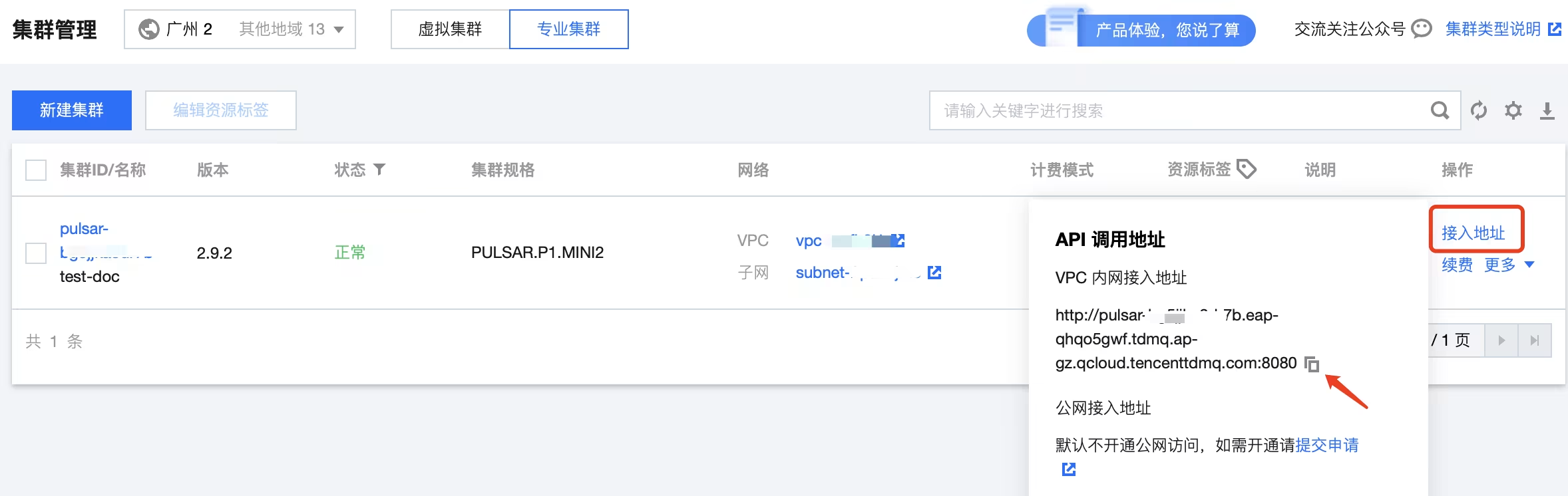
1. Cluster access point address and port information.
On the Cluster page, obtain the information by clicking Access Address in the operation column. Select different access points based on the network type.

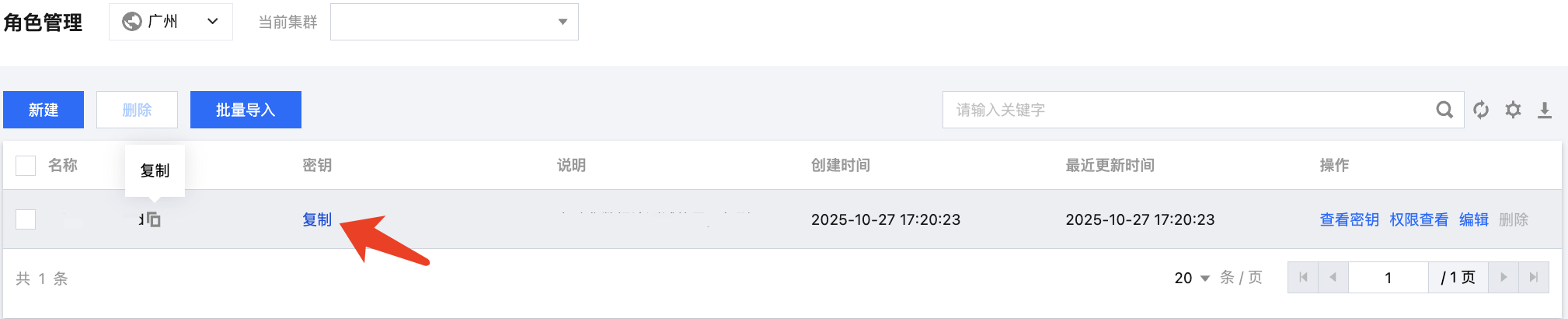
2. The role token for accessing the cluster. Make sure that the role has already been granted the corresponding access permissions.
On the Role Management page, copy the role token. Role token leakage may lead to data leakage. Keep your role token securely.

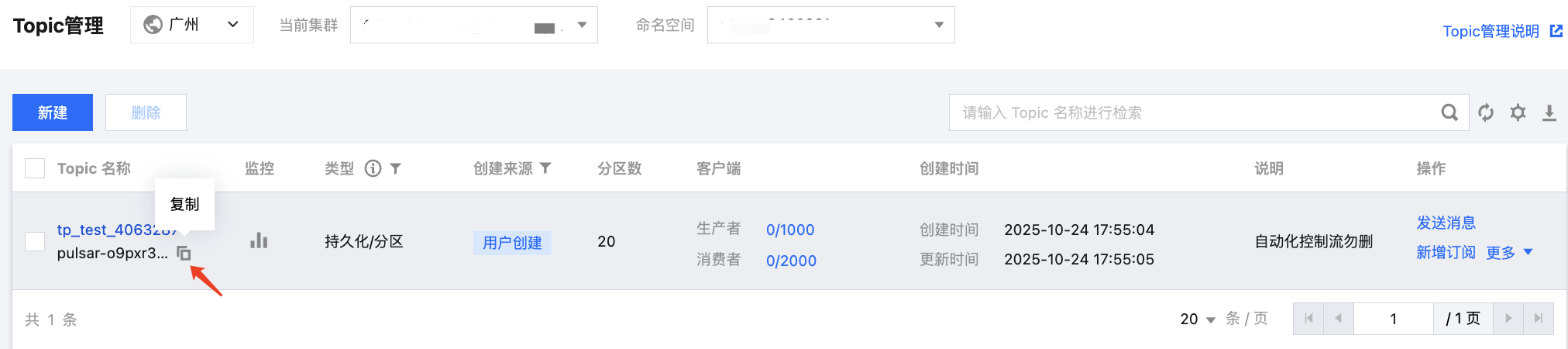
3. Topic name.
On the Topic page in the console, copy the topic name. The format is clusterid/namespace/topic.

4. Subscription relationship name.
On the Consumer tab of the topic details page, copy the subscription relationship name.


Help and Support

Was this page helpful?

Help us improve! Rate your documentation experience in 5 mins.

Feedback