Troubleshooting Guide for EdgeOne 4XX/5XX Status Codes
ダウンロード
フォーカスモード
フォントサイズ
If your business requests return 4XX/5XX status codes after you access EdgeOne, you can troubleshoot the issue by referring to the following common causes and solutions.
Note:
If you still cannot resolve the issue after referring to the following troubleshooting guide, you can contact us for further diagnosis. To help us locate the problem, please provide the EO-LOG-UUID. If you do not have it, please provide the following details:
User IP address and EdgeOne node IP address.
Specific 4XX and 5XX error codes and messages.
The time and time zone when the 4XX and 5XX errors occurred.
The URL that caused the HTTP 4XX and 5XX errors (for example, https://www.example.com/images/icons/image1.png).
HTTP 400
1. Meaning: The server cannot or will not process the request due to reasons considered to be client errors (for example, malformed request syntax, invalid request message framing, or deceptive request routing).
2. Possible causes and solutions:
Origin server response: Test by directly accessing the origin server. If the origin server returns 400, modify the origin server configuration or the client request behavior to obtain a correct response.
EdgeOne node response:
Check whether the request method is supported by EdgeOne. If the request method is not one of the following, the EdgeOne node will directly return a 400 status code.
GET, HEAD, POST, PUT, DELETE, TRACE, CONNECT, OPTIONS, PATCH, COPY, LOCK, MKCOL, MOVE, PROPFIND, PROPPATCH, UNLOCK.
The protocol format is incorrect, for example, using port 443 to access HTTP.
The HTTP request does not comply with RFC specifications.
HTTP 403
1. Meaning: The server cannot or will not process the request due to reasons considered to be client errors (for example, malformed request syntax, invalid request message framing, or deceptive request routing).
2. Possible causes and solutions:
Origin server response: Test by directly accessing the origin server. If the origin server returns 403, modify the origin server configuration or the client request behavior to obtain a correct response.
EdgeOne node response: A common cause is failing the hotlink protection check.
Check whether HTTP Response is configured in the rule engine. If it is, check whether the request matches basic access control rules such as Referer allowlists/blocklists, IP address allowlists/blocklists, and User-Agent allowlists/blocklists.
Check whether Token Authentication is configured in the rule engine. If it is, verify whether the timestamp in the client request URL has expired or the MD5 encrypted string is calculated incorrectly.
Check whether Remote Authentication is configured through edge functions. If it is, verify whether the client request URL does not comply with the validation and release rules of the authentication server.
HTTP 416
1. Meaning: The server cannot process the requested data range. The most common scenario is that the requested data range is not within the file range.
2. Possible causes and solutions:
Origin server response: Test by directly accessing the origin server. If the origin server returns 416, modify the origin server configuration or the client request behavior to obtain a correct response.
EdgeOne node response:
An abnormal range, such as rangeStart < 0, rangeStart > rangeEnd, or rangeStart > FileSize.
The range header in the client request is non-standard. For example, the request uses Range: Bytes=0-1023 instead of Range: bytes=0-1023.
HTTP 418
1. Meaning: Servers generally use this response to handle requests they do not want to process.
2. Possible causes and solutions:
Origin server response: Test by directly accessing the origin server. If the origin server returns 418, modify the origin server configuration or the client request behavior to obtain a correct response.
EdgeOne node response: For domains connected to EdgeOne, the system automatically assigns service nodes to the domain, and the corresponding nodes deliver the domain's configuration file. The file content depends on the domain's configuration, such as origin server, cache, and header settings. When a request reaches an EdgeOne node, the node reads the domain's configuration file. If the configuration file does not exist, the node returns a 418 status code.
Example: A client requests
http://example.com/test.jpg, a domain connected to EdgeOne. The request configuration for this domain exists on nodes 1.1.1.1 and 1.1.1.2. When the domain request reaches these two nodes, the nodes read the configuration file for the domain example.com and respond successfully. If the request reaches node 2.2.2.2, the node returns a 418 status code. Check whether the domain is bound to service nodes other than those for example.com and whether the CNAME configuration is correct. If no issue is found, please contact us for assistance.HTTP 423
1. Meaning: Indicates "Locked". In the context of EdgeOne, it generally indicates that a request loop has been triggered.
2. Possible causes and solutions:
Origin server response: Test by directly accessing the origin server. If the origin server returns 423, modify the origin server configuration or the client request behavior to obtain a correct response.
EdgeOne node response: A request loop is triggered, which means the Loops value in the CDN-Loop header is greater than or equal to 16. For details, see CDN-Loop. This issue commonly occurs when an accelerated domain connected to EO has its origin server also set to a domain connected to EO or another CDN acceleration service.
HTTP 520
1. Meaning: A custom status code defined by EdgeOne. After a TCP connection is established between the node and the origin server, the node sends an HTTP request to the origin server. If the origin server directly sends an RST packet, the node returns a 520 status code to the client.
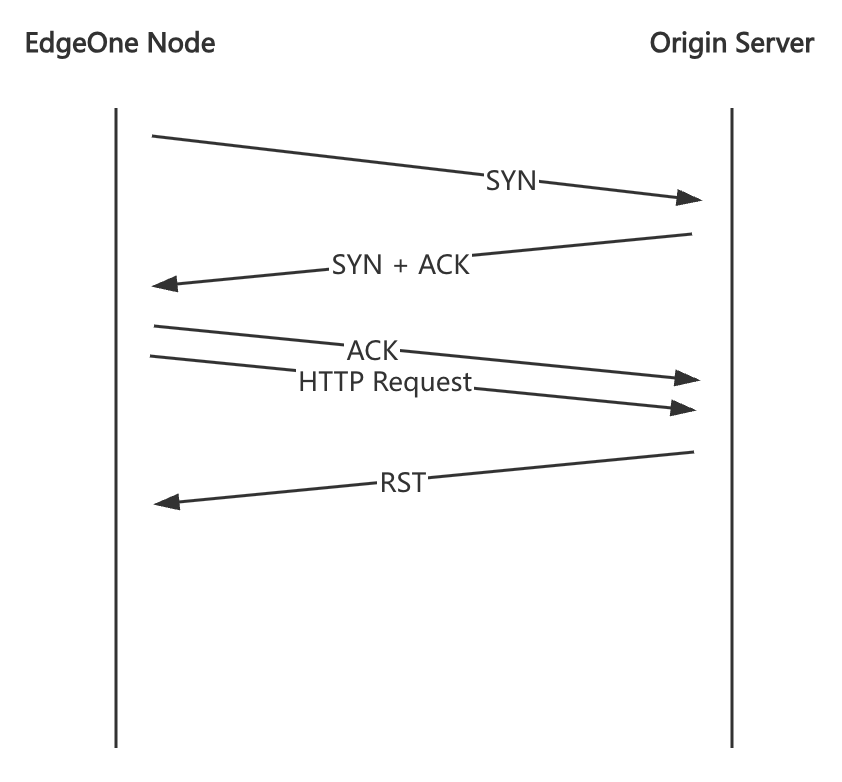
2. Possible causes and solutions:
Origin server service exception: Test by directly accessing the origin server and capture packets to check whether the origin server responds with an RST packet to HTTP requests. This may be caused by the origin server firewall or an exception in the origin server service itself.
HTTP 521
1. Meaning: A custom status code defined by EdgeOne. When a node sends a request to the origin server, if the origin server directly sends an RST packet during the TCP connection establishment phase, the node returns a 521 status code to the client.
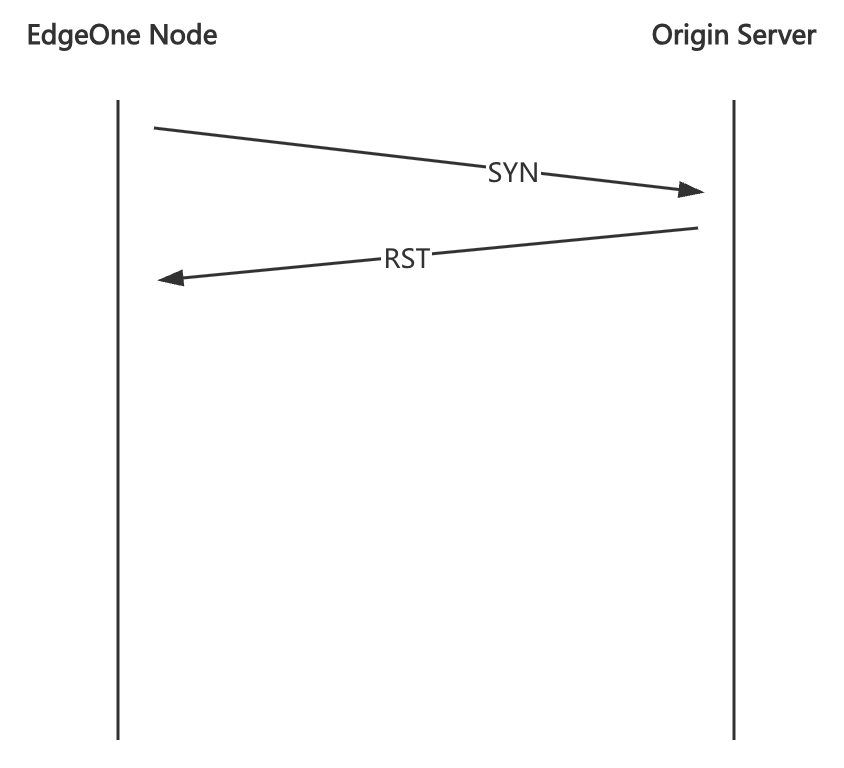
2. Possible causes and solutions:
Origin server service exception: Test by directly accessing the origin server. You can use command-line tools such as curl or telnet to check whether a TCP connection can be established. This issue is usually caused by certain ports on the origin server not being open to the public network or by network problems on the origin server node.
HTTP 522
1. Meaning: A custom status code defined by EdgeOne. When a node sends a request to the origin server, if the origin server does not respond during the TCP connection establishment phase, causing the node to time out, the node returns a 522 status code to the client.
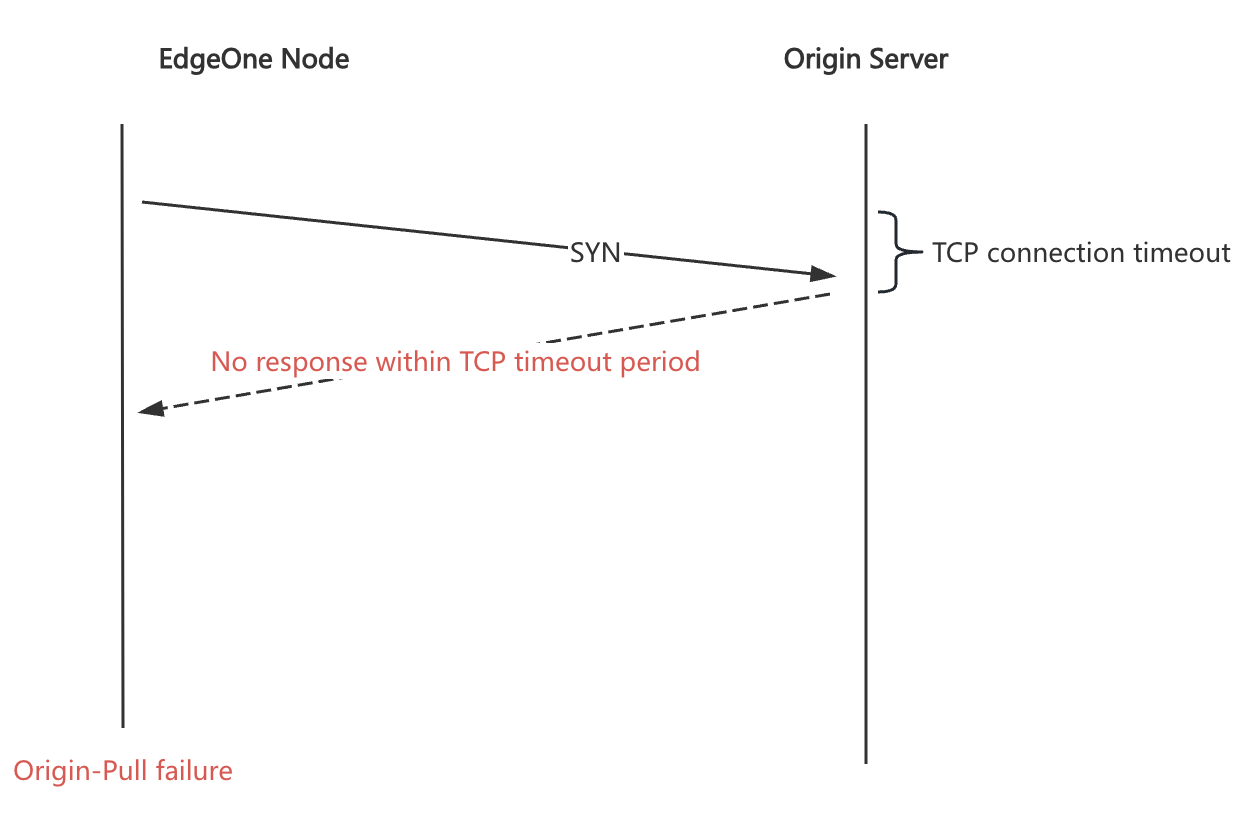
2. Possible causes and solutions:
Origin server service exception: Test by directly accessing the origin server. You can use command-line tools such as curl or telnet to check whether a TCP connection can be established. This issue is usually caused by certain ports on the origin server not being open to the public network or by network problems on the origin server node.
HTTP 523
1. Meaning: A custom status code defined by EdgeOne. If the origin server configured for the domain is a domain name, the node needs to resolve the domain name to obtain the origin server IP address during origin-pull. If the resolution fails, the node cannot perform origin-pull and returns a 523 status code to the client.
2. Possible causes and solutions:
Try using dig to resolve the origin server domain name and check whether it can be resolved normally.
If the origin server domain name can be resolved normally, please contact us for assistance.
HTTP 524
1. Meaning: A custom status code defined by EdgeOne. After a node successfully establishes a connection with the origin server and sends a request to it, if the origin server does not respond, causing the node to time out, the node returns a 524 status code to the client.
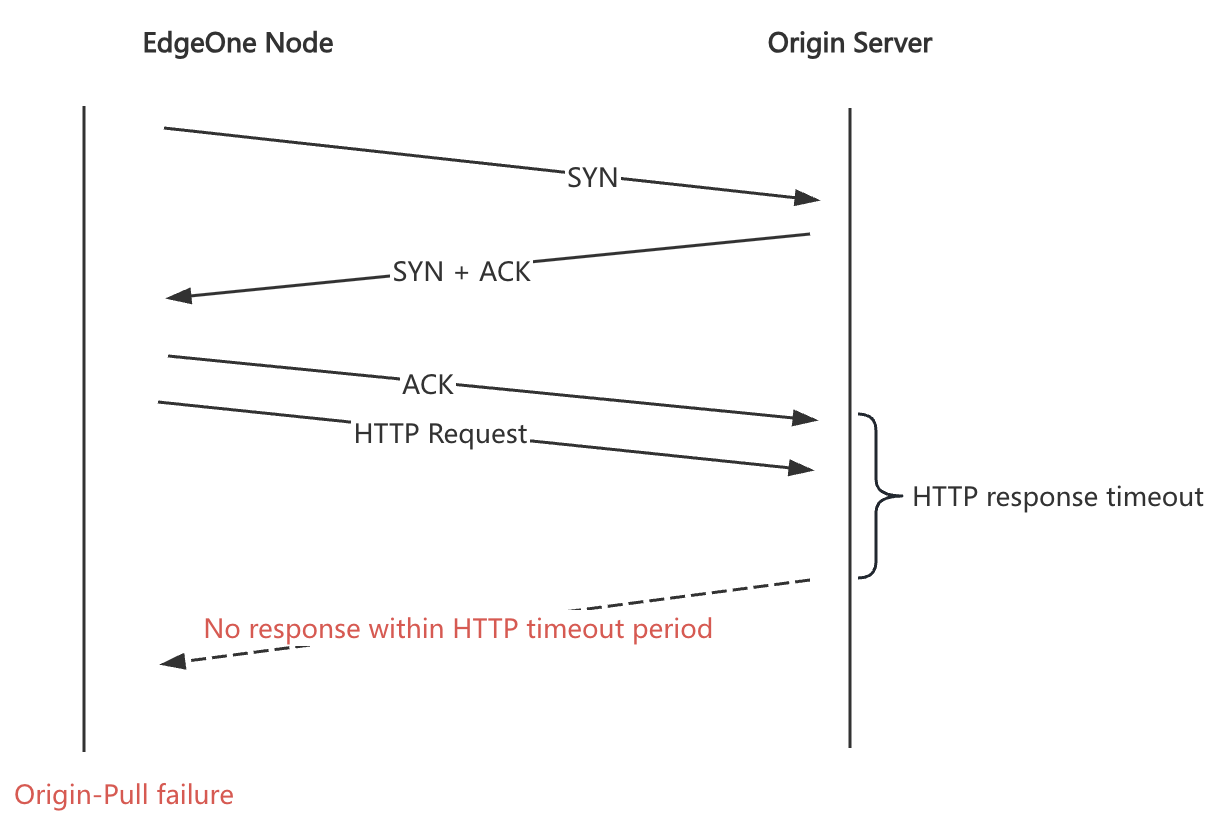
2. Possible causes and solutions:
Origin server service exception: Test by directly accessing the origin server and check whether it responds to HTTP requests. If the origin server responds normally, try adjusting the origin-pull timeout. If the issue persists, please contact us for assistance.
HTTP 525
1. Meaning: A custom status code defined by EdgeOne. If the origin-pull protocol is HTTPS, the node needs to perform an SSL handshake with the origin server during origin-pull. If the handshake fails, the node returns a 525 status code to the client.
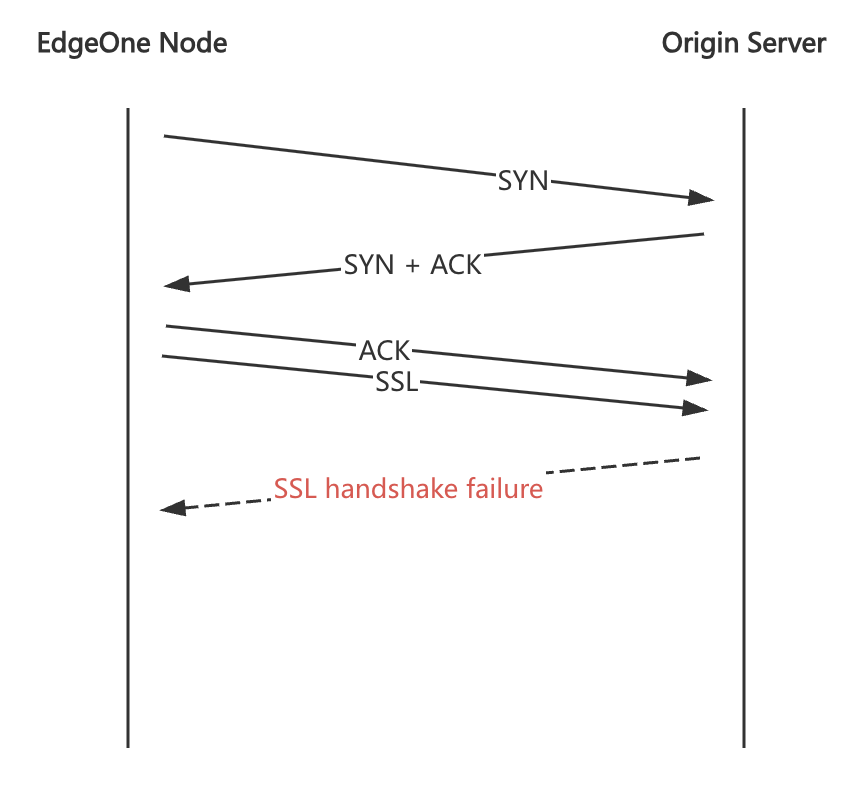
2. Possible causes and solutions:
Check whether the origin-pull protocol is configured as HTTPS but no certificate is deployed on the origin server. If so, change the origin-pull protocol to HTTP in the domain management console, or deploy the certificate for the corresponding domain on the origin server.
Packet loss occurs during the SSL handshake between the node and the origin server due to network issues.
The origin-pull certificate validity check fails. Currently, EdgeOne verifies the certificate validity period by default.
フィードバック