We understand the challenges of the startup phase: every line of code has the potential to change the world, but server costs and Ops pressure can clip the wings of a dream. Therefore, we aim to provide basic resource support, low-barrier access, and stability assurance, so that you can focus on creating core value during the business incubation period and minimize concerns over technical and cost pressures. The Free Plan is a long-term support program for early-stage developers, nonprofit projects, and technical validation scenarios, designed to provide growth assistance from 0 to 1 through technology inclusiveness and to witness the spark of innovation with you.
Once activated, the subscription remains valid unless manually destroyed.
Excess Charge
Basic usage is unmetered, with no excess charges.
Service Commitment
Basic security and acceleration services are provided, but SLA is not guaranteed.
Note:
1. The Free Plan is intended for individual developers, technical teams refining MVPs, nonprofit and educational projects, and early-stage websites in technical validation - especially those willing to follow fair use policies and contribute constructive feedback.
2. This Free Plan focuses on accelerating and caching standard website content (e.g., HTML, JS, CSS), but does not support video delivery or large-file distribution (including but not limited to high-volume images, audio/video files, game installers, etc.). For these use cases, please subscribe to a paid plan.
3. If such content is distributed - or reasonably suspected to be - without an applicable paid subscription,EdgeOne reserves the right to:
Suspend or restrict your access to EdgeOne;
Restrict end users from obtaining your specific resources through EdgeOne;
4. If the system detects high-frequency abnormal calls, continuous resource occupation in non-genuine business scenarios, or other suspected violations (e.g., commercial abuse, or malicious use), automated protection mechanisms may be triggered, resulting in traffic throttling or feature restrictions.
5. If your account has an overdue payment, the free edition plan will still enter an isolated state, which triggers site disabling and service termination.
Plan Functions
The Free Plan provides essential acceleration capabilities through basic resources, as well as platform-level DDoS protection and basic WAF protection capabilities. For a detailed feature comparison, please refer to Comparison of EdgeOne Plans to view.
Auto-Downgrade
If your prepaid plan (Personal / Basic / Standard) is not renewed upon expiration, the system will automatically downgrade your plan to the Free Plan to maintain basic service continuity.
Note:
After the paid edition plan expires, it will enter the service suspension buffer period. If the plan is still not renewed after the buffer period, the automatic downgrade logic will be triggered.
If your paid edition plan is not renewed after the service suspension buffer period ends, the system will determine whether a free edition plan exists for the current account. If yes, your site will automatically switch to the free edition plan. If no, site suspension will be triggered.
If your plan is not bound to any site or your account is in arrears, it will avoid triggering automatic downgrade but trigger site suspension.
2. Other unsupported functions will remain effective but cannot be modified; deletion is allowed.
3. SLA guarantee level will be adjusted from 99.9% to no guaranteed SLA.
Quota Adjustment
The rules exceeding quotas will remain effective but cannot be added or modified; items must be deleted to stay within plan limits before making modifications.
Data Retention
1. Historical offline logs will remain accessible, but new offline logs will no longer be generated or available for download.
2. The data query range will be limited to 14 days.
All affected features and quotas subject to the above constraints during the downgrade are detailed in the table below.
Pre-downgrade configurations remain unchanged and continue to take effect.
Only the following configurations can be modified:
Query string (retain/ignore all parameters)
Case-insensitive
1. 1. Upgrading the plan restores the rights and enables unrestricted changes.
2. 2. Manual deactivation or deletion of configurations allows subsequent modifications.
Configuration modifications are allowed under either of the following conditions:
Usage Cap Policy
No additions or edits allowed; only closure or deletion is permitted.
Real-Time Logs
Custom statistics metrics
Web Protection - Exception Rules
Web Protection - Custom Precise Matching Rules
Web Protection - Rate Limiting Rules
Web Protection - Web security monitoring rules
Web Protection - IP Group
Web Protection - Intelligent Client Filtering
Enabling is not allowed; only closure is permitted.
Web Protection - Managed Rules - Automatic Update
Web Protection - Deep Analysis
Web Protection - Core Managed Rules
Modifications apply exclusively to the free vulnerability protection rules; other rules remain fixed.
Web Protection - Custom Block Page
Only restoration to default configurations is permitted: default pages/status codes (566/567).
Default pages/status codes (566/567)
Quota Category
Number of Origin Groups
Quota rules that exceeded limits before the downgrade remain intact and stay effective.
No additions or edits allowed; only closure or deletion is permitted.
1. 1. Upgrading the plan restores the rights and enables unrestricted changes.
2. 2. Manual deactivation or deletion of configurations allows subsequent modifications.
Configuration modifications are allowed under either of the following conditions:
Number of Load Balancing Tasks
Total Number of Rules Engines
Number of Embedded IF Rules in the Rules Engine
Number of Embedded ELSE IF Rules in the Rules Engine
Number of Subdomains
Number of Real-Time Log Tasks
Number of Rate Limiting Rules in Web Protection
Number of Precise Access Control Rules in Web Protection
Free Plan Downgrade Example - Feature Limitations
If a user purchases a Standard Plan on May 12th and activates the following features based on actual scenarios during business access:
Product Feature
Configuration Details
Smart Acceleration
Enabled
Custom Cache Key
Cache specified parameters
Web Protection - Custom Precise Matching Rules
Matches based on specified UA, triggering a JavaScript challenge upon hit
Web Protection - Deep Analysis
Enabled
Web Protection - Core Managed Rules
Core managed rules, enabled observation mode
Upon non-renewal of your Standard Plan at expiration on June 12, the downgrade protocol will be triggered. During this process, restrictions will apply to features unsupported in the Free Plan, primarily as follows:
Product Feature
Processing Limitations
Smart Acceleration
Disabled automatically (value-added feature not supported).
Custom Cache Key
The Free Plan does not support custom Cache Keys; the configuration will still be effective after downgrade, only allowing changes to the query string (retain/ignore all parameters) and ignore case sensitivity.
Web Protection - Custom Precise Matching Rules
The Free Plan does not support Precise Access Control Rules; the configuration will still be effective after downgrade, but no modifications are allowed, only deletion of the rules.
Web Protection - Deep Analysis
The Free Plan does not support deep analysis; the configuration will still be effective after downgrade, but no modifications are allowed, only closure of the feature.
Web Protection - Core Managed Rules
The Free Plan does not support core managed rules; the configuration will still be effective after downgrade, but no modifications are allowed, only modifications to the free vulnerability protection rule set.
Free Plan Downgrade Scenario - Quota Limits
If a user purchases a Standard Plan on May 12th and activates the following features based on actual scenarios during business access:
Product Feature
Configuration Details
Subdomains
Accessed 300 subdomains
Rules Engine
Configured 50 rules engines
Real-Time Logs
Configured 2 real-time log push tasks
Web Protection - Rate Limiting Rules
Configured 5 rate limiting rules
Web Protection - Precise Access Control Rules
Configured 2 custom rules
Upon non-renewal of your Standard Plan at expiration on June 12, the downgrade protocol will be triggered. During this process, restrictions will apply to features unsupported in the Free Plan, primarily as follows:
Product Feature
Processing Limitations
Subdomains
The Free Plan only supports 200 subdomains; if the number of subdomains exceeds 200, configuration changes will not be allowed, and you will need to delete the excess 100 subdomains before any configuration changes can be made.
Rules Engine
The Free Plan only supports 20 rules engines; if the number of rules engines exceeds 20, configuration changes will not be allowed, and you will need to delete the excess 30 rules engines before any configuration changes can be made.
Real-Time Logs
The Free Plan only supports 1 real-time log task; if the number of real-time log tasks exceeds 1, configuration changes will not be allowed, and you will need to delete one of the excess real-time log tasks before any configuration changes can be made.
Web Protection - Rate Limiting Rules
The Free Plan only supports 1 rate limiting rule; if the number of rate limiting rules exceeds -1, configuration changes will not be allowed, and you will need to delete the excess 4 rate limiting rules before any configuration changes can be made.
Web Protection - Custom Precise Matching Rules
The Free Plan only supports 0 Custom Precise Matching Rules; if the number of Custom Precise Matching Rules exceeds 0, configuration changes will not be allowed, and you will need to delete the excess 2 Custom Precise Matching Rules before any configuration changes can be made.
Add-on Suite
The EdgeOne Free Plan Add-on Suite is a feature unlock suite for users on the free edition plan. After subscribing, free edition plan users can enable advanced features such as smart acceleration, QUIC, image and audio/video processing, and offline logs on demand without upgrading to a paid plan, while also enjoying corresponding SLA support. For details, see Free Plan Add-on Suite Overview.
Upgrade Instructions
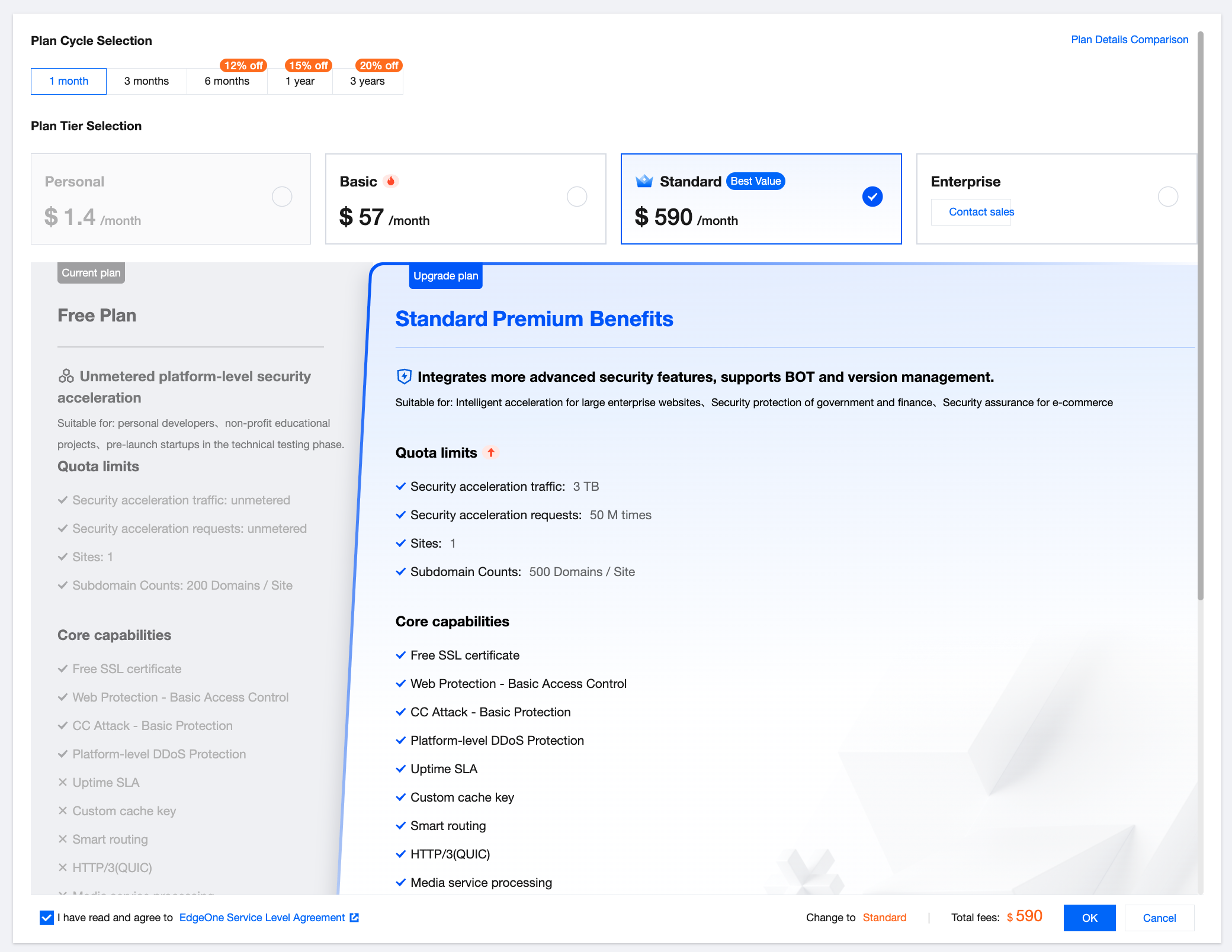
If you require enhanced acceleration or security capabilities beyond what the Free Plan offers, we provide a smooth upgrade. By upgrading to the official plans, you can fully unlock higher-level product technical features. You can upgrade the Free Plan anytime via the console to a Personal, Basic, or Standard Plan. Upon successful upgrade, you will receive formal EdgeOne security acceleration services. For example, if you need to upgrade to the Standard Plan during your current free usage, you may refer to the following steps:
2. On the Plan Management page, select the Free Plan and click Upgrade Plan.
3. On the Upgrade Plan page, select the Standard Plan, check Agree to the Service Agreement, and click Confirm.
4. You will be redirected to the order payment confirmation page; if you have any vouchers, you may select them for use, and then click Submit Order.
5. After submitting the order, choose the corresponding payment method to complete the payment.
Note:
1. If your Free Plan was downgraded from a higher-tier plan, you can only upgrade back to the original tier by default. To upgrade to a different tier, please remove or disable features that exceed the target plan's limits.
2. You can use the console to upgrade only to the Personal, Basic, or Standard plans. For upgrades to Enterprise Plan, please contact us.
3. When a free edition plan is upgraded to any paid edition plan, the free edition plan will be automatically terminated. If your paid edition plan expires and is not renewed timely, the system will determine whether another free edition plan exists for the current account. If yes, your site will automatically switch to the free edition plan. Otherwise, site suspension will be triggered.
4. If your free edition plan has an add-on suite subscribed, the add-on suite will be automatically unsubscribed during the upgrade. The refund amount will be calculated based on the remaining duration of the add-on suite. For details, see Refund Policy.
Beta Access
The Free Plan is currently in limited beta; specific terms are as follows:
Event 1: Speed Test to Grab More EdgeOne Free Plans
Activity Rules
All users can participate in the speed test activity after signing in their Tencent EdgeOne account, but only primary accounts can get free plans after sharing speed test results; collaborators and sub-accounts are not eligible.
Note:
Tencent EdgeOne reserves the right to update the activity rules and product details. The final terms will be those published on the activity page.
2. After completing the speed test, click the X and Facebook icons to share quickly.
3. For each platform you successfully share to, return to the current activity page to get a free plan. Each platform allows only one plan, and repeated sharing will not yield additional ones. Plans will be directly added to your account (no redemption code required) .
All international site users who have registered on Tencent Cloud and completed enterprise or individual authentication (excluding co-authors and sub-accounts) are eligible to participate.
Redemption Instructions
Each account can use only one redemption code to redeem one free plan, and codes cannot be stacked.
Codes expire 7 days after issuance and cannot be redeemed after expiration.
Note:
1. Redemption codes are strictly prohibited from private trading or resale. If violated, we reserve the right to revoke the code's validity and pursue legal liability.
2. Users are responsible for any loss of benefits due to mistakes like redemption code leaks or missing the redemption deadline.
3. Tencent EdgeOne reserves the right to update the activity rules and product details. The final terms will be those published on the activity page.