Sparkジョブクラスに関するよくある質問
ダウンロード
フォーカスモード
フォントサイズ
PySparkタスクのデータスキューにより、python+jvmのメモリ使用量がK8sのrequestを超過し、OOMkilledが発生しましたか?
問題の説明:PySparkタスク実行時に、executorログに「k8sがOOMKiiledを実行」と表示され、使用メモリがk8sの制限メモリを超えています。
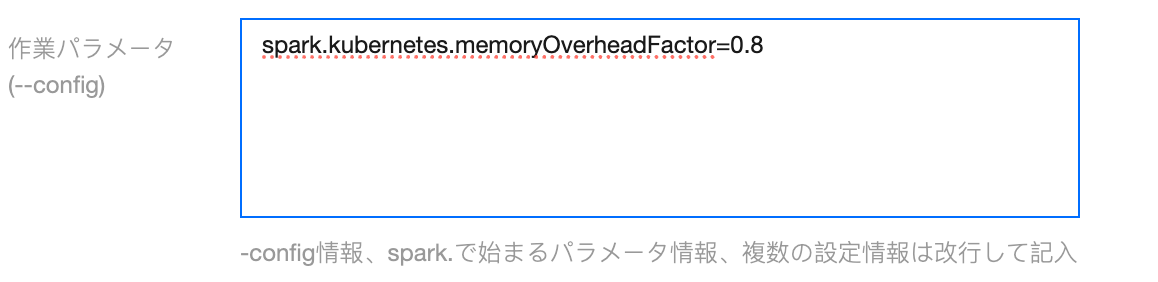
原因分析:K8sが申請するメモリは、SparkエグゼキュータのメモリにmemoryOerheadFactorを乗じて計算されます。Pythonで処理するデータに偏りがある場合、または単一のデータが大きすぎる場合、使用メモリがK8sに割り当てられたメモリを超える可能性があります。
ソリューション:タスクパラメータに spark.kubernetes.memoryOverheadFactor=0.8 を追加します。デフォルト値は0.4です。
「Insert into/overwrite」後に自動的にrepartitionコマンドを追加してデータをパーティション分割し、小ファイルの数を減らすにはどうすればよいですか?
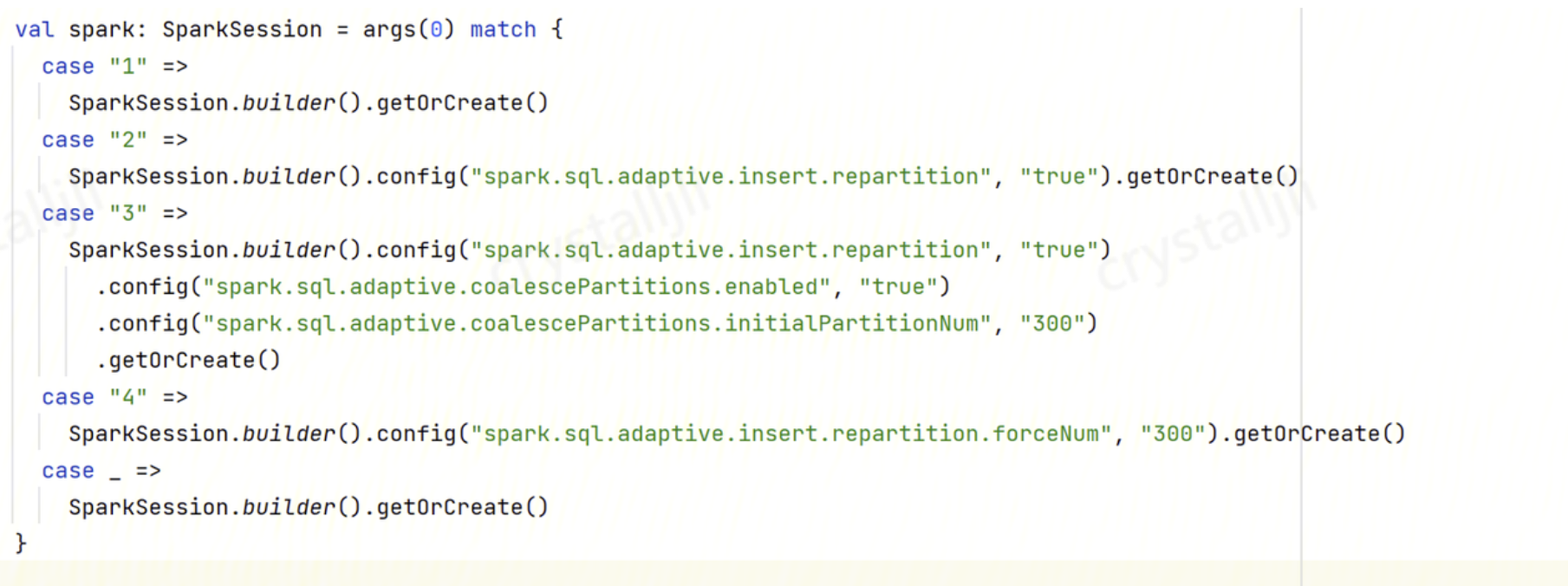
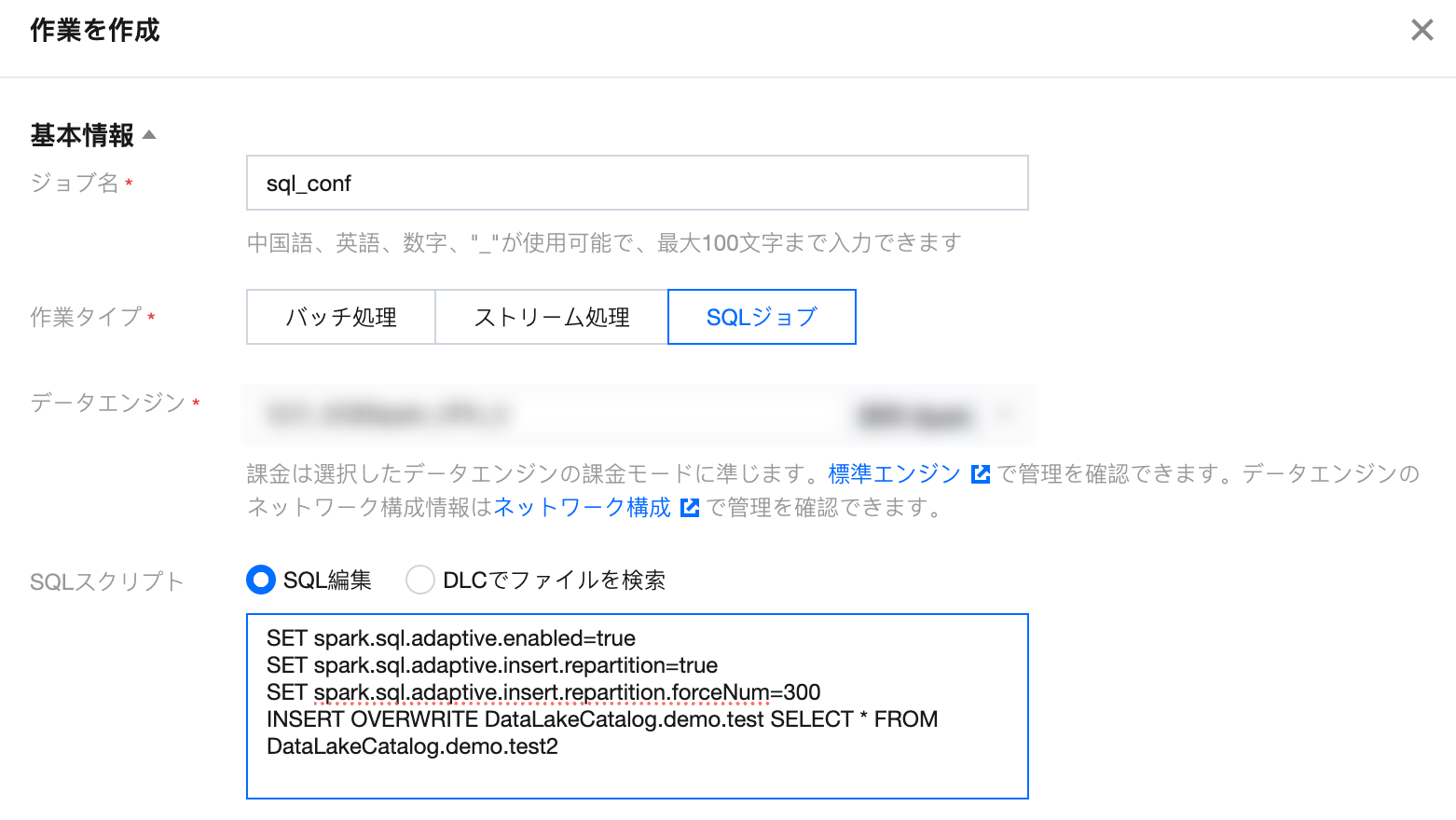
ソリューション:自動リパーティションを有効にし、以下のパラメータを設定します:
spark.sql.adaptive.enabled:truespark.sql.adaptive.insert.repartition:truespark.sql.adaptive.insert.repartition.forceNum:300 (具体的なパーティション数を指定します)
操作手順:
プログラム内でSparkConfに設定します:
プログラム内でSQL SETを設定します:
PySparkタスクが高並列でCOSストレージバケットに書き込む際に503エラーが返されますか?
問題の説明:PySparkタスクが高並列でCOSストレージバケットに書き込む際に、executorが非常に多くのCOSからの503エラーを返します。
問題の原因:SparkタスクがCOSに書き込む際の並列コア数は*fs.cosn.trsf.fs.ofs.data.transfer.thread.countで指定されます。例えば、4096コアの場合、チューニングを行わないとデフォルトの並列度は4096*32=131072となり、COSのボトルネックを引き起こします。
ソリューション:
1. COSに新しいメタデータアクセラレーションバケットを作成し、sparkタスクの書き込み時のリストとリネームの過負荷を防ぎます。
2. COSのメタデータ高速化バケットの帯域幅制限を調整します。
3. タスクに以下のパラメータを追加し、高並列度時のCOSへのアクセス負荷を軽減します。
fs.cosn.trsf.fs.ofs.data.transfer.thread.count=8fs.cosn.trsf.fs.ofs.block.max.file.cache.mb=0spark.hadoop.fs.cosn.trsf.fs.ofs.data.transfer.thread.count=8spark.hadoop.fs.cosn.trsf.fs.ofs.block.max.file.cache.mb=0
よく使われるデータガバナンスSQLは何ですか?
ライブラリガバナンスSQLを閉じる
ALTER DATABASE DataLakeCatalog.demo_dbSETDBPROPERTIES ('dlc.ao.data.govern.inherit' = 'none','dlc.ao.merge.data.enable' = 'disable','dlc.ao.expired.snapshots.enable' = 'disable','dlc.ao.remove.orphan.enable' = 'disable','dlc.ao.merge.manifests.enable' = 'disable')
ライブラリガバナンス SQL を有効にする
ALTER DATABASE DataLakeCatalog.db_nameSETDBPROPERTIES ('dlc.ao.data.govern.inherit' = 'none','dlc.ao.merge.data.enable' = 'enable','dlc.ao.merge.data.engine' = 'bda-sinker','dlc.ao.merge.data.min-input-files' = '10','dlc.ao.merge.data.target-file-size-bytes' = '536870912','dlc.ao.merge.data.interval-min' = '90','dlc.ao.expired.snapshots.enable' = 'enable','dlc.ao.expired.snapshots.engine' = 'bda-sinker','dlc.ao.expired.snapshots.retain-last' = '5','dlc.ao.expired.snapshots.before-days' = '2','dlc.ao.expired.snapshots.max-concurrent-deletes' = '4','dlc.ao.expired.snapshots.interval-min' = '150','dlc.ao.remove.orphan.enable' = 'enable','dlc.ao.remove.orphan.engine' = 'bda-sinker','dlc.ao.remove.orphan.before-days' = '3','dlc.ao.remove.orphan.max-concurrent-deletes' = '4','dlc.ao.remove.orphan.interval-min' = '600','dlc.ao.merge.manifests.enable' = 'enable','dlc.ao.merge.manifests.engine' = 'bda-sinker','dlc.ao.merge.manifests.interval-min' = '1440')
テーブルガバナンス SQL をオフにする
ALTER TABLE`DataLakeCatalog`.`db_name`.`tb_name`SETTBLPROPERTIES ('dlc.ao.data.govern.inherit' = 'none','dlc.ao.merge.data.enable' = 'disable','dlc.ao.expired.snapshots.enable' = 'disable','dlc.ao.remove.orphan.enable' = 'disable','dlc.ao.merge.manifests.enable' = 'disable')
テーブルガバナンス SQL をオンにする
ALTER TABLE `DataLakeCatalog`.`db_name`.`tb_name`SET TBLPROPERTIES ('dlc.ao.data.govern.inherit' = 'default')
テーブルガバナンス SQL をオンにする
ALTER TABLE`DataLakeCatalog`.`db_name`.`tb_name`SETTBLPROPERTIES ('dlc.ao.data.govern.inherit' = 'none','dlc.ao.merge.data.enable' = 'enable','dlc.ao.merge.data.engine' = 'bda-sinker','dlc.ao.merge.data.min-input-files' = '10','dlc.ao.merge.data.target-file-size-bytes' = '536870912','dlc.ao.merge.data.interval-min' = '90','dlc.ao.expired.snapshots.enable' = 'enable','dlc.ao.expired.snapshots.engine' = 'bda-sinker','dlc.ao.expired.snapshots.retain-last' = '5','dlc.ao.expired.snapshots.before-days' = '2','dlc.ao.expired.snapshots.max-concurrent-deletes' = '4','dlc.ao.expired.snapshots.interval-min' = '150','dlc.ao.remove.orphan.enable' = 'enable','dlc.ao.remove.orphan.engine' = 'bda-sinker','dlc.ao.remove.orphan.before-days' = '3','dlc.ao.remove.orphan.max-concurrent-deletes' = '4','dlc.ao.remove.orphan.interval-min' = '600','dlc.ao.merge.manifests.enable' = 'enable','dlc.ao.merge.manifests.engine' = 'bda-sinker','dlc.ao.merge.manifests.interval-min' = '1440')
Where条件を指定せずに全表を結合するSQL
CALL `DataLakeCatalog`.`system`.`rewrite_data_files`(`table` => 'tb_name',`options` => map('min-input-files','10','target-file-size-bytes','536870912','delete-file-threshold','1','max-concurrent-file-group-rewrites','20'))
Where条件による増分マージSQLをサポート
CALL `DataLakeCatalog`.`system`.`rewrite_data_files`(`table` => 'tb_name',`options` => map('min-input-files','10','target-file-size-bytes','536870912','delete-file-threshold','1','max-concurrent-file-group-rewrites','20'),`where` => 'field_date > "2022-01-01" and field_date <= "2023-01-01"')
スナップショットの期限切れ SQL
CALL `DataLakeCatalog`.`system`.`expire_snapshots`(`table` => 'tb_name',older_than => TIMESTAMP '2023-02-28 16:06:35.000',retain_last => 1,max_concurrent_deletes => 4,stream_results => true)
SQLの実行計画とSQL実行のログを確認する方法は?
SQLの実行計画を確認する:データ探索でexplainキーワードを使用してSQL実行の物理計画を確認します。explainの詳細な使用方法については、SQL統一構文 > EXPLAINを参照してください。
SQLの実行ログを確認する:
1. データ探索でSQLを実行し、実行結果にSQL実行ログが表示されます。
2. DLC コンソール > データ運用管理 > 実行履歴でSQL実行ログを確認できます。
CASTが自動的に精度を変換しなかったため、データ書き込みに失敗しましたか?
問題の説明:hive sql を spark sql に移行する際に、Cannot safely cast 'class_type': string to bigintというエラーが発生しました。
問題の特定:Spark 3.0.0以降、Spark SQLは型変換を処理する際に3つの安全ポリシーを持っています:
ANSI:Sparkがstringからtimestampへの変換など、一部の不合理な型変換を許可しないようにします。
LEGACY:Sparkが有効なCast操作である限り、型の強制変換を許可します。
STRICT:Sparkが精度損失の可能性がある変換を一切許可しません。デフォルトのポリシーはANSIです。
ソリューション:ポリシーをLEGACYに変更し、spark.sql.storeAssignmentPolicy=LEGACYを設定します。
QUERY_PROGRESS_UPDATE_ERROR(code=3060): ステートメントの進捗状況の更新に失敗しました
問題説明:データ探索でspark sqlタスクを提出した際、実行中に「Failed to Update statement progress」エラーが発生しました。
問題特定:複数のSpark SQLタスクが提出された場合、各SQLの実行進捗を継続的に非同期で追跡する必要がありますが、ここでの非同期処理キューには制限があり、デフォルト値は100です(2024.1.14以降のバージョンでは300に更新されています)。したがって、あるタスクが提出された後ずっと実行が完了せず、後続の新しいタスクがキューの上限を超えると、このエラーが発生します。このエラーが発生した場合、通常はそのSQLタスクがロングテールタスクである可能性を示しており、他のタスクへのリソース占有が適切かどうかを確認する必要があります。
解決策:エンジン上で設定 livy.rsc.retained-statements を調整し、デフォルト値より大きい値に設定できます。調整後、エンジンは再起動します。具体的な値はタスクの並列処理量に基づいて設定でき、このパラメータはクラスターへの影響が小さく、同時に送信されるSQLの並列処理量が100-200/分に達した場合でも、このパラメータを6000に調整しても実測で影響はありませんでした。
フィードバック