Apache Airflowを使用してDLCエンジンのタスクをスケジュールして送信する
ダウンロード
フォーカスモード
フォントサイズ
本記事では、DLCがApache Airflowスケジューリングツールをサポートしていることについて説明し、Apache Airflowを使用してDLCのさまざまな種類のエンジンタスクを実行する方法をデモンストレーションする例を提供します。
背景情報
Apache Airflowは、Airbnbによってオープンソース化されたスケジューリングツールで、Pythonで記述されており、有向非巡回グラフ(DAG)を使用して依存関係のある一連のジョブを定義およびスケジュールします。Pythonで記述されたサブジョブをサポートし、Bashコマンド、Python関数、SQLクエリ、Sparkジョブなどのタスクを実行するためのさまざまなオペレーター(Operators)を提供し、高い柔軟性と拡張性を備えています。Apache Airflowは、データエンジニアリング、データ処理、ワークフロー自動化などの分野で広く使用されています。Apache Airflowが提供する豊富な機能と視覚的なインターフェースを活用することで、ユーザーはワークフローの状態と実行状況を簡単に監視および管理できます。Apache Airflowの詳細については、Apache Airflowを参照してください。
前提条件
1. Apache Airflow環境の準備。
2. Apache Airflowをインストールして起動します。Apache Airflowのインストールと起動に関する詳細な操作については、Apache Airflow クイックスタートを参照してください。
3. jaydebeapi 依存パッケージをインストールします。pip install jaydebeapi。
4. データレイクコンピューティング DLC 環境の準備。
5. データレイクコンピューティング DLC エンジンサービスを開通します。
6. 標準 Spark エンジンを使用する場合、Hive JDBC ドライバを準備し、hive-jdbc-3.1.2-standalone.jar をダウンロードするにはクリックしてください。
7. 標準 Presto エンジンを使用する場合、Presto JDBC ドライバを準備し、presto-jdbc-0.284.jar をダウンロードするにはクリックしてください。
8. SuperSQL エンジンを使用する場合、DLC JDBC ドライバを準備し、JDBC ドライバをダウンロードするにはクリックしてください。
重要なステップ
Connection とスケジュールタスクの作成
Apache Airflow ワークディレクトリの下に dags ディレクトリを作成し、dags ディレクトリの下にスケジュールスクリプトを作成して .py ファイルとして保存します。例えば、この記事ではスケジュールスクリプト /root/airflow/dags/airflow-dlc-test.py を以下のように作成します:
import timefrom datetime import datetime, timedeltaimport jaydebeapifrom airflow import DAGfrom airflow.operators.python_operator import PythonOperatorjdbc_url='jdbc:dlc:dlc.tencentcloudapi.com?task_type=SparkSQLTask&database_name={dataBaseName}&datasource_connection_name={dataSourceName}®ion={region}&data_engine_name={engineName}'user = 'xxx'pwd = 'xxx'dirver = 'com.tencent.cloud.dlc.jdbc.DlcDriver'jar_file = '/root/airflow/jars/dlc-jdbc-2.5.3-jar-with-dependencies.jar'def createTable():sqlStr = 'create table if not exists db.tb1 (c1 int, c2 string)'conn = jaydebeapi.connect(dirver, jdbc_url, [user, pwd], jar_file)curs = conn.cursor()curs.execute(sqlStr)rows = curs.rowcount.realif rows != 0:result = curs.fetchall()print(result)curs.close()conn.close()def insertValues():sqlStr = "insert into db.tb1 values (111, 'this is test')"conn = jaydebeapi.connect(dirver,jdbc_url, [user, pwd], jar_file)curs = conn.cursor()curs.execute(sqlStr)rows = curs.rowcount.realif rows != 0:result = curs.fetchall()print(result)curs.close()conn.close()def selectColums():sqlStr = 'select * from db.tb1'conn = jaydebeapi.connect(dirver, jdbc_url, [user, pwd], jar_file)curs = conn.cursor()curs.execute(sqlStr)rows = curs.rowcount.realif rows != 0:result = curs.fetchall()print(result)curs.close()conn.close()def get_time():print('現在の時間は:', datetime.now().strftime('%Y-%m-%d %H:%M:%S'))return time.time()default_args = {'owner': 'tencent', # 所有者名'start_date': datetime(2024, 11, 1), # 初回実行開始時間、UTC時間'retries': 2, # 失敗時の再試行回数'retry_delay': timedelta(minutes=1), # 失敗時の再試行間隔}dag = DAG(dag_id='airflow_dlc_test', # DAG ID、完全に英数字とアンダースコアで構成する必要がありますdefault_args=default_args, # 外部で定義されたdic形式のパラメータschedule_interval=timedelta(minutes=1), # DAGの実行頻度を定義、日、週、時間、分、秒、ミリ秒で設定可能catchup=False # DAG実行時、開始時刻から現在までのすべてのタスクを実行するかどうか、デフォルトはTrue)t1 = PythonOperator(task_id='create_table',python_callable=createTable,dag=dag)t2 = PythonOperator(task_id='insert_values',python_callable=insertValues,dag=dag)t3 = PythonOperator(task_id='select_values',python_callable=selectColums,dag=dag)t4 = PythonOperator(task_id='print_time',python_callable=get_time,dag=dag)t1 >> t2 >> [t3, t4]
パラメータ説明:
パラメータ | 説明 |
jdbc_url | |
user | SecretId |
pwd | SecretKey |
dirver | |
jar_file | ドライバ jar パッケージの保存パス。対応するエンジンの JDBC ドライバ jar パッケージの絶対パスを置き換える必要があります。詳細については、Hive JDBC アクセス、Presto JDBC アクセス、および DLC JDBC アクセスを参照してください |
スケジュールタスクを実行する
Webインターフェースに進み、DAGsタブで送信されたスケジュールプロセスを検索し、スケジュールを開始できます。
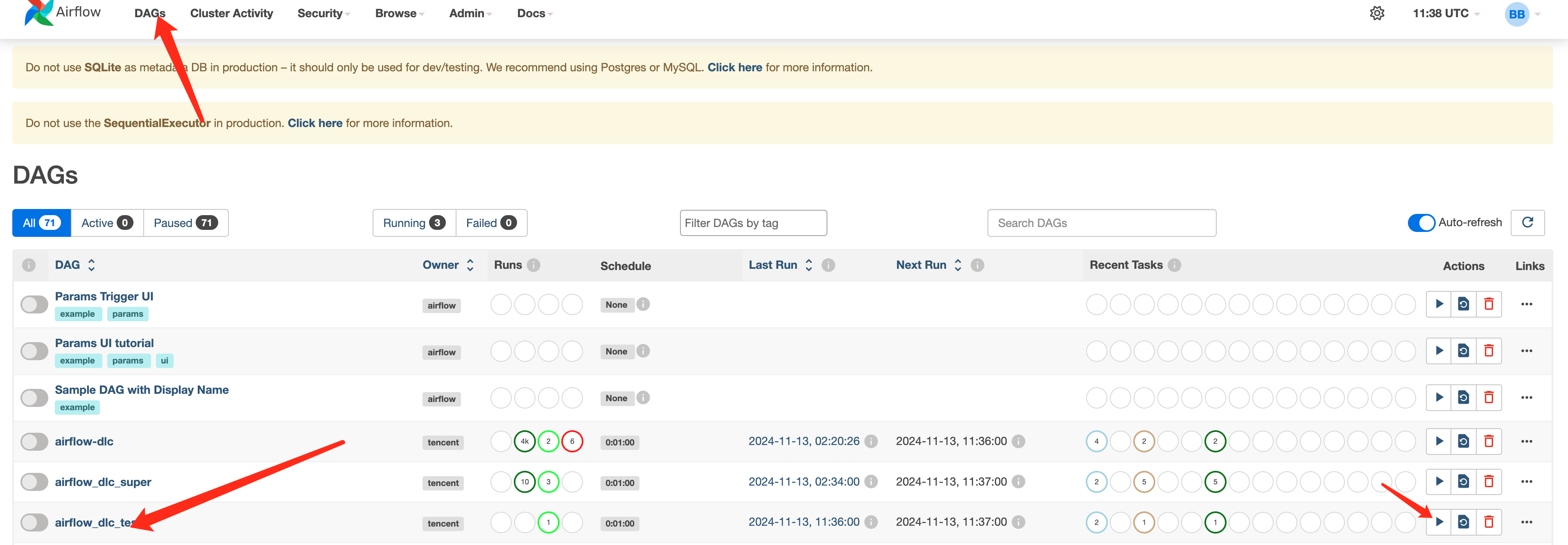
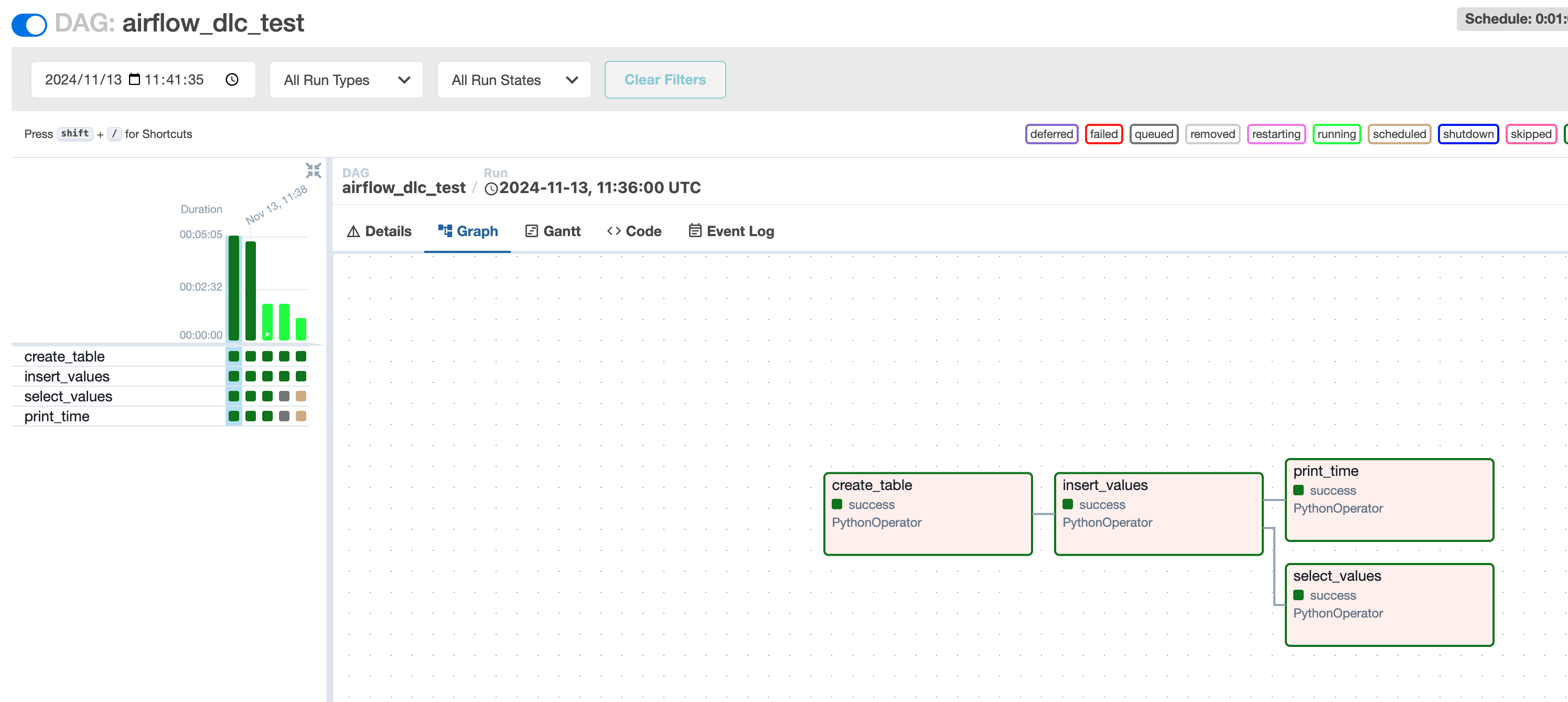
タスク実行結果を確認する
フィードバック