tencent cloud

Data Lake Compute

Release Notes
Product Introduction
Overview
Strengths
Use Cases
Purchase Guide
Billing Overview
Refund
Payment Overdue
Configuration Adjustment Fees
Getting Started
Complete Process for New User Activation
DLC Data Import Guide
Quick Start with Data Analytics in Data Lake Compute
Quick Start with Permission Management in Data Lake Compute
Quick Start with Partition Table
Enabling Data Optimization
Cross-Source Analysis of EMR Hive Data
Standard Engine Configuration Guide
Configuring Data Access Policy
Operation Guide
Console Operation Introduction
Development Guide
Runtime Environment
SparkJar Job Development Guide
PySpark Job Development Guide
Query Performance Optimization Guide
UDF Function Development Guide
System Restraints
Client Access
JDBC Access
TDLC Command Line Interface Tool Access
Third-party Software Linkage
Python Access
Practical Tutorial
Accessing DLC Data with Power BI
Table Creation Practice
Using Apache Airflow to Schedule DLC Engine to Submit Tasks
Direct Query of DLC Internal Storage with StarRocks
Spark cost optimization practice
DATA + AI
Using DLC to Analyze CLS Logs
Using Role SSO to Access DLC
Resource-Level Authentication Guide
Implementing Tencent Cloud TCHouse-D Read and Write Operations in DLC
DLC Native Table
SQL Statement
SuperSQL Statement
Overview of Standard Spark Statement
Overview of Standard Presto Statement
Reserved Words
API Documentation
History
Introduction
API Category
Making API Requests
Data Table APIs
Task APIs
Metadata APIs
Service Configuration APIs
Permission Management APIs
Database APIs
Data Source Connection APIs
Data Optimization APIs
Data Engine APIs
Resource Group for the Standard Engine APIs
Data Types
Error Codes
General Reference
Error Codes
Quotas and limits
Operation Guide on Connecting Third-Party Software to DLC
FAQs
FAQs on Permissions
FAQs on Engines
FAQs on Features
FAQs on Spark Jobs
DLC Policy
Privacy Policy
Data Privacy And Security Agreement
Service Level Agreement
Contact Us

DLC JDBC Access

PDF
Focus Mode
Font Size
Last updated: 2026-01-21 15:54:07

Environment Preparation

Dependency: JDK 1.8

Connecting to DLC

1. Load the JDBC driver for DLC.
Class.forName("com.tencent.cloud.dlc.jdbc.DlcDriver");
2. Create a connection using DriverManager.
Connection cnct = DriverManager.getConnection(url, secretId, secretKey);

URL Format

jdbc:dlc:<dlc_endpoint>?task_type=SQLTask&database_name=abc&datasource_connection_name=DataLakeCatalog&region=ap-nanjing&data_engine_name=spark-cu&result_type=COS&read_type=Stream
Description of parameters in the JDBC access URL:
Parameter
Required
Description
dlc_endpoint
Yes
Endpoint of the DLC service. The value is fixed at dlc.tencentcloudapi.com.
datasource_connection_name
Yes
Data source connection name, corresponding to the DLC data directory.
task_type
Yes
Task type
Fill in SQLTask for the Presto engine.
Fill in SparkSQLTask for the SparkSQL engine.
Fill in BatchSQLTask for the Spark engine.
database_name
No
Database name
region
Yes
Region supported by the DLC service, including: ap-nanjing, ap-beijing, ap-guangzhou, ap-shanghai, ap-chengdu, ap-chongqing, na-siliconvalley, ap-singapore, and ap-hongkong.
data_engine_name
Yes
Data engine name
secretId
Yes
SecretId managed by Tencent Cloud KMS
secretKey
Yes
SecretKey managed by Tencent Cloud KMS
result_type
No
Default value: Service. You can set the value to COS if you demand a higher speed of obtaining results.
Service: Obtain results through the DLC API.
COS: Obtain results from the COS client.
read_type
No
Stream: Obtain results from COS via streams.
DownloadSingle: Obtain results by downloading a single file to a local path.
Default value: Stream. This value takes effect only when result_type is set to COS.
The file is downloaded to the temporary directory /tmp. Make sure that the read and write permissions on this directory are granted. The data will be automatically deleted after it is read.

Querying

Statement stmt = cnct.createStatement();ResultSet rset = stmt.executeQuery("SELECT * FROM dlc");
while (rset.next())
{// process the results
}
rset.close();
stmt.close();
conn.close();
}
rset.close();
stmt.close();
conn.close();

Statement Support

Currently, the statement that can be used by the JDBC driver is consistent with the standard statement of DLC.
Sample Code

Database and Table Operation

import java.sql.*;
public class MetaTest {
public static void main(String[] args) throws SQLException {
try {
Class.forName("com.tencent.cloud.dlc.jdbc.DlcDriver");
} catch (ClassNotFoundException e) {
e.printStackTrace();
return;
}
Connection connection = DriverManager.getConnection(
"jdbc:dlc:<dlc_endpoint>?task_type=<task_type>&database_name=<database_name>&datasource_connection_name=DataLakeCatalog&region=<region>&data_engine_name=<data_engine_name>&result_type=<result_type>",
"<secret_id>",
"secret_key");
Statement statement = connection.createStatement();
String dbName = "dlc_db1";
String createDatabaseSql = String.format("CREATE DATABASE IF NOT EXISTS %s", dbName);
statement.execute(createDatabaseSql);
String tableName = "dlc_t1";
String wholeTableName = String.format("%s.%s", dbName, tableName);
String createTableSql =
String.format(
"CREATE EXTERNAL TABLE %s ( "
+ " id string , "
+ " name string , "
+ " status string , "
+ " type string ) "
+ "ROW FORMAT SERDE "
+ " 'org.apache.hadoop.hive.ql.io.orc.OrcSerde' "
+ "STORED AS INPUTFORMAT "
+ " 'org.apache.hadoop.hive.ql.io.orc.OrcInputFormat' "
+ "OUTPUTFORMAT "
+ " 'org.apache.hadoop.hive.ql.io.orc.OrcOutputFormat' "
+ "LOCATION\\\\n"
+ " 'cosn://<bucket_name>/<path>' ",
wholeTableName);
statement.execute(createTableSql);
// get meta data
DatabaseMetaData metaData = connection.getMetaData();
System.out.println("product = " + metaData.getDatabaseProductName());
System.out.println("jdbc version = "
+ metaData.getDriverMajorVersion() + ", "
+ metaData.getDriverMinorVersion());
ResultSet tables = metaData.getTables(null, dbName, tableName, null);
while (tables.next()) {
String name = tables.getString("TABLE_NAME");
System.out.println("table: " + name);
ResultSet columns = metaData.getColumns(null, dbName, name, null);
while (columns.next()) {
System.out.println(
columns.getString("COLUMN_NAME") + "\\\\t" +
columns.getString("TYPE_NAME") + "\\\\t" +
columns.getInt("DATA_TYPE"));
}
columns.close();
}
tables.close();
statement.close();
connection.close();
}
}


Data Query

import java.sql.*;
public class DataTest {
public static void main(String[] args) throws SQLException {
try {
Class.forName("com.tencent.cloud.dlc.jdbc.DlcDriver");
} catch (ClassNotFoundException e) {
e.printStackTrace();
return;
}
Connection connection = DriverManager.getConnection(
"jdbc:dlc:<dlc_endpoint>?task_type=<task_type>&database_name=<database_name>&datasource_connection_name=DataLakeCatalog&region=<region>&data_engine_name=<data_engine_name>&result_type=<result_type>",
"<secret_id>",
"secret_key");
Statement statement = connection.createStatement();
String sql = "select * from dlc_test";
statement.execute(sql);
ResultSet rs = statement.getResultSet();
while (rs.next()) {
System.out.println(rs.getInt(1) + ":" + rs.getString(2));
}
rs.close();
statement.close();
connection.close();
}
}


Database Client

You can load the package of JDBC driver for DLC into the SQL client and then connect the client to the DLC service for querying.

Prerequisites

1. The DLC service has been activated.
2. The JDBC driver package mentioned above has been downloaded.
3. SQL Workbench/J has been downloaded and installed.

Directions

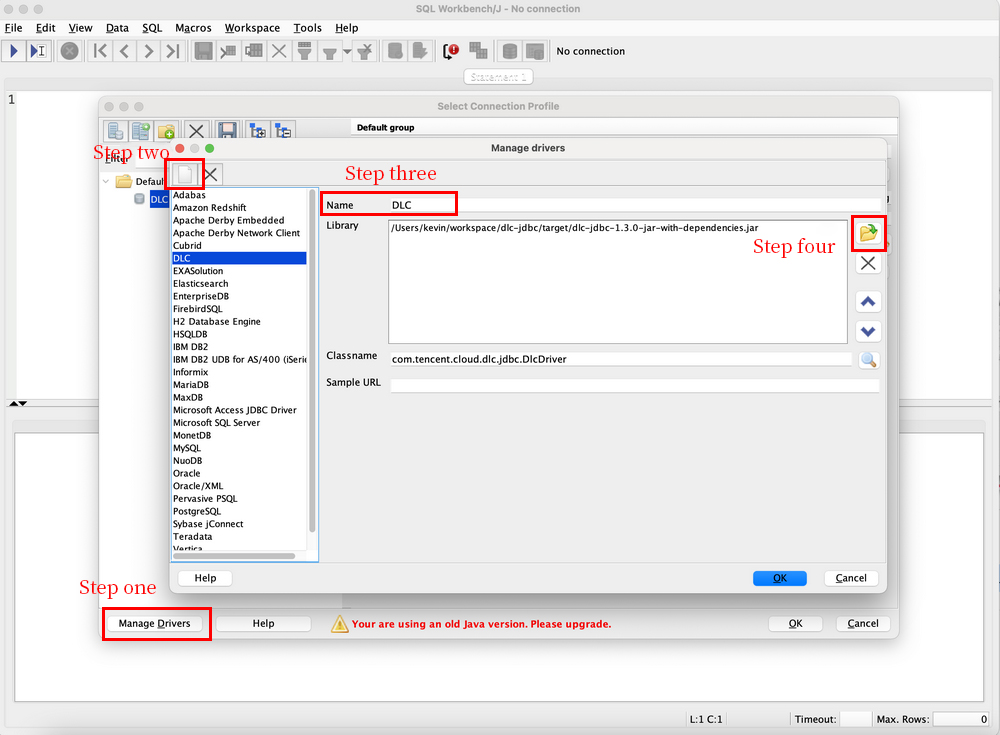
1. Create the driver for DLC based on the JDBC driver package.


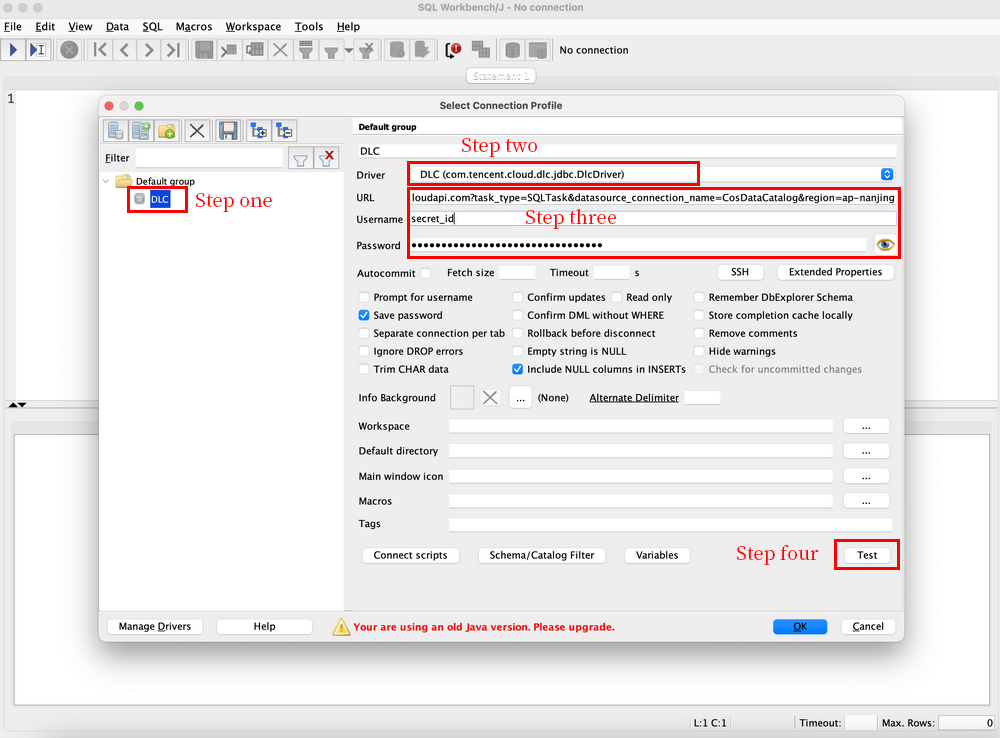
2. Connect to DLC, fill in the following parameters, and click Test. After the test passes, the connection to DLC is completed.
Name: Connection name, used to identify the connection to DLC.
Username: Corresponds to the secret_id of the Tencent Cloud user.
Password: Corresponds to the secret_key of the Tencent Cloud user.
URL: URL used to connect to DLC. The format is the same as the URL for creating a connection through JDBC mentioned above.


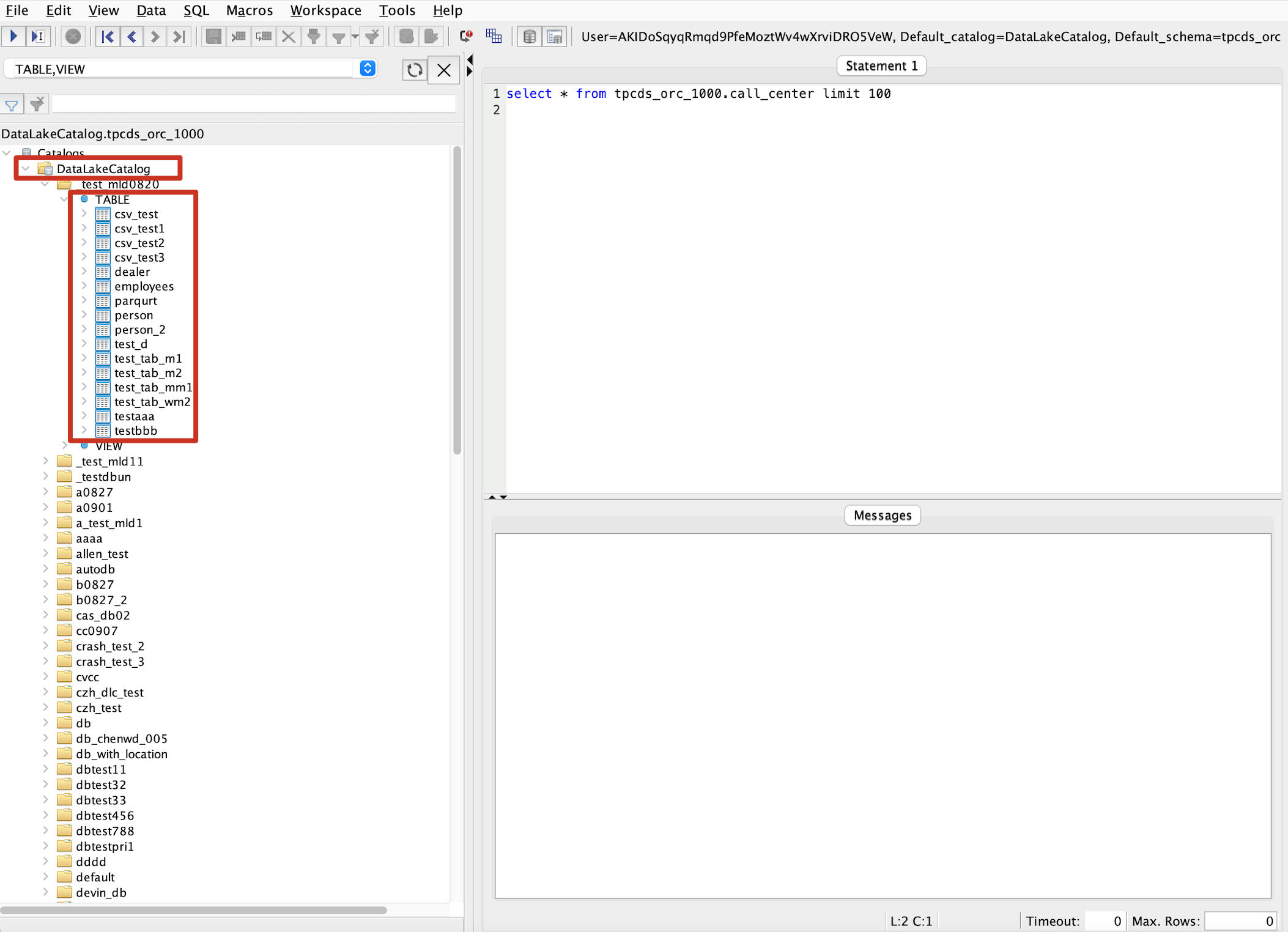
3. View the database and table information.


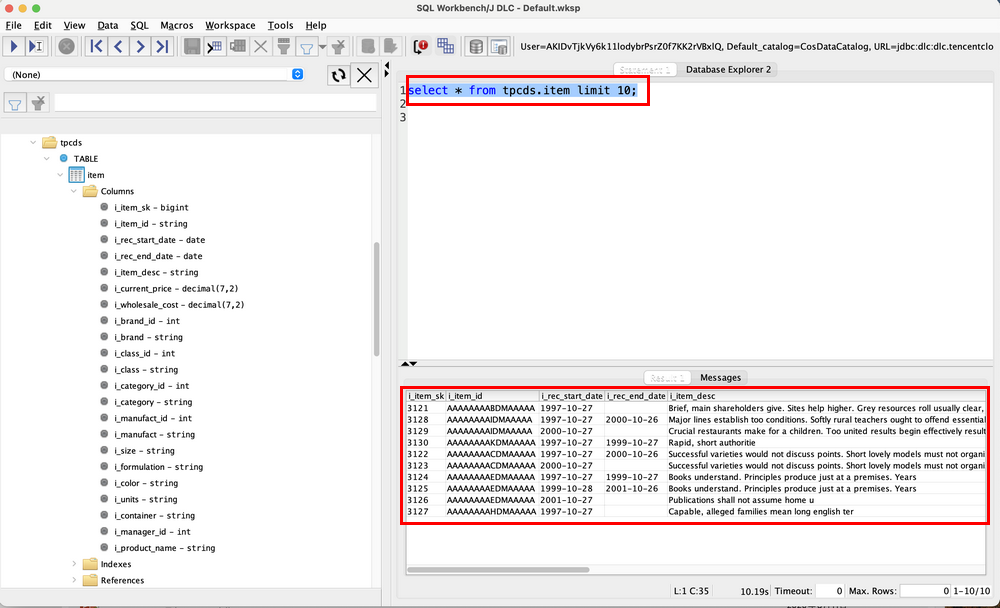
4. Query the data.


Help and Support

Was this page helpful?

Help us improve! Rate your documentation experience in 5 mins.

Feedback