The release of new game versions and the downloading of software can lead to sudden spikes in bandwidth and costs. EdgeOne offers Speed limit for single connection download, which allows for rate limiting of requests between nodes and clients on the downlink, thus helping to control the bandwidth peak of accelerated domains. However, this may also impact the user experience of file downloads, so a reasonable throttling value should be set according to business characteristics.
Feature Description
1. Supported throttling modes:
Speed limit for entire download process: Throttling is applied according to the set value throughout the entire process starting from the response to the client.
Speed limit starts after a specific byte of full-speed download: No throttling occurs before reaching the specified byte; after responding with the specified byte, throttling is applied according to the set value.
Speed limit starts after a specific time of full-speed download: No throttling occurs before the specified time; after the specified time, throttling is applied according to the set value.
2. Supported throttling capabilities:
Field
Meaning
Set the start byte for rate limiting
Configuring to 0 means throttling throughout the entire download process; otherwise, throttling starts from the specified byte and there is no throttling before that byte.
Note: Supports filling in constants or Variables. If you fill in ${http.request.uri.args["length"]}, the node will extract the value of the length parameter from the URL to start throttling.
Example: Setting throttling to start from 1024 bytes with a throttling value of 1000 KB/s means no throttling from 0-1024 KB, and after 1024 KB, the speed will maintain at 1000 KB/s.
Set the start time for rate limiting in seconds
Configuring to 0 means throttling throughout the entire download process; otherwise, throttling starts from the specified duration (timed from the beginning of the response data to the client).
Note: Supports filling in constants or Variables. If you fill in ${http.request.uri.args["time"]}, the node will extract the value of the time parameter from the URL to start throttling.
Example: Setting throttling to start from 2 seconds with a throttling value of 1000 KB/s means no throttling from 0-2 s, and after 2 s, the speed will maintain at 1000 KB/s.
Speed Limit Value
The node will control the response speed to the client according to the set value.
Note: Supports filling in constants or Variables. If you fill in the variable ${http.request.uri.args["rate"]}, EO will extract the rate parameter value from the request URL for throttling.
Example: If you fill in the constant 2048, the throttling value will be 2048 KB/s; if you fill in the variable ${http.request.uri.args["rate"]}, with a URL like http://example.com/download/test.zip?rate=1024, the throttling value will be 1024 KB/s.
Note:
The specified duration throttling starts timing from when response data is sent to the client and may be influenced by factors such as access path, client reception speed, and edge node TCP buffer, so the actual start time for throttling may have some discrepancies with the configured time in the console.
The variable capabilities for setting bytes to start throttling and seconds to start throttling are currently in grayscale release. If you need to use them, please contact us.
The grayscale release for starting throttling after a specific time at full-speed download is ongoing. For usage, please contact us.
Single connection rate limiting applies to individual HTTP requests. The rate limiting start byte is specific to the current request range. For example, if the total size of the requested URL resource is 1GB, with rate limiting set to start from 100 KB, and the Range request covers 200-500 KB, the rate limiting will be triggered when the request reaches the 300KB mark.
Operation Steps
Scenario 1: Throttling a specific domain to a specific throttling value
If you want all requests to be limited to a download speed of 500 KB/s for the domain www.example.com under the site example.com, refer to the following steps:
1. Log in to the Tencent Cloud EdgeOne console, enter Service Overview in the left menu bar, and click the site to be configured under Website Security Acceleration.
2. In the site details page, click Site Acceleration, go to the global configuration page, and click on the Rules Engine tab.
3. On the rules engine page, click Create Rule, select New Blank Rule, and proceed to the new rule editing page.
4. In the rule editing page, select matching type as HOST equals www.example.com.
5. Click Action > Select Box, and from the operation list, choose Speed limit for single connection download.
6. Select the mode as Full-Process Download Throttling, and fill in the throttling value as 500.
7. The complete rule configuration is shown below. Click Save and Publish to complete the rule configuration.
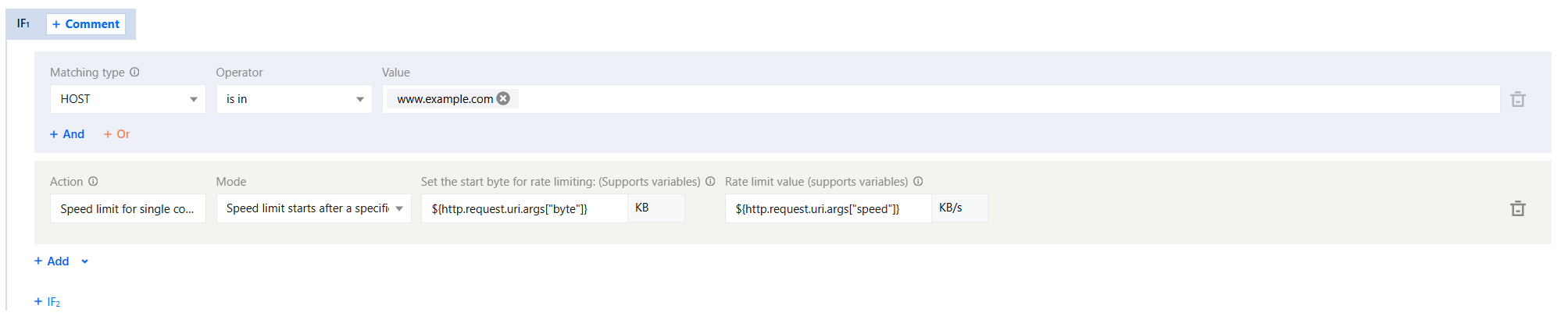
Scenario 2: Throttling a specific domain based on the variable value in the request query string
If you want the domain www.example.com under the site example.com to dynamically throttle based on the values of the query parameters in the request URL, where speed is the throttling value and byte is the size at which throttling begins, refer to the following steps:
1. Log in to the Tencent Cloud EdgeOne console, enter Service Overview in the left menu bar, and click the site to be configured under Website Security Acceleration.
2. In the site details page, click Site Acceleration, go to the global configuration page, and click on the Rules Engine tab.
3. On the rules engine page, click Create Rule, select New Blank Rule, and proceed to the new rule editing page.
4. In the rule editing page, select matching type as HOST equals www.example.com.
5. Click Action > Select Box, and from the operation list, choose Speed limit for single connection download.
6. Select the mode as Speed limit starts after a specific byte of full-speed download, set Set the start byte for rate limiting as ${http.request.uri.args["byte"]}, and set Speed Limit Value as ${http.request.uri.args["speed"]}.
7. The complete rule configuration is shown below. Click Save and Publish to complete the rule configuration.