tencent cloud

Tencent Cloud EdgeOne

Release Notes and Announcements
Release Notes
Security Announcement
Announcements
Product Introduction
Overview
Strengths
Use Cases
Comparison Between EdgeOne and CDN Products
Use Limits
Purchase Guide
Description of Trial Plan Experience Benefits
Free Plan Guide
Billing Overview
Billing Items
Subscriptions
Renewals
Instructions for overdue and refunds
Comparison of EdgeOne Plans
About "clean traffic" billing instructions
DDoS Protection Capacity Description
Getting Started
Choose business scenario
Quick access to website security acceleration
Quick deploying a website with Pages
Domain Service&Origin Configuration
Domain Service
HTTPS Certificate
Origin Configuration
Site Acceleration
Overview
Access Control
Smart Acceleration
Cache Configuration
File Optimization
Network Optimization
URL Rewrite
Modifying Header
Modify the response content
Rule Engine
Image&Video Processing
Speed limit for single connection download
DDoS & Web Protection
Overview
DDoS Protection
Web Protection
Bot Management
API Discovery(Beta)
Edge Functions
Overview
Getting Started
Operation Guide
Runtime APIs
Sample Functions
Best Practices
Pages
L4 Proxy
Overview
Creating an L4 Proxy Instance
Modifying an L4 Proxy Instance
Disabling or Deleting an L4 Proxy Instance
Batch Configuring Forwarding Rules
Obtaining Real Client IPs
Data Analysis&Log Service
Log Service
Data Analysis
Alarm Service
Site and Billing Management
Billing Management
Site Management
Version Management
General Policy
General Reference
Configuration Syntax
Request and Response Actions
Country/region and Corresponding Codes
Terraform
Overview
Installing and Configuring Terraform
Practical Tutorial
EdgeOne Skill User Guide
Automatic Warm-up/Cache Purge
Resource Abuse/hotlinking Protection Practical
HTTPS Related Practices
Acceleration Optimization
Scheduling Traffic
Data Analysis and Alerting
Log Platform Integration Practices
Configuring Origin Servers for Cloud Object Storage (Such As COS)
CORS Response Configuration
API Documentation
History
Introduction
API Category
Making API Requests
Site APIs
Acceleration Domain Management APIs
Site Acceleration Configuration APIs
Edge Function APIs
Alias Domain APIs
Security Configuration APIs
Layer 4 Application Proxy APIs
Content Management APIs
Data Analysis APIs
Log Service APIs
Billing APIs
Certificate APIs
Origin Protection APIs
Load Balancing APIs
Diagnostic Tool APIs
Custom Response Page APIs
API Security APIs
DNS Record APIs
Content Identifier APIs
Legacy APIs
Ownership APIs
Image and Video Processing APIs
Multi-Channel Security Gateway APIs
Version Management APIs
Data Types
Error Codes
FAQs
Product Features FAQs
DNS Record FAQs
Domain Configuration FAQs
Site Acceleration FAQs
Data and Log FAQs
Security Protection-related Queries
Origin Configuration FAQs
Troubleshooting
Reference for Abnormal Status Codes
Troubleshooting Guide for EdgeOne 4XX/5XX Status Codes
520/524 Status Code Troubleshooting Guide
521/522 Status Code Troubleshooting Guide
Tool Guide
Agreements
Service Level Agreement
Origin Protection Enablement Conditions of Use
TEO Policy
Privacy Policy
Data Processing And Security Agreement
Contact Us
Glossary
DocumentationTencent Cloud EdgeOneTroubleshootingTroubleshooting Guide for EdgeOne 4XX/5XX Status Codes

Troubleshooting Guide for EdgeOne 4XX/5XX Status Codes

Focus Mode
Font Size
Last updated: 2025-08-14 14:58:00
After connection to EdgeOne, if your business request encounters a 4XX/5XX status code, you can troubleshoot by referring to the following common causes and solutions.
Note:
If you are still unable to resolve the issue by referring to the following troubleshooting guide, you can contact us. To facilitate troubleshooting, please provide EO-LOG-UUID information. If it is unavailable, please provide the following details:
User IP and EdgeOne node IP;
Specific 4XX/5XX error code and message;
Time and timezone for the 4XX/5XX error;
The URL causing the HTTP 4XX/5XX error (for example, https://www.example.com/images/icons/image1.png:).

HTTP 400

1. Meaning: The server cannot or will not process the request due to certain causes that are considered client errors (such as request syntax errors, invalid request message formats, or deceptive request routing).
2. Possible causes and solutions:
Origin server response: Test direct access to the origin server. If the origin server responds with 400, then modify the origin server configuration or adjust the client request behavior to obtain a correct response.
EdgeOne node response:
Check whether the request method is within the scope supported by EdgeOne. If it is not one of the following request methods, EdgeOne nodes will directly respond with a 400 status code.
GET, HEAD, POST, PUT, DELETE, TRACE, CONNECT, OPTIONS, PATCH, COPY, LOCK, MKCOL, MOVE, PROPFIND, PROPPATCH, and UNLOCK.
Protocol format errors, such as accessing HTTP via Port 443.
The HTTP request does not comply with RFC standards.

HTTP 403

1. Meaning: The server cannot or will not process the request due to certain causes that are considered client errors (such as request syntax errors, invalid request message formats, or deceptive request routing).
2. Possible causes and solutions:
Origin server response: Test direct access to the origin server. If the origin server responds with 403, then modify the origin server configuration or adjust the client request behavior to obtain a correct response.
EdgeOne node response: A common cause is failure to pass the hotlink protection verification.
Check whether HTTP response has been configured in the rule engine. If so, verify whether it hits basic access controls such as referer blocklist/allowlist, IP blocklist/allowlist, and user-agent blocklist/allowlist.
Check whether token authentication has been configured in the rule engine. If so, verify whether the URL in the client request has an expired timestamp or an incorrect MD5 encrypted string.
Check whether remote authentication has been configured through the edge function. If so, verify whether the URL in the client request does not comply with the authentication and release rules of the authentication server.

HTTP 416

1. Meaning: The server cannot process the requested data range. The most common situation is that the requested data range is not within the file range,
2. Possible causes and solutions:
Origin server response: Test direct access to the origin server. If the origin server responds with 416, then modify the origin server configuration or adjust the client request behavior to obtain a correct response.
EdgeOne node response:
Abnormal range values, such as: rangeStart < 0, rangeStart > rangeEnd, and rangeStart > FileSize.
The range header of the client request is not standard. For example, the request is Range: Bytes=0-1023 instead of Range: bytes=0-1023.

HTTP 418

1. Meaning: This response is typically used by servers to handle requests they do not want to deal with.
2. Possible causes and solutions:
Origin server response: Test direct access to the origin server. If the origin server responds with 418, then modify the origin server configuration or adjust the client request behavior to obtain a correct response.
EdgeOne node response: For a domain name connected to EdgeOne, the system automatically assigns service nodes to the domain name, and the corresponding nodes issue the configuration file for the domain name. The file content depends on the domain name's configuration, such as the origin server, cache, and header. When a request reaches an EdgeOne node, the node will read the configuration file for the domain name. If the configuration file is not found, a 418 status code will be returned.
Example: A client requests the domain name http://example.com/test.jpg that has been connected to EdgeOne, and the relevant request configuration for the domain name exists on nodes 1.1.1.1 and 1.1.1.2. When a domain name request reaches these two nodes, they will read the configuration file for the domain name example.com and respond successfully. However, if a request reaches node 2.2.2.2, a 418 status code will be returned. Please check whether the domain is bound to a service node that does not correspond to example.com, and whether the CNAME configuration is correct. If everything appears to be in order, please contact us for further assistance.

HTTP 423

1. Meaning: It indicates "locked". In the scenario of connection to EdgeOne, it generally means request loopback is triggered.
2. Possible causes and solutions:
Origin server response: Test direct access to the origin server. If the origin server responds with 423, then modify the origin server configuration or adjust the client request behavior to obtain a correct response.
EdgeOne node response: Request loopback is triggered, that is, the CDN-Loop header's Loops value is ≥ 16. For details, see CDN-Loop. This is usually seen in accelerated domain names connected to EO, and accelerated domain names connected to EO or CDN are also set on the origin server.

HTTP 520

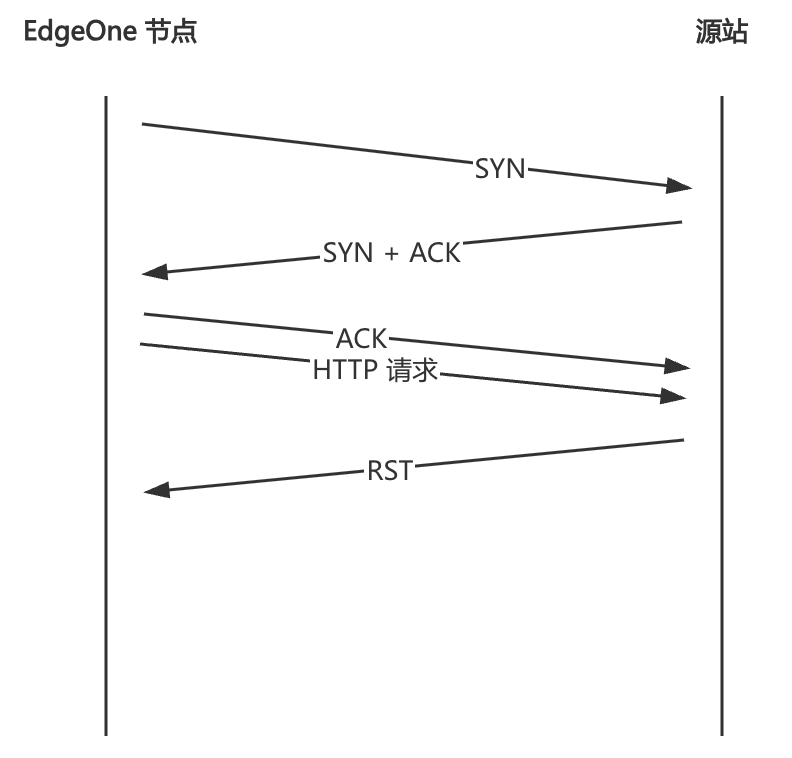
1. Meaning: EdgeOne's custom status code. After the node successfully establishes a TCP connection with the origin server, it initiates an HTTP request to the origin server. However, the origin server directly sends an RST packet, and the node responds to the client with a 520 status code.


2. Possible causes and solutions:
Origin server service exception: Test direct access to the origin server and capture packets to check whether the origin server responds to the HTTP request with an RST packet. This may be caused by the origin server's firewall or service exception.

HTTP 521

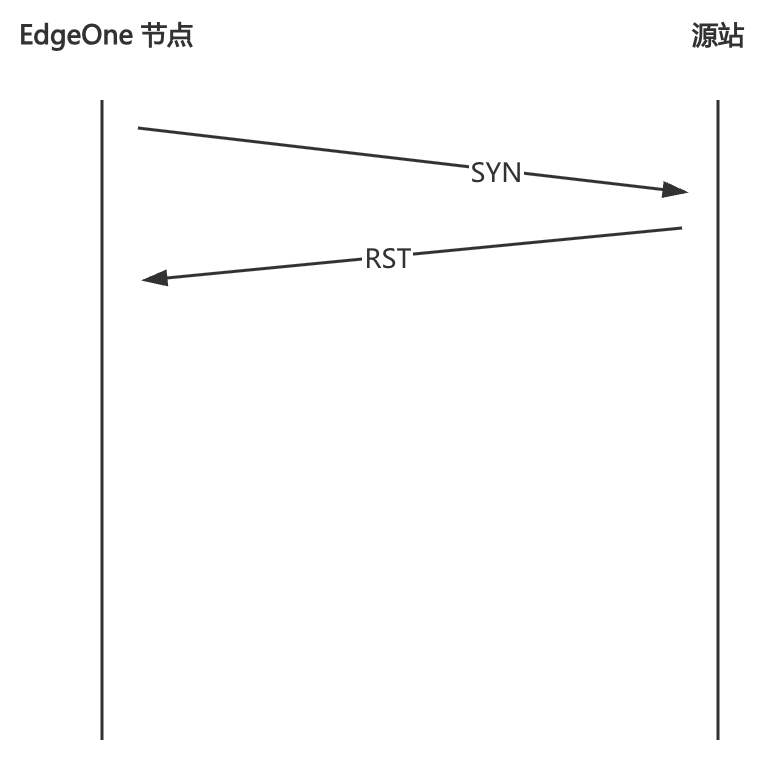
1. Meaning: EdgeOne's custom status code. When the node requests the origin server, if the origin server directly sends an RST packet during the TCP connection establishment phase, the node responds to the client with a 521 status code.


2. Possible causes and solutions:
Origin server service exception: Test direct access to the origin server. You can use a command tool such as curl or telnet to check whether the TCP connection can be established. This is usually caused by certain ports of the origin server not being open to the public network or origin server node network issues.

HTTP 522

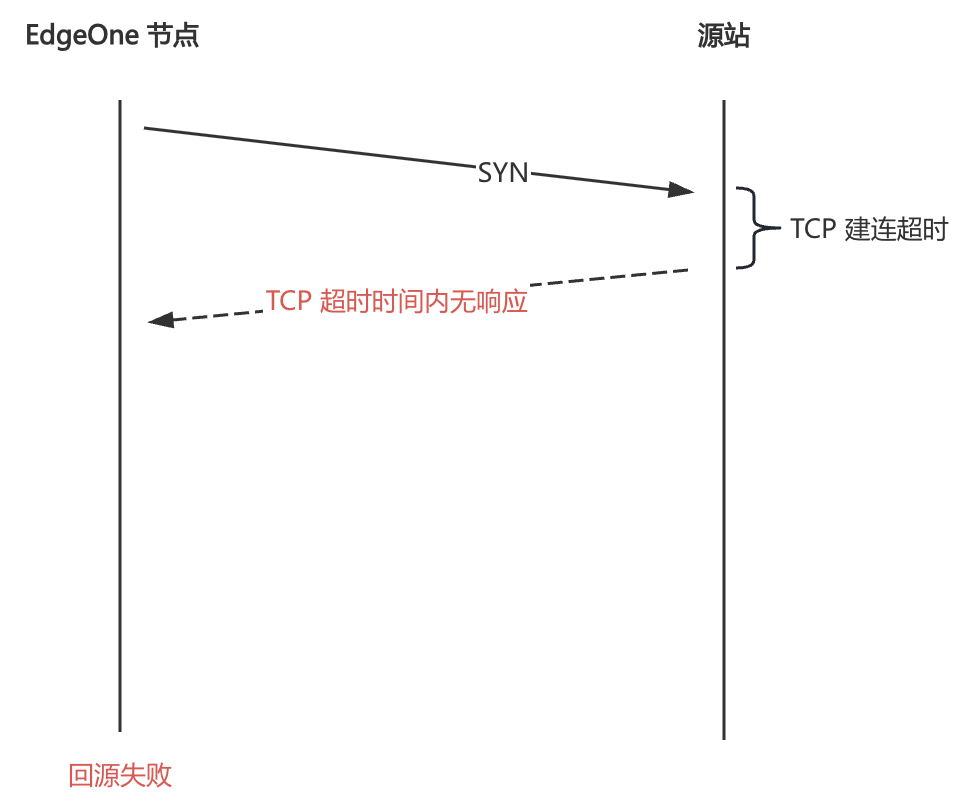
1. Meaning: EdgeOne's custom status code. When the node requests the origin server, if the origin server does not respond during the TCP connection establishment phase, causing the node to time out, the node responds to the client with a 522 status code.


2. Possible causes and solutions:
Origin server service exception: Test direct access to the origin server. You can use a command tool such as curl or telnet to check whether the TCP connection can be established. This is usually caused by certain ports of the origin server not being open to the public network or origin server node network issues.

HTTP 523

1. Meaning: EdgeOne's custom status code. If the origin server configured for the domain name is a domain name, then when the node requests the origin server, it needs to resolve the domain name to obtain the IP of the origin server. If the resolution fails, the node cannot request the origin and responds to the client with a 523 status code.
2. Possible causes and solutions:
Try using dig to resolve the origin server domain name to confirm whether it can be resolved normally.
If the origin server domain name can be resolved normally, please contact us.

HTTP 524

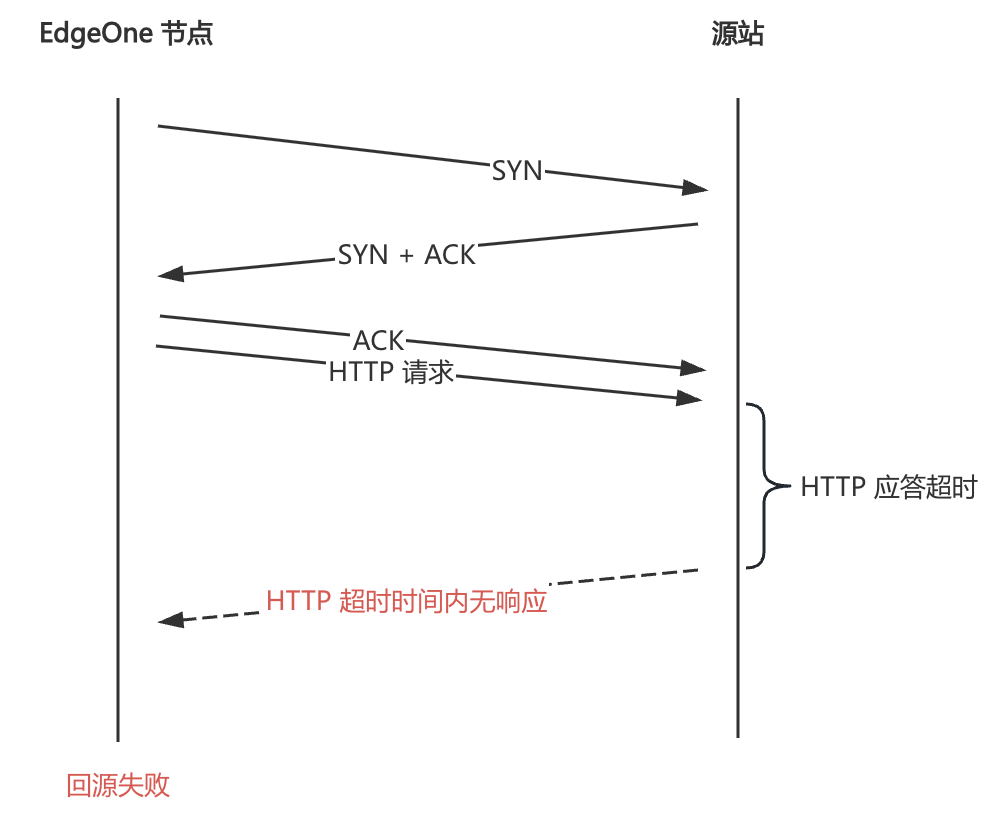
1. Meaning: EdgeOne's custom status code. After the node successfully establishes a connection with the origin server and sends a request to the origin server, if the origin server does not respond, causing the node to time out, the node responds to the client with a 524 status code.


2. Possible causes and solutions:
Origin server service exception: Test direct access to the origin server to check for a response to the HTTP request. If the origin server responds normally, you can try adjusting the origin-pull timeout. If the issue persists, please contact us.

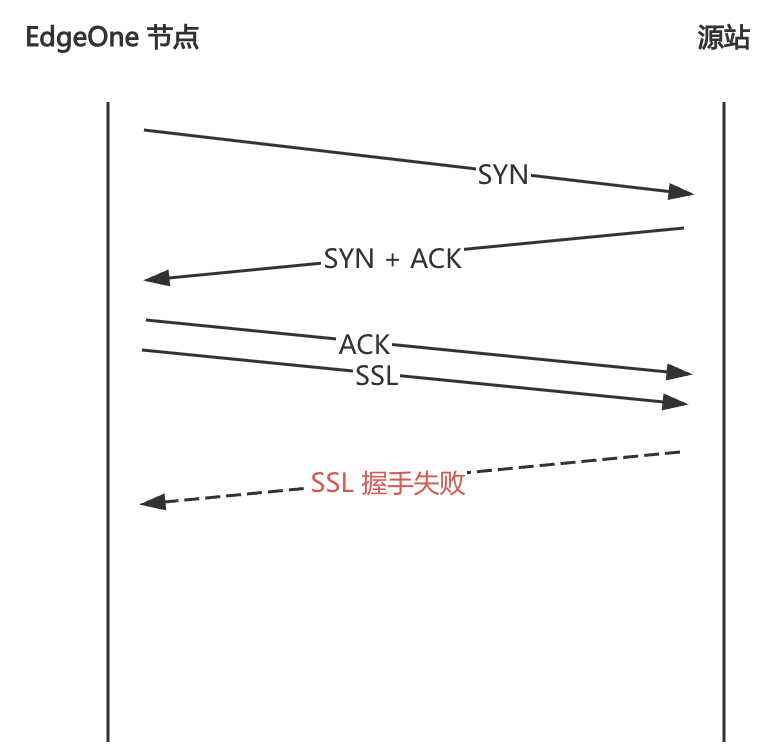
HTTP 525

1. Meaning: EdgeOne's custom status code. If the origin-pull protocol is HTTPS, the node needs to perform an SSL handshake with the origin server when it requests the origin server. If the handshake fails, the node responds to the client with a 525 status code.


2. Possible causes and solutions:
Check whether the domain name's origin-pull protocol is configured as HTTPS, but the origin server has no certificate deployed. If so, you can change the origin-pull protocol to HTTP in the domain name management section or deploy the corresponding domain name certificate on the origin server.
Packet loss occurs due to network issues during the SSL handshake between the node and the origin server.


Help and Support

Was this page helpful?

Help us improve! Rate your documentation experience in 5 mins.

Feedback