521/522 Status Code Troubleshooting Guide
Download
Focus Mode
Font Size
When you use Tencent Cloud EdgeOne to accelerate site access resources, the client's requests will be sent to the EdgeOne edge node, then back to the middle layer node, and finally back to the origin. Therefore, if there are issues during the access process, it may involve problems with multiple layers of network links. When EdgeOne fails to reach the origin, a 52x error will occur. This document will guide you on how to troubleshoot when encountering a 521/522 status code.
Taking the 522 status code as an example:
Definition
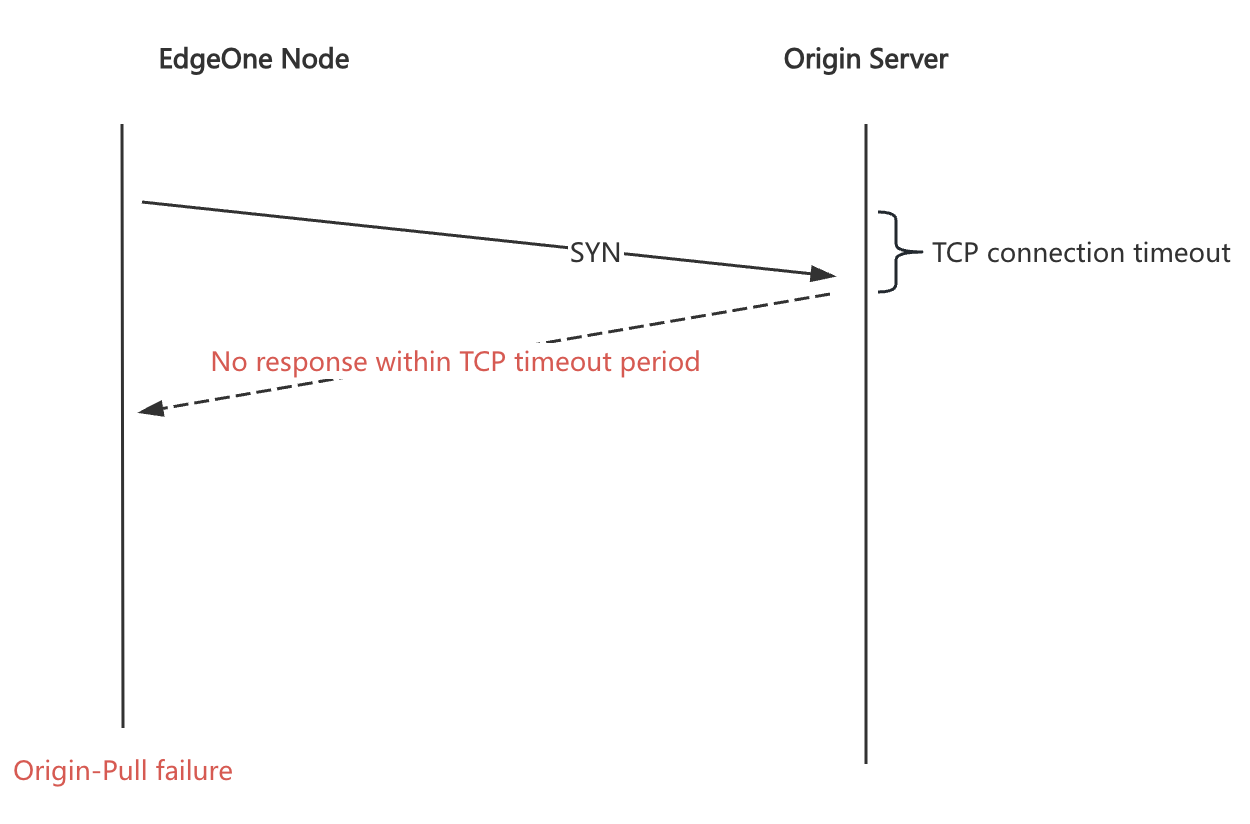
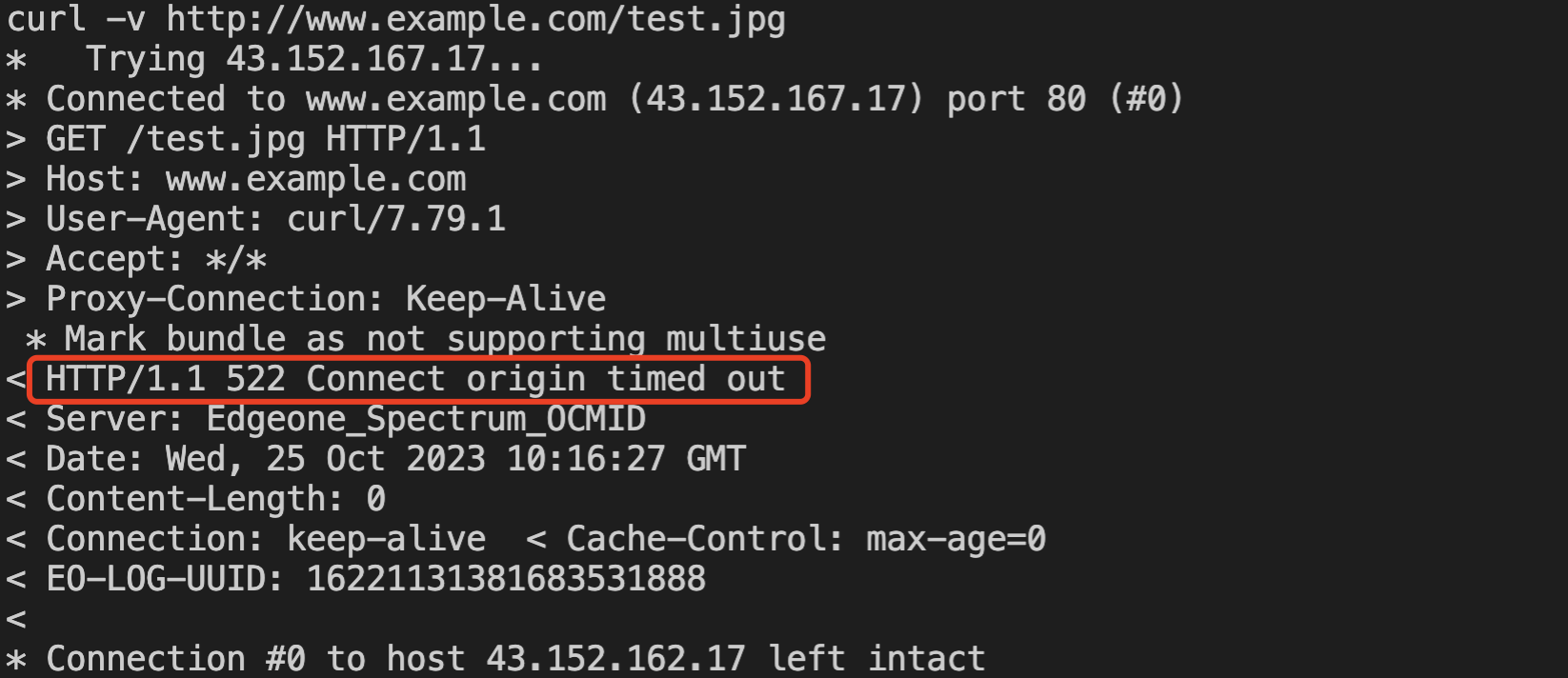
The 522 status code is a custom status code defined by EdgeOne, indicating that the node's request to the origin has timed out during the TCP connection stage because the origin did not respond. Thus, the node responds to the client with a 522 status code. Please refer to the list of abnormal status codes for the meanings of other status codes.
Phenomenon
Possible Causes
Issues with the origin's own services
Security policy of the origin
ISP restrictions (HTTP)
Troubleshooting Method
Initiate an HTTP/HTTPS request from a third party (not from CDN or origin) directed at the origin for testing. The third party can be a personal PC, server, monitoring platform, etc. You can use the command-line tool CURL on the server to troubleshoot.
Step 1: Confirm the Origin Configuration Information
If you have no special configurations, it is sufficient to follow the origin, protocol, and port set in "Domain Management". If you have special configurations, you can determine them as follows:
1.
Origin IP: The origin IP needs to be confirmed based on the origin, origin group, load balancing, and the configuration of "Modify Origin" in the rules engine in "Domain Management".2.
Origin-pull Protocol: The origin protocol needs to be confirmed based on "Domain Management", the rules engine "Origin HTTPS", and the origin protocol in "Modify Origin".3.
Origin-pull Port: If there are no special configurations, it will be 80 or 443. If you modified the origin port in the "Modify Origin" operation in the rules engine, follow the modified one.4.
Origin-pull HOST: Default follows the acceleration domain name. If you set it in the rules engine "Host Header Rewrite" operation, the set one shall prevail.5.
Origin-pull Path: Default follows the request URL. If you modified it in the rules engine "Rewrite Origin URL" operation, the modified one shall prevail.Step 2: Troubleshoot Issues with the Origin's Own Services
There may be issues with the origin's services, such as port not being open. Use the command-line tool telnet to send a telnet request to the origin port from the third-party platform:
telnet [origin_ip] [port]
Note: Ensure CURL version is above 7.21.3.
Assuming the origin uses port
80, and the origin IP is 1.1.1.1.telnet 1.1.1.1 80
If the TCP connection is disconnected or remains in connection from the third-party platform, execute the following command on the origin to confirm whether the origin's
80 port is open:netstat -tnlp|grep -w 80
If the TCP connection is successfully established or you found the origin port is open, proceed to Step 3.
Step 3: Troubleshoot Origin Security Policies
Possible reasons include:
1. The origin has set a firewall, and the EdgeOne return node IP is not on the IP whitelist.
Use CURL to obtain an
EO-LOG-UUID, submit it to Tencent Cloud technical support, and have them check the IP of the EdgeOne return node. Verify whether the return node IP is in the origin's IP whitelist. The method to obtain the UUID is as follows: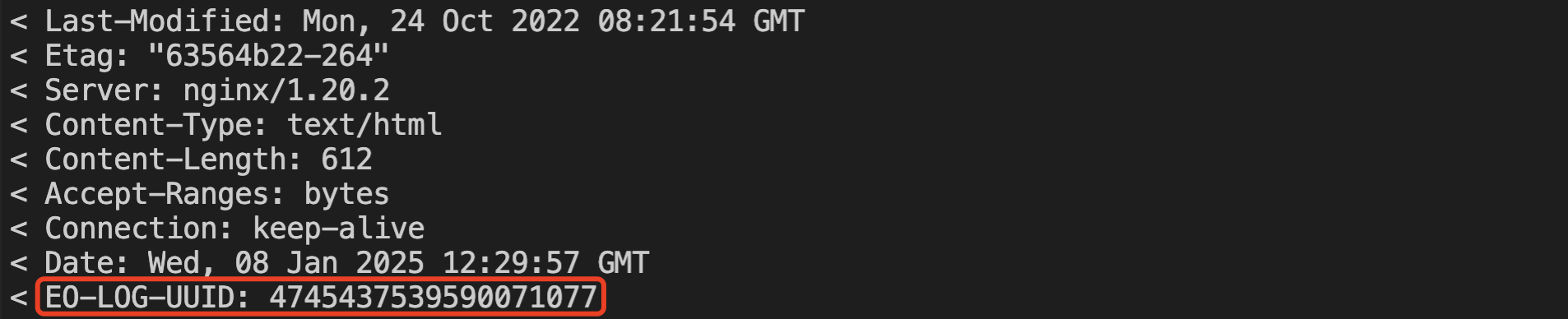
2. The origin has set access rate limits, causing the EdgeOne return requests to be too frequent.
Directly point to the origin and initiate multiple requests concurrently to see if the failed connection or timeout phenomenon can be reproduced.
Step 4: ISP Restrictions
If all the above checks are normal, the issue may be that the origin's egress is restricted by the carrier's link. You can locate the problem by reverse probing the origin's egress from multiple locations on the public network, without logging into the origin.
Probing method:
In a public network environment, it is recommended to select clients from multiple different carriers and regions to perform tcptraceroute on the service port of the origin IP address:
# Probe the origin's port 443 (HTTPS).tcptraceroute [origin IP] 443# Probe the origin's port 80 (HTTP).tcptraceroute [origin IP] 80
If tcptraceroute is not installed in the environment, you can use mtr -T -P [port] [origin IP] as an alternative.
Determination method:
If probes from multiple locations can all reach the origin: you can rule out carrier link restrictions.
If probes from multiple locations all start to fail at a certain intermediate hop, determine the cause based on the failure location:
If the failure point is near the origin's egress (the last few hops): it is most likely a carrier link issue on the origin's egress side. Please contact the origin's data center or cloud provider and the corresponding carrier to verify and resolve the issue.
If the failure point is near the probe end: it is a local link issue on the probe side. Please retest using a client from another region.
Still Unable to Locate the Issue? Submit a Ticket for Assistance
If you still cannot locate the problem after performing the four troubleshooting steps above, please submit a ticket to contact Tencent Cloud Technical Support for assistance, and provide the following information in the ticket:
The specific URL where the 521/522 status code occurs
Problem occurrence time (accurate to the minute, a time range is recommended)
EO-LOG-UUID (can be obtained from the response header and is used to locate specific request logs)
Solution
For the 522 status code, if it's confirmed that the origin server has a long connection response time (EdgeOne's default connection timeout is 5 seconds), you can try adjusting the "TCP Connection Timeout." The timeout setting should not exceed the client timeout to prevent EdgeOne origin nodes from triggering client timeout disconnections while waiting for the origin server's response. Currently, "TCP Connection Timeout" is not supported as a standard feature in the console. If needed, please contact us.
Help and Support
Was this page helpful?
You can also Contact sales or Submit a Ticket for help.
Help us improve! Rate your documentation experience in 5 mins.
Feedback