快速指引
下载
聚焦模式
字号
本文档旨在引导您完成在边缘安全加速平台 EO 的边缘推理中部署开源或者自有模型及调用 API 的完整过程。您将了解如何创建推理服务、管理服务凭证、发起推理请求以及进行基础的故障排查,从而帮助您将边缘推理的 AI 模型能力集成到您的应用中。我们将以部署 Llama-3.2-3B-Instruct 大语言模型为示例,演示从环境准备到模型上线调用的全流程。
说明:
边缘推理当前仅支持企业版套餐,同时需要申请白名单后使用,如您有需要请联系商务或 联系我们。
本指南以 Linux/macOS 环境为例,Windows 用户请在 WSL 或 Docker Desktop 环境下操作。
前置条件
在开始之前,请确保您已准备好以下内容:
准备项 | 说明 |
腾讯云账号 | 已完成实名认证的腾讯云账号 |
企业版套餐 | 已订购 EdgeOne 企业版套餐 |
Docker 环境 | 本地已安装 Docker(建议 Docker 20.10+),用于构建和推送镜像 |
腾讯云容器镜像服务(TCR) | 已开通腾讯云容器镜像服务(个人版即可),用于存储自定义镜像 |
GPU 服务器(可选) | 如需在本地测试镜像运行,需具备 NVIDIA GPU 的机器;仅做构建则不需要 |
创建推理服务并调用
以下步骤演示了如何将一个模型部署为在线服务,并进行调用。此流程同时适用于传统模型(如 OCR、语音识别)和大语言模型(LLM)或者文生图模型等。
步骤一:登录腾讯云控制台
1. 打开浏览器访问 腾讯云控制台,使用您的腾讯云账号登录。
2. 在控制台顶部搜索栏中输入 边缘安全加速平台 EO,或在左侧导航中找到 边缘安全加速平台 EO,点击进入。
3. 在 EdgeOne 控制台左侧导航中,找到并点击服务总览菜单,选择边缘推理进入边缘推理管理页面。
步骤二:准备自定义镜像(以 Llama-3.2-3B 为例)
边缘推理通过容器化方式部署模型。您需要编写一个 Dockerfile,将模型文件、推理框架和依赖项打包成一个完整的 Docker 镜像。
2.1 创建项目目录
在本地创建一个工作目录:
mkdir llama3-edge-inference && cd llama3-edge-inference
2.2 编写 Dockerfile
在项目目录中创建
Dockerfile 文件。以下示例使用 vLLM 作为推理框架,从 ModelScope 下载 Llama-3.2-3B-Instruct 模型:# ============================================================# Dockerfile for Llama3.2-3B Model with vLLM 0.6.3.post1# ============================================================# 使用 vLLM 官方 OpenAI 兼容镜像作为基础镜像FROM vllm/vllm-openai:v0.6.3.post1# 设置环境变量,跳过 HuggingFace Hub 在线验证(离线模式)ENV HF_HUB_OFFLINE=1ENV HF_HOME=/data/modelsENV TRANSFORMERS_CACHE=/data/models# 安装 modelscope 用于下载模型(使用国内镜像源加速)RUN pip3 install --no-cache-dir modelscope -i https://pypi.tuna.tsinghua.edu.cn/simple# 创建模型目录并下载模型文件RUN mkdir -p /data/models/LLM-Research/Llama-3.2-3B-Instruct && \\python3 -c "from modelscope import snapshot_download; snapshot_download('LLM-Research/Llama-3.2-3B-Instruct', local_dir='/data/models/LLM-Research/Llama-3.2-3B-Instruct')"# 暴露推理服务端口EXPOSE 8000# 启动参数说明:# --host 0.0.0.0 监听所有网络接口# --port 8000 服务监听端口# --model 模型文件路径# --trust-remote-code 信任远程代码(部分模型需要)# --dtype half 使用半精度推理,降低显存占用# --max-model-len 8192 最大上下文长度CMD ["--host", "0.0.0.0", \\"--port", "8000", \\"--model", "/data/models/LLM-Research/Llama-3.2-3B-Instruct", \\"--trust-remote-code", \\"--dtype", "half", \\"--max-model-len", "8192"]
关键参数说明:
参数 | 说明 |
FROM vllm/vllm-openai:v0.6.3.post1 | 基础镜像已内置 vLLM 推理引擎和 OpenAI 兼容 API 接口 |
HF_HUB_OFFLINE=1 | 禁用在线模型验证,确保容器在无外网环境下也可启动 |
--dtype half | 使用 FP16 半精度推理,Llama-3.2-3B 模型约需 6GB 显存 |
--max-model-len 8192 | 设置最大上下文窗口为 8192 tokens |
说明:
请根据您的实际模型和推理框架调整 Dockerfile。如果您使用其他框架(例如 SGLang 等),请参考对应框架的容器化文档。
步骤三:构建 Docker 镜像
3.1 构建镜像
在 Dockerfile 所在目录执行以下命令构建镜像:
docker build -t llama3-3b-vllm:v1.0 .
构建过程将依次执行以下操作:
1. 拉取 vLLM 基础镜像。
2. 安装 ModelScope 依赖。
3. 下载 Llama-3.2-3B-Instruct 模型文件(约 6GB,请耐心等待)。
说明:
首次构建可能需要 10-30 分钟,取决于网络速度。建议在网络稳定的环境下执行。如果因网络问题下载失败,可以重新执行构建命令,Docker 会从上次中断的步骤继续。更多 Docker 教程,您可以查看 官方 Docker 教程。
3.2 验证镜像(可选)
构建完成后,可以查看镜像信息:
docker images | grep llama3-3b-vllm
预期输出:
llama3-3b-vllm v1.0 xxxxxxxxxxxx xx minutes ago 约15GB
如果您本地有 GPU 环境,可以运行以下命令测试镜像是否正常工作:
docker run --gpus all -p 8000:8000 llama3-3b-vllm:v1.0
等待服务启动完成后(日志中出现
Uvicorn running on http://0.0.0.0:8000),在另一个终端窗口执行测试请求:curl http://localhost:8000/v1/chat/completions \\-H "Content-Type: application/json" \\-d '{"model": "/data/models/LLM-Research/Llama-3.2-3B-Instruct","messages": [{"role": "user", "content": "Hello!"}],"max_tokens": 50}'
步骤四:推送镜像至腾讯云容器镜像服务(TCR)
构建好的镜像需要上传到腾讯云容器镜像服务(TCR),以便边缘推理平台拉取和部署。
说明:
1. 如果使用 TCR 标准版、基础版、高级版的实例,需要在 访问控制 >公网访问,开启公网访问入口,边缘推理需要通过公网拉取镜像。
2. 如果使用个人版镜像仓库,无需创建实例,且默认支持公网访问。
4.1 开通容器镜像服务
1. 登录 腾讯云容器镜像服务控制台。
2. 创建一个命名空间(如
edge-inference)。3. 在命名空间下创建一个镜像仓库(如
llama3-3b-vllm)。4.2 登录 TCR
在本地终端执行以下命令登录 TCR(请替换为您的实际实例信息):
# 个人版 TCR 登录docker login ccr.ccs.tencentyun.com --username=<腾讯云账号ID>
系统会提示输入密码,请输入您在 TCR 控制台中设置的镜像仓库密码。
说明:
如果使用企业版 TCR,登录地址格式为
<实例名>.tencentcloudcr.com,请参考 TCR 控制台获取具体地址。4.3 标记并推送镜像
# 为镜像打标签(请替换为您的实际仓库地址)docker tag llama3-3b-vllm:v1.0 ccr.ccs.tencentyun.com/edge-inference/llama3-3b-vllm:v1.0# 推送镜像到 TCRdocker push ccr.ccs.tencentyun.com/edge-inference/llama3-3b-vllm:v1.0
说明:
由于模型镜像较大(约 15GB),推送时间取决于上行带宽,建议在带宽充足的环境下操作。
4.4 确认上传成功
步骤五:创建项目
项目是边缘推理的一级资源,用于组织和管理多个推理服务。一个项目可以包含多个推理服务,您还可以通过项目绑定标签来实现权限管控。
1. 在 EdgeOne 控制台的边缘推理页面,单击创建项目 。
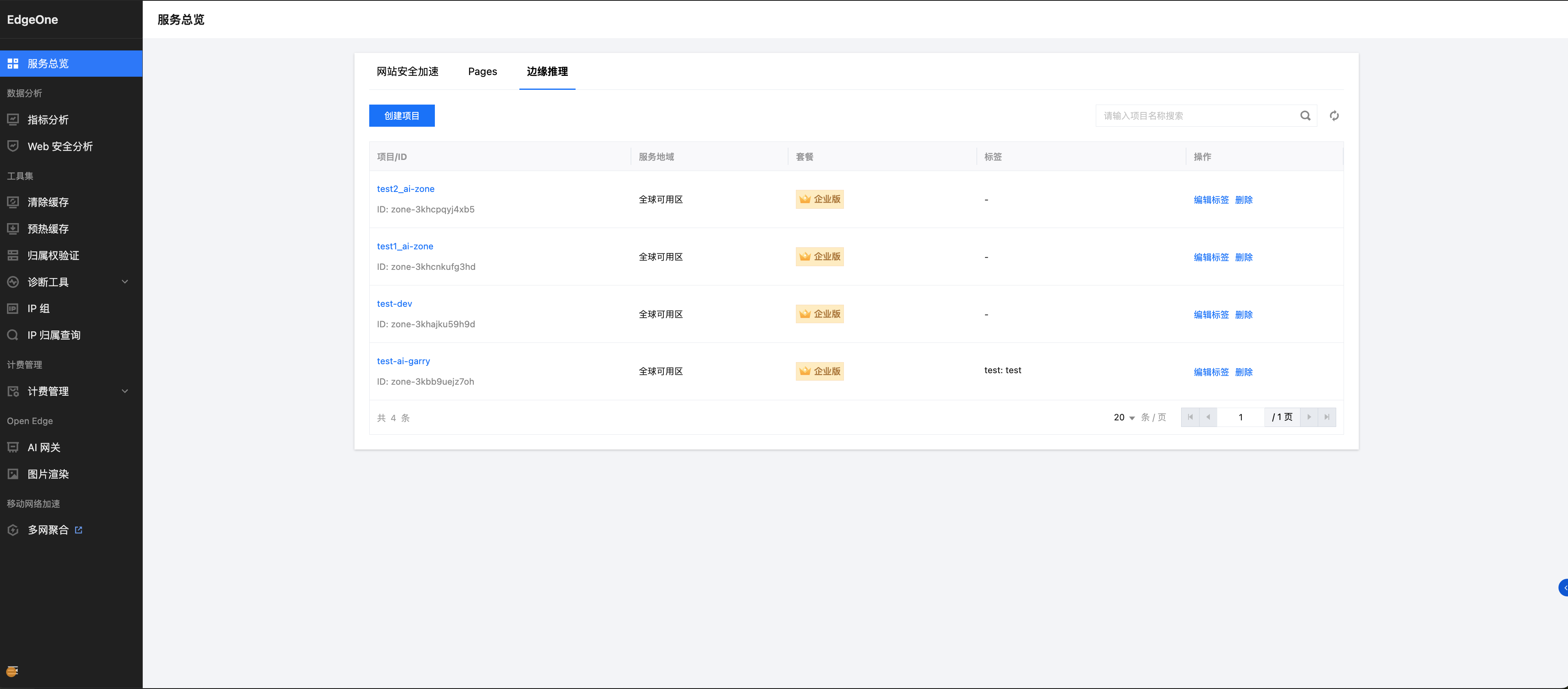
2. 填写项目信息:
项目名称:输入项目名称(如
llm-inference-project)绑定套餐:选择您已订购的企业版套餐
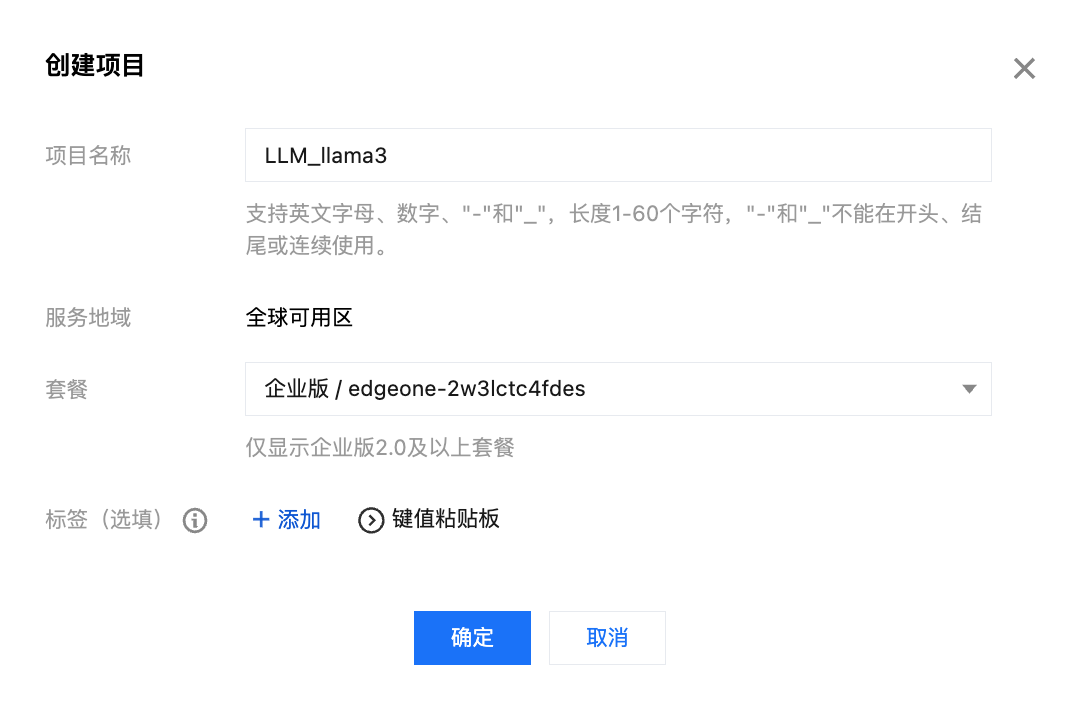
3. 完成项目创建后,点击项目名称进入项目详情页,即可开始创建推理服务。
步骤六:创建推理服务
服务是边缘推理的核心单元。创建服务意味着将您上传的镜像以容器形式部署到边缘节点,平台将为您提供一个公网可访问的服务地址。
在已创建的项目中,单击创建服务。
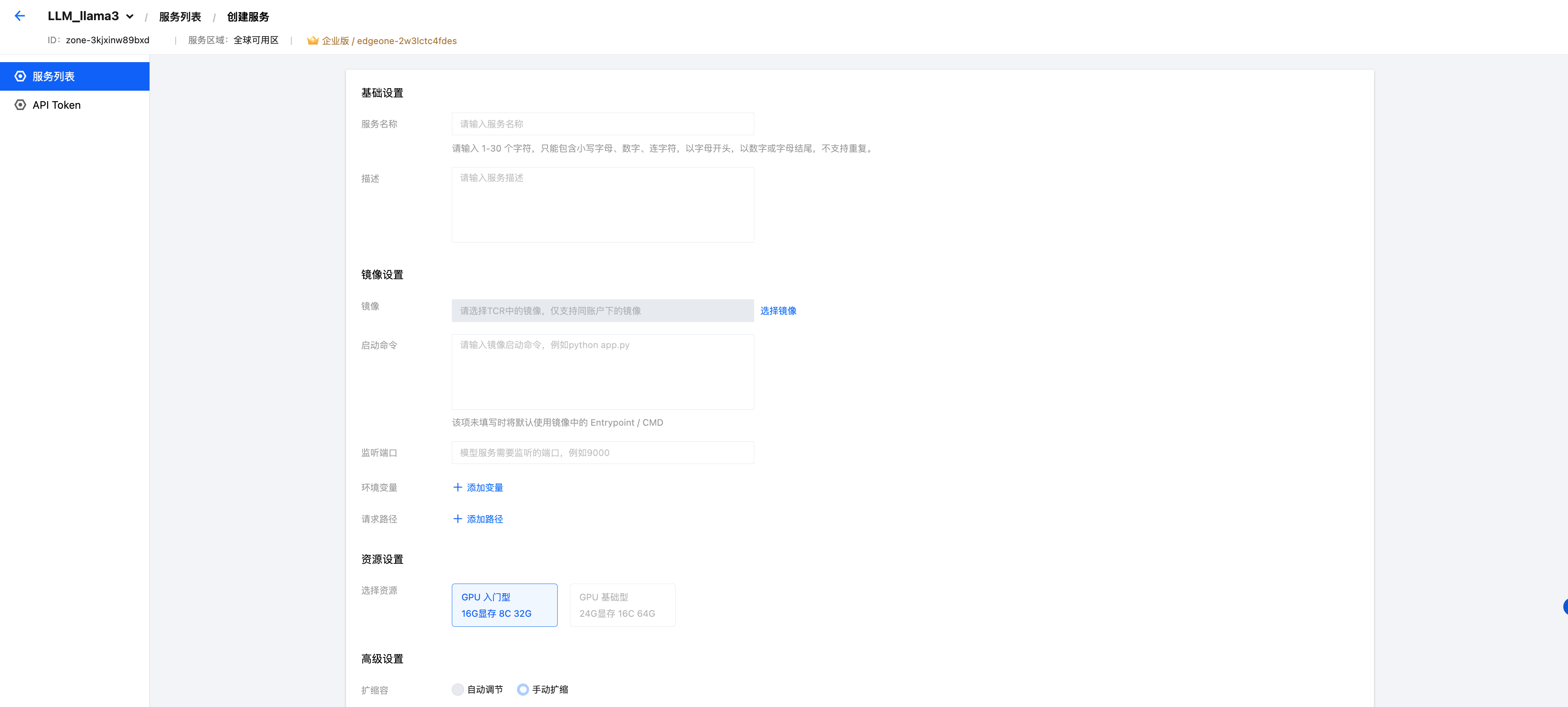
6.1 基础设置
配置项 | 说明 | 示例值 |
服务名称 | 服务的唯一标识,创建后无法修改 | llama3-3b-service |
描述 | 服务的用途说明,最多60字符 | Llama-3.2-3B 推理服务 |
6.2 镜像设置
配置项 | 说明 | 示例值 |
镜像 | 选择您账号下已上传至 TCR 的镜像 | ccr.ccs.tencentyun.com/edge-inference/llama3-3b-vllm:v1.0 |
启动命令 | 容器启动时执行的命令。如不填写,则使用镜像中的 ENTRYPOINT/CMD | 留空(使用 Dockerfile 中已定义的 CMD) |
监听端口 | 您的推理服务 HTTP Server 监听的端口 | 8000 |
环境变量 | 运行时环境变量配置 | 变量名: HF_HOME,变量值:/data/models |
请求路径 | 客户端调用推理服务的 API 路径 | /v1/chat/completions |
关于启动命令:
本示例中 Dockerfile 已通过
CMD 设置了启动参数,因此可以留空。如果需要覆盖默认参数,可以填写完整的启动命令,例如:python3 -m vllm.entrypoints.openai.api_server --host 0.0.0.0 --port 8000 --model /data/models/LLM-Research/Llama-3.2-3B-Instruct --trust-remote-code --dtype half --max-model-len 8192
6.3 资源设置
配置项 | 说明 |
选择资源 | 当前提供入门型和基础型两种 GPU 资源规格,选择后无法更改 |
注意:
所选的实例规格(尤其是 GPU 显存)必须满足模型运行的要求。Llama-3.2-3B 使用 FP16 推理时约需 6GB 显存,请选择显存 ≥ 8GB 的规格,否则可能导致显存溢出(OOM)而部署失败。
6.4 高级设置
配置项 | 说明 | 建议配置 |
扩缩容 | 自动:根据请求量自动扩缩容 手动:固定实例数,常驻运行并持续收费 | 建议选择自动,节省成本 |
并发数 | 单实例的并发请求数上限 | 对于 LLM 推理,建议设置稍大,对于生图等长任务,则可能并发处理上限需较小,取决于模型大小和显存 |
6.5 完成创建
完成以上配置后单击创建,系统将开始部署服务。请耐心等待服务状态从「部署中」转为「运行中」,表示服务已就绪。
说明:
首次部署需要拉取镜像到边缘节点,由于镜像较大,部署时间可能需要 5-15 分钟。您可以在服务详情页查看部署日志。
步骤七:创建 API Token 并获取服务信息
服务成功运行后,您需要创建 API Token 用于鉴权,并获取服务的访问地址。
7.1 进入服务详情
点击服务名称进入服务详情页面,在基础信息中您可以看到:
服务状态:应显示为「运行中」。
访问地址:平台分配的公网访问 URL(如
https://your-service-id.edgeone-infer.com)。请求示例:平台自动生成的调用示例。
7.2 创建 API Token
边缘推理的所有请求都需要通过 Bearer Token 进行鉴权,因此需要先创建 API Token。
1. 单击服务详情中的请求示例。
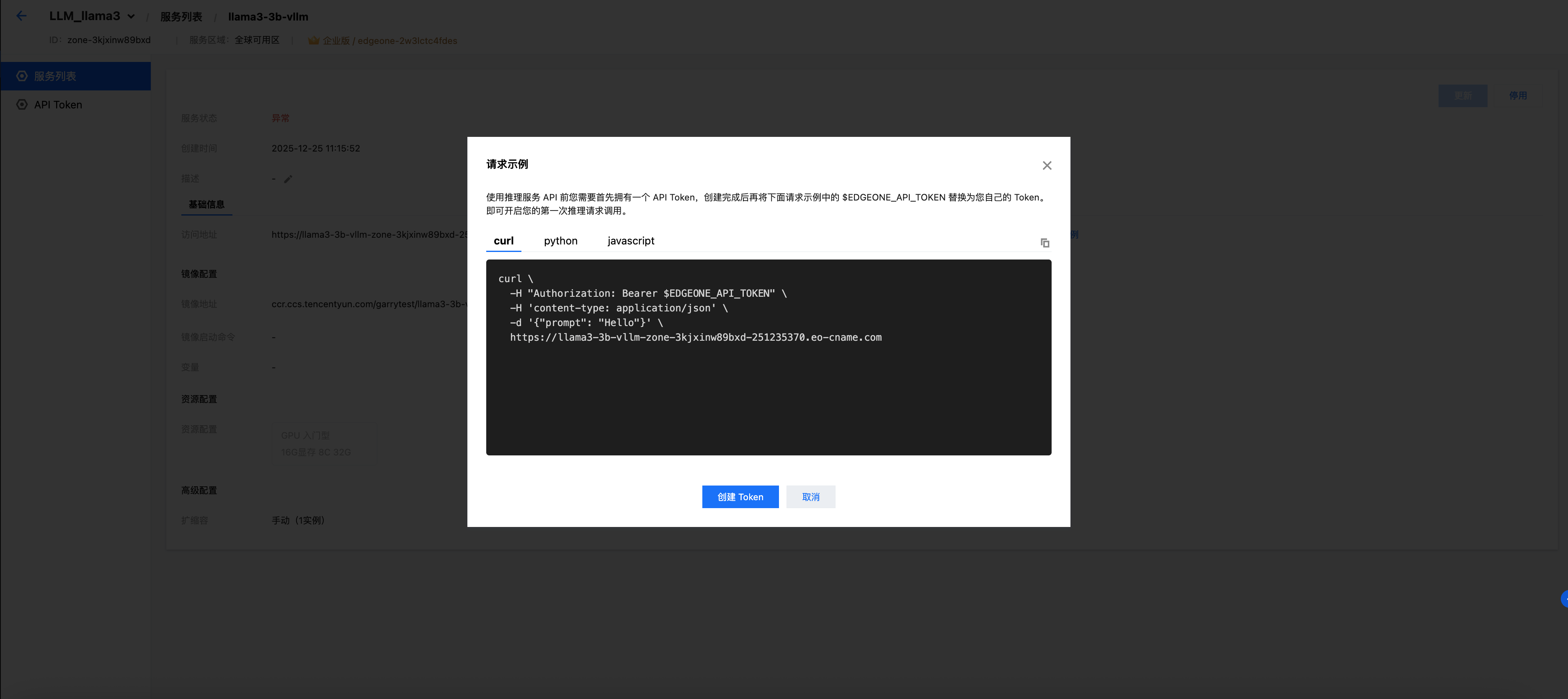
2. 单击创建 API Token。输入 Token 名称(如
my-first-token),系统将自动生成一个 API Token。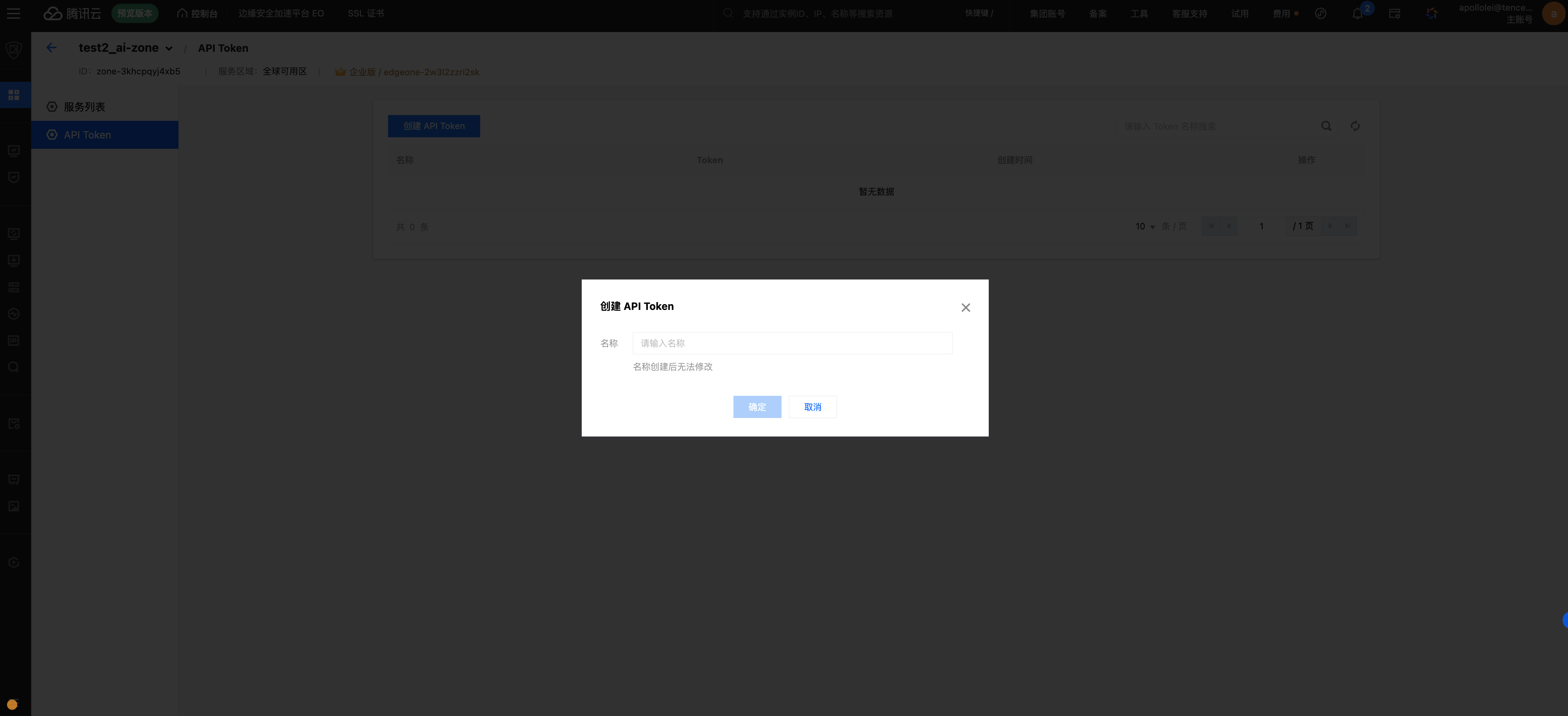
3. 创建完成后,Token 会自动填入请求示例中。您也可以在左侧菜单的 API Token 页面中集中管理所有 Token。
说明:
API Token 是访问推理服务的重要凭证,请妥善保管。Token 默认以掩码形式显示,点击可复制完整内容。请勿在公开场所泄露您的 Token。
步骤八:调用模型服务
服务部署成功并获取 API Token 后,您可以通过 HTTPS API 调用模型。边缘推理支持同步和异步两种调用模式,您可以通过请求头 Work-Mode 进行切换,以适配不同业务场景。
调用模式 | Work-Mode 取值 | 响应方式 | 适用场景 |
同步(默认) | 不传 或 sync | 请求阻塞,直接返回完整推理结果 | 实时对话、低延迟交互、短输入短输出场景 |
异步 | async | 立即返回 TaskId,需通过查询接口轮询结果 | 长文本生成、批量任务、规避网关超时风险的场景 |
8.1 同步调用
同步模式下,服务端会在推理完成后直接返回 OpenAI 兼容格式的完整响应。请将以下示例中的 YOUR_SERVICE_URL 和 YOUR_BEARER_TOKEN 替换为您的实际信息:
curl https://YOUR_SERVICE_URL/v1/chat/completions \\-H "Authorization: Bearer YOUR_BEARER_TOKEN" \\-H "Content-Type: application/json" \\-d '{"model": "/data/models/LLM-Research/Llama-3.2-3B-Instruct","messages": [{"role": "system", "content": "You are a helpful assistant."},{"role": "user", "content": "Hello, who are you?"}],"max_tokens": 256,"temperature": 0.7}'
预期响应示例:
{"id": "cmpl-xxxxxxxx","object": "chat.completion","created": 1739260800,"model": "/data/models/LLM-Research/Llama-3.2-3B-Instruct","choices": [{"index": 0,"message": {"role": "assistant","content": "Hello! I'm Llama, a helpful AI assistant developed by Meta. I'm here to help you with questions, provide information, and assist with various tasks. How can I help you today?"},"finish_reason": "stop"}],"usage": {"prompt_tokens": 25,"completion_tokens": 42,"total_tokens": 67}}
请求参数说明
参数 | 类型 | 必填 | 说明 |
model | string | 是 | 模型路径,与容器内模型文件路径一致 |
messages | array | 是 | 对话消息列表,包含 role(system/user/assistant)和 content |
max_tokens | integer | 否 | 最大生成 token 数,默认由模型决定 |
temperature | float | 否 | 生成温度,范围 0-2,值越高输出越随机,默认 1.0 |
top_p | float | 否 | 核采样参数,范围 0-1,默认 1.0 |
stream | boolean | 否 | 是否启用流式输出,默认 false |
stop | string/array | 否 | 停止生成的标记词 |
8.2 异步调用
异步模式适用于长文本生成、批量任务等场景,可有效规避同步调用因网关超时导致的失败。异步调用分为提交任务和查询结果两个步骤。
8.2.1 提交异步推理请求
提交请求时,需要在请求头中加入 Work-Mode: async,服务端不会立刻返回推理结果,而是返回一个任务 ID(TaskId)。
请求接口:
项目 | 说明 |
URL | 如: https://YOUR_SERVICE_URL/v1/chat/completions |
Method | POST |
Authorization | Bearer YOUR_BEARER_TOKEN |
Content-Type | application/json |
Work-Mode | async(必填,标识为异步模式) |
curl 示例:
curl -sS -X POST \\"https://YOUR_SERVICE_URL/v1/chat/completions" \\-H "Authorization: Bearer YOUR_BEARER_TOKEN" \\-H "Content-Type: application/json" \\-H "Work-Mode: async" \\-d '{"model": "/data/models/LLM-Research/Llama-3.2-3B-Instruct","messages": [{"role": "system", "content": "You are a helpful assistant."},{"role": "user", "content": "Hello, who are you?"}],"max_tokens": 256,"temperature": 0.7}'
返回示例:
{"TaskId": "YOUR_TASK_ID","Status": "PENDING"}
说明:
拿到 TaskId 后,必须使用其调用查询接口获取最终推理结果。
8.2.2 查询异步任务结果
通过任务 ID 查询任务状态和最终结果。查询时需要在请求头中加入 Work-Infer-Action: query。
请求接口:
项目 | 说明 |
URL | 如: https://YOUR_SERVICE_URL/query/YOUR_TASK_ID |
Method | GET |
Authorization | Bearer YOUR_BEARER_TOKEN |
Work-Infer-Action | query(必填,标识为查询动作) |
curl 示例:
curl -sS -X GET \\"https://YOUR_SERVICE_URL/query/YOUR_TASK_ID" \\-H "Authorization: Bearer YOUR_BEARER_TOKEN" \\-H "Work-Infer-Action: query"
任务状态说明:
Status | 含义 | 后续动作 |
PENDING | 任务已提交,正在排队 | 继续轮询 |
RUNNING | 任务正在推理中 | 继续轮询 |
SUCCEEDED | 任务执行成功,Response 字段返回完整推理结果 | 读取结果,停止轮询 |
FAILED | 任务执行失败,Error 字段返回错误原因 | 检查输入或重试 |
任务成功响应示例:
{"TaskId": "YOUR_TASK_ID","Status": "SUCCEEDED","Response": {"id": "chatcmpl-abc123","object": "chat.completion","created": 1746789012,"model": "/data/models/LLM-Research/Llama-3.2-3B-Instruct","choices": [{"index": 0,"message": {"role": "assistant","content": "Hello! I'm Llama, a helpful AI assistant developed by Meta."},"finish_reason": "stop"}],"usage": {"prompt_tokens": 25,"completion_tokens": 42,"total_tokens": 67}}}
任务失败响应示例:
{"TaskId": "YOUR_TASK_ID","Status": "FAILED","Error": "错误原因描述"}
8.2.3 Python 完整示例(提交 + 轮询查询)
以下是一个完整的 Python 示例,演示了异步任务的提交与轮询查询过程。
import timeimport requestsBASE = "https://YOUR_SERVICE_URL"TOKEN = "YOUR_BEARER_TOKEN"MODEL = "/data/models/LLM-Research/Llama-3.2-3B-Instruct"def submit_async():url = f"{BASE}/v1/chat/completions"headers = {"Authorization": f"Bearer {TOKEN}","Content-Type": "application/json","Work-Mode": "async",}payload = {"model": MODEL,"messages": [{"role": "system", "content": "You are a helpful assistant."},{"role": "user", "content": "Hello, who are you?"},],"max_tokens": 256,"temperature": 0.7,}r = requests.post(url, headers=headers, json=payload, timeout=30)r.raise_for_status()return r.json()["TaskId"]def query_task(task_id, timeout=120, interval=1.0):url = f"{BASE}/query/{task_id}"headers = {"Authorization": f"Bearer {TOKEN}","Work-Infer-Action": "query",}deadline = time.time() + timeoutwhile time.time() < deadline:r = requests.get(url, headers=headers, timeout=15)r.raise_for_status()data = r.json()status = data.get("Status")if status == "SUCCEEDED":return dataif status == "FAILED":raise RuntimeError(f"task failed: {data}")time.sleep(interval)raise TimeoutError(f"task {task_id} timeout")if __name__ == "__main__":task_id = submit_async()print("submitted:", task_id)result = query_task(task_id)print(result["Response"]["choices"][0]["message"]["content"])
说明:
异步任务建议设置合理的轮询间隔(推荐 1-3 秒),避免频繁查询造成额外开销。
异步模式适合处理较长的推理任务,可有效规避同步调用因网关超时导致的失败。
常见问题排查
问题 | 可能原因 | 解决方法 |
服务状态一直显示「部署中」 | 镜像过大,拉取时间较长 | 等待 15-30 分钟;检查镜像是否正确上传至 TCR |
服务状态显示「部署失败」 | GPU 显存不足或镜像启动异常 | 检查资源规格是否满足模型要求;查看部署日志排查错误 |
API 请求返回 401 | Token 无效或过期 | 检查 Authorization 头是否正确;确认 Token 格式为 Bearer <token> |
API 请求返回 502/504 | 服务未就绪或请求超时 | 确认服务状态为「运行中」;适当增加超时时间 |
返回 OOM 错误 | 显存不足 | 降低 --max-model-len 参数值;选择更高规格的 GPU 资源 |
文档反馈