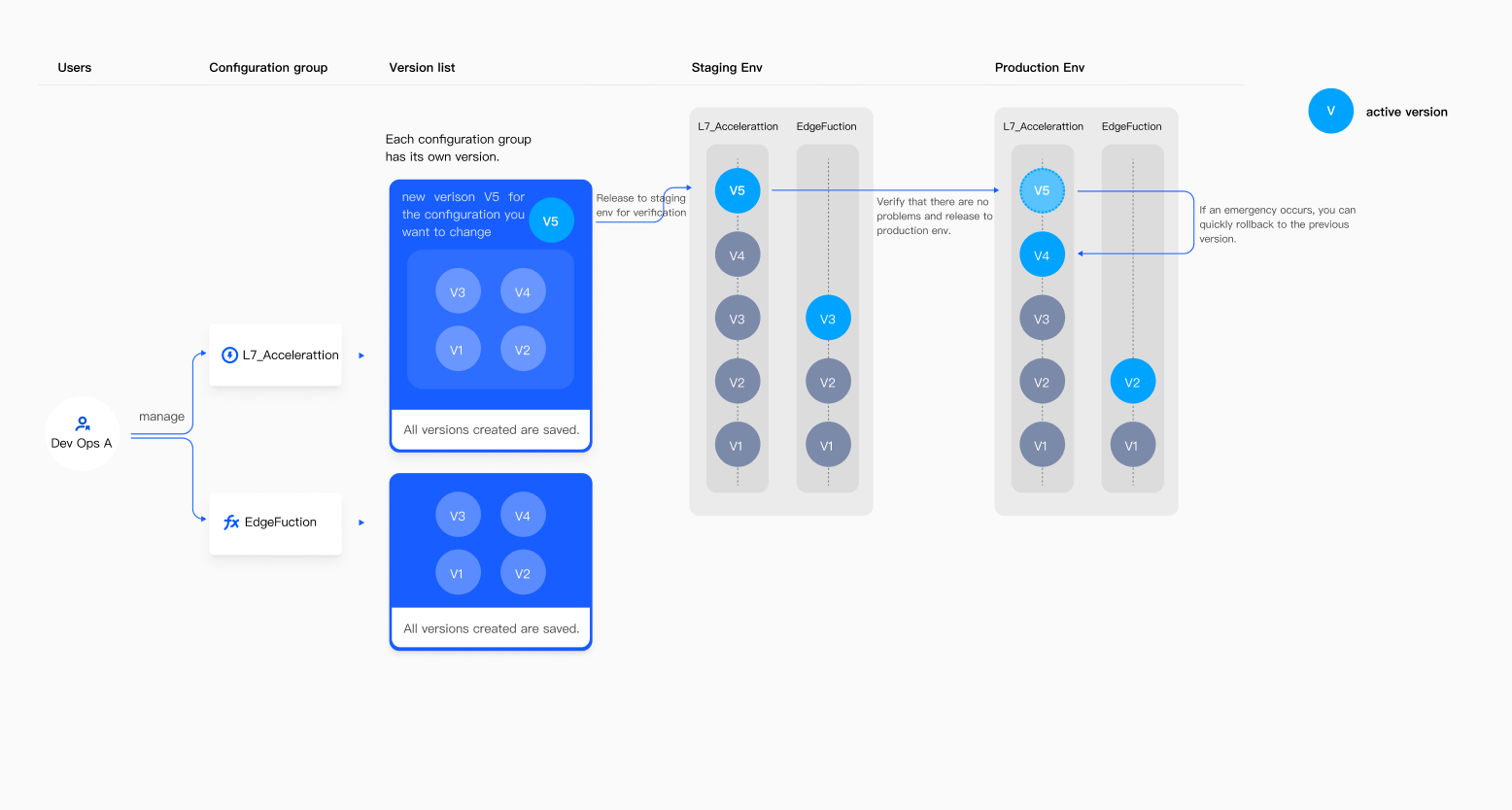
EdgeOne version management allows you to safely test, deploy, and roll back site configurations.
Note:
This feature only supports sites linked to Standard and Enterprise Edition packages.
Supported Modules
The current version management only supports Layer 7 Acceleration Configuration Group and Edge Functions Configuration Group. Once version management is enabled, the Site Acceleration, Rule Engine, and Edge Functions modules will be in Version Management Mode and can only follow version changes, while other configurations under the site will be in Instant Activation Mode.
Feature Value
1. Allows you to create independent versions for configuration management and changes.
2. Provide a testing environment, allowing you to deploy changes to the testing environment for validation before deploying to the production environment, ensuring potential issues and conflicts can be identified in advance.
3. If any unexpected issues arise after deployment, version management also provides the ability to quickly roll back to a previous version, allowing you to quickly restore to a stable configuration and minimize the negative impact on your business.
Relevant Concepts Reference
Version
In version management, a version is the smallest management unit of configuration. You can create independent versions to manage configuration changes.
Configuration Group
Configuration groups are the upper management units of versions. EdgeOne divides different feature modules into different types of configuration groups, such as: Site Acceleration and Rule Engine modules are divided into Layer 7 Acceleration Configuration Group, Edge Functions - Trigger Rules module is divided into Edge Functions Configuration Group, Layer 4 Proxy module is divided into Layer 4 Acceleration Configuration Group, Security Protection module is divided into Security Configuration Group, etc.
Assuming you use both Layer 7 Acceleration and Security Protection features, and two different teams are responsible for operations, dividing into different configuration groups helps your teams manage their respective configurations more conveniently.
Working Mode
Working modes are divided into Instant Activation Mode and Version Management Mode.
Instant Activation Mode means that configuration changes are immediately issued and will affect all production traffic once effective.
Version Management Mode means that configurations must follow version releases to change, and will only affect traffic in the corresponding environment after the version takes effect.
Before enabling version management, all configurations under the site are in Instant Activation Mode; after enabling version management, configurations in the configuration group will be in Version Management Mode, while other configurations under the site will be in Instant Activation Mode.
Environment
After enabling version management, EdgeOne will provide you with a Test Environment and a Production Environment by default.
Test Environment: EdgeOne provides a set of nodes isolated from the production environment as a test environment, allowing you to safely test if the changes in configuration have any issues.
Production Environment: The entire network of EdgeOne nodes serves as the production environment. Once you have verified the configuration in the test environment, you can deploy the changes to the production environment to affect all production traffic.