tencent cloud

Cloud Streaming Services

Release Notes and Announcements
Announcements
User Guide
Product Introduction
Overview
CSS Products
Concepts
Features
Use Cases
Strengths
Use Limits
Purchase Guide
Billing Overview
Basic Service Fee
Value-Added Service Fee
Prepaid plan
Purchase Process
Changing Billing Modes
Refund Policy
Viewing Bills
Renewal
Processing for Overdue Payments
Billing FAQs
Live Video Broadcasting (LVB)
Overview
Use Cases
Getting Started
SDK Integration
Live Event Broadcasting (LEB)
Overview
LEB Versus LVB
Use Cases
Getting Started
SDK Integration
Live Video Caster
Overview
Application Scenarios
Feature Area Introduction
Managing Live Video Caster
General Cloud Director
Configuring Program Lists and Automated Broadcasting
Console Guide
Console Overview
Overview
Domain Management
Stream Management
Package Management
AI Features
Feature Configuration
Relay
Billing Usage Statistics
Monitoring
Toolkit
OOTB live
CAM-Based Access Control
Feature Guide
Push and Playback
Features
Practices in Typical Scenarios
Cloud Native Recording
Live Streaming Security
Global CSS Service
Callback Notifications
User Guides for Common Third-Party Tools
SDK Guide
0. SDK Integration Guide
1. Stream Push
2. Playback
3. Advanced Features
API Documentation
History
Introduction
API Category
Making API Requests
Live Pad APIs
Live Stream Mix APIs
Time Shifting APIs
Monitoring Data Query APIs
Billing Data Query APIs
Live Transcoding APIs
Delayed Playback Management APIs
Domain Name Management APIs
Watermark Management APIs
Certificate Management APIs
Stream Pulling APIs
Recording Management APIs
Live Callback APIs
Screencapturing and Porn Detection APIs
Authentication Management APIs
Live Stream Management APIs
Data Types
Error Codes
Ops Guide
Video Stuttering
Troubleshooting Push Failure
Troubleshooting Playback Failure
CLS Assists in Live Stream Troubleshooting
Troubleshooting High Latency
Troubleshooting Poor Quality of Pulled Video
Authorizing CSS to Store Screenshots in a COS Bucket
Troubleshooting
Live Stream Mixing Error `InvalidParameter.OtherError`
About Pushing
Generating Push URLs
PC Push
Playing Method
Web Player
Live Streaming Quiz
FAQs
Service Region
Live Streaming Basics
Push and Playback
CSS Billing
Global CSS Service
Live Recording
On-Cloud Stream Mix
Domain Configuration
Related to Live Video Caster
Compatibility with Apple ATS
Difference Between Stream Interruption and Stream Suspension
SLA
CSS Service Level Agreement
CSS Policy
Privacy Policy
Data Processing And Security Agreement
Glossary
DocumentationCloud Streaming ServicesOps GuideCLS Assists in Live Stream Troubleshooting

CLS Assists in Live Stream Troubleshooting

PDF
Focus Mode
Font Size
Last updated: 2026-03-16 11:32:41

Preparation

Follow the document to configure log shipping to Tencent Cloud Log Service (CLS).

Purpose

Use Tencent Cloud Log Service (CLS) to ingest and analyze CSS access logs in real time. This enables you to quickly narrow down the root cause of streaming issues across the client, network, CDN, origin, and encoder (push), accelerating troubleshooting and improving operational efficiency.

Recommended Dashboards

How to use

Before running, replace these parameters:
{start_time}, {end_time} usually set via CLS time picker; only add explicit timestamp filters if required.
{host} : domain name
{streamname}
{client_ip}
{interval} (e.g., 1 minute / 5 minute — match your CLS syntax)

Playback — Overview / Errors

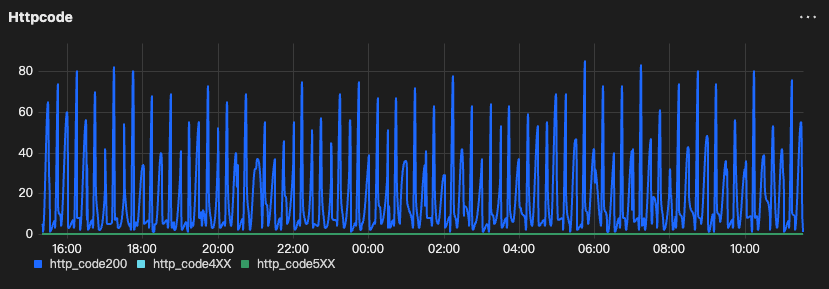
HttpCode Trend (200 vs 4xx vs 5xx)

Goal: Confirm error spike and classify 4xx vs 5xx.
Output: time bucket + counts of 200 / 4xx / 5xx.
type:"lvb"
and host:"{host}"
and streamname:"{streamname}"
| select
histogram(cast(__TIMESTAMP__ as timestamp), interval 1 minute) as analytic_time,
sum(case when http_code = 200 then 1 else 0 end) as http_code200,
sum(case when http_code >= 400 and http_code < 500 then 1 else 0 end) as http_code4XX,
sum(case when http_code >= 500 then 1 else 0 end) as http_code5XX
group by analytic_time
order by analytic_time
limit 1000


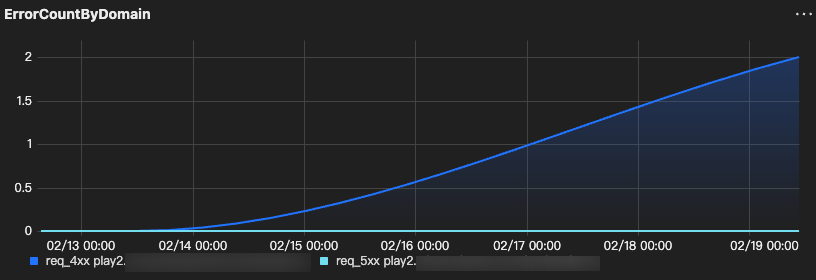
ErrorCountByDomain (req_4xx/req_5xx)

Goal: Find domain outliers.
Output: host + total requests + 4xx/5xx counts.
type:"lvb"
| SELECT
host,
COUNT(*) AS req_total,
COUNT_IF(http_code >= 400 AND http_code < 500) AS req_4xx,
COUNT_IF(http_code >= 500 AND http_code < 600) AS req_5xx
GROUP BY host
ORDER BY req_5xx DESC, req_4xx DESC
LIMIT 200


Playback — Latency / Loss

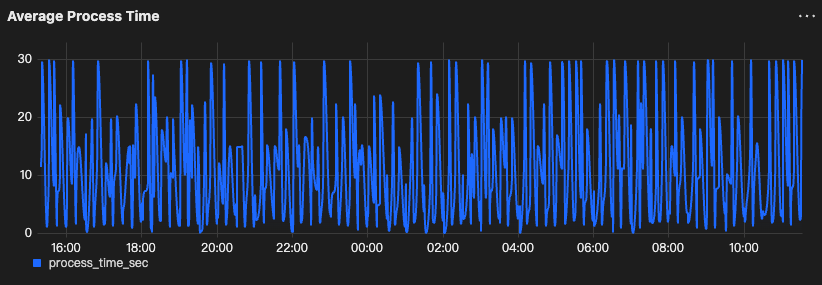
Average Process Time

Goal: Detect processing latency spike.
Output: time bucket + avg/max process_time (sec).
type:"lvb" and host:"{host}" and http_code=200 and streamname:"{streamname}"
| select histogram( cast(__TIMESTAMP__ as timestamp),interval 1 minute) as analytic_time,
avg(process_time)/1000.0 as process_time_sec
group by analytic_time
order by analytic_time
limit 1000


RTT Trend

Goal: Detect network latency spike.
Output: time bucket + avg rtt
Note:
keep / adjust the unit conversion depending on your field unit (some environments store rtt in ms already).
type:"lvb" and host:"{host}" and http_code=200 and streamname:"{streamname}"
| select histogram( cast(__TIMESTAMP__ as timestamp),interval 1 minute) as analytic_time,
avg( if(rtt='-', NULL, cast(rtt as double)) )/1000.0 as avg_rtt_ms
group by analytic_time
order by analytic_time
limit 1000

Loss Rate Trend

Goal: Detect loss spike.
Output: time bucket + avg lost_rate
type:"lvb"
| SELECT
histogram(CAST(__TIMESTAMP__ AS timestamp), interval 1 minute) AS time,
host,
AVG(IF(lost_rate = '-', NULL, CAST(lost_rate AS double))) AS avg_lost_rate
GROUP BY time, host
ORDER BY time
LIMIT 1000

Playback — Compare / Outliers

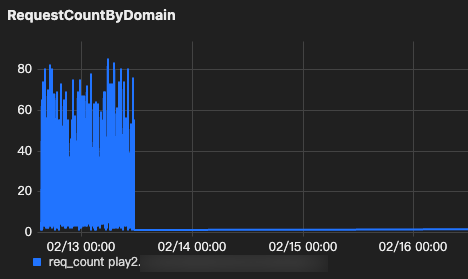
RequestCountByDomain

Goal: Compare traffic across domains.
Output: host + request_count
type:"lvb"
| select
histogram(CAST(__TIMESTAMP__ AS timestamp), interval 1 minute) AS time,
host,
count(*) as req_count
group by time, host
order by time
limit 1000


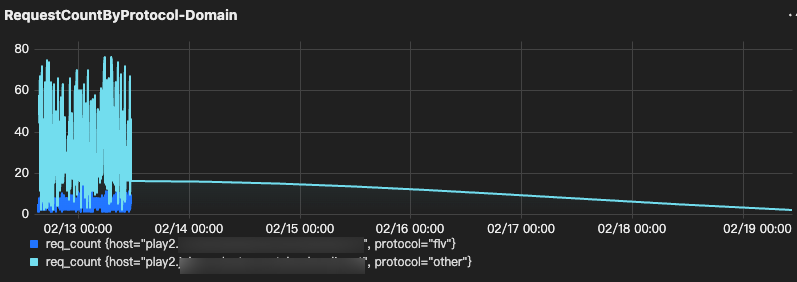
RequestCountByProtocol-Domain

Goal: Identify protocol-specific anomalies per domain.
Output: time bucket + host + protocol + request_count.
For HLS concurrent user can refer to the documentation.
Note:
If your field name is not url, replace it (e.g., request_url, uri, path).
type:"lvb"
| select
histogram(CAST(__TIMESTAMP__ AS timestamp), interval 1 minute) AS time,
host,
case
when url like '%.flv%' then 'flv'
when url like '%rtmp%' then 'rtmp'
else 'other'
end as protocol,
count(*) as req_count
group by time, host, protocol
order by time
limit 1000


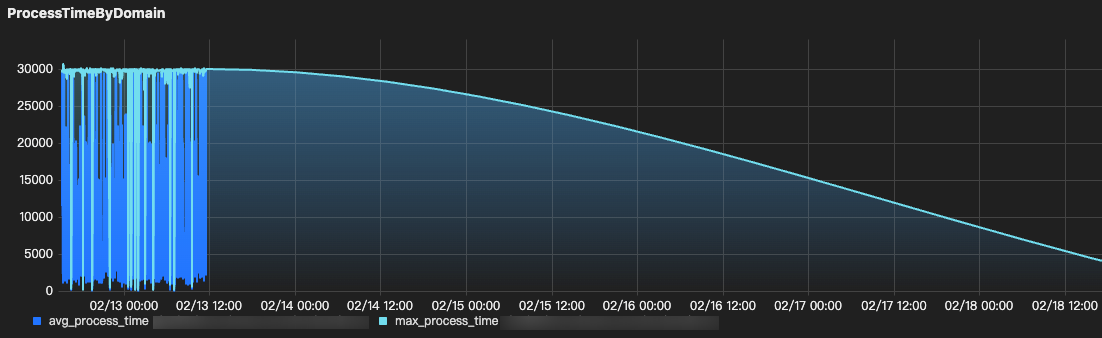
ProcessTimeByDomain

Goal: Compare processing latency across domains.
Output: time bucket + host + avg/max process_time
*
| SELECT
histogram(CAST(__TIMESTAMP__ AS timestamp), interval {interval}) AS time,
host,
AVG(process_time) AS avg_process_time,
MAX(process_time) AS max_process_time
GROUP BY time, host
ORDER BY time
LIMIT 1000


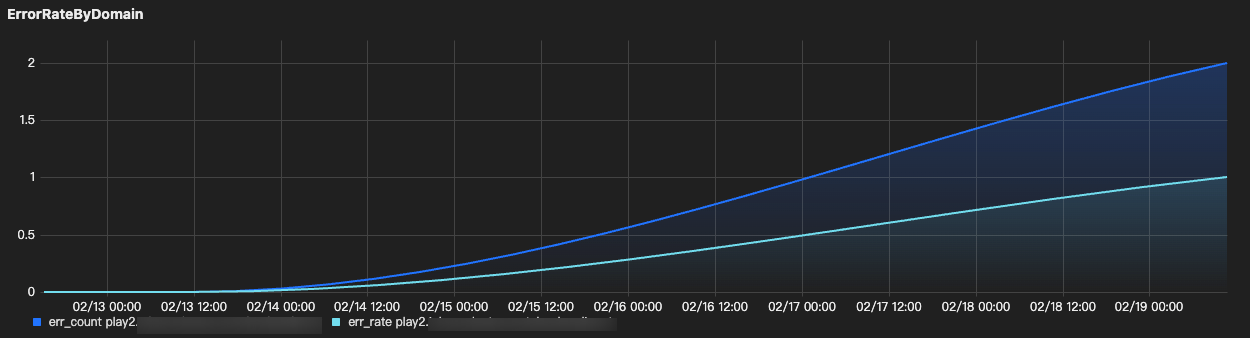
ErrorRateByDomain

Goal: Errors across domains.
Output: time bucket + host + success/error + avg rtt/loss
type:"lvb"
| SELECT
histogram(cast(__TIMESTAMP__ AS timestamp), interval 1 minute) AS time,
host,
SUM(IF(http_code >= 400 AND http_code < 600, 1, 0)) AS err_count,
SUM(IF(http_code >= 400 AND http_code < 600, 1, 0)) * 1.0 / COUNT(*) AS err_rate
GROUP BY time, host
ORDER BY time
LIMIT 1000


Playback — Single User

SingleUserQuality (success/latency/loss/errors)

Goal: Evaluate one user’s playback quality.
Output: time bucket + success rate + avg rtt/loss + 4xx/5xx counts
type:"lvb"
AND host:"{host}"
AND streamname:"{streamname}"
AND client_ip:"{client_ip}"
| SELECT
histogram(CAST(__TIMESTAMP__ AS timestamp), interval {interval}) AS time,
client_ip,
COUNT(*) AS req_count,
ROUND(COUNT_IF(http_code = 200) * 100.0 / COUNT(*), 2) AS success_rate_pct,
COUNT_IF(http_code >= 400 AND http_code < 500) AS err_4xx,
COUNT_IF(http_code >= 500 AND http_code < 600) AS err_5xx,
AVG(IF(rtt = '-', NULL, CAST(rtt AS DOUBLE))) / 1000.0 AS avg_rtt_ms,
AVG(IF(lost_rate = '-', NULL, CAST(lost_rate AS DOUBLE))) AS avg_lost_rate
GROUP BY time, client_ip
ORDER BY time
LIMIT 1000

Push — Quality

Note:
The bitrate formulas below assume {interval} = 1m (60s).
If you change {interval} to 5m, update the divisor from 60 to 300.

PushBitrateByStream

Goal: Detect bitrate drops/instability for push streams.
Output: time bucket + bitrate_kbps
*
| SELECT
histogram(CAST(__TIMESTAMP__ AS timestamp), interval 1 minute) AS time,
CONCAT(host, ' | ', streamname) AS host_stream,
ROUND(SUM(size) * 8 / 60.0 / 1000, 2) AS bitrate_kbps
GROUP BY time, host_stream
ORDER BY time
LIMIT 1000

AvgBandwidth_mbps

Goal: Detect uplink bandwidth drops/instability.
Output: time bucket + avg_bandwidth_mbps
*
| SELECT
histogram(CAST(__TIMESTAMP__ AS timestamp), interval 1 minute) AS time,
host,
ROUND(SUM(size) * 8 / 60.0 / 1000 / 1000, 3) AS avg_bandwidth_mbps
GROUP BY time, host
ORDER BY time
LIMIT 1000

HTTP Status Code Trend (2xx vs 4xx vs 5xx)

Why did 4xx responses spike?

If 403 dominates: what to check

1. Playback authentication or signed URL mismatch.
A 403 often means the playback URL is invalid, expired, or does not match the playback authentication policy.
Verify txSecret / txTime.
Verify the expiration time and server clock.
Verify the domain’s Playback Authentication settings.
If using splicing live streaming, verify the URL signing rule and URL format.
Push & Playback (includes txSecret / txTime usage): See documentation.
Rule for Splicing Live Streaming URLs (URL signing rules/examples): See documentation.
Playback Authentication Configuration: See documentation.
2. Advanced content protection (if enabled)
If you enabled additional protection (e.g., remote token validation), confirm it’s not rejecting requests.
Video Content Protection: See documentation.
3. Referer or IP-based access control (if enabled)
These often cause 403 spikes after access control policies are enabled or changed.
Referer Configuration: See documentation.
IP Allowlist / Blocklist Configuration: See documentation.
4. Region-based access control (if enabled)
If playback region management is enabled, confirm the affected region is allowed. Region-based policies can cause 403 responses for users in specific locations.
Access Control by Region Configuration: See documentation.

If 404 dominates: what to check (CSS)

1. Confirm the playback URL is correct (domain / app / stream / suffix).
Many 404s are simply caused by an incorrect playback URL (wrong domain, wrong AppName/StreamName, or wrong suffix such as .flv / .m3u8).
Playback URL format / examples: See documentation.
2. Confirm the stream is actually live on CSS (push status).
If the stream is not being pushed, or the push has stopped, even a correct playback URL will return 404.
Verify in the console (Stream Management > Live Streams) and/or call DescribeLiveStreamState to check whether the stream is active / inactive / disabled: See documentation.
3. Check whether the stream was interrupted or ended.
A stream interruption or a stopped push can lead to 404 during playback (or 404 after a short delay).
Stream interruption records (console): See documentation.
Stream event API (push/interruption events): See documentation.
4. For HLS: determine whether 404 happens on .m3u8 or on .ts segments.
This split is critical because the root causes are different:
404 on .m3u8, most likely the stream is not live / does not exist / the path is incorrect.
404 on .ts, the client is requesting segments that are not present for the requested playback position (commonly due to a stale playlist/proxy caching, or seeking outside the available segment window).
HLS splits the stream into 5–10s segments and manages them via M3U8 playlists: See documentation.
If rewind/replay is required, use Time Shifting (CSS saves TS segments and allows specifying playback time via M3U8 parameters; the time range can be up to 6 hours). See documentation.
5. If Origin Server (origin-pull mode) is enabled
If the playback domain is configured with origin-pull, a 404 may actually mean the stream/resource is missing on the origin side.
Origin Server Configuration: See documentation.

Why did 5xx responses spike?

1. Confirm whether Origin Server (origin-pull mode) is enabled. Most 5xx spikes in playback are upstream/origin-related when origin-pull is on.
Origin Server Configuration: See documentation.
2. Identify which 5xx code dominates (500 vs 502 vs 503 vs 504) Different 5xx codes usually point to different upstream failure modes.
Data Types (valid playback error codes): See documentation.
3. Correlate 5xx with latency and scope (blast radius)
Break down 5xx by host / streamname / url and check whether it correlates with higher processing time (upstream slowness often precedes 504/5xx).
Real-Time Log Analysis (CSS-CLS playback logs): See documentation.
4. If 503/504 aligns with traffic surge, confirm capacity/readinessLarge spikes may require advance coordination (otherwise you’ll chase symptoms).
Use Limits / surge support guidance: See documentation.

Latency (mostly HTTP 200)

Why is latency high even though most requests return HTTP 200?

If protocol choice dominates, likely cause: You’re using HLS (M3U8), which naturally has higher latency (often 10–30s).
If you need low latency, switch playback to LL-HLS / WebRTC (based on platform support).
If you must use HLS, reduce segment settings (may increase stutter): See documentation.

We already use HTTP-FLV/RTMP, but latency is still high. What should we change?

Troubleshooting High Latency: See documentation.

Loss (mostly HTTP 200)

Why does playback stutter/freeze even though most requests return HTTP 200?

1. If lost_rate dominates, likely cause: Viewer-side packet loss / unstable downstream network (lost_rate is only valid when type=leb).
2. In CLS playback logs, filter type=leb, then trend lost_rate and rtt
3. Break down by prov / isp / server_region to see whether loss is concentrated in a specific region/ISP.
If loss is region/ISP-specific: move impacted viewers to LEB (WebRTC) for better weak-network resilience. See documentation.
If you need smoother playback under fluctuating bandwidth: enable Adaptive Bitrate (HLS/WebRTC only). See documentation.
If all viewers stutter (not region-specific): treat it as upstream-side (low upstream FPS / upstream congestion) and reduce bitrate/resolution or stabilize uplink. See documentation.

Compare / Outliers

Only one region looks abnormal while others remain normal. What should we check?

If a single region dominates (errors / latency / stalling), likely causes:
Playback domain acceleration region mismatch (traffic coming from a region not covered).
Region allow/block policy enabled (playback region management).
Protocol-specific issue limited to that region (blocked protocol / fallback behavior).
1. Acceleration region mismatch (domain-level).
Check the playback domain “Acceleration Region” configuration.
If the abnormal user region is outside the accelerated region, playback can fail or behave unexpectedly.
Region Configuration: See documentation.
Service Region: See documentation.
2. Region allow/block (most common “only one region breaks” config)
Check whether “Access Control by Region” (playback region management) is enabled.
Verify the abnormal region isn’t blocked / not included.
Access Control by Region Configuration: See documentation.
3. Protocol-specific impact
If the abnormal region correlates with one protocol (e.g., only HLS or only FLV), validate protocol enablement & player behavior:
Is the protocol blocked on the domain?
Is the player auto-falling back to another protocol in that region/device?
Blocking Playback by Protocol: See documentation.

Single User

Only one user reports buffering/latency/errors, but overall dashboards look normal. How do we verify and isolate?

1. Confirm it’s isolated:
Compare the same time window in global metrics (request/error/latency). See documentation.
2. In CLS Real-Time Log Analysis, filter by client_ip and the exact time range; review http_code.
If using LEB, also review rtt and lost_rate (LEB-only fields; type=leb).
3. Decision
High rtt / lost_rate + mostly 200 → likely client network quality issue (Wi-Fi/ISP/route).
Repeated 4xx/5xx -> follow the main RCA logic but scoped to that user (client_ip filter)

Push

Push bitrate drops / stream disconnects / upstream looks unstable. Is it uplink/network or encoder/config?

1. If push instability dominates, likely cause: Uplink congestion/packet loss, or encoder overload/misconfig causing bitrate/FPS fluctuations.
2. Check: Confirm whether the stream is active / inactive / forbidden around the incident window. See documentation.
3. Pull push-side metrics per stream and trend them: video bitrate / video FPS / audio bitrate / codec / client IP. See documentation. Field reference documentation.
4. If uplink/network suspected (bitrate drops + reconnects / instability): reduce push bitrate, stabilize uplink; upstream bandwidth too low can cause congestion. See documentation.
5. If encoder/config suspected (bandwidth looks stable but bitrate/FPS unstable): tune encoder settings; keep bitrate reasonable (Tencent suggests < 4 Mbps to avoid push lag). See documentation.
6. If uplink is lossy/long-distance: switch push protocol to SRT or RTMP over SRT for better loss resistance.
RTMP over SRT: See documentation.
SRT resilience example: See documentation.

Help and Support

Was this page helpful?

Help us improve! Rate your documentation experience in 5 mins.

Feedback