tencent cloud

Cloud Streaming Services

Release Notes and Announcements
Announcements
User Guide
Product Introduction
Overview
CSS Products
Concepts
Features
Use Cases
Strengths
Use Limits
Purchase Guide
Billing Overview
Basic Service Fee
Value-Added Service Fee
Prepaid plan
Purchase Process
Changing Billing Modes
Refund Policy
Viewing Bills
Renewal
Processing for Overdue Payments
Billing FAQs
Live Video Broadcasting (LVB)
Overview
Use Cases
Getting Started
SDK Integration
Live Event Broadcasting (LEB)
Overview
LEB Versus LVB
Use Cases
Getting Started
SDK Integration
Live Video Caster
Overview
Application Scenarios
Feature Area Introduction
Managing Live Video Caster
General Cloud Director
Configuring Program Lists and Automated Broadcasting
Console Guide
Console Overview
Overview
Domain Management
Stream Management
Package Management
AI Features
Feature Configuration
Relay
Billing Usage Statistics
Monitoring
Toolkit
OOTB live
CAM-Based Access Control
Feature Guide
Push and Playback
Features
Practices in Typical Scenarios
Cloud Native Recording
Live Streaming Security
Global CSS Service
Callback Notifications
User Guides for Common Third-Party Tools
SDK Guide
0. SDK Integration Guide
1. Stream Push
2. Playback
3. Advanced Features
API Documentation
History
Introduction
API Category
Making API Requests
Live Pad APIs
Live Stream Mix APIs
Time Shifting APIs
Monitoring Data Query APIs
Billing Data Query APIs
Live Transcoding APIs
Delayed Playback Management APIs
Domain Name Management APIs
Watermark Management APIs
Certificate Management APIs
Stream Pulling APIs
Recording Management APIs
Live Callback APIs
Screencapturing and Porn Detection APIs
Authentication Management APIs
Live Stream Management APIs
Data Types
Error Codes
Ops Guide
Video Stuttering
Troubleshooting Push Failure
Troubleshooting Playback Failure
CLS Assists in Live Stream Troubleshooting
Troubleshooting High Latency
Troubleshooting Poor Quality of Pulled Video
Authorizing CSS to Store Screenshots in a COS Bucket
Troubleshooting
Live Stream Mixing Error `InvalidParameter.OtherError`
About Pushing
Generating Push URLs
PC Push
Playing Method
Web Player
Live Streaming Quiz
FAQs
Service Region
Live Streaming Basics
Push and Playback
CSS Billing
Global CSS Service
Live Recording
On-Cloud Stream Mix
Domain Configuration
Related to Live Video Caster
Compatibility with Apple ATS
Difference Between Stream Interruption and Stream Suspension
SLA
CSS Service Level Agreement
CSS Policy
Privacy Policy
Data Processing And Security Agreement
Glossary

LEB Versus LVB

PDF
Focus Mode
Font Size
Last updated: 2024-10-24 15:43:12
As a lower-latency version of LVB, LEB provides superb live streaming experience with millisecond playback latency, far lower than that of live stream playback using traditional protocols. LEB is designed for scenarios with high latency requirements. In addition to live shopping and online education, it is also suitable for interactive scenarios such as live sports streaming and live game streaming.
Advantages
Description
Millisecond-level ultra-low latency playback
By adopting the UDP protocol, millisecond-level latency live streaming capability is achieved in high-concurrency scenarios, improving the traditional live streaming drawback of 3-5 seconds latency. At the same time, it takes into account core indicators such as instant start and lag rate, providing users with an ultimate ultra-low latency live streaming experience.
Comprehensive features, smooth compatibility
Compatible with all standard live streaming features, including push, transcoding, recording, screenshot, content moderation, and playback, it supports customers to smoothly migrate from existing standard live streaming services.
Wide coverage of acceleration nodes and high bandwidth capacity
Currently, Live Event Broadcasting (LEB) has super acceleration nodes with global distribution and extensive coverage (supporting 2000+ nodes and 25 countries), capable of supporting 100T+ bandwidth.
Easy to use
Integration is straightforward, requiring no additional plugins. It can span multiple platforms, supporting a variety of operating systems and devices.
Excellent network resilience
In various weak network environments (such as high packet loss and high latency), Live Event Broadcasting (LEB) can still ensure high-quality video streams, providing users with a more stable live streaming experience.
Web low-latency support
Currently, CDN live streaming only supports HLS format streams on the web, but this format has a playback latency of several seconds. Live Event Broadcasting (LEB) can also support web playback with only a few hundred milliseconds of latency.
Smooth transition between multiple bitrates
Seamlessly switch between transcoded streams with different bitrates without any interruptions or jumps, ensuring a smooth transition in both visual and auditory experiences.
Adaptive Bitrate Control
Adaptively switch between different bitstreams according to network bandwidth, ensuring a smooth playback experience during varying network conditions.
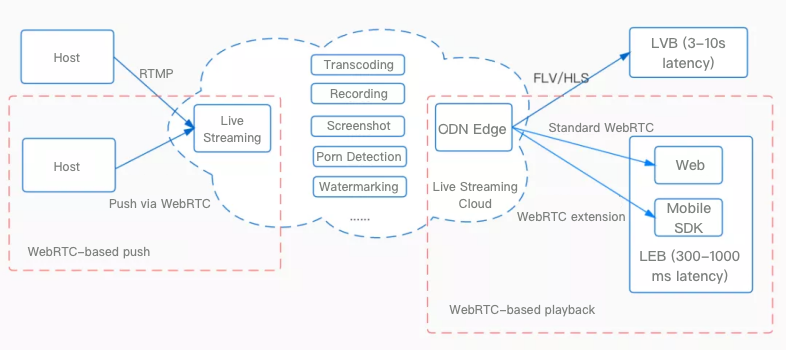
Compared to Standard Live Video Broadcasting (LVB), Live Event Broadcasting (LEB) uses the WebRTC protocol during the playback process, thus it has a lower playback latency than Standard LVB. The following will specifically compare the differences between LEB.

Protocol Comparison

Currently, Live Video Broadcasting (LVB) uses common playback protocols such as RTMP, FLV, and HLS. The common feature of these protocols is that they are all based on the TCP protocol. TCP has delayed acknowledgment and piggybacking, which means that it does not immediately respond with an ACK for each received data but waits for a certain amount of data before responding. This can lead to a perceived delay, and in weak network scenarios, this can even result in delays of several seconds or even tens of seconds.
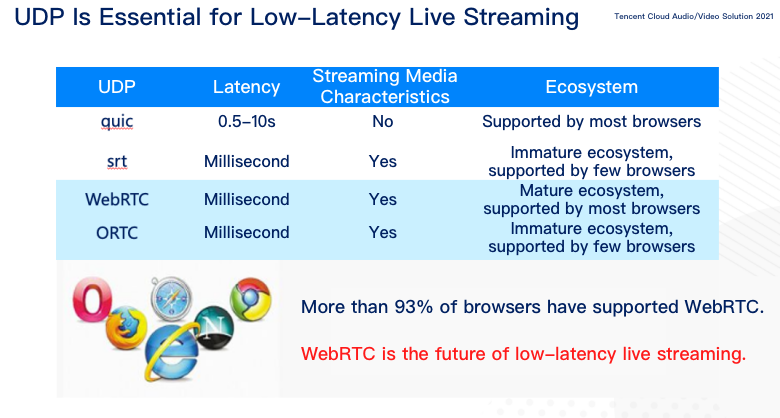
In order to achieve lower latency in live streaming, faster and better-quality playback protocols are needed. Research shows that low-latency live streaming protocols in the industry include QUIC, SRT, WebRTC, and ORTC, all of which are based on the UDP protocol at the underlying level. Comparatively, QUIC has a higher latency because it does not have streaming features; SRT, WebRTC, and ORTC all have millisecond-level latency and streaming features. Among them, SRT and ORTC are less commonly used in the industry, while WebRTC is widely used and has a thriving technical ecosystem.

A good ecological environment is an important consideration for Live Event Broadcasting (LEB) to carry out low-latency transformation using WebRTC. Most popular browsers such as Chrome and Safari already support the WebRTC standard, and mature open-source WebRTC SDKs.

Low-latency live streaming services in the industry use protocols such as QUIC, SRT, WebRTC, and ORTC. Among these, the latency of QUIC is relatively high because it does not have the characteristics of streaming media. SRT, WebRTC, and ORTC have streaming media characteristics and can stream with millisecond latency, but SRT and ORTC are not as widely used as WebRTC. As a result, LEB uses the UDP-based WebRTC to implement low-latency live streaming.


Latency Comparison

The latency of the FLV protocol in standard live streaming is generally between 2 and 10 seconds. The main factors contributing to its latency are the GOP size and TCP backlog in weak network transmission. The latency of HLS is even higher, ranging from several seconds to tens of seconds. The main factors causing HLS latency are the GOP size and TS size, making it the highest latency in standard live streaming.
In contrast, Live Event Broadcasting (LEB) adopts the WebRTC playback protocol based on the UDP protocol, which enables millisecond-level latency between nodes. The latency of LEB is typically between 300 ms and 1000 ms.


Weak Network Resilience Comparison

Live Event Broadcasting (LEB) has stronger weak network resilience compared to Standard Live Video Broadcasting (LVB), providing a more stable playback experience. To further demonstrate the weak network advantages of LEB, we conducted tests on video lag rate and other indicators for LEB and Standard LVB under normal and weak network environments. The specific test results are as follows:

Test Scenarios

The publisher uses RTMP for streaming, and the audience plays FLV and LEB streams separately, with lag rate and other indicators recorded. The publisher has a lossless network, while the audience's network is set to different weak network conditions for testing. The main test indicators are frame rate and lag rate.

Stream Parameter Configuration

Parameter
Configuration Information
Resolution
720 × 1080
Bitrate
1800 kbps
Frame Rate
15

Comparison of Key Indicators in Several Weak Network Scenarios

Video Frame Rate


Video Lag Rate


Audio Lag Rate


Parameter Description

Indicator
Explanation
Video Lag Rate
Video rendering intervals greater than 500 milliseconds are considered as lags. The total duration of all lags divided by the total playback duration is the lag rate.
Audio Lag Rate
 Audio playback intervals greater than 200 milliseconds are considered as lags. The total duration of all lags divided by the total playback duration is the lag rate.
Video Frame Rate
The number of frames played per second in a video.

Help and Support

Was this page helpful?

Help us improve! Rate your documentation experience in 5 mins.

Feedback