tencent cloud

Cloud Streaming Services

Release Notes and Announcements
Announcements
User Guide
Product Introduction
Overview
CSS Products
Concepts
Features
Use Cases
Strengths
Use Limits
Purchase Guide
Billing Overview
Basic Service Fee
Value-Added Service Fee
Prepaid plan
Purchase Process
Changing Billing Modes
Refund Policy
Viewing Bills
Renewal
Processing for Overdue Payments
Billing FAQs
Live Video Broadcasting (LVB)
Overview
Use Cases
Getting Started
SDK Integration
Live Event Broadcasting (LEB)
Overview
LEB Versus LVB
Use Cases
Getting Started
SDK Integration
Live Video Caster
Overview
Application Scenarios
Feature Area Introduction
Managing Live Video Caster
General Cloud Director
Configuring Program Lists and Automated Broadcasting
Console Guide
Console Overview
Overview
Domain Management
Stream Management
Package Management
AI Features
Feature Configuration
Relay
Billing Usage Statistics
Monitoring
Toolkit
OOTB live
CAM-Based Access Control
Feature Guide
Push and Playback
Features
Practices in Typical Scenarios
Cloud Native Recording
Live Streaming Security
Global CSS Service
Callback Notifications
User Guides for Common Third-Party Tools
SDK Guide
0. SDK Integration Guide
1. Stream Push
2. Playback
3. Advanced Features
API Documentation
History
Introduction
API Category
Making API Requests
Live Pad APIs
Live Stream Mix APIs
Time Shifting APIs
Monitoring Data Query APIs
Billing Data Query APIs
Live Transcoding APIs
Delayed Playback Management APIs
Domain Name Management APIs
Watermark Management APIs
Certificate Management APIs
Stream Pulling APIs
Recording Management APIs
Live Callback APIs
Screencapturing and Porn Detection APIs
Authentication Management APIs
Live Stream Management APIs
Data Types
Error Codes
Ops Guide
Video Stuttering
Troubleshooting Push Failure
Troubleshooting Playback Failure
CLS Assists in Live Stream Troubleshooting
Troubleshooting High Latency
Troubleshooting Poor Quality of Pulled Video
Authorizing CSS to Store Screenshots in a COS Bucket
Troubleshooting
Live Stream Mixing Error `InvalidParameter.OtherError`
About Pushing
Generating Push URLs
PC Push
Playing Method
Web Player
Live Streaming Quiz
FAQs
Service Region
Live Streaming Basics
Push and Playback
CSS Billing
Global CSS Service
Live Recording
On-Cloud Stream Mix
Domain Configuration
Related to Live Video Caster
Compatibility with Apple ATS
Difference Between Stream Interruption and Stream Suspension
SLA
CSS Service Level Agreement
CSS Policy
Privacy Policy
Data Processing And Security Agreement
Glossary

Live Recording

PDF
Focus Mode
Font Size
Last updated: 2025-01-15 17:33:56

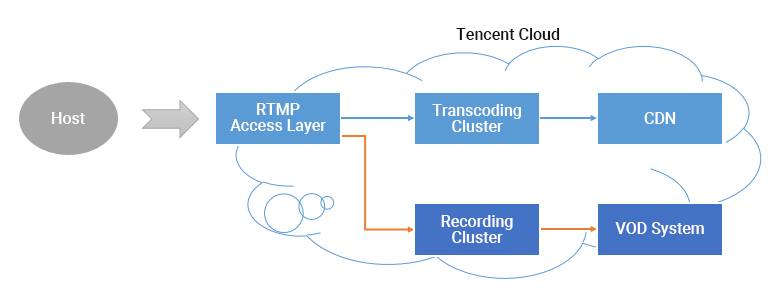
How does live recording work?

img

After you enable recording for a live stream, each audio/video frame published from the host's mobile phone will be relayed to the recording system and written into a recording file.
Once a live stream is interrupted, the access layer will immediately notify the recording server to stop writing into the file, transfer it to the Video on Demand (VOD) or Cloud Object Storage (COS) system, and generate an index for it. Then, you will see the newly generated recording file in the VOD or COS system. At the same time, if you have configured recording event notifications, the recording system will notify the server you configured earlier about the file's index ID and online playback URL.

Why can't I use the live recording feature?

The live recording feature relies on Tencent Cloud's VOD Service or COS Service. If you need to use the recording feature, ensure that the VOD or COS service is in normal operating condition. Failure to enable the VOD or COS service or the suspension of it due to account delinquency will result in the inability to record live streams, and no recording files or recording fees will be generated during the period.

When will the recording file be ready after a live stream ends?

The recording file is ready when you receive the recording callback ( about 5 minutes after a live stream ends). For more information, see Live Stream Callback.

How do I get recording files?

After the recording file is generated, it will be stored in the VOD platform or Cloud Object Storage (COS). Customers need to activate the VOD service and Cloud Object Storage for successful storage. You can obtain the recorded file through the following methods:
Stored on Tencent Cloud Video on Demand (VOD) platform
Stored in Cloud Object Storage (COS)

Can I migrate my videos?

To migrate your videos, you need to get the download addresses and download your videos.

How do I set the video storage period?

CSS does not set a limit on the video storage period. You can manage your video files in the console or via RESTful APIs.

How many recording files are generated for a live stream?

Recording in HLS format : There is no upper limit on the duration of recording files. However, if a live stream is interrupted and the timeout period for breakpoint resumption (which can be set to 0s to 1800s) elapses, a new recording file will be generated. When HLS file segmentation is enabled, the duration of a single HLS recording file can range from 1 to 720 minutes.
Recording in FLV format : The duration of a single file is limited to 1 minute to 720 minutes.
Recording in MP4 or AAC format : The duration of a single file is limited to 1 minute to 120 minutes.
Recording in MP4, FLV, or AAC format : The duration of a single file is limited to 1 minute to 120 minutes.
You may specify a shorter maximum duration by setting the RecordInterval parameter in the CreateLiveRecordTemplate API.
If a live stream is so short that it ends before the recording module is started, no recording files will be generated.
If a live stream is shorter than RecordInterval and is not interrupted, only one recording file will be generated.
If a live stream lasts longer than RecordInterval, the stream will be recorded into multiple files. This is to reduce the uncertainty of a file's transfer time in a distributed system.
If a live stream is interrupted and resumed, a new recording file will be generated each time an interruption occurs.

How do I know which live stream a recording file belongs to?

It depends on how you define a live stream. Assume that a host streamed for 20 minutes, but the stream was interrupted twice, once due to network change and once manually by the host. Does this count as one or three live streams?
In most mobile live streaming scenarios, we consider the period from when a host starts live streaming to when they end it as one live stream.
If you use the above standard, to determine which live stream a recording file belongs to, just search for recording notifications by live stream code and time. Each recording notification carries information including stream ID, start time, and end time.

How do I splice the recording files of a live stream?

You can use a cloud API to splice recording files.

Why are there two recording channels when I have configured only one recording template?

This is usually because two recording tasks are initiated for the push domain. Check the following:
1. Check in the console whether you have selected two recording formats.
If you use the new console, select Domain Management on the left sidebar, find your push domain, click Manage on the right to enter the details page, and select Template Configuration to view your recording configuration.
If you use the legacy console, go to Live Stream Code Access > Access Configuration to view the recording configuration.
2. Make sure you haven't called the 3.0 API CreateRecordTask or 2.0 API Live_Tape_Start to start a recording task at the same time. You can either call the CreateRecordTask API or create a recording template in the console to start recording. If you create a recording task and configure a recording template for a live stream at the same time, it will be recorded twice.
Note:
If you enabled live recording in the legacy console and want to disable it in the new console, please submit a ticket.
If the problem persists, please submit a ticket.

How do I record audio only?

If you record the streams of a specific room, add the following parameter to the end of your push URL:
Audio only: record_type=audio
Video: record_type=video
If you want both video and audio-only files, you can record videos first and then transcode the video files to audio files in VOD.

How do I save my videos permanently?

Set the storage period in your recording template to 0. For details, see Live Recording.

Can CSS automatically remove the beginning and end of a recording file?

No, because the player is not able to identify the beginning and end of a video. Instead, you can use the following methods:
Trim the recorded videos. For details, see EditMedia.
Adjust the playback progress.

How can I recover my live streaming content if I forget to record it?

Tencent Cloud does not record your content without your request, so you cannot recover the content. This is the case with most cloud service providers.

Help and Support

Was this page helpful?

Help us improve! Rate your documentation experience in 5 mins.

Feedback