How to Receive Event Notification
Download
Focus Mode
Font Size
If an event configured in the template triggers a callback during live streaming, Tencent Cloud will send a request to the customer's server which is responsible for the response. After passing the verification, the server will obtain a JSON packet of the callback.
Currently, the following events can trigger a notification during live streaming: live push, stream interruption, live recording, live screencapture, live streaming image audit, live streaming audio audit, push error events, and relay events.
Overall Process
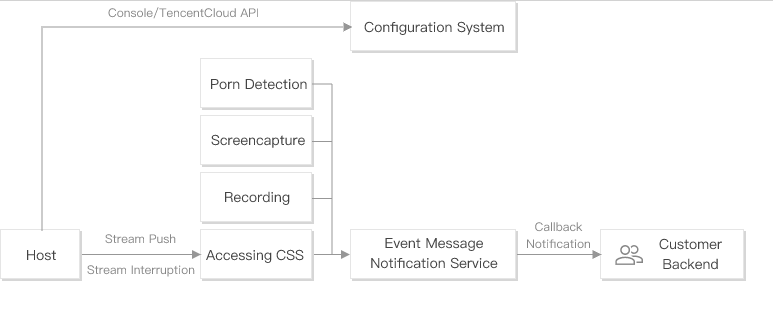
Process Description:
1. The host configures event message notification URLs and features such as recording and screencapture in the console or by calling TencentCloud APIs.
2. The host pushes and stops the stream.
3. When an event occurs, a message will be sent to the customer backend via the event message notification service.
Event Message Notification Protocol
Network Protocol
Request: HTTP POST request with a JSON packet. The specific packet content of each type of message is described later.
Response: HTTP status code = 200. The server ignores the specific content of the response packet. For protocol-friendliness, we recommend you add
JSON: {"code":0}`` to the response.Notification Reliability
The event notification service has a retry mechanism. For the screencapture event, up to 5 retries will be made at an interval of 2 minutes. For the stream push, stream interruption, recording, and porn detection events, up to 12 retries will be made at an interval of 1 minute.
To prevent frequent retries from placing too much strain on your server and bandwidth, make sure response packets are returned as expected. A retry is triggered in the following cases:
No response packet is returned for a long time (at least 20 seconds).
The HTTP status code in the response is not
200.How to Configure Event Callbacks
Note:
CSS allows you to configure callback URLs separately for events of stream push, stream interruption, recording, screencapture and porn detection.
CSS Console
1. Log in to the CSS console and click Feature Configuration > Live Stream Callback to create a callback template. For detailed directions, see Creating a Callback Template.
2. Click Domain Management, find the target push domain name, and click Manage > Template Configuration to bind it with the callback template. For detailed directions, see Callback Configuration.
Server APIs
1. Call the CreateLiveCallbackTemplate API to create a callback template and set the callback parameters.
2. Call the CreateLiveCallbackRule API to set the
DomainName (push domain name) and TemplateId (returned in step 1) parameters. Enter the AppName in the push and playback URLs to enable callback for specific live streams.Callback Parameters
After the template is successfully bound with the domain name, if an event configured in the template is triggered during the live streaming, Tencent Cloud will send a JSON packet containing the callback information to the customer's server. The callback parameters are detailed as below:
Help and Support
Was this page helpful?
You can also Contact sales or Submit a Ticket for help.
Help us improve! Rate your documentation experience in 5 mins.
Feedback