2. Log in to the CSS console to get a URL for live push. For detailed directions, please see Live Push.
3. Select Domain Management, click Add Domain, enter your domain name, select Playback Domain as the type, and click Save.
Note:
If you do not have a playback domain, you can go to Domain Registration to purchase a domain. You can also purchase a domain through other domain service providers.
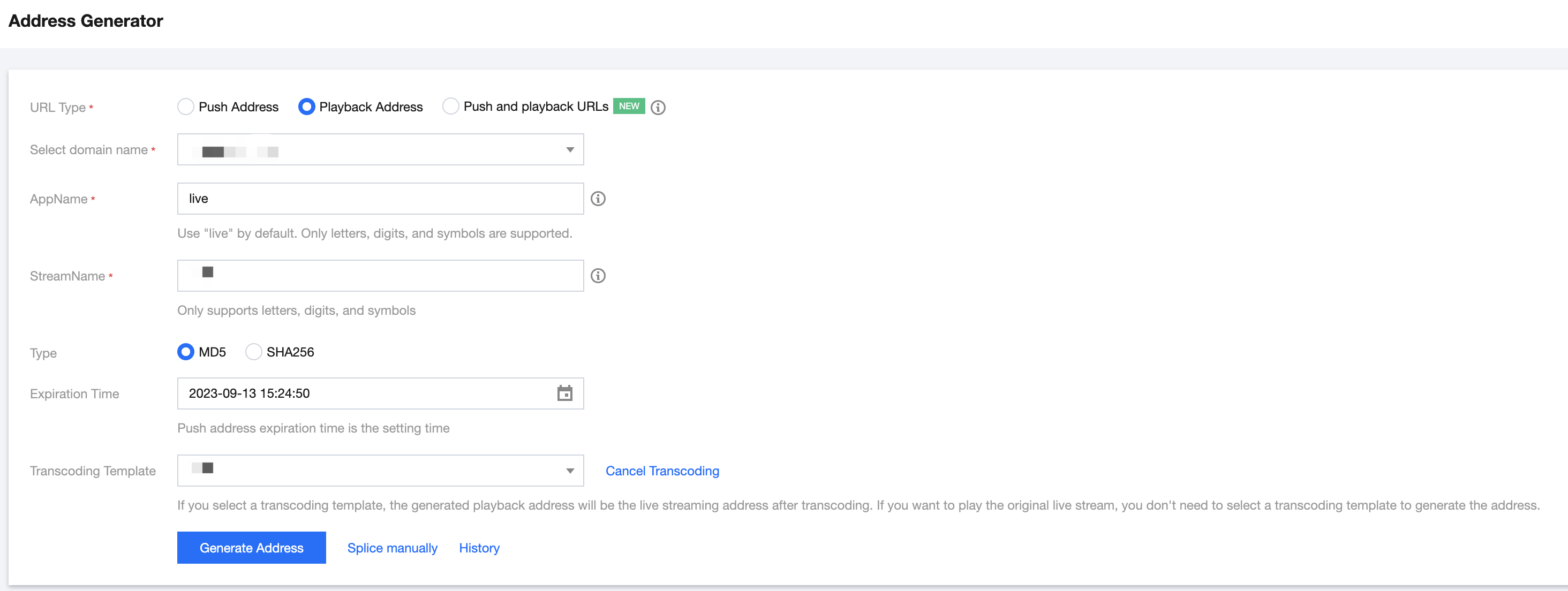
Select CSS Toolkit > Address Generator to get a playback URL and configure as follows:
Select Playback Domain as the type of the URL.
Select a playback domain name you added in Domain Management.
Enter the same StreamName as that of the push URL. The StreamName of the playback URL must be the same as that of the push URL to play back the corresponding stream.
You need to choose an encryption type based on your security requirements and performance considerations. The encryption type can be either MD5 or SHA256, with MD5 being the default option.
Select the expiration time of the URL, such as 2023-09-13 15:24:50.
Click Generate Address.
Note:
1. You can also select a playback domain name in Domain Management in the CSS console, click Manage, select Playback Configuration, enter the expiration time of the playback URL and the StreamName same as that in the push URL, and click Generate Playback Address.
2. In some scenarios, there is a need for a preview of the backup stream.Primary/Backup streams refer to two independent streams under the same stream name (StreamName), linked by their stream IDs. The primary stream is the main stream that is prioritized for pushing, while the backup stream is a redundant stream used for quick switching in case of primary stream failure. The system defaults to playing the primary stream content. To preview the backup stream, please follow these two steps:
2.1 Obtaining the backup stream identifier: Call the DescribeBackupStreamList interface, passing the stream name (StreamName), to obtain the UpstreamSequence value of the backup stream (e.g., "1234").
2.2 Modify the playback address: Add two streaming parameters after the original mainstream playback address: UpstreamSequence=xxx&type=xxx (Fill in the UpstreamSequence value obtained in the previous step, for example, "1234".).
For example:
The main address (default playback): https://domain/AppName/StreamName.flv?txSecret=Md5(key+StreamName+hex(time))&txTime=hex(time
Backup stream address (preview backup stream, with parameters): https://domain/AppName/StreamName.flv?txSecret=Md5(key+StreamName+hex(time))&txTime=hex(time)&UpstreamSequence=1234&type=1234
Live Playback
A live push must be successful before the stream can be watched via the playback URL. You can use the following methods to test live streaming based on your business scenario:
Scenario 1. Playback on PC client
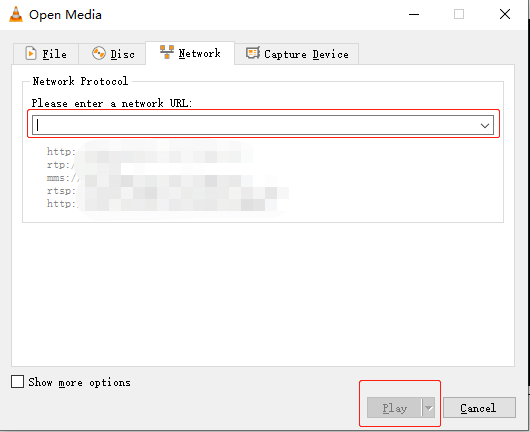
You can use tools such as VLC, FFmpeg, and TCPlayerDemo for playback.
3. Enter the playback URL in the input box or scan the QR code of the playback URL.
4. Tap the play button in the bottom-left corner to start playback.
Note:
If you need to push/play streams in an App, you can integrate Mobile Live Video Broadcasting (MLVB) SDK with CSS. MLVB SDK supports RTMP, HTTP-FLV, HLS, and WebRTC playback protocols.
Scenario 3. Playback on web
You are recommended to choose TCPlayer in the player SDK for playback. Based on Tencent Cloud's powerful backend functionality and AI technology, TCPlayerLite provides excellent playback capabilities for live streaming and video on-demand. Deeply integrated with the Tencent Cloud LVB and VOD services, Player+ features smooth and stable playback performance, advertising placement, and data monitoring.
Note:
Currently, most mobile browsers on the market do not support HTTP-FLV playback. Therefore, for web-based playback, you are recommended to select the HTTP-FLV playback protocol for PC browsers and HLS for mobile browsers.