Do CLB instances and backend CVM instances communicate over the public network or private network?
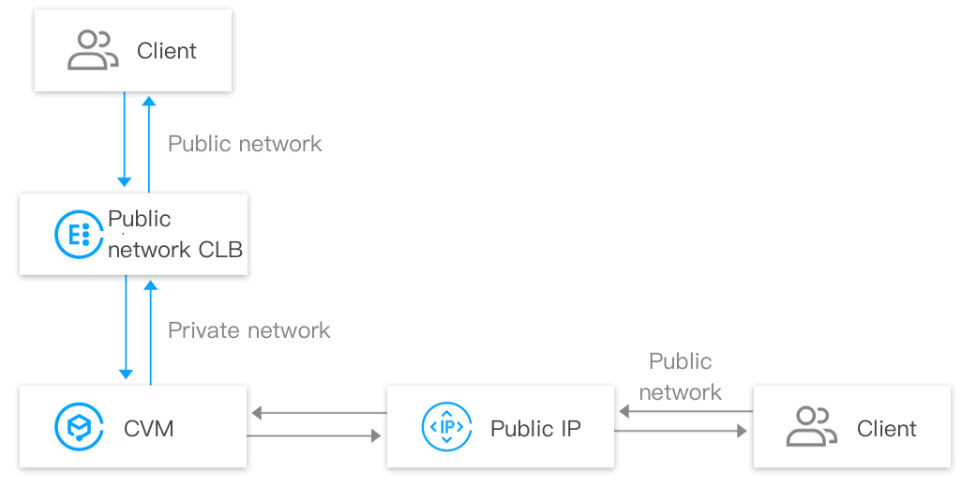
Communication between CLB and CVM instances generates private network traffic, irrespective of whether the account type is bill-by-IP or bill-by-CVM. The traffic routes of the two types are as follows:
A client accesses a CLB instance over the public network, the CLB instance forwards the traffic to a CVM instance over the private network, then the CVM instance responds to the CLB instance over the private network, finally the CLB instance responds to the client.
When a CVM instance accesses the public network or is accessed via a public IP address, the CVM instance interacts with a client via a public IP address or EIP.
CLB billing policies vary by account type. For more information, see Billing Overview. The main difference between bill-by-IP and bill-by-CVM accounts lays in the billing dimension, and other aspects such as service access and monitoring are the same. For more information about differences between account types, see Checking Account Type.
Public network fee of bill-by-IP accounts: For the public network traffic accessing a CLB instance or a public IP address, the public network fee is charged on the CLB instance or the public IP address.
Public network fee of bill-by CVM accounts: For the public network traffic accessing a CLB instance or a public IP address, the public network fee is charged on the CVM instance.
Bill-by-IP account: You need to specify the CLB bandwidth cap when you purchase a CLB instance. If the business bandwidth exceeds the cap, the CLB instance will lose packets automatically.
Bill-by-CVM account: You do not need to specify the CLB bandwidth cap when you purchase a CLB instance. The CLB bandwidth is restricted by the total public network bandwidth of the backend CVM instances.
What are the monitoring metrics related to billing for CLB?
You can refer to the following monitoring metrics for billing related to CLB, including network fees and LCU fees:
Type
Metric
Description
Network fee
AccOuttraffic
CLB-to-real server traffic out
OutTraffic
CLB-to-real server bandwidth out
InTraffic
CLB-to-real server bandwidth in
LCU fee
ClientConnum
Client-to-CLB connections
ClientNewConn
Client-to-CLB new connections
TotalReq
Requests per second
ClientAccOuttraffic
Client-to-CLB traffic out
ClientAccIntraffic
Client-to-CLB traffic in
You can refer to the following monitoring metrics related to CLB limits, including bandwidth and LCU caps:
Type
Metric
Description
Bandwidth cap
ClientOuttraffic
Client-to-CLB bandwidth out
ClientIntraffic
Client-to-CLB bandwidth in
LCU cap
ClientConcurConn
Client-to-CLB concurrent connections
ClientNewConn
Client-to-CLB new connections
TotalReq
Requests per second
ClientOuttraffic
Client-to-CLB bandwidth out
ClientIntraffic
Client-to-CLB bandwidth in
For more information about monitoring metrics, see Monitoring Metrics. For more information about network fees, see Network Fee. For more information about LCU billing, see LCU Pricing.