Access URL Redirection
ダウンロード
フォーカスモード
フォントサイズ
Overview
EdgeOne Nodes redirect the client requests request URL to the target URL by responding to 3XX status codes. This feature can change the URL redirection that originally needed to be generated and returned by the origin server in your business scenario to be directly constructed and returned by the EdgeOne edge nodes, reducing the network latency of following the origin-pull and the load of the origin server generating the URL redirection, and improving the access performance of the client.
Use Cases
The following are common Applicable Scenarios for Rewrite access URL:
Migration of website or reconstruction: When a website undergoes migration or reconstruction, the URL structure may change. To maintain the validity of old links, you can use URL redirect to redirect old URLs to new URLs, ensuring that users and Search Engines can smoothly access the new resources.
Geographical location or Device Type orientation: Based on the user's geographical location or device type, you can use URL redirect to guide users to different resources or pages. For example, provide optimized mobile pages for mobile device users, or provide different language versions of pages based on the user's region.
Temporary maintenance or activity page: When a website is undergoing temporary maintenance or hosting a specific event, you can use URL redirect to guide users to the maintenance notification page or activity page, thereby improving the user Experience.
Directions
Scenario One: Domain Services Require a 302 Redirection to a Temporary Maintenance Page
If you require temporary maintenance for the domain business
www.example.com under your example.com site, and want to redirect all requests under the domain to https://www.example.com/public/waitingpage/index.html via a 302 redirection, you can refer to the following steps:1. Log in to the Tencent Cloud EdgeOne console, enter Service Overview in the left menu bar, and click the site to be configured under Website Security Acceleration.
2. On the site details page, click Site Acceleration to enter the global site configuration page, then click the Rule Engine tab.
3. On the rule engine management page, click Create rule and select Add blank rule.
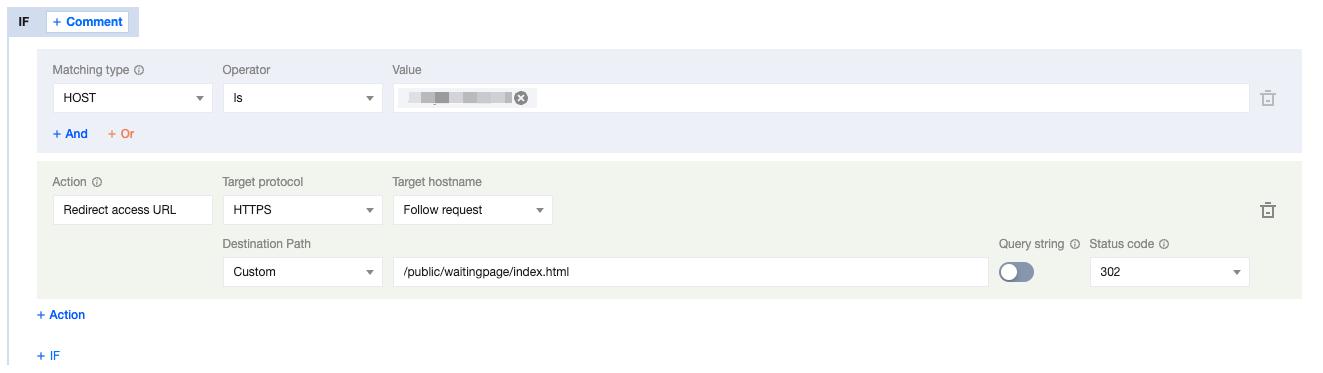
4. On the rule editing page, select the Matching type as HOST is
www.example.com.5. Click on Action, and in the pop-up action list, select the Action as Redirect access URL.
6. Configure the rules for Redirect access URL. Select the Target protocol as HTTPS, the Target hostname as Follow request, and the Destination Path as
/public/waitingpage/index.html.7. Click Save and Publish to complete the configuration. The complete rule configuration is as shown below:
Scenario Two: Migration of Origin Server Resource Directory, Client Request URL Must Remain Unchanged
If you need to migrate all jpg image resources from the
test directory to the newtest directory under the www.example.com domain of your example.com site, but the client request URL needs to remain unchanged, that is, the test directory is still accessed. You may refer to the following steps:1. Log in to the Tencent Cloud EdgeOne console, enter Service Overview in the left menu bar, and click the site to be configured under Website Security Acceleration.
2. On the site details page, click Site Acceleration to enter the global site configuration page, then click the Rule Engine tab.
3. On the rule engine management page, click Create rule and select Add blank rule.
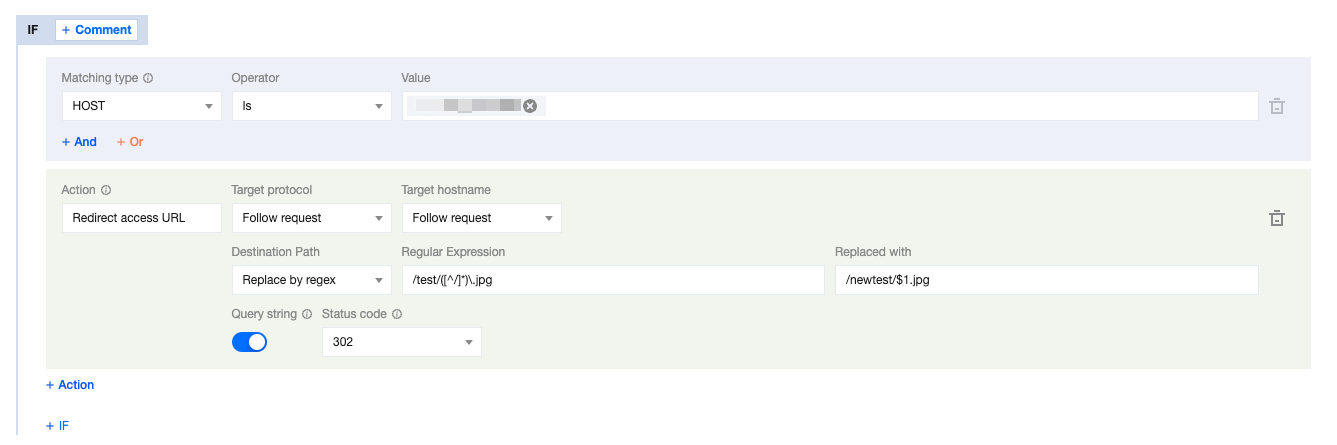
4. On the rule editing page, select the Matching type as HOST is
www.example.com.5. Click on Action, and in the pop-up action list, select the action as Redirect access URL.
6. Configure the rules for Redirect access URL. Select the Target protocol as Follow request, the Target hostname as Follow request. And you can configure the Destination Path as Replace by regex, input the Regular Expression as
/test/([^/]*)\\.jpg to match the destination path, and replace it with /newtest/$1.jpg.7. Click Save and Publish to complete the configuration. The complete rule configuration is as shown below:
Relevant References
The explanations for each configuration item of the redirect access URL are as follows:
Configuration Item | Description |
Target Protocol | The request protocol of the target redirect address, default to follow the request, can support specifying the jump to HTTP/HTTPS protocol. |
Target Hostname | The Hostname part of the target redirect address, default to follow the request, support modifying to a custom domain. For example, www.example.com. |
Destination Path | The path part of the target redirect address, providing three mode options: Follow request: Default configuration, follow the request path. Custom: Customize a complete path, replace the original request path with the target path. For example, /download.Regular Expression: Support matching and replacing paths through Google RE2 Regex. At the same time, it supports using $numto refer to the Regex capture group, where num represents the group number, up to $9.For example: Currently, we hope to replace the path /old-path/1234 with /new-path/1234, we can configure the Regex expression as ^/old-path/(\\d+)$, and the replacement path can be configured as /new-path/$1, where $1 refers to the first capture group in the Regex expression, that is, the number part of the path. |
Query String | Whether to carry the original query string to the target URL, default to enable, that is, carry the original query string after redirecting. |
Status Code | Select the response status code for the redirect: 302 (default), 301, 303, and 307. |
フィードバック