Tag管理
ダウンロード
フォーカスモード
フォントサイズ
操作シナリオ
ユーザーは各タスクにTagを設定できます。マイグレーションタスクの数が多い場合は、Tagで同じ種類のマイグレーションタスクをフィルタリングでき、タスクの管理が容易になります。
タグの編集と追加
1. DTSコンソールにログインし、左側のナビゲーションでデータ移行ページを選択し、指定した移行タスクを選択し、上部のタグを編集をクリックします。
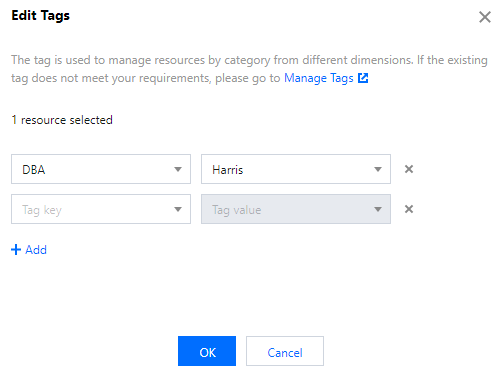
2. 表示されたダイアログでタグを選択します。タグを新規追加する必要がある場合は、追加をクリックしてください。

タグの削除
1. DTSコンソールにログインし、左側のナビゲーションでデータ移行ページを選択し、指定した移行タスクを選択し、上部のタグを編集をクリックします。
2. 表示されたダイアログボックスで、タグの最後にある×印をクリックして、対応するタグを削除します。
フィードバック