tencent cloud

Event Bridge

Release Notes and Announcements
Release Notes
[July 19, 2024] Solution to CLS Billing Issues for EB Topics
User Tutorial
Product Introduction
Overview
Basic Concepts
Strengths
Use Cases
Limits
Purchase Guide
Billing Overview
Product Pricing
Overdue Payments and Service Suspension
Getting Started
Activating EventBridge
Quickly Delivering Custom Events
Quickly Configuring Cloud Monitor Event Alarm Push
Event Source
Overview
Tencent Cloud Service Event Source
Event Structure
Connector
Event
Event Structure
Custom Event
Tencent Cloud Service Event
Event Bus
Overview
Creating Event Bus
Managing Event Bus
Linkage Tracing
Event Rule
Overview
Event Pattern
Creating Event Rule
Managing Event Rule
Configuring Data Conversion
Event Target
SCF Target
CLS Log Target
Message Push Target
CKafka Target
Practical Tutorial
Migrating Event Alarm
Real-Time Oceanus Alarm Message Push
Automatic Backup and Restart of Exceptional CVM Instance
Planning a EventBridge-based Midplatform for a Retail Business
API Documentation
History
Introduction
API Category
Making API Requests
Delivery Target APIs
Event Bus APIs
Event Rule APIs
Event Connector APIs
Data Transformer APIs
Event Storage APIs
Data Types
Error Codes
FAQs
Concept
Alarm
Billing
Contact Us
EB Policy
Privacy Policy
Data Processing And Security Agreement
DocumentationEvent BridgeEvent SourceTencent Cloud Service Event Source

Tencent Cloud Service Event Source

PDF
Focus Mode
Font Size
Last updated: 2024-07-23 15:08:07
Note:
All Ops events such as alarms and auditing events generated by Tencent Cloud services will be delivered to the Tencent Cloud service event bus, which is the default event bus and cannot be modified or deleted. You can go to the EventBridge console to bind rules and targets to the Tencent Cloud service event bus to distribute Tencent Cloud service events.
If you want to use the Cloud Monitor events (such as CVM kernel faults and OOM exceptions) and CloudAudit events (available soon) that are generated by Tencent Cloud services as event sources, you only need to activate the corresponding Tencent Cloud services, and then the Tencent Cloud services will be automatically connected to EventBridge. The events generated by Tencent Cloud services will be delivered to the Tencent Cloud service event bus by default. For more information, see Tencent Cloud Service Event.

Directions

The following is the procedure for viewing all Tencent Cloud services (Cloud Monitor) data sources currently supported:
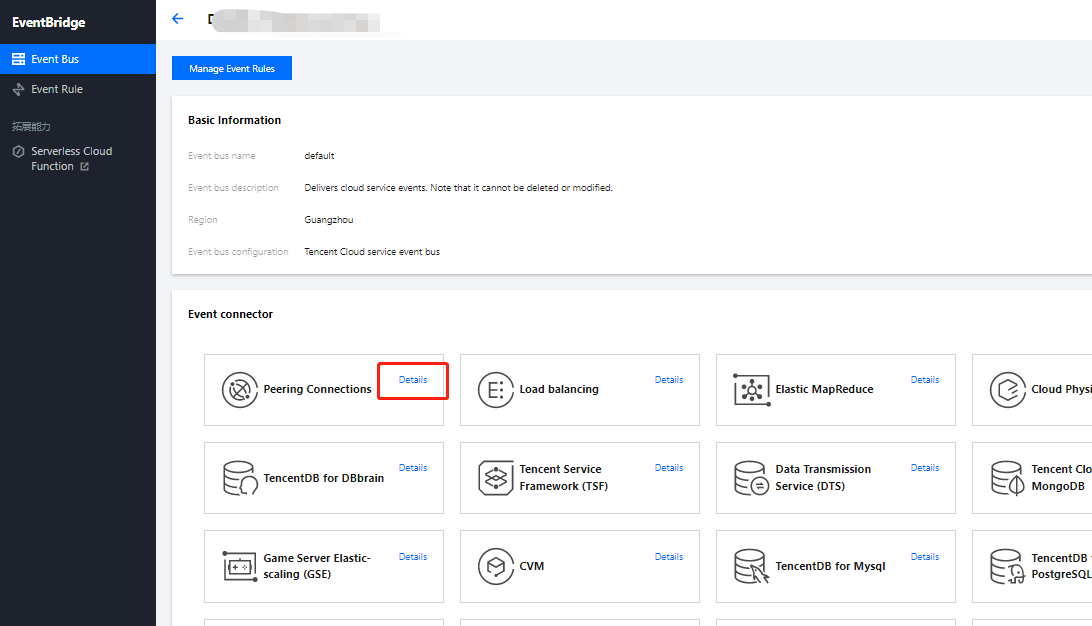
1. Log in to the EventBridge console and choose Tencent Cloud service event bus > default to view the Tencent Cloud service events that are currently connected to the Tencent Cloud service event bus.


2. In the Event Connector area, you can view all Tencent Cloud services that support alarm event push.


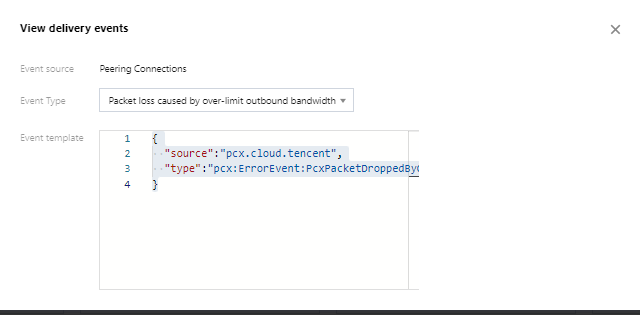
3. You can click Details to view all alarm event types that are currently supported.



Supported Event Sources

Help and Support

Was this page helpful?

Help us improve! Rate your documentation experience in 5 mins.

Feedback