You can terminate an instance via the console or API when it is no longer needed. To prevent instances containing business data from being terminated by mistake, Distributed Cache (Redis-compatible) provides the Instance Termination Protection feature. Once enabled, the instance cannot be terminated via the console or API. If you have confirmed that an instance needs to be terminated, disable the Instance Termination Protection first and then perform the termination. This feature is primarily designed to safeguard instances with business data, preventing them from being accidentally terminated and causing data loss.
Feature List
Instance Termination Protection is disabled by default for both newly purchased and existing instances. You can enable it as needed. Once enabled, the instance cannot be terminated via the console or API. To terminate an instance, disable this feature first and then perform the termination.
Notes
Instance Termination Protection only blocks termination operations actively initiated by users. It does not apply to system-level terminations, for example:
Pay-as-you-go instances are terminated after being suspended for overdue payments and exceeding the recycle bin retention period.
Yearly/monthly subscription instances are terminated after they expire, exceed the renewal grace period, enter the recycle bin, and exceed the retention period.
Fee Instructions
Instance Termination Protection is currently a free feature.
Supported Architectures
The Instance Termination Protection feature is supported by both standard architecture and cluster architecture instances of Distributed Cache, covering the Redis edition and Valkey edition storage engines.
Feature Status Description
After Instance Termination Protection is enabled, you can confirm the feature status using the following methods:
The status of the relevant instance is displayed as Termination Protection Enabled on the Instance List and Instance Details pages, allowing you to quickly determine whether the feature is enabled.
All instance-related buttons for termination are grayed out and unclickable to prevent misoperations.
Directions
Enabling Instance Termination Protection
Enabling for a Single Instance
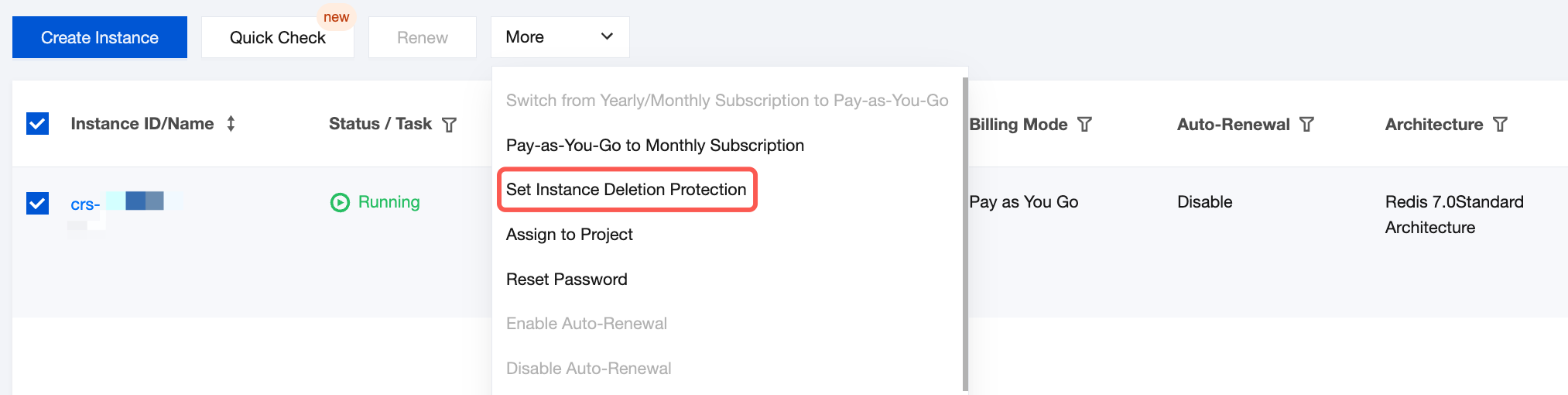
1. Log in to the Distributed Cache console, select the target instance from the instance list, and choose More > Set Instance Deletion Protection in the Operation column.
Alternatively, you can go to the Instance Details page and click in the Instance Termination Protection section of the
area.
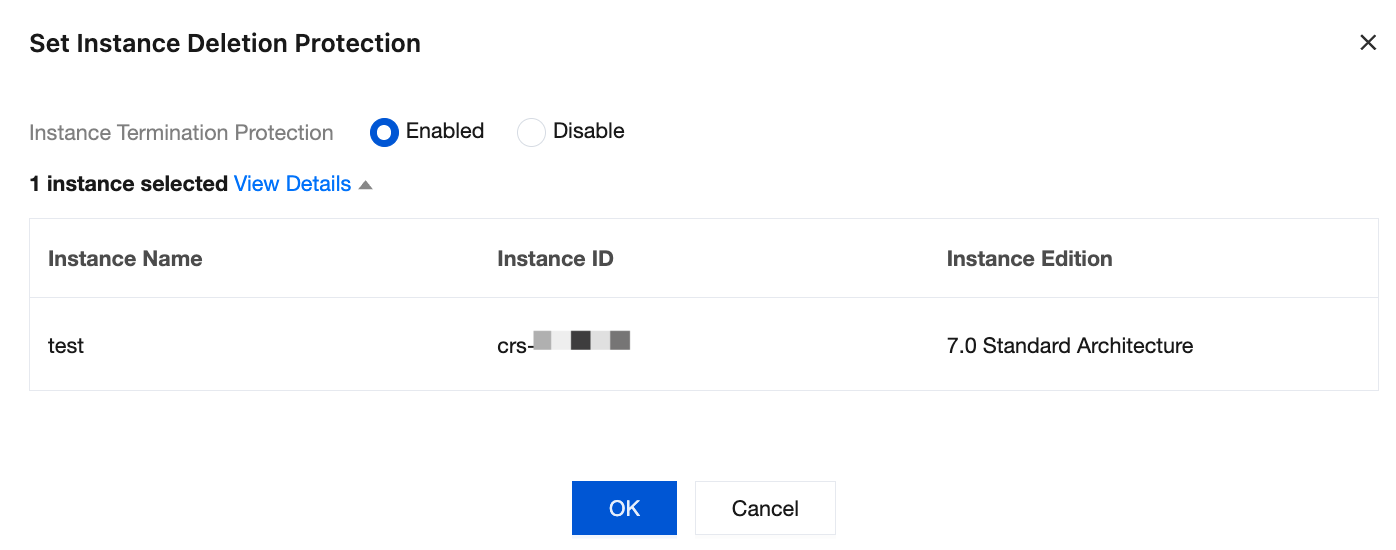
2. In the dialog box that appears, select Enable in the Instance Termination Protection section, and then click OK to complete the operation.
Batch Enabling for Multiple Instances
1. Log in to the Distributed Cache console, select multiple target instances from the instance list, and choose More > Set Instance Deletion Protection above the list.
2. In the dialog box that appears, select Enable in the Instance Termination Protection section, and then click OK to complete the operation.
Disabling Instance Termination Protection
If you have confirmed that the instance can be terminated, first disable Instance Termination Protection and then perform the termination operation.
Disabling Instance Termination Protection for a Single Instance
1. Log in to the Distributed Cache console, select the target instance from the instance list, and choose More > Set Instance Deletion Protection in the Operation column.
Alternatively, you can go to the Instance Details page and click in the Instance Termination Protection section of the
area.
2. In the dialog box that appears, select Disable in the Instance Termination Protection section, and then click OK to complete the operation.
Disabling Instance Termination Protection for Multiple Instances
1. Log in to the Distributed Cache console, select multiple target instances from the instance list, and choose More > Set Instance Deletion Protection above the list.
2. In the dialog box that appears, select Disable in the Instance Termination Protection section, and then click OK to complete the operation.
Related APIs
After you enable Instance Termination Protection, calls to the instance from the following termination-related APIs will be blocked. Alternatively, you can enable termination protection via API parameters when creating an instance.
API Name
Description
API Documentation Link
CreateInstances
Creates an instance and supports enabling instance termination protection during creation.
Can an Instance Be Read and Written Normally After Instance Termination Protection Is Enabled?
Yes. Instance Termination Protection only restricts the termination operation of an instance and does not affect any of its business functions, such as normal read/write, backup, monitoring, and parameter configuration.
Why Is an Instance Terminated by the System When Termination Protection Is Enabled?
Instance Termination Protection only blocks termination operations actively initiated by users and does not apply to system-level terminations. For example, pay-as-you-go instances with overdue payments that have exceeded the service suspension period, or yearly/monthly subscription instances that have expired and exceeded the recycle bin retention period, will be automatically terminated by the system. To prevent data loss, please renew or top up your account in a timely manner to ensure the normal operation of your instances.