Dashboard Subscription
Download
Focus Mode
Font Size
Overview
CLS supports dashboard subscription. It can export dashboards as images and periodically send them to specified recipients via email or other means. You can use this feature for dashboards that require daily, weekly, or monthly reports to be sent to a team.
Usage Limits
Each account can have up to 100 subscription tasks.
Directions
Creating a subscription task
1. Log in to the CLS console.
2. On the left sidebar, click View Dashboard to enter the dashboard page.
3. Click Subscription at the top and select Create to enter the subscription configuration page.

4. Enter the Task Name and select the Time Range of the subscribed dashboard.
5. Set the Variables of the subscribed dashboard.
If you select Default Configuration, the default configuration items will be used for the variables of the subscribed dashboard. When the default variables change, the subscribed dashboard will also change.
If you select Custom Configuration, you can customize variables to render the subscribed dashboard.
6. Click Preview Content to preview the subscribed dashboard.
7. Select the subscription frequency. You can choose daily, weekly, or monthly cycles. Multiple cycles can be selected.
8. Configure the subscription method:
Type | Description |
Tencent Cloud user | Select a Tencent Cloud user as the email recipient of the subscribed dashboard. Users with no email address configured cannot receive email notifications. |
Custom email address | Enter one or multiple custom email addresses. |
WeCom | Push the subscribed dashboard via the WeCom bot Webhook address. For details, see WeCom Group Bot Settings. |
Lark | Push the subscribed dashboard via the Feishu bot Webhook address. For details, see Feishu Group Bot Settings. For security settings, it is recommended to use "Custom Keywords" and reference fixed words from the dashboard name. Do not use variables. |
DingTalk | Push the subscribed dashboard via the DingTalk bot Webhook address. For details, see DingTalk Custom Bot Settings. For security settings, it is recommended to use "Custom Keywords" and reference fixed words from the dashboard name. Do not use variables. |
9. Dashboard Link: The subscription content includes an access link to the dashboard. When DataSight is enabled or a custom domain is configured, you can choose to use the DataSight or custom domain as the access link.
10. Click Send Immediately, and CLS will send a subscription email to all the configured recipients.
Managing a subscription task
1. Log in to the CLS console.
2. On the left sidebar, click View Dashboard to enter the dashboard page.
3. Click Subscription at the top and select Manage Subscription Task to enter the subscription task management page.
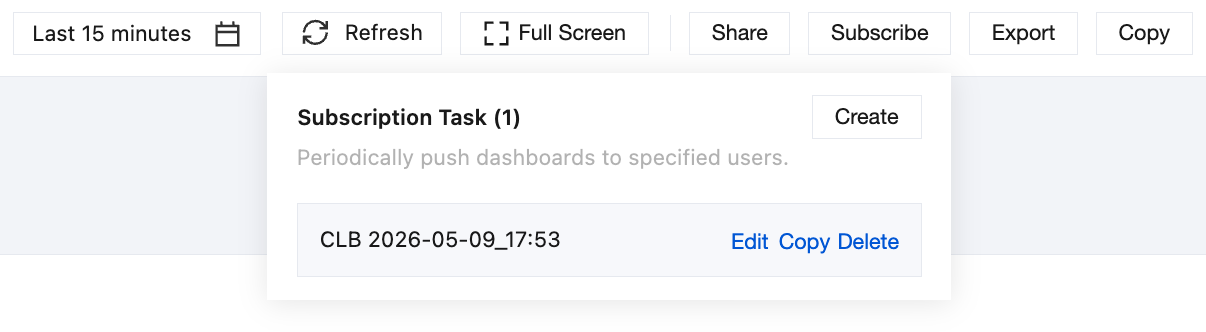
4. You can create, edit, or delete dashboard subscription tasks and view the last operation.
Help and Support
Was this page helpful?
You can also Contact sales or Submit a Ticket for help.
Help us improve! Rate your documentation experience in 5 mins.
Feedback