Overview of data processing
Download
Focus Mode
Font Size
Data Processing
provides log data filtering, cleansing, masking, enrichment, and distribution capabilities.Depending on the location of data processing in the data link, different data sources (source) and result storage (sink), several data processing scenarios are currently supported:
Scenarios | Description |
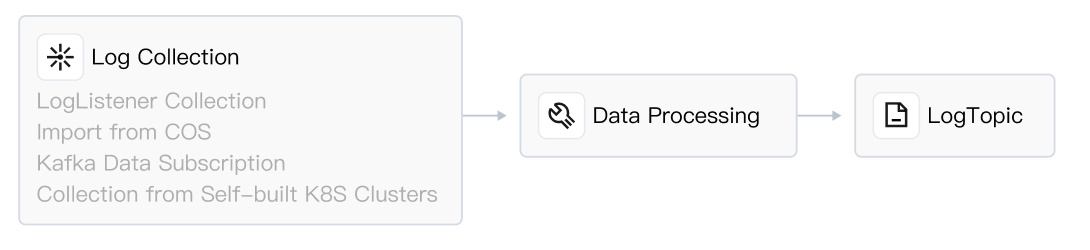 | Log Collection - Processing - Log Topic: Log collection to CLS first transits data processing (filtering, structuring), then writes to the log topic. As shown in the figure, data processing is in the data link before the log topic, known as preprocessing. Perform log filtering during preprocessing to effectively reduce log write traffic, index traffic, index storage volume, and log storage volume. Perform log structuring during preprocessing. After enabling key-value index, you can use SQL to analyze logs, configure dashboards, and set up alarms. |
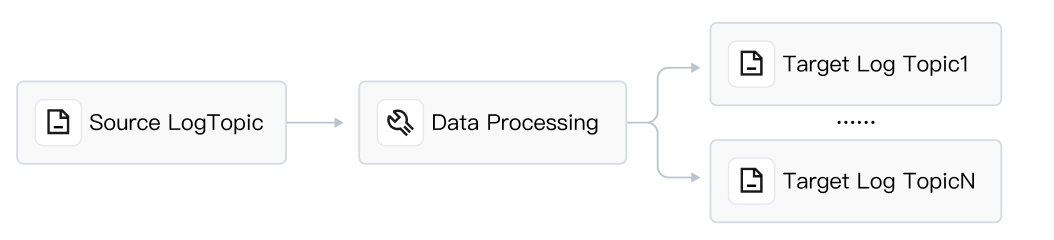 | Log Topic - Processing - Fixed Log Topic: Process data from the source log topic and store it in a log topic, or distribute logs to multiple log topics. |
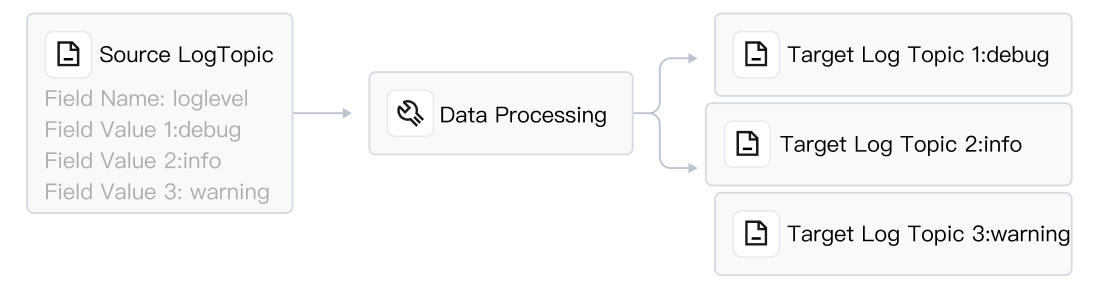 | Log Topic - Processing - Dynamic Log Topic: Dynamically create log topics based on the field value of the source log topic, and distribute related logs to the corresponding log topics. For example, if the source log topic has a field named Service with values such as "Mysql," "Nginx," and "LB," CLS can auto-create log topics named Mysql, Nginx, LB, etc., and write related logs to these topics. |
Basic Concepts
Features
Extract structured data for future BI analysis and monitoring chart (Dashboard) generation. If your raw log is not structured data, you will be unable to perform SQL calculations, which also means you cannot perform OLAP analysis or use CLS dashboards (charts drawn based on SQL results). Therefore, it is recommended that you use data processing to convert unstructured data into structured data. If your log follows a pattern, you can also extract structured data during log collection. Please refer to full regular expression format (single line) or delimited format. Compared with the collection side, data processing provides more complex structured processing logic.
Log filtering. Reduce subsequent usage costs. Drop unnecessary log data to save storage costs and traffic costs on the cloud. For example, you may subsequently deliver logs to Tencent Cloud COS or Ckafka, effectively saving delivery traffic.
Sensitive data masking. For example: mask identity card, phone number, etc.
Log distribution. For example: classify logs by log level (ERROR, WARNING, INFO), then distribute to different log topics.
Advantages
Easy to use, especially friendly to data analysts and operation and maintenance engineers. Provide ready-to-use functions with no need to purchase, configure, or maintain a Flink cluster. Simply use our packaged DSL functions to achieve stream processing on massive logs, including data cleaning and filtering, masking, structuring, and distribution. For details, see function overview.
High-throughput real-time log data stream processing. High processing efficiency (millisecond latency) and high throughput, reaching 10-20 MB/s per partition (source log topic partition).
Success Stories
Data cleaning and filtering: Customer A, drop invalid logs and only retain specified fields, completing partial missing fields and field values. If a log has no product_name or sales_manager field, deem it as invalid and drop the log. Otherwise, preserve the log and only retain the three fields: price, sales_amount, and discount. Drop other fields. If the log misses the discount field, add this field and assign it a default value, such as "70%".
Data transformation: Customer B, the field value in the original log is an IP. The customer needs to add fields and values for country and city based on the IP. For example, 2X0.18X.51.X5, add field country: China, city: Beijing. Convert the UNIX timestamp to UTC+8, for example, 1675826327 converts to 2023/2/8 11:18:47.
Log classification and delivery: Customer C, the raw log is multi-level JSON, which also includes an array. Customer C uses data processing to extract the array from the designated node of the multi-level JSON as a field value, such as extracting the Auth field value from Array[0]. Then, based on the Auth field value, distribute the log data. When the value is "SASL", send it to target topic A; when the value is "Kerberos", send it to target topic B; when the value is "SSL", send it to target topic C.
Log structuring: Customer D, the raw log
"2021-12-02 14:33:35.022 [1] INFO org.apache.Load - Response:status: 200, resp msg: OK" is structured through data processing, and the result is log_time:2021-12-02 14:33:35.022, loglevel:info, status:200.Fee Instructions
Data processing incurs related costs. For details, see Billing Overview. If your business only requires the use of logs after processing, it is recommended to configure the retention time of the source log topic to 3-7 days and disable indexing for the source log topic to effectively reduce costs.
Specifications and Limits
Help and Support
Was this page helpful?
You can also Contact sales or Submit a Ticket for help.
Help us improve! Rate your documentation experience in 5 mins.
Feedback