Viewing Instance Monitoring
Download
포커스 모드
폰트 크기
TencentDB for MySQL provides monitoring for primary instances, read-only instances, disaster recovery instances, database proxy nodes, as well as the read-write nodes and read-only nodes of cloud disk edition instances. It offers an independent monitoring view for each instance for querying. This document describes how to switch between and view the monitoring of different nodes under a cloud disk edition instance via the console. For details about the monitoring feature, such as specific metrics and granularity, see Monitoring Feature.
Note:
You can obtain the instance's monitoring metrics via TencentDB for MySQL Monitoring Metrics.
You can also create a Dashboard for monitoring metrics to dynamically analyze metric monitoring data.
If one instance contains more than 300,000 tables, it can negatively impact database monitoring. Therefore, it is crucial to manage the number of tables effectively and ensure that the total number of tables in each instance stays below this threshold.
Prerequisites
To create an instance of TencentDB for MySQL cloud disk edition, see Purchase Method.
The instance status is Running.
Policy Type Description for Cluster Edition (Cloud Disk) Architecture Instances in TCOP
For Cluster Edition (Cloud Disk) architecture instances, the policy type in TCOP is cluster edition monitoring. When configuring an alarm policy, choose CDB > MySQL > Cluster.
Operation Steps
1. Log in to the TencentDB for MySQL console. On the instance list page, click the Instance ID or the Manage button in the Operation column to go to the Instance Details page.
2. Select the Instance Monitoring tab to view monitoring metrics for the read-write node (default).
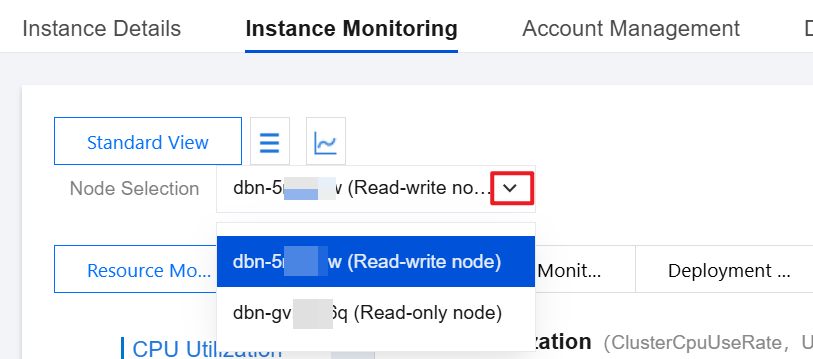
3. To view monitoring data for other read-only nodes under the cloud disk-based instance, you can switch using the drop-down list after Node Selection.
피드백