Enabling Audit Service
Download
포커스 모드
폰트 크기
Tencent Cloud provides SQL Insight (Database Audit) capability for TencentDB for MySQL, recording database access and SQL statement execution, helping enterprises perform risk control and improve data security levels.
Prerequisites
Supported Versions and Architecture
The feature currently supports database kernel versions MySQL 5.6 20180122 and later, MySQL 5.7 20190429 and later, and MySQL 8.0 20210330 and later.
The feature supports two-node, three-node, and cloud disk edition instance architectures, with read-only instances also supported.
Instances of MySQL 5.5, single-node (cloud disk) architecture, read-only analysis engines, and two-node economical editions do not support this feature.
Operation Steps
1. Log in to the TencentDB for MySQL console.
2. Select SQL Insight (Database Audit) in the left sidebar.
3. Select a region at the top, click the Audit Log Storage Status field on the Audit Instance page, and select Disabled to filter instances with the audit service disabled.
4. In the audit instance list, locate the target instance (you can also quickly find it by filtering resource attributes in the search box), and click Enable Database Audit in its Operation column.
Note:
Batch enabling of the audit service is supported. On the Audit Instance page, select multiple target instances and click Enable Database Audit at the top to go to the settings page.

5. On the page for enabling the audit service, sequentially complete the audit instance selection, audit type settings, audit service settings, and advanced performance analysis settings. Read and check the Tencent Cloud Service Agreement, then click OK.
5.1 Select Audit Instance
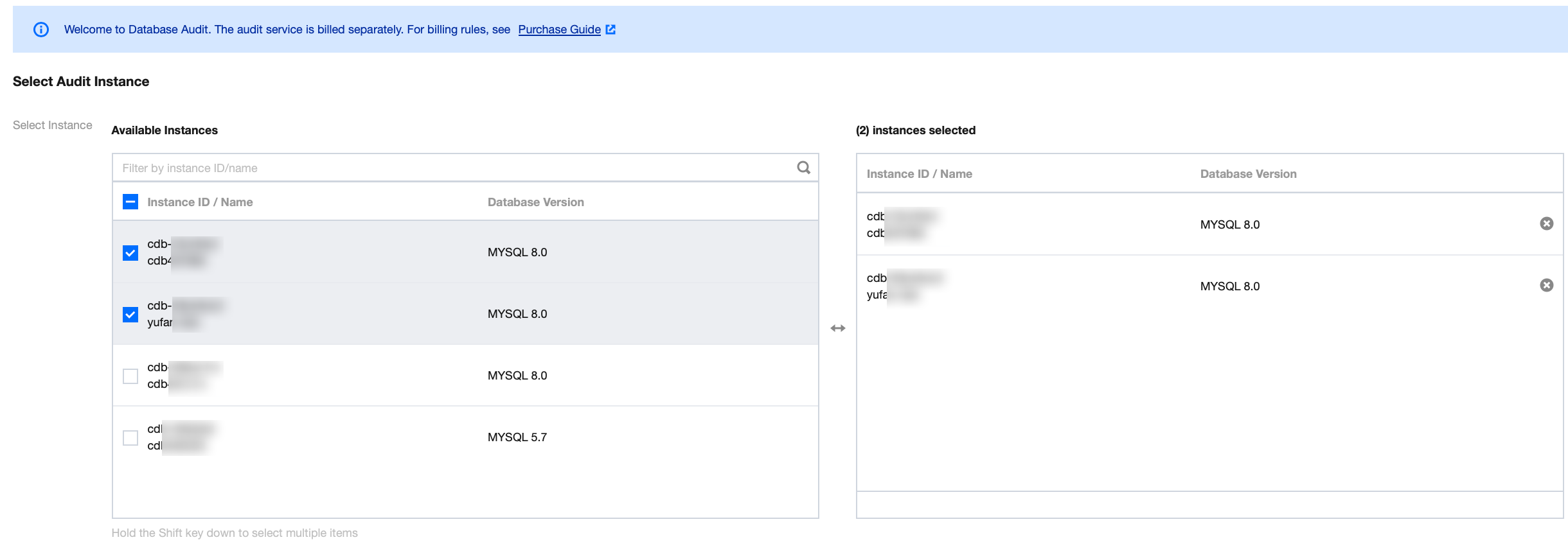
Under the audit instance selection item, the system automatically selects the instance chosen in Step 4 by default. It also supports modifying the target instance in this window (selecting other instances or multiple instances). You can also quickly locate the target instance in the search box by Instance ID/Name. After completing the instance selection, go to the audit rule settings.
5.2 Audit Rule Settings
In the audit type settings, you need to select either Full Audit or Rule-Based Audit. A detailed comparison between the two is provided in the following table.
Parameter | Description |
Full Audit | Comprehensively records all access to the database and SQL statement execution. |
Rule-Based Audit | Rule audit records access to the database and SQL statement execution based on customized audit rules. |
When the audit type is set to Full Audit
, the actual operations on the console fall into the following two scenarios. You can refer to the corresponding operations accordingly.You can select an existing template from the rule templates or choose to create a new rule template. For detailed steps on creating a new template, refer to Create New Rule Template.
Note:
You can apply up to 5 rule templates, and different rule templates are in an "OR" relationship.
Rule templates are applied to instances with the audit type set to "Full Audit". They are only used to set the risk level and alarm policy for audit logs that match the rules in the template. Audit logs that do not match the rules are still retained.
When the audit type is set to Rule Audit, you can select an existing rule from rule templates or create a new rule template. If you select an existing rule from the templates, you can directly go to the audit service settings. If no suitable rule exists in the templates, you can create a new rule template and refresh to select it. For detailed steps, refer to Create New Rule Template.
Note:
You can apply up to 5 rule templates, and different rule templates are in an "OR" relationship.
Rule templates are applied to instances with the audit type set to "Rule Audit". They are used to retain audit logs that match the rules in the template, set risk levels, and configure alarm policies. Audit logs that do not match the rules will not be retained.
5.3
Configure Audit
Under the audit service settings, you need to configure the audit log retention period and high/low-frequency storage duration, read and select the Tencent Cloud Service Agreement, then click OK to enable the audit service.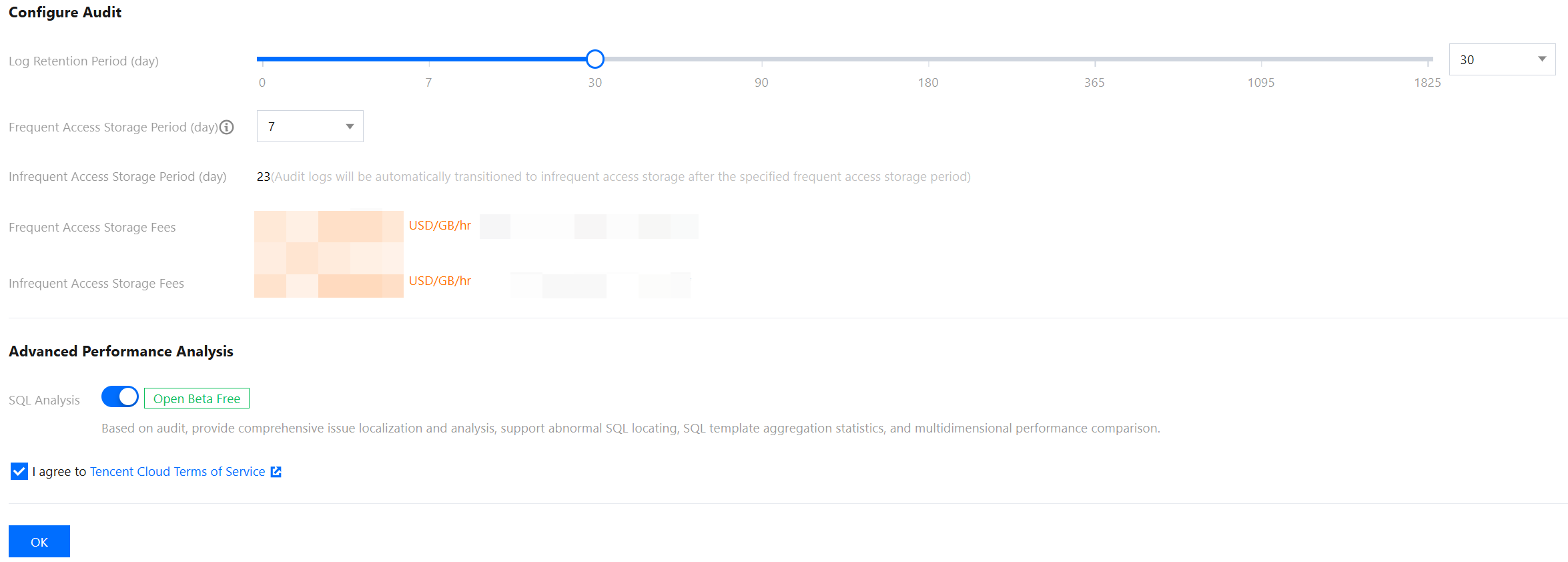
Parameter | Description |
Log Retention Period | Set the retention period for audit logs. Unit: days. Supported values are 7, 30, 90, 180, 365, 1095, and 1825 days. |
Frequent Access Storage Period | Frequent Access Storage Period represents ultra-high-performance storage medium with excellent query performance. Unit: days. After the storage duration is set, audit data within the specified period will be stored in high-frequency storage. Data beyond this duration will automatically move to low-frequency storage. Both storage types support identical audit capabilities, differing only in performance. For example: if the log retention period is set to 30 days and high-frequency storage duration to 7 days, the low-frequency storage duration defaults to 23 days. |
5.4 Advanced Performance Analysis
SQL Analysis: DBbrain provides comprehensive problem identification and analysis capabilities based on SQL Insight (Database Audit), supporting abnormal SQL identification, SQL template aggregation statistics, and multi-dimensional performance comparison. This option is enabled by default but can be manually disabled, indicating that the SQL analysis capability is not enabled.
Note:
The SQL analysis feature is currently in open beta and is available for a free trial. Once the beta phase concludes, TencentDB for DBbrain will officially introduce a commercial billing plan. You can refer to the official announcement for specific pricing details at that time. For more details about SQL analysis, see SQL Analysis (MySQL).
피드백