tencent cloud

Tencent Real-Time Communication

Release Notes and Announcements
Release Notes
Recent Product Announcement
TRTC Live (TUILiveKit) Product Launch Announcement
TRTC Conference Official Editions Launched
The commercial version of Conference is coming soon
Terms and Conditions Applicable to $9.9 Starter Package
Rules for the "First Subscription $100 Discount" Promotion
Announcement on the Start of Beta Testing for Multi-person Audio and Video Conference
TRTC Call Official Editions Launched
License Required for Video Playback in New Version of LiteAV SDK
TRTC to Offer Monthly Packages
Product Introduction
Overview
Concepts
Features
Strengths
Use Cases
Performance Statistics
Tencent RTC Quickplay: Experience Ultimate Real-Time Audio and Video Interaction!
Purchase Guide
Billing Overview
Free Minutes
Monthly subscription
Pay-as-you-go
TRTC Overdue and Suspension Policy
FAQs
Refund Instructions
User Tutorial
Free Demo
Call
Overview
Activate the Service
Run Demo
Integration
Offline Call Push
Conversational Chat
On-Cloud Recording
AI Noise Reduction
UI Customization
Calls integration to Chat
Additional Features
No UI Integration
Server APIs
Client APIs
Solution
ErrorCode
Release Notes
FAQs
Conference
Overview(TUIRoomKit)
Activate the Service (TUIRoomKit)
Run Demo(TUIRoomKit)
Integration(TUIRoomKit)
Screen Sharing (TUIRoomKit)
Schedule a meeting (TUIRoomKit)
In-meeting Call (TUIRoomKit)
UI Customization(TUIRoomKit)
Virtual Background (TUIRoomKit)
Conference Control (TUIRoomKit)
Cloud Recording (TUIRoomKit)
AI Noise Reduction (TUIRoomKit)
In-Conference Chat (TUIRoomKit)
Robot Streaming (TUIRoomKit)
Enhanced Features (TUIRoomKit)
Client APIs (TUIRoomKit)
Server APIs (TUIRoomKit)
FAQs (TUIRoomKit)
Error Code (TUIRoomKit)
SDK Update Log (TUIRoomKit)
Live
Billing of Video Live Component
Overview
Activating the Service (TUILiveKit)
Run Demo
No UI Integration
UI Customization
Live Broadcast Monitoring
Video Live Streaming
Voice Chat Room
Advanced Features
Client APIs
Server APIs
Error Codes
Release Notes
FAQs
RTC Engine
Activate Service
SDK Download
API Examples
Usage Guidelines
API Reference Manual
Advanced Features
AI Integration
Overview
Configure MCP Server
Install Skills
Integration Guide
FAQ
RTC RESTFUL API
History
Introduction
API Category
Room Management APIs
Stream mixing and relay APIs
On-cloud recording APIs
Data Monitoring APIs
Pull stream Relay Related interface
Web Record APIs
AI Service APIs
Cloud Slicing APIs
Cloud Moderation APIs
Making API Requests
Call Quality Monitoring APIs
Usage Statistics APIs
Data Types
Appendix
Error Codes
Console Guide
Application Management
Package Management
Usage Statistics
Monitoring Dashboard
Development Assistance
Solution
Real-Time Chorus
FAQs
Migration Guide
Billing
Features
UserSig
Firewall Restrictions
How to Downsize Installation Package
Android and iOS
Web
Flutter
Electron
TRTCCalling for Web
Audio and Video Quality
Others
Legacy Documentation
RTC RoomEngine SDK(Old)
Integrating TUIRoom (Web)
Integrating TUIRoom (Android)
Integrating TUIRoom (iOS)
Integrating TUIRoom (Flutter)
Integrating TUIRoom (Electron)
TUIRoom APIs
On-Cloud Recording and Playback (Old)
RTC Analytics Monthly Packages (Previous Version)
Protocols and Policies
Compliance
Security White Paper
Notes on Information Security
Service Level Agreement
Apple Privacy Policy: PrivacyInfo.xcprivacy
TRTC Policy
Privacy Policy
Data Processing And Security Agreement
Glossary

Android

PDF
Focus Mode
Font Size
Last updated: 2025-10-09 16:25:48
This document describes how to customize the UI of TUICallKit and provides two schemes for customization: slight UI adjustment and custom UI implementation.

Scheme 1. Slight UI Adjustment

You can adjust the UI of TUICallKit by directly modifying the UI source code in the Android/tuicallkit-kt folder in tencentyun/TUICallKit.

Replacing icons

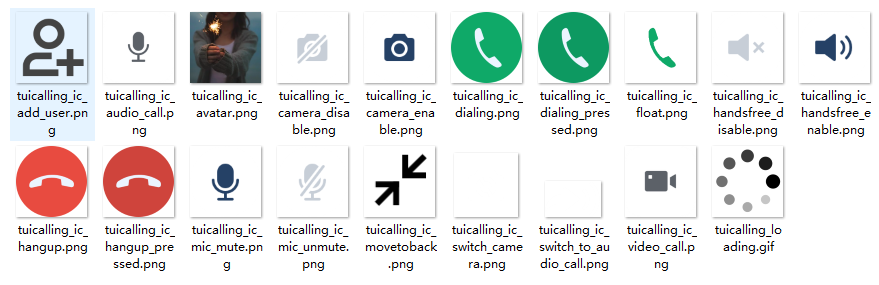
You can directly replace the icons in the tuicallkit-kt/src/main/res/drawable-xxhdpi folder to customize the color tone and style of all the icons in your application. When you replace an icon, make sure the filename is the same as the original icon.


Replacing ringtones

You can replace ringtones by replacing the three audio files in the tuicallkit-kt/src/main/res/raw folder.
Filename
Description
phone_dialing.mp3
The sound of making a call
phone_hangup.mp3
The sound of being hung up
phone_ringing.mp3
The ringtone for incoming calls

Replacing text

You can modify the strings on the video call UI by modifying the strings.xml file in tuicallkit-kt/src/main/res/values-**/.

Scheme 2. Custom UI Implementation

The entire call feature of TUICallKit is implemented based on the UI-less component TUICallEngine. You can delete the tuicallkit folder and implement your own UIs based entirely on TUICallEngine.

TUICallEngine

TUICallEngine is the underlying API of the entire TUICallKit component. It provides key APIs such as APIs for making, answering, declining, and hanging up one-to-one audio/video and group calls and device operations.
API
Description
Creates a TUICallEngine instance (singleton mode).
Terminates a TUICallEngine instance (singleton mode).
Init
Authenticates the basic audio/video call capabilities.
Registers an event listener.
Unregisters an event listener.
calls
Initiate a one-to-one or multi-person call.
join
Proactively join a call.
accept
Accepts a call.
reject
Rejects a call.
hangup
Ends a call.
ignore
Ignores a call.
Invites users to the current group call.
Subscribes to the video stream of a remote user.
Unsubscribes from the video stream of a remote user.
Turns the camera on.
Turns the camera off.
Switches between the front and rear cameras.
Turns the mic on.
Turns the mic off.
Selects the audio playback device (receiver or speaker).
Sets the alias and profile photo.
Sets whether to enable multi-device login for TUICallEngine (supported by the Group Call package).
Set the rendering mode of video image.
Set the encoding parameters of video encoder.
Advanced features.
Set beauty level, support turning off default beauty.

TUICallObserver

TUICallObserver is the callback event class of TUICallEngine. You can use it to listen on the desired callback events.
API
Description
onError
A call occurred during the call.
A call invitation was received.
The call was connected.
onCallEnd
The call ended.
The call not connected.
A user declined the call.
A user didn't respond.
A user was busy.
A user is invited to join a call.
A user joined the call.
A user left the call.
Whether a user had a video stream.
Whether a user had an audio stream.
The volume levels of all users.
The network quality of all users.
The current user was kicked offline.
The user sig is expired.

Definitions of Key Types

API
Description
The call media type. Enumeration: Video call and audio call.
The call role. Enumeration: Caller and callee.
The call status. Enumeration: Idle, waiting, and answering.
The audio/video room ID, which can be a number or string.
The camera type. Enumeration: Front camera and rear camera.
The audio playback device type. Enumeration: Speaker and receiver.
The information of the current network quality.

Help and Support

Was this page helpful?

Help us improve! Rate your documentation experience in 5 mins.

Feedback