You may consider enabling Advanced Permission Control if you want to allow only specific users to enter a room or use their mics, but are worried that giving permissions on the client side makes the service vulnerable to attacks and cracking.
You do not need to enable advanced permission control in the following scenarios:
Scenario 1: You want an audience as large as possible and do not want to control access to rooms.
Scenario 2: Preventing client-side attacks is not your priority at the moment.
We recommend that you enable advanced permission control for enhanced security in the following scenarios:
Scenario 1: Your video or audio calls have high security requirements.
Scenario 2: You want to implement different access controls for different rooms.
Scenario 3: You want to control the use of mics by audience.
Supported Platforms
iOS
Android
macOS
Windows
Electron
Web
Flutter
✓
✓
✓
✓
✓
✓
✓
Understanding Advanced Permission Control
After you enable advanced permission control, TRTC will verify not only UserSig (the room entry ticket), but also PrivateMapKey (the permission ticket). The latter contains an encrypted roomid and permission bit list.
A user providing only UserSig but not PrivateMapKey will be unable to enter the specified room.
The permission bit list in PrivateMapKey uses the eight bits of a byte to represent different permissions for users holding PrivateMapKey.
Bit Sequence
Binary
Decimal
Permission
First
0000 0001
1
Room creation
Second
0000 0010
2
Room entry
Third
0000 0100
4
Sending audio
Fourth
0000 1000
8
Receiving audio
Fifth
0001 0000
16
Sending video
Sixth
0010 0000
32
Receiving video
Seventh
0100 0000
64
Sending substream (screen sharing) video
Eighth
1000 0000
128
Receiving substream (screen sharing) video
Enabling Advanced Permission Control
Step 1. Log in to the TRTC console and enable advanced permission control
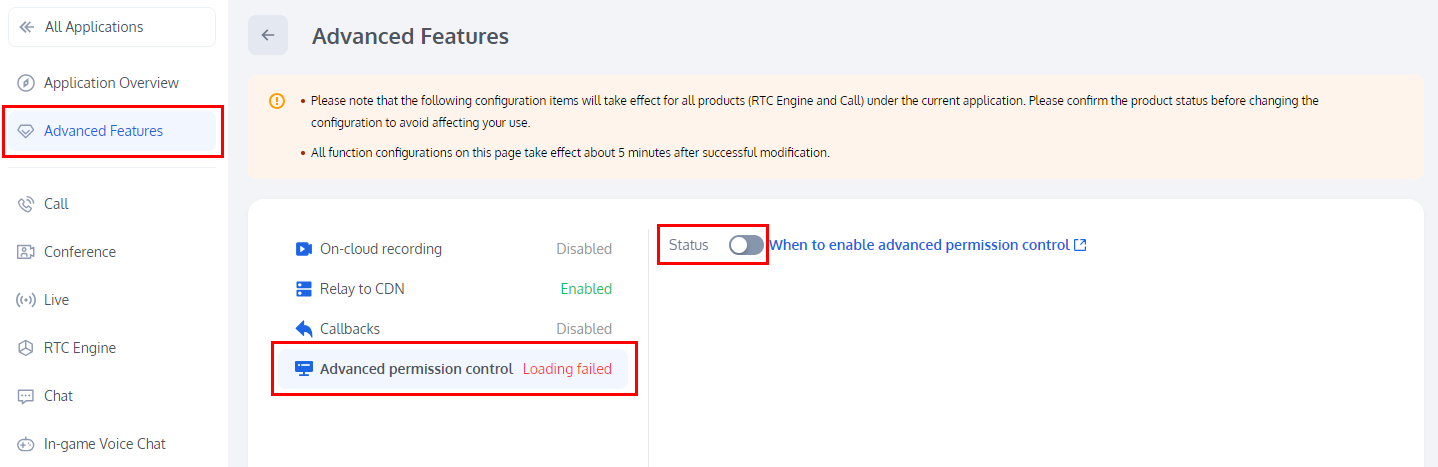
1. Log to Tencent RTC Console > Applications, click on Manage in the row of the target application whose feature configuration needs to be modified, and select Advanced Features from the project column on the left.
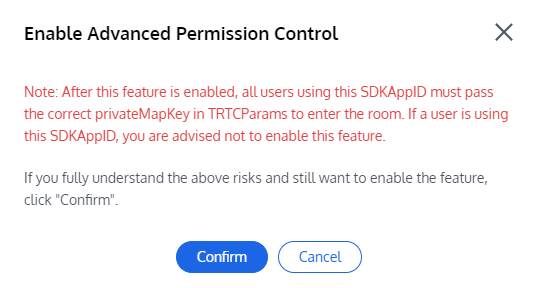
2. In Advanced Features, click the button on the right side of Enable Advanced Permission Control, and in the pop-up window, click Confirm to complete the activation.
Note:
After you enable advanced permission control for an application (SDKAppid), all users using the application must pass privateMapKey in TRTCParams to enter a room (as described in Step 2 below). Therefore, you are not advised to enable the feature if you have active users using the application.
Step 2. Calculate PrivateMapKey on your server
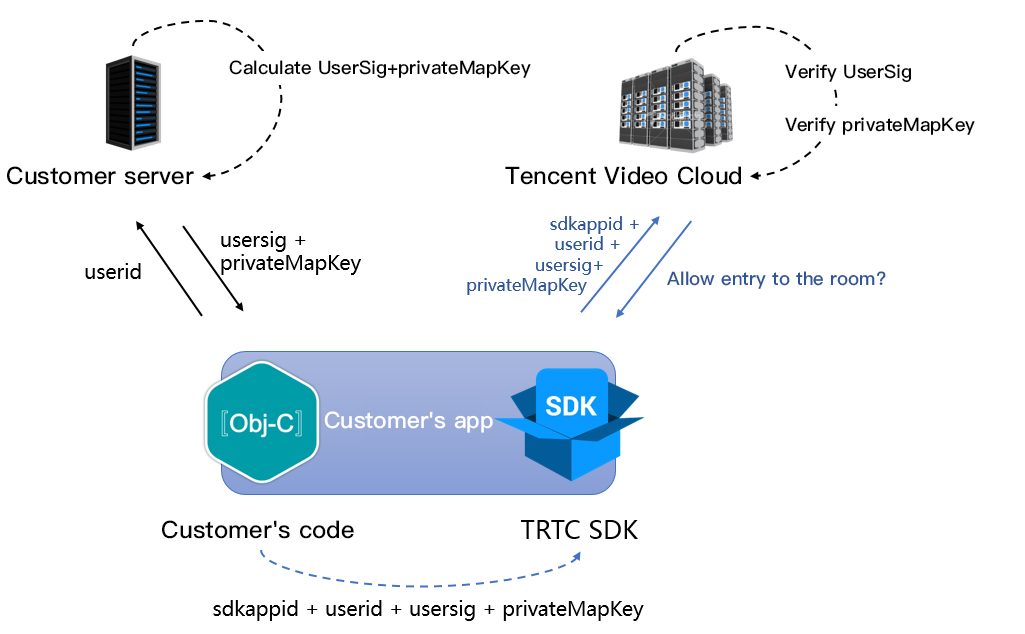
PrivateMapKey protects the client from being reverse engineered and cracked and consequently prevents non-members from entering high-level rooms. Therefore, instead of calculating PrivateMapKey directly on your application, you should do so on your server and then return the result to your application.
We provide PrivateMapKey calculation codes for Java, GO, PHP, Node.js. Python, C#, and C++. You can download and integrate them into your server.
Programming Language
Key Functions
Download Link
Java
genPrivateMapKey and genPrivateMapKeyWithStringRoomID
Step 3. Distribute PrivateMapKey from your server to your application
As shown in the figure above, PrivateMapKey is calculated on your server and distributed to your application, which can then pass the PrivateMapKey to the SDK via two methods.
Method 1: passing PrivateMapKey to the SDK when calling enterRoom
You can set privateMapKey in TRTCParams when calling the enterRoom API of TRTCCloud.
This method verifies PrivateMapKey when users enter a room. It is simple and is used to assign permissions to users before room entry.
Method 2: updating PrivateMapKey to the SDK through an experimental API
During live streaming, when audience turn their mics on to co-anchor, TRTC will re-verify the PrivateMapKey carried in TRTCParams at the time of room entry. That means if you set a short validity period for PrivateMapKey, such as 5 minutes, the re-verification may fail and cause the audience to be removed from the room when they switch to the role of “anchor”.
To solve this issue, you can extend the validity period, for example, from 5 minutes to 6 hours or, before the audience call switchRole to switch to the role of “anchor”, apply for a new PrivateMapKey from your server and update it to the SDK by calling the experimental API updatePrivateMapKey. Below is the sample code:
Android
iOS
C++
C#
JSONObject jsonObject =newJSONObject();
try{
jsonObject.put("api","updatePrivateMapKey");
JSONObject params =newJSONObject();
params.put("privateMapKey","xxxxx");// Enter the new `privateMapKey`.
std::string api = "{\\"api\\":\\"updatePrivateMapKey\\",\\"params\\":{\\"privateMapKey\\":"xxxxx"}}";
mTRTCCloud.callExperimentalAPI(api);
FAQs
1. Why can't I enter any online room?
After you enable room permission control for an application (SDKAppid), users must pass PrivateMapKey in TRTCParams to enter any room under the application. Therefore, if your online business is running, and you haven’t integrated into it the privateMapKey logic, please do not enable room permission control.
2. What is the difference between PrivateMapKey and UserSig?
UserSig is a required parameter of TRTCParams, which is used to check whether the current user is authorized to use TRTC services and prevent attackers from stealing the traffic in your application (SDKAppid).
PrivateMapKey is an optional parameter of TRTCParams, which is used to check whether the current user is authorized to enter the specified room (roomid) and confirm the user’s permissions in the room. Use PrivateMapKey only if you need to distinguish users from one another.