Creating a Template
Download
Focus Mode
Font Size
Scenarios
You can use configuration templates to batch create configurations for log topics. For example, to batch create tasks for delivering log topics to COS, you can first create a template and set the COS delivery properties. Then, apply the template to multiple log topics to quickly create multiple COS delivery tasks with identical properties.
Prerequisites
CLS has been activated, a logset and a log topic have been created, and log data has been successfully collected.
Sub-accounts/collaborators require authorization from the root account. For the authorization procedure, refer to Managing Permissions Based on CAM. For authorization policies, refer to the following:
{"statement": [ {"action": ["cls:DescribeTopics","cls:DescribeLogsets","cls:GetConfigurationTemplateApplyLog","cls:ApplyConfigurationTemplate","cls:CreateConfigurationTemplate","cls:DeleteConfigurationTemplate","cls:ModifyConfigurationTemplate","cls:DescribeConfigurationTemplates","cos:GetService","cam:ListAttachedRolePolicies" ],"effect":"allow","resource": [ "*" ]} ],"version": "2.0" }
The access policy has been granted to the Tencent Cloud CLS service role QcloudAccessForCLSRoleInTemplate. This policy is used by the CLS template Template to assume the user's identity for performing a series of operations. Based on the user's configuration, this background task creates delivery tasks, indexes, collection configurations, and other operations for the user.
Operation Steps
1. Log in to the CLS console.
2. In the left sidebar, select Configuration Templates.
3. Click Create template. The current template can only be configured for delivery to COS.
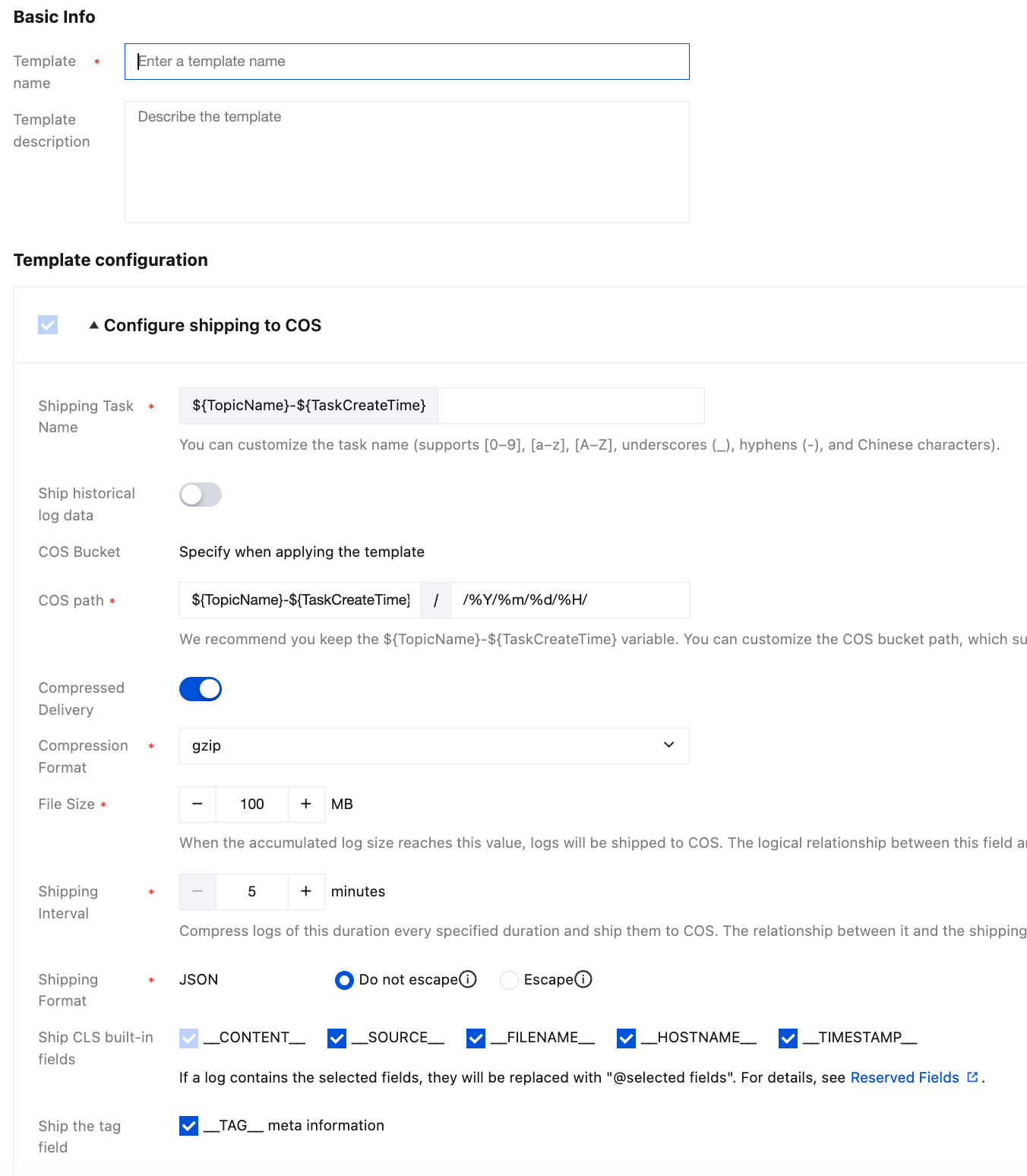
The configuration items are described as follows:
Configuration Item | Description | Rule | Required | |
Template name | | Name of the configuration template. | - | Required |
Template description | | Description of the template. | - | Optional |
Configure shipping to COS Preference | Shipping Task Name | The shipping task name is generated by concatenating ${TopicName}-${TaskCreateTime} by default. ${TopicName} refers to the log topic name, and ${TaskCreateTime} refers to the creation time of the COS delivery task. You can enter a custom suffix. | The total length of the shipping task name is 255 characters, of which ${TopicName} can be up to 200 characters. Any part exceeding 200 characters will be truncated. | - |
| Ship historical log data | Disabled: Only real-time data is delivered. Enabled: Deliver historical data. You can select the time range for log delivery. The backend automatically intersects with the lifecycle of the log topics to which the template is applied. For example: In the template, the shipping time range is from May 1 to ∞, while the retention period for log topic A is 30 days. For topic A: If the template is applied on May 15, the log time range for the COS delivery task is from May 1 to ∞. If the template is applied on June 1, the log time range for the COS delivery task is from May 2 to ∞. Note: After the template is submitted, the log delivery time range cannot be modified. | Select Time | Required |
| COS Bucket | Select when applying the template. | - | - |
| COS path | Default: ${TopicName}-${TaskCreateTime}/%Y/%m/%d/%H/
${TopicName} refers to the log topic name, ${TaskCreateTime} refers to the delivery task creation time, and /%Y/%m/%d/%H/ refers to /year/month/day/hour/. You can add custom characters to the default COS path, or delete the default path and use your custom path. | The path must not start with '/'. The total path length is 255 characters, of which ${TopicName} can be up to 200 characters. Any part exceeding 200 characters will be truncated. | Optional |
| Compressed Delivery | Whether data is shipped after compression. | Enabled by Default | Required |
| Compression Format | No compression, Snappy, lzop, gzip | No compression, Snappy, lzop, gzip | Required |
| File Size | The size of the raw log files to be shipped is used in conjunction with the shipping interval. Whichever condition is met first triggers the corresponding rule to compress the files and then ship them to COS. For example, if you configure 256 MB and 15 minutes, and the file size reaches 256 MB within 5 minutes, then the file size condition triggers the shipping task first. | Value range: 5–256; unit: MB. | Required |
| Shipping Interval | Specifies the interval at which a shipping task is triggered. It is used in conjunction with the shipping file size. Whichever condition is met first triggers the corresponding rule to compress the files and then ship them to COS. For example, if you configure 256 MB and 15 minutes, and the file size is only 200 MB at the 15-minute mark, then the interval time condition triggers the shipping task first. | Value range: 300–900; unit: s. | Required |
| Shipping Format | Note: When you choose not to escape, numeric values contained in the first-level nodes of the JSON are automatically converted to int or float after delivery. | - | Required |
| Ship CLS built-in fields | - | Required | |
| Ship the tag field | Whether to deliver __TAG__ fields. | - | Required |
4. Click OK to save the template. The template must be applied to a log topic to take effect. See Apply Template.
Help and Support
Was this page helpful?
You can also Contact sales or Submit a Ticket for help.
Help us improve! Rate your documentation experience in 5 mins.
Feedback