Synchronizing Logs Across Accounts via Kafka Data Subscription
Download
Focus Mode
Font Size
Overview
In some scenarios, we may need to migrate and synchronize logs between log topics across different accounts. This document will explain how to use the Kafka data subscription feature to synchronize logs from Log Topic a in Account A to Log Topic b in Account B.
Operation Steps
1. Log in to the CLS console, go to the Log Topic management page, find the Log Topic a that needs to be migrated or synchronized, and click the name of Log Topic a to enter the log topic details page.
2. On the log topic details page, select the Consumption over Kafka tab, as shown below:
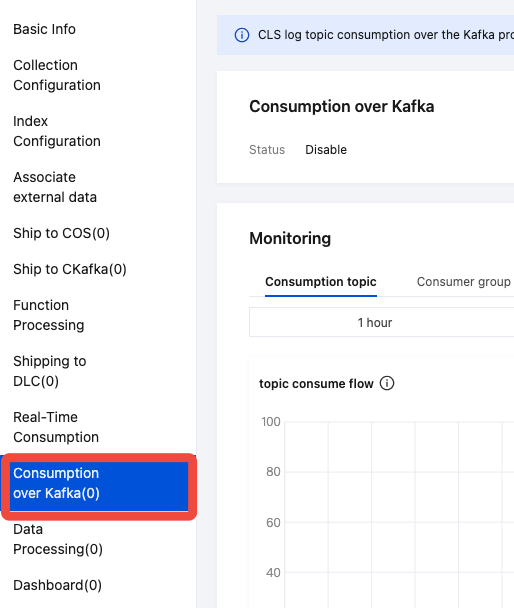
3. Enable the current status of Kafka protocol consumption.
4. Configure Kafka protocol consumption according to the image below.
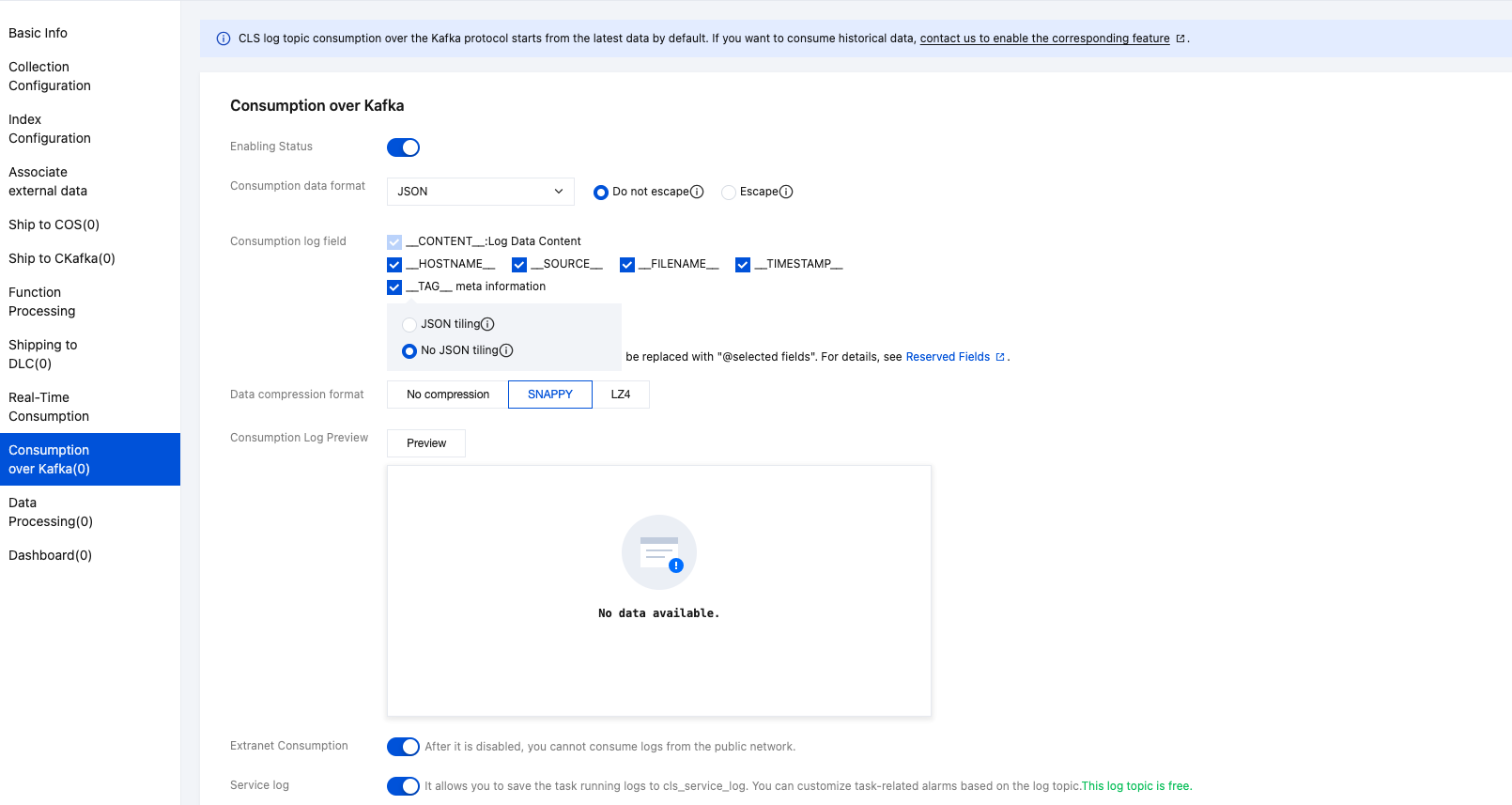
5. After completing the configuration, click OK. You will then see the log topic listed as the Kafka Topic ID and Kafka service domain name for the Kafka consumer. Make sure to record the Kafka Topic ID and Kafka service domain name.
Note:
If Log Topic a and Log Topic b are in different regions, record the public network domain name. If they are in the same region, it is recommended to record the private network domain name.
6. View the logset where Log Topic a is located and record the logset ID.
7. Go to API Token Management, view the key ID and key for Account A, and record them.
8. Log in to Account B, find the Log Topic b that needs to be migrated or synchronized, and click the name of Log Topic b to enter the log topic details page.
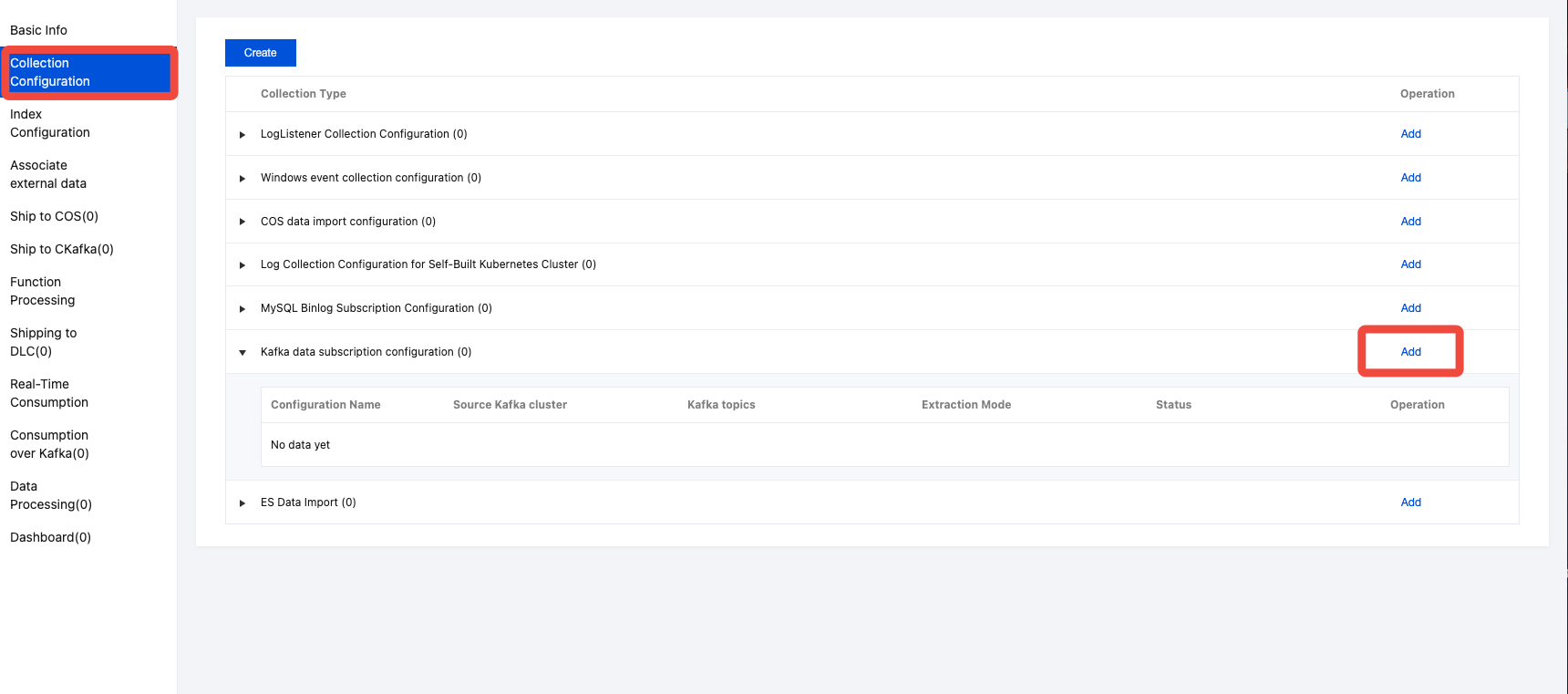
9. On the log topic details page, select Collection Configuration, and click Add on the right side of Kafka data subscription configuration, as shown below:
10. In the cluster configuration step, make the following configurations:
Kafka type: Self-built Kafka.
Service address: The Kafka service domain name of the Log Topic a consumer. If Log Topic a and Log Topic b are in different regions, use the public network domain name; if they are in the same region, it is recommended to use the private network domain name.
Protocol: sasl_plaintext.
Authentication mechanism: PLAIN.
Username: The logset ID of Log Topic a.
Password: Key ID of Account A# Key of Account A.
Kafka topics: The Kafka topic ID of the Log Topic a consumer.
Consumer group: Empty.
Starting position: Latest.
11. After completing the cluster configuration, you can click Preview to check if the logs from Log Topic a have been successfully consumed.
12. Click Next to configure the Subscription rule and Index Configuration as needed. For more details, see Configure Kafka Data Subscription Task.
13. After completing the creation of the Kafka data subscription task for Log Topic b, you can proceed with log Search and Analysis, Monitoring Alarm, Dashboard, Data Processing, and other features.
Help and Support
Was this page helpful?
You can also Contact sales or Submit a Ticket for help.
Help us improve! Rate your documentation experience in 5 mins.
Feedback