Which languages are supported by the GME voice message and speech-to-text conversion services?
More than 120 languages are supported, such as simplified and traditional Chinese, English, Japanese, and Korean. For more information, please see Language Parameter Reference List.
Can the voice message and speech-to-text conversion services of GME be used with voice chat?
Yes. You can call corresponding APIs to switch services.
After I upload a voice file successfully by calling the API for uploading voice files, a URL is returned as the fileid. How to use it?
Call the API for file downloading and download the file through this URL. Specifically, the fileid called back upon file upload completion needs to be sent to the server, and other clients can get the voice message through the fileid.
Can the voice message files be downloaded?
Yes. After a file is uploaded, a URL will be returned, through which the voice message file can be downloaded.
How long is the validity of a voice message file?
A voice message file will be retained on the server for 90 days. Then, the download URL to the file will become invalid. If you want to retain the file permanently, please store it on your own server.
Is there a time limit for voice message recording?
Yes. The duration of a voice message is limited to 1 to 58 seconds.
It takes too long to upload or download a voice message file. How to fix it?
If the delay in converting a voice message to text is too high, we recommend using the streaming recording API.
I have obtained the voice ID from the client, can the GME voice chat sound effect be played back in the HTML5 end?
The HTML5 end currently only has the voice chat feature.
Speech-to-text Conversion Failed
The error code 8200 is reported when I am using the voice message feature. How to fix it?
This error is caused by incorrect initialization of the voice message feature. We recommend checking whether the AppID and OpenId entered during initialization and authentication are correct.
The error code 4101 indicating an access failure occurs when I am finishing a recording. Do I need to create a folder first?
Yes. For security concerns, GME does not actively create a folder. Please create a folder first and make sure that the path is secure.
After I started recording, the error code 4098 occurred. How to fix it?
Please check the following for troubleshooting:
1. Whether the microphone of the computer is available.
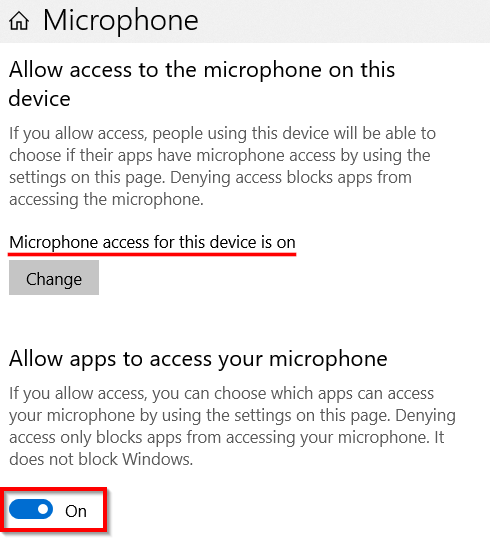
2. Whether the microphone is allowed to use.
Please see the example of the settings on Windows:
The initialization and authentication succeeded, but the error code 8194 occurred when I was uploading voice message files. How to fix it?
Please check whether the OpenId in initialization and the applyauthbuffer API are the same.
I have successfully uploaded a voice message, but why there is no callback information?
Please check whether you have periodically called the Poll function.