Viewing Deduction Details
Download
Focus Mode
Font Size
Overview
In the VOD console, you can view the deduction details of your packages, including the deduction types of transcoding packages and the usage of storage packages.
Viewing Deduction Details
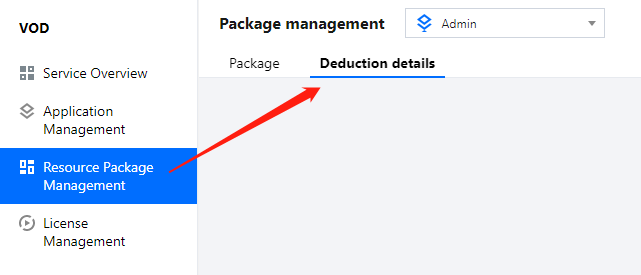
Log in to the VOD console, select Resource Package Management on the left sidebar, and click Deduction details.
Storage package
Under the Storage tab, you can view the deduction details of storage packages. The fields shown include package ID, package specifications, region, deduction type, deduction ratio (compared to Chinese mainland-STANDARD), actual usage, and deduction time. To learn more about the deduction rules, see Prepaid Packages.

Note:
About deduction: Usage inside and outside the Chinese mainland is deducted at a ratio of 1:1 and 1:1.2 respectively. Usage inside the Chinese mainland is deducted first.
Traffic package
Under the Traffic tab, you can view the deduction details of traffic packages. The fields shown include package ID, package specifications, region, deduction ratio (compared to Chinese mainland), actual usage, and deduction time. To learn more about the deduction rules, see Prepaid Packages.

General transcoding package
Under the General transcoding tab, you can view deduction details of general transcoding packages. The fields shown include package ID, package specifications, deduction type, deduction ratio (compared to general H.264 SD), actual usage (min), and deduction time. To learn more about the deduction rules, see Prepaid Packages.

Top Speed Codec (TSC) transcoding package
Under the TSC transcoding tab, you can view deduction details of TSC transcoding packages. The fields shown include package ID, package specifications, deduction type, deduction ratio (compared to TSC H.264 SD), actual usage (min), and deduction time. To learn more about the deduction rules, see Prepaid Packages.

Moderation package
Under the Moderation tab, you can view deduction details of moderation packages. The fields shown include package ID, package specifications, deduction type, actual usage (min), and deduction time. To learn more about the deduction rules, see Prepaid Packages.

Note:
Daily billing: If the bill for the current billing cycle hasn't been generated yet, this page will show your usage data for the previous cycle. For example, suppose your bill is generated at 15:00 on January 3. Before 15:00 on January 3, because the usage for January 2 has not been deducted yet, this page will show data as of January 1. After 15:00 on January 3, this page will show data as of January 2.
Monthly billing: If the bill for the current billing cycle hasn't been generated yet, this page will show your usage data for the previous cycle. For example, suppose your bill is generated at 15:00 on March 1. Before 15:00 on March 1, because the usage for February has not been deducted yet, this page will show data as of January. After 15:00 on March 1, this page will show data as of February.
Help and Support
Was this page helpful?
You can also Contact sales or Submit a Ticket for help.
Help us improve! Rate your documentation experience in 5 mins.
Feedback