tencent cloud

Video on Demand

Release Notes and Announcements
Release Notes
Announcements
Product Introduction
Overview
Product Features
Features
Strengths
Scenarios
Solutions
Professional Edition
Introduction to Video On Demand Professional Edition
Quick Start
Console Guide
Development Guide
Purchase Guide
Billing Overview
Billing Modes
Purchase Guide
Viewing Bills
Renewal
Overdue Policy
Refund Policy
Getting Started
Console Guide
Console Overview
Service Overview
Application Management
Media Management
Package Management
License Management
Real-Time Log Analysis
Practical Tutorial
Media Upload
Smart Cold Storage of VOD Media Asset Files
Video Processing
Distribution and Playback
How to Receive Event Notification
How to Migrate Files from Origin Server to VOD
Live Recording
How to Pull from Custom Origin Servers
How to Use EdgeOne to Distribute Content in VOD
Development Guide
Media Upload
Media Processing
Video AI
Event Notification
Video Playback
Media Encryption and Copyright Protection
Broadcast Channel
CAM
Media File Download
Subapplication System
Error Codes
Player SDK
Overview
Basic Concepts
Features
Free Demo
Free Trial License
Purchase Guide
SDK Download
Licenses
Player Guide
Integration (UI Included)
Integration (No UI)
Advanced Features
API Documentation
Player Adapter
Player SDK Policy
Server APIs
History
Introduction
API Category
Other APIs
Media Processing APIs
Parameter Template APIs
Task Management APIs
Media Upload APIs
Media Management APIs
Event Notification Relevant API
Media Categorization APIs
Domain Name Management APIs
Distribution APIs
AI-based Sample Management APIs
Region Management APIs
Data Statistics APIs
Carousel-Related APIs
Just In Time Transcode APIs
No longer recommended APIs
Making API Requests
AI-based image processing APIs
Task Flow APIs
Data Types
Error Codes
Video on Demand API 2024-07-18
FAQs
Mobile Playback
Fees
Video Upload
Video Publishing
Video Playback
Web Playback
Full Screen Playback
Statistics
Access Management
Cold Storage
Agreements
Service Level Agreement
VOD Policy
Privacy Policy
Data Processing And Security Agreement
Contact Us
Glossary

Video Publishing

PDF
Focus Mode
Font Size
Last updated: 2024-12-02 17:39:37

What are the definitions and resolutions of videos published in VOD?

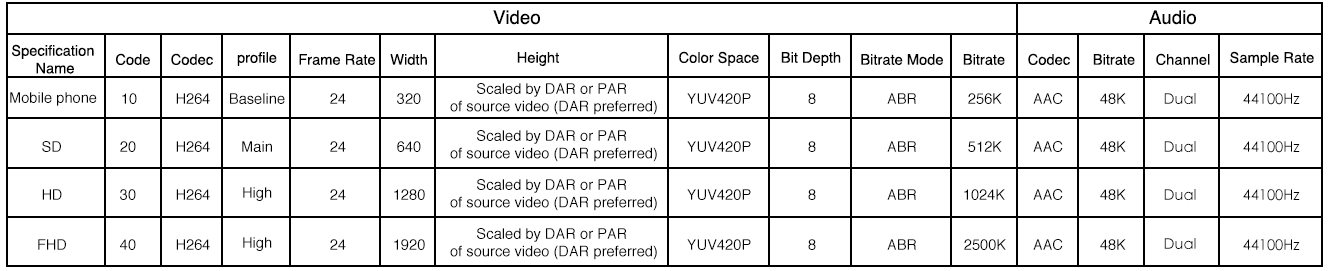
VOD provides a rich set of transcoding features for video release. In order to deliver a better viewing experience in different network environments, you can transcode and publish videos based on the following recommended definition categories:
LD (mobile): bitrate: 256 Kbps; resolution: around 320 * 240.
SD: bitrate: 512 Kbps; resolution: around 640 * 480.
HD: bitrate: 1,024 Kbps; resolution: around 1280 * 720.
FHD: bitrate: 2,500 Kbps; resolution: around 1920 * 1080.
The detailed specifications and technical parameters of output videos after transcoding are as follows:

Note:
Right-click and select Open image in new tab to view a high-definition image.
If the resolution of an uploaded video does not match the values above, the video will be transcoded to a resolution with a standard width in the corresponding category and a proportionally scaled height.
If the resolution of the uploaded video is lower than the set transcoding specification (for example, a video with a resolution of 640 * 480 is uploaded, but the transcoding is set to HD), the system will still transcode it according to the set format (i.e., HD here). However, as the video itself has a lower definition, the user experience may be poor and traffic and bandwidth will be consumed.

Can a video be transcoded from a low resolution to a high resolution? Can video quality be improved by transcoding?

VOD can transcode a video to a resolution higher than the original one, but the video quality will not be improved.

Does the video release effect vary by time and region?

No, theoretically. The VOD system is enabled for access from anywhere at any time. Please note that the viewing experience is greatly determined by the quality of the network from user device to video server and the device specifications. Therefore, during peak hours of network service, the experience may vary due to the change of network conditions or low device specifications.

If I modify the player configuration after releasing the "web player code", do I need to release the previously released HTML code again?

You do not need to generate the code again, because it is maintained and updated by the system automatically. After the player configuration is modified, the released player code will take effect immediately.

In "Media Assets", what is the difference between "Source File URL" and "Video with Web Player Code" displayed in "Video Release"?

The URL of a source file corresponds to a video file of a specific bitrate, which does not contain any player information itself and can be opened directly in a browser for playback.
The web player code corresponds to the code that can be edited on the web, including the Flash address, adaptive HTML code, IFRAME code, player settings information (such as definition, roll content, and sharable link). This code can be embedded in a user-edited webpage.

In "Web Player Management", what will happen if I delete a custom player?

As the custom player has been deleted, video files will be automatically associated with the current default player configuration, but the code that has already been released can continue to be used. If you need to make changes, please define the player and release the code again.

Why is an output video not as clear as the source video?

The definition of a video during playback depends on the following two aspects:
The definition provided by the VOD server after the video is transcoded and published.
The network environment where the user watches the video. Decrease in definition during video playback may be caused by two factors: one is that a low-definition instead of high-definition video is stored in VOD; the other is that the player may be adapted to a low definition for playback due to poor network connection.

What is blocklist/allowlist?

The blocklist/allowlist can be used to allow or deny the requests for accessing videos published through player code from particular webpages. These lists are effective to videos published through player code. You can enable this feature globally and specify a blocklist or an allow list. Each list can contain up to 10 URLs by checking the referer of access source. For more information on how to protect video file URLs, please see Hotlink Protection Overview.
Yes.

Can I add ads to videos published through an application player?

Adding ads is currently not supported. We will support this feature as soon as possible.

Help and Support

Was this page helpful?

Help us improve! Rate your documentation experience in 5 mins.

Feedback