Image Interception Policies
Download
Focus Mode
Font Size
Users can configure alarms and interception policies on the image interception policies page. The image interception policy allows you to intercept the startup of containers with images that have critical security issues in clusters of multiple clouds (precondition: node host has installed TCSS Agent), preventing malicious images from running container services.

After you create and activate an interception policy, it will take effect in about 3-5 minutes. Once it is activated, if a hit risk image attempts to start a container, the system will alarm or intercept the container startup and report the interception records, based on the configured policy's alarm and interception requirements.
Currently supported intercepted image types: Images with critical and high-risk vulnerabilities, Trojan viruses, and sensitive information risks, as well as images started in privileged mode.
Privileged image interception supports only one rule configured. To modify the range of intercepted images, you can edit the configured rule.
Viewing Policy Overview
After users have configured the alarm and interception policies, the system will count the total number of enabled policies, as well as the number of included effective interception policies and observation period policies.

Viewing Event Overview
Once the user configures the image startup interception policy and sets it to take immediate effect, attempts to start containers using targeted risky images will be intercepted in real-time, with the image startup actions reported and recorded. If the policy includes an observation period, during which only alarms are issued without interception, attempts to start containers using targeted risky images will trigger real-time reporting of the image startup actions. In both scenarios, event logs will be generated.
In the event overview, daily statistics will be provided for both image startup interception events and events where only alarms were triggered. Trend charts for both types of events over the past 7 days and the current total number of events will be displayed. Click View event details to navigate to Image Risk Management >Image Interception Events page to view details of the image interception events.
Creating a Policy
1. Log in to the TCSS console. In the left sidebar, choose Policy Management > Image Interception Policy.
2. On the image interception policy page, click Create Policy, configure the relevant parameters, and click OK.
Note
According to the set policy, the startup of containers on the node will be intercepted. Image interception may affect the business. Proceed with caution.
Create New Risk Image Interception Policy
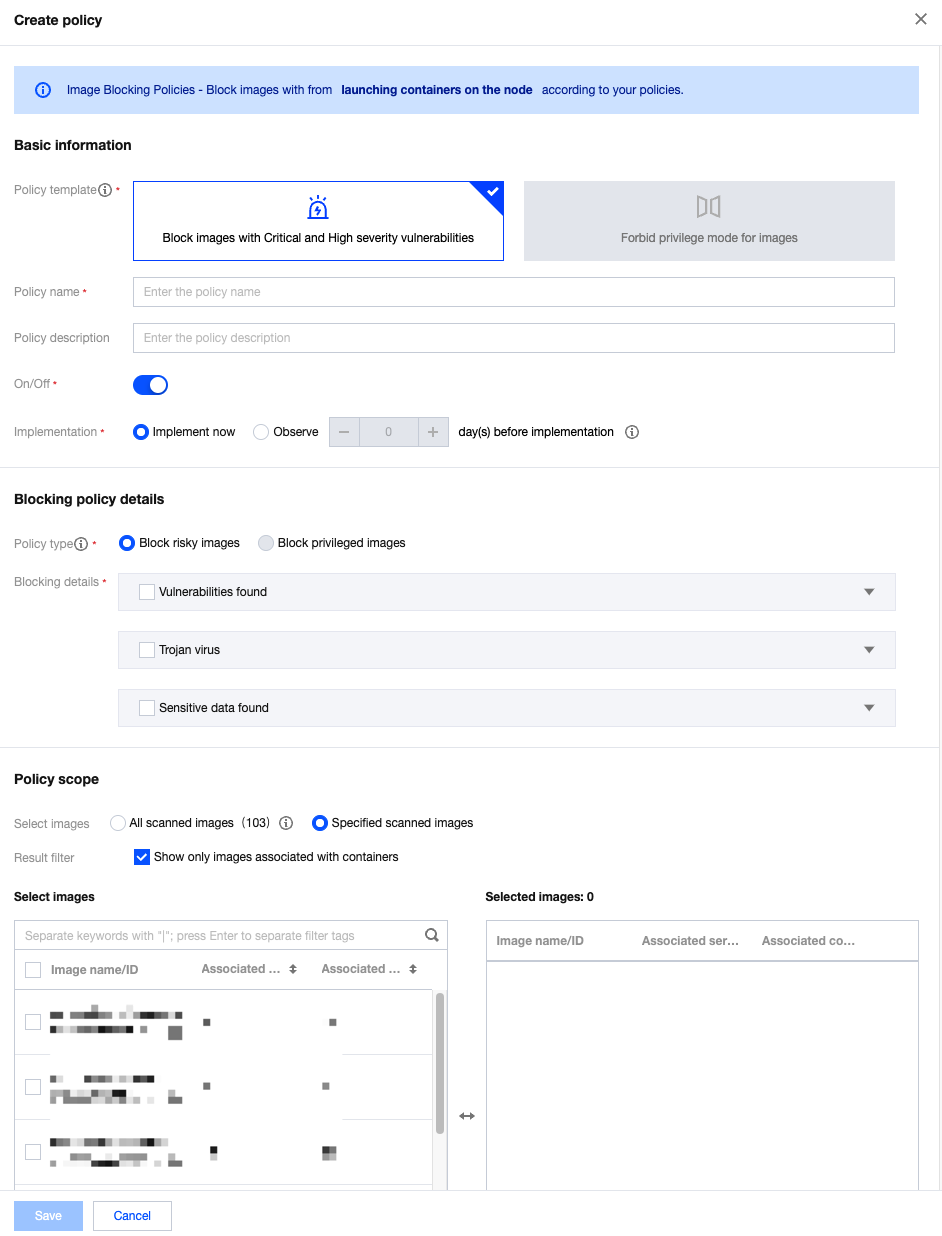
Parameter Category | Parameter Name | Parameter Details |
Basic Information | Policy Template | Required, select Intercept Images with Critical and High-Risk Vulnerabilities. |
| Policy Name | Required, up to 128 characters. |
| Policy Description | Optional, up to 256 characters. |
| Enable/Disable | Enable: Start intercepting images or the countdown for the observation period. Disable: Policy is not effective. |
| Implementation | Implement now: After the policy is issued, the intercepting action is executed immediately when the target image is hit. Observe n day(s) before implementation: During the observation period, only alarms are triggered without interception. The intercepting action is executed immediately after the observation period ends. |
Intercepting Policy Details | Policy Type | Select Intercept Images with Critical and High-Risk Vulnerabilities for the policy template and intercept risky images for the policy type. If you need to change the policy type, adjust the policy template. |
| Intercepting details | For the three categories, vulnerabilities found, Trojan virus, and sensitive data found, at least one of them must be configured. Vulnerabilities Found can be configured based on the CVE number, component name and version number, or vulnerability classification. Trojan Virus can be configured based on the file MD5 or Trojan virus type. Sensitive Data Found can be configured based on the threat level and type of sensitive data. |
Effective Range | Images Selection | When you configure risk image interception, the effective range of the policy must be for scanned images. The system cannot determine the presence of vulnerabilities, Trojan viruses, or sensitive data risks in unscanned images. |
Create an Interception Policy for Privileged Images
When you create an interception policy for privileged images , if a privileged image interception policy has already been created, a new one cannot be created. You need to edit or create policies for those already existed. If not created, you can click Create Policy to configure directly.
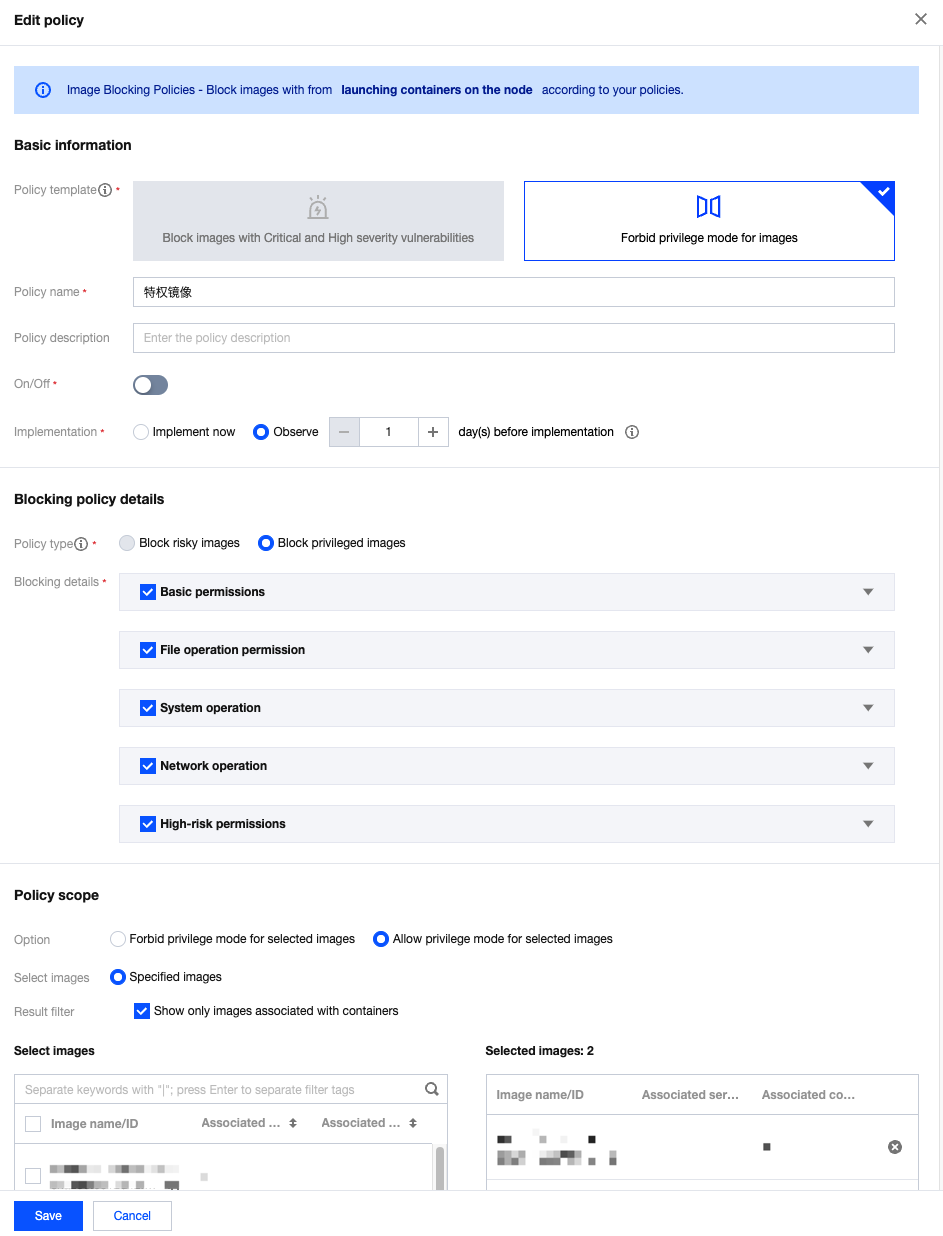
Parameter Category | Parameter Name | Parameter Details |
Basic Information | Policy Template | Required, select Intercept container images started in privileged mode. |
| Policy Name | Required, up to 128 characters. |
| Policy Description | Optional, up to 256 characters. |
| Enable/Disable | Enable: Start intercepting images or begin the countdown for the observation period. Disable: The policy is not effective. |
| Implementation | Implement now: After the policy is issued, the intercepting action is executed immediately when the target image is hit. Observe n day(s) before implementation: During the observation period, only alarms are triggered without interception. The intercepting action is executed immediately after the observation period ends. |
Intercepting Policy Details | Policy Type | Select Intercept container images started in privileged mode for the policy template and Privileged Image Interception for the policy type. If you need to change the policy type, adjust the policy template. |
| Intercepting Details | Users can check privileged startup parameters, defaulting to all. The system categorizes privileged parameters into five categories: base permissions, file operation permission, system operation, network operation, and high-risk permissions. Users can adjust categories or specific classifications within a category. |
Effective Range | Effective Method | When users configure the privileged image interception policy, the option for effective method includes "selected images are not allowed to run in privileged mode" or "only selected images are allowed to run in privileged mode (privileged startup of other images will be blocked)". |
| Images Selection | Users can select all images or custom images. |
Managing a Policy
View: On the image interception policy page, click image interception policy name to view the details of the interception policy.
Enable or Disable: Adjust the policy's effectiveness by toggling the button in the startup status column.
When it is enabled, start intercepting images or the countdown for the observation period.
When it is disabled, the policy is not effective.
Edit: Click Edit to adjust the policy's name, description, startup status, policy effectiveness status, interception policy details, and policy effective range. The policy template cannot be adjusted.
Help and Support
Was this page helpful?
You can also Contact sales or Submit a Ticket for help.
Help us improve! Rate your documentation experience in 5 mins.
Feedback