Self-Built Cluster
Download
Focus Mode
Font Size
This document describes how to access an external cluster for unified management and risk check.
Note:
Supports Kubernetes (K8s) cluster versions 1.13 and later.
Directions
1. Log in to the TCSS console and click Cluster Security > Security Check on the left sidebar.
2. On the Security Check page, click Access cluster.

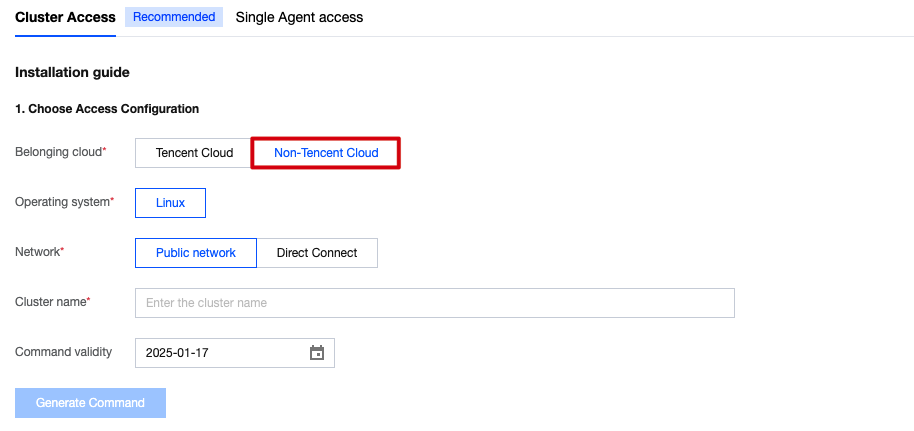
3. On the Cluster Access page, select the belonging cloud as Tencent Cloud or Non-Tencent Cloud .
Tencent Cloud: the CVM resources of a self-built cluster come from Tencent Cloud, follow the on-page prompts to select the recommended installation method and the cluster name.
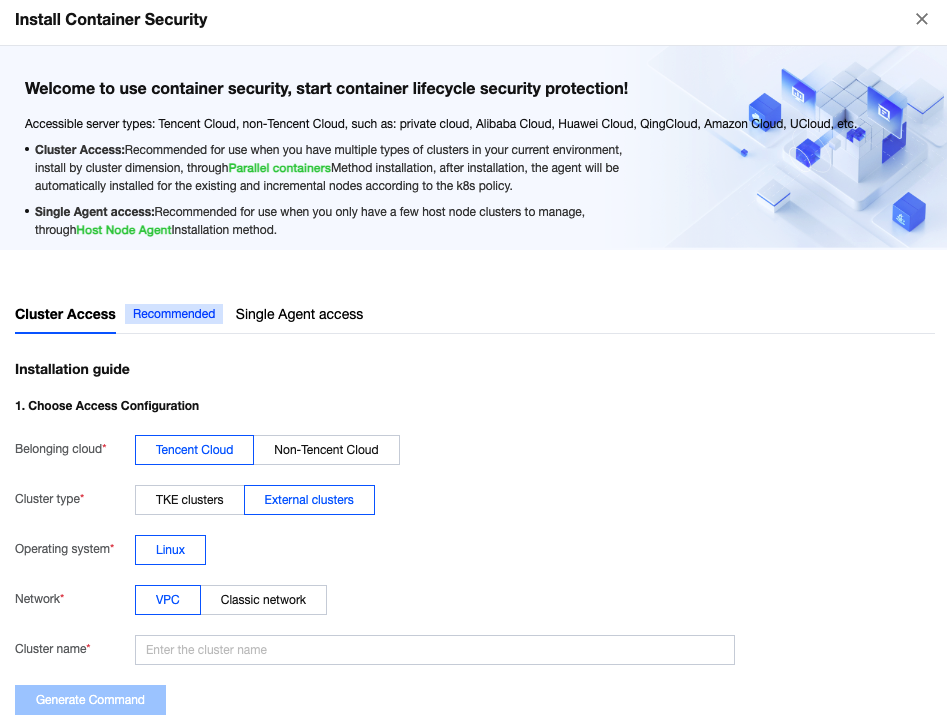
Non-Tencent Cloud: Select Non-Tencent Cloud, and follow the on-page prompts to configure the recommended scheme, cluster name, and command validity period.
Note:
The CVM resources of the connected cluster come from other clouds, including self-built clusters, standalone clusters, and managed clusters hosted by other clouds.
4. Click Generate Command , copy and execute the relevant commands. You can download or copy the YAML file content below and install it by the following two methods.
Note:
It is recommended that you generate a separate connection command for each cluster to avoid duplicate cluster names.
Method 1: Click Copy Command Link , then paste and execute the command on a machine capable of running k8s commands. Alternatively, you may first download the YAML file below, copy it to the machine, and execute
kubectl apply -f tcss.yaml .Method 2: Go to the TKE console - cluster details page, and use the Create Resources with YAML File option to copy the command content.
---apiVersion: v1kind: Namespacemetadata:name: tcss---apiVersion: rbac.authorization.k8s.io/v1kind: Rolemetadata:namespace: tcssname: tcss-adminrules:- apiGroups: ["extensions", "apps", ""]resources: ["*"]verbs: ["get", "list", "watch", "create", "update", "patch", "delete"]---apiVersion: rbac.authorization.k8s.io/v1kind: RoleBindingmetadata:name: tcss-admin-rbnamespace: tcsssubjects:- kind: ServiceAccountname: tcss-agentnamespace: tcssapiGroup: ""roleRef:kind: Rolename: tcss-adminapiGroup: rbac.authorization.k8s.io---apiVersion: v1kind: ServiceAccountmetadata:name: tcss-agentnamespace: tcss---apiVersion: rbac.authorization.k8s.io/v1kind: ClusterRolemetadata:name: security-clusterrolerules:- apiGroups: ["", "v1"]resources: ["namespaces", "pods", "nodes", "services", "serviceaccounts", "configmaps", "componentstatuses"]verbs: ["get", "list", "watch"]- apiGroups: ["apps","batch","extensions","rbac.authorization.k8s.io","networking.k8s.io","cilium.io"]resources: ["*"]verbs: ["get", "list","watch"]- apiGroups: ["networking.k8s.io"]resources: ["networkpolicies"]verbs: ["get", "list", "watch", "create", "update", "patch", "delete"]- apiGroups: ["apiextensions.k8s.io"]resources: ["customresourcedefinitions"]verbs: ["list", "get","create"]- apiGroups: ["apiextensions.k8s.io"]resourceNames: ["tracingpolicies.cilium.io", "tracingpoliciesnamespaced.cilium.io"]resources: ["customresourcedefinitions"]verbs: ["list", "get", "update"]---apiVersion: rbac.authorization.k8s.io/v1kind: ClusterRoleBindingmetadata:name: security-clusterrolebindingroleRef:apiGroup: rbac.authorization.k8s.iokind: ClusterRolename: security-clusterrolesubjects:- kind: ServiceAccountname: tcss-agentnamespace: tcss- kind: Username: tcssapiGroup: rbac.authorization.k8s.io---apiVersion: v1kind: Secretmetadata:name: tcss-agent-secretnamespace: tcssannotations:kubernetes.io/service-account.name: tcss-agenttype: kubernetes.io/service-account-token---apiVersion: batch/v1kind: Jobmetadata:name: init-tcss-agentnamespace: tcssspec:template:spec:serviceAccountName: tcss-agentcontainers:- image: ccr.ccs.tencentyun.com/yunjing_agent/agent:latestimagePullPolicy: Alwaysname: init-tcss-agentcommand: ["/home/work/yunjing-agent"]args: ["-token",'',"-vip",'','-cc']resources:limits:cpu: 100mmemory: 512Mirequests:cpu: 100mmemory: 128Mienv:- name: user_tagsvalue: "default"- name: k8s_namevalue: "11"- name: appidvalue: "1256299843"securityContext:privileged: truevolumeMounts:- mountPath: /run/secrets/kubernetes.io/tcss-agentname: token-projectionsecurityContext: {}hostPID: truerestartPolicy: Nevervolumes:- name: token-projectionsecret:secretName: tcss-agent-secretbackoffLimit: 5---apiVersion: apps/v1kind: DaemonSetmetadata:labels:k8s-app: yunjing-agentname: yunjing-agentnamespace: kube-systemannotations:config.kubernetes.io/depends-on: batch/v1/namespaces/tcss/jobs/init-tcss-secretsspec:selector:matchLabels:k8s-app: yunjing-agenttemplate:metadata:annotations:eks.tke.cloud.tencent.com/ds-injection: "true"labels:k8s-app: yunjing-agentspec:tolerations:- operator: Existscontainers:- image: ccr.ccs.tencentyun.com/yunjing_agent/agent:latestimagePullPolicy: Alwaysname: yunjing-agentcommand: ["/home/work/yunjing-agent"]args: ["-d","-token",'',"-vip",'']resources:limits:cpu: 250mmemory: 512Mirequests:cpu: 100mmemory: 128MisecurityContext:privileged: trueterminationMessagePath: /dev/termination-logterminationMessagePolicy: FilednsPolicy: ClusterFirstrestartPolicy: AlwaysschedulerName: default-schedulersecurityContext: {}terminationGracePeriodSeconds: 30hostNetwork: truehostPID: true---apiVersion: apps/v1kind: Deploymentmetadata:labels:k8s-app: tcss-assetname: tcss-assetnamespace: tcssspec:selector:matchLabels:k8s-app: tcss-assetreplicas: 1template:metadata:labels:k8s-app: tcss-assetannotations:eks.tke.cloud.tencent.com/ds-injection: "true"spec:serviceAccountName: tcss-agenttolerations:- operator: Existscontainers:- image: ccr.ccs.tencentyun.com/yunjing_agent/agent:latestimagePullPolicy: Alwaysname: tcss-assetcommand: ["/home/work/yunjing-agent"]args: ["-asset"]resources:limits:cpu: 100mmemory: 256Mirequests:cpu: 50mmemory: 64MisecurityContext:privileged: trueterminationMessagePath: /dev/termination-logterminationMessagePolicy: FilednsPolicy: ClusterFirstrestartPolicy: AlwaysschedulerName: default-schedulersecurityContext: {}terminationGracePeriodSeconds: 30hostPID: true
5. After installation, check if it is successful. Upon the cluster's connection, a namespace named tcss will be created within the cluster, along with the creation of the following workload resources. Ensure that the following three workloads are running properly:
Install a Job-type workload named init-tcss-agent under the tcss namespace.
Install a Deployment-type workload named tcss-asset under the tcss namespace.
Install a DaemonSet-type workload named yunjing-agent under the kube-system namespace.
5.1 Check if the Job workload is deployed successfully.
To check if the Job is created successfully, run the command:
kubectl get jobs -n tcss .
To check if the Job is deployed successfully, run the command:
kubectl get pods -n tcss | grep init-tcss-agent .
5.2 Check if the DaemonSet is deployed successfully.
To check if the DaemonSet is created successfully, run the command:
kubectl get daemonset -A -l k8s-app=yunjing-agent .
To check if the DaemonSet is deployed successfully, run the command:
kubectl get pods -A -l k8s-app=yunjing-agent .
5.3 Check if the Deployment workload is deployed successfully.
To check if the Deployment is created successfully, run the command:
kubectl get deployment -n tcss
To check if the Deployment is deployed successfully, run the command:
kubectl get pods -n tcss | grep tcss-asset
Help and Support
Was this page helpful?
You can also Contact sales or Submit a Ticket for help.
Help us improve! Rate your documentation experience in 5 mins.
Feedback