tencent cloud

Tencent Cloud Elastic Microservice

Release Notes and Announcements
Announcements
Release Notes
Product Introduction
Overview
Strengths
Scenarios
Purchase Guide
Billing Overview
Product Pricing
Overdue Policies
Getting Started
Step 1. Get the Access Permission
Step 2. Create an Environment
Step 3. Create an Application
Step 4. Deploy the Application
Operation Guide
Environment Management
Application Management
Permission Management
View Change Record
Practical Tutorial
Use of GitHub Actions in TEM
Hosting a Static Website
Public Network Access of TEM Applications
TEM Application Access to Public Network (Through API Gateway)
TEM Application Failure Troubleshooting Guide
Quick Access to TEM Application Through API Gateway
Java Application Fine-Tuning
Migration from Java 8 to Java 11
API Documentation
History
Introduction
API Category
Making API Requests
Environment APIs
ModifyIngress
Resource APIs
Application APIs
Service APIs
RollingUpdateApplicationByVersion
Access Policy APIs
Configuration file APIs
Log collecting APIs
Scaling Rule APIs
Application Version APIs
Other APIs
Workload APIs
Data Types
Error Codes
FAQs
TEM Configuration
Contact Us
Glossary
TEM Policy
Privacy Policy
Data Privacy and Security Agreement

Access Acquisition by Root Account

PDF
Focus Mode
Font Size
Last updated: 2024-01-09 12:00:35

Overview

As TEM needs to access APIs of other Tencent Cloud products, you need to create service roles and grant TEM those roles.

Preparation

Note:
After you register a Tencent Cloud account, the system will create a root account for you by default, which is used to quickly access Tencent Cloud resources.

Directions

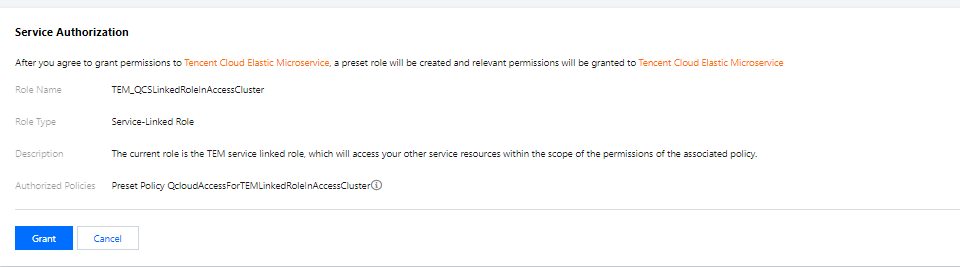
If you use TEM for the first time, you need to create the TEM_QCSLinkedRoleInAccessCluster and TEM_QCSLinkedRoleInTEMLog service roles as follows to grant you the permissions to access resources of other Tencent Cloud products.
1. Log in to the TEM console with the root account.


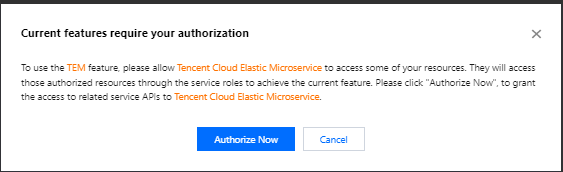
2. Click Authorize Now to enter the CAM console, click Grant, and the TEM_QCSLinkedRoleInAccessCluster service role will be created to grant you the permissions to access resources of Tencent Cloud products other than CLS.


3. Return to the TEM console and click Authorized.
4. On the left sidebar, click Application management. In the pop-up window, click Authorize Now to enter the CAM console, click Grant, and the TEM_QCSLinkedRoleInTEMLog service role will be created to grant you the permission to access CLS resources.
Help and Support

Was this page helpful?

Help us improve! Rate your documentation experience in 5 mins.

Feedback