World Model
ダウンロード
フォーカスモード
フォントサイズ
Feature Introduction
The Tencent Cloud Media Processing Service (MPS) AIGC aggregation platform provides 360° panoramic image and 3D scene generation capabilities.
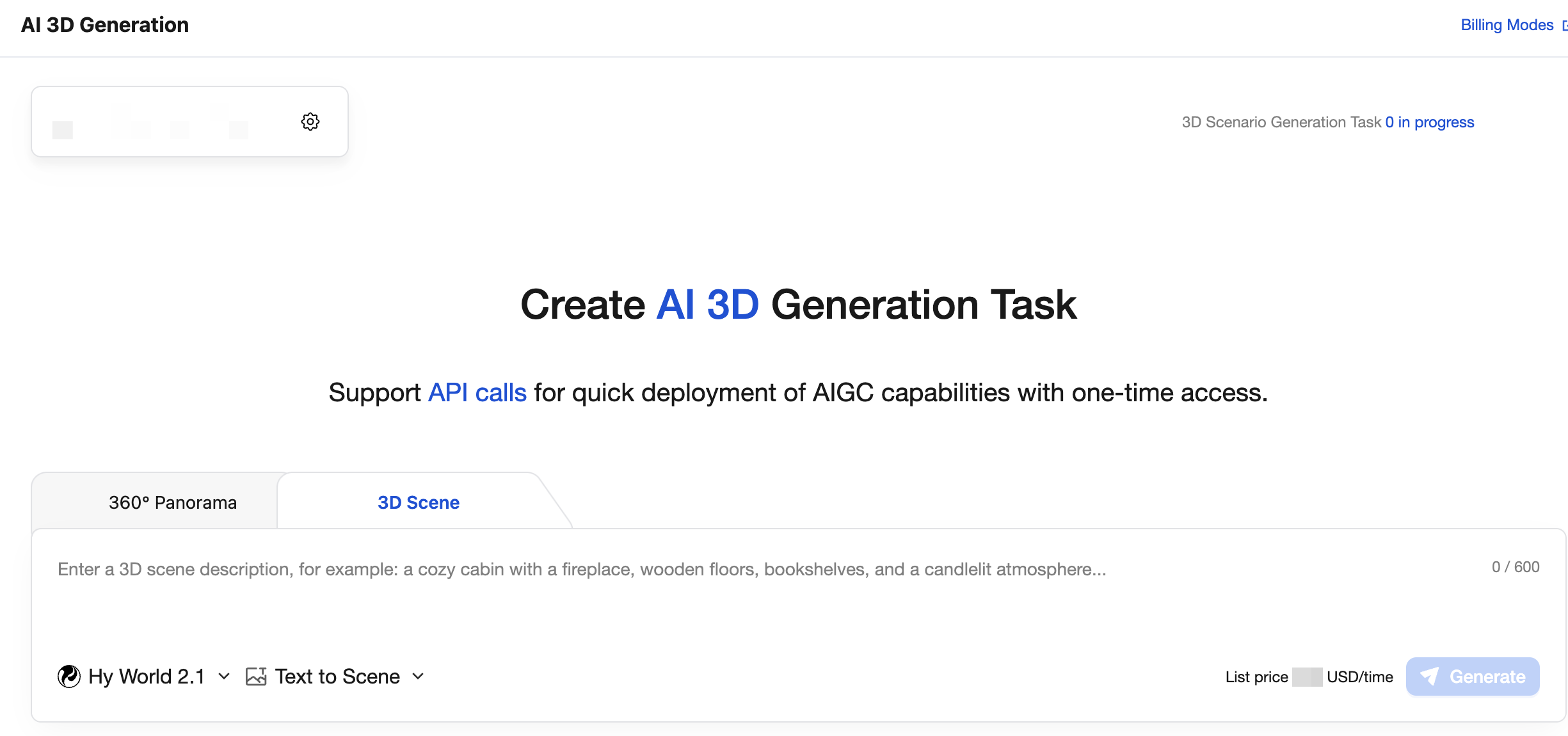
Usage
You can quickly experience the generation results of the World Model through the console. For details, see the Console Guide.
You can call different models and obtain generated results through the same set of APIs.
Billing Overview
When you call AI 3D generation through MPS, the duration of successfully generated task results is billed in seconds. For complete descriptions of billing rules for each type, see the pay-as-you-go documentation.
Prerequisites
1. Activating the Service
1. Log in to the Tencent Cloud MPS console and activate the MPS service by following the instructions.
2. Obtain the API key: Go to API Key Management to obtain the SecretId and SecretKey.
3. (Optional) To store generated results in COS, you also need to activate COS, create a bucket, and authorize the MPS_QcsRole role. For details, see the Account Authorization documentation.
2. Installing Dependencies
The code examples in this guide use axios as the HTTP client, but it is not required. You can choose any of the following methods to send HTTP requests based on your project needs.
Solution | Installation Required or Not | Applicable Scenarios |
axios (the default example in this document) | npm install axios | Existing projects are already using axios, or prefer its API style. |
Native fetch in Node.js | No installation required (built into Node.js 18 or later) | Zero dependencies, recommended for modern projects. |
Native https in Node.js | No installation required | Compatible with legacy Node.js versions (< 18). |
If you choose axios:
npm install axios
If you choose native fetch (Node.js 18 or later, zero dependencies), replace axios.post(...) in the code with the following:
// Replace the axios.post call// Original: const resp = await axios.post(`https://${MPS_HOST}`, payload, { headers });// return resp.data;// Change to:const resp = await fetch(`https://${MPS_HOST}`, {method: 'POST',headers: headers,body: JSON.stringify(payload)});return await resp.json();
Note:
The built-in
crypto module in Node.js can complete the signing without additional installation. The signing part has no external dependencies.3. Key Configuration
{"tencentCloud": {"secretId": "Your SecretId","secretKey": "Your SecretKey","region": "ap-guangzhou"}}
Attention:
Security warning: Never hardcode keys in your code or commit them to Git. Instead, use environment variables or a separate configuration file (add it to
.gitignore).API Overview
Function | API | Action | Feature Description | Request Rate Limit |
360° panoramic image | CreateAigcImageTask | Generate a panorama based on prompt or reference image. Select either one as the input; they cannot be used at the same time. | 20 requests/second | |
| DescribeAigcImageTask | Poll the generation progress and results of the panorama. | 20 requests/second | |
3D scene generation | CreateAigcVideoTask | Generate a 3D scene based on prompt or reference image. Select either one as the input; they cannot be used at the same time. | 10 requests/second | |
| DescribeAigcVideoTask | Poll the generation progress and results of the 3D scene. | 50 requests/second | |
Note:
General information:
Request domain: mps.intl.tencentcloudapi.com
Request method: POST (application/json)
API version: 2019-06-12
Signing method: TC3-HMAC-SHA256
Signature Mechanism (TC3-HMAC-SHA256)
TencentCloud API 3.0 uses TC3-HMAC-SHA256 signature authentication. The signing process is as follows:
1. Construct the canonical request (CanonicalRequest): concatenate the HTTP request method, URI, query string, Headers, and Payload Hash.
2. Construct the string to sign (StringToSign): concatenate the algorithm, timestamp, CredentialScope, and CanonicalRequest Hash.
3. Calculate the Signature: Derive the signing key by performing HMAC layer by layer with the SecretKey, and then sign the StringToSign.
4. Construct the Authorization Header: assemble the final authorization header.
Must-Knows
1. Generated results are stored for only 12 hours.
URLs of images and videos are valid for only 12 hours. Download them promptly after generation or transfer them to your own COS/server.
2. Rate limits
360° panorama / 3D scene creation: 1 concurrent request
360° panorama / 3D scene query: 20 requests/second
Implement concurrency control and request queues to avoid triggering rate limits.
3. Image Input Requirements
The minimum resolution requirement is 512×512, and the file size must not exceed 10M.
Supported formats: JPG, JPEG, PNG, WEBP.
Image URLs must be accessible from the public network.
4. Prompt Length Limit
Character limit: no more than 600 characters
5. COS Storage
Use StoreCosParam to store results directly in a specified COS bucket. You need to:
Enable the COS service.
Create a bucket.
Grant the MPS_QcsRole role access to this bucket.
Core Code Implementation
1. Signature Tool (tencent-sign.js)
/*** TencentCloud API Signature Tool (TC3-HMAC-SHA256)*/const crypto = require('crypto');function sha256(message) {return crypto.createHash('sha256').update(message).digest('hex');}function hmac256(key, message) {return crypto.createHmac('sha256', key).update(message).digest();}/*** Generate a TencentCloud API V3 signature.* @param {string} secretId - TencentCloud SecretId* @param {string} secretKey - TencentCloud SecretKey* @param {string} service - Service name, for example, 'mps'* @param {string} action - API name, for example, 'CreateAigcVideoTask'* @param {string} payload - Request body in JSON string format* @param {string} region - Region, for example, 'ap-guangzhou'* @param {string} [version] - API version number, default '2019-06-12'* @returns {{ headers: object }} - Request headers with the complete signature.*/function signRequest(secretId, secretKey, service, action, payload, region, version) {const timestamp = Math.floor(Date.now() / 1000);const date = new Date(timestamp * 1000).toISOString().split('T')[0];// ===== Step 1: Concatenate the canonical request string =====const httpRequestMethod = 'POST';const canonicalUri = '/';const canonicalQueryString = '';const contentType = 'application/json';const canonicalHeaders =`content-type:${contentType}\\n` +`host:${service}.tencentcloudapi.com\\n` +`x-tc-action:${action.toLowerCase()}\\n`;const signedHeaders = 'content-type;host;x-tc-action';const hashedRequestPayload = sha256(payload);const canonicalRequest =`${httpRequestMethod}\\n${canonicalUri}\\n${canonicalQueryString}\\n` +`${canonicalHeaders}\\n${signedHeaders}\\n${hashedRequestPayload}`;// ===== Step 2: Concatenate the string to sign =====const algorithm = 'TC3-HMAC-SHA256';const credentialScope = `${date}/${service}/tc3_request`;const hashedCanonicalRequest = sha256(canonicalRequest);const stringToSign =`${algorithm}\\n${timestamp}\\n${credentialScope}\\n${hashedCanonicalRequest}`;// ===== Step 3: Calculate the signature =====const secretDate = hmac256(`TC3${secretKey}`, date);const secretService = hmac256(secretDate, service);const secretSigning = hmac256(secretService, 'tc3_request');const signature = crypto.createHmac('sha256', secretSigning).update(stringToSign).digest('hex');// ===== Step 4: Concatenate the Authorization header =====const authorization =`${algorithm} Credential=${secretId}/${credentialScope}, ` +`SignedHeaders=${signedHeaders}, Signature=${signature}`;return {headers: {'Authorization': authorization,'Content-Type': contentType,'Host': `${service}.tencentcloudapi.com`,'X-TC-Action': action,'X-TC-Timestamp': String(timestamp),'X-TC-Version': version || '2019-06-12','X-TC-Region': region || ''}};}module.exports = { signRequest };
2. MPS API Wrapper (mps-api.js)
const axios = require('axios');const { signRequest } = require('./tencent-sign');const MPS_HOST = 'mps.intl.tencentcloudapi.com';const SERVICE = 'mps';/*** Generic MPS API call function*/async function callMpsApi(action, params, config) {const payload = JSON.stringify(params);const { headers } = signRequest(config.tencentCloud.secretId,config.tencentCloud.secretKey,SERVICE,action,payload,config.tencentCloud.region);const resp = await axios.post(`https://${MPS_HOST}`, payload, { headers });return resp.data;}// =============================================// Hunyuan panoramic image (360°, ModelVersion=3d-world-panorama-2.0)// =============================================/*** Create a Hunyuan panoramic image task* @param {string} prompt - Panoramic description (up to 600 characters)* @param {string} imageUrl - Reference image URL (optional, used for image-to-panorama generation)* @param {object} options - Additional options* @param {string} options.modelName - Model name, default: 'Hunyuan'* @param {string} options.modelVersion - Model version, default: '3d-world-panorama-2.0'* @param {object} options.storeCos - COS storage parameters* @returns {{ Response: { TaskId: string, RequestId: string } }}*/async function createPanoramaTask(prompt, imageUrl, options = {}) {const config = options._config; // Pass in the configuration objectconst params = {ModelName: options.modelName || 'Hunyuan',ModelVersion: options.modelVersion || '3d-world-panorama-2.0',Prompt: prompt,Operator: options.operator || 'admin'};// Reference image (image-to-panorama)if (imageUrl) {params.ImageUrl = imageUrl;}// COS Storageif (options.storeCos) {params.StoreCosParam = options.storeCos;}return await callMpsApi('CreateAigcImageTask', params, config);}// =============================================// Hunyuan 3D World (ModelVersion=3d-world-scene-2.0)// =============================================/*** Create a Hunyuan 3D World task (text-to-3D / image-to-3D, or real-scene 3D reconstruction)* @param {string} prompt - Scene description (up to 600 characters)* @param {string} imageUrl - Reference image URL (optional, used for image-to-3D generation)* @param {object} options - Additional options* @param {string} options.modelName - Model name, default: 'Hunyuan'* @param {string} options.modelVersion - Model version, default: '3d-world-scene-2.0'* @param {object} options.storeCos - COS storage parameters* @returns {{ Response: { TaskId: string, RequestId: string } }}*/async function createWorldTask(prompt, imageUrl, options = {}) {const config = options._config; // Pass in the configuration objectconst params = {ModelName: options.modelName || 'Hunyuan',ModelVersion: options.modelVersion || '3d-world-scene-2.0',Prompt: prompt,Operator: options.operator || 'admin'};// Reference image (image-to-3D / real-scene reconstruction)if (imageUrl) {params.ImageUrl = imageUrl;}// COS Storageif (options.storeCos) {params.StoreCosParam = options.storeCos;}return await callMpsApi('CreateAigcVideoTask', params, config);}/*** Query a Hunyuan panoramic image task* @param {string} taskId - TaskId returned during task creation, in the format '4-AigcImage-xxx'* @param {object} config - Configuration object* @returns {{ Response: { Status: string, ImageUrl: string[], Message: string, RequestId: string } }}* Status: 'WAIT' | 'RUN' | 'DONE' | 'FAIL'* ImageUrl: A list of panoramic image URLs returned when the task is completed (⚠️ stored for only 12 hours)*/async function describeImageTask(taskId, config) {return await callMpsApi('DescribeAigcImageTask', { TaskId: taskId }, config);}/*** Query a Hunyuan 3D world task* @param {string} taskId - TaskId returned during task creation, in the format '4-AigcImage-xxx'* @param {object} config - Configuration object* @returns {{ Response: { Status: string, Message: string, RequestId: string,* image_url: string, scene_url: string, point_url: string,* mesh_url: string, mesh_simplified_url: string, position_info: string } }}* Status: 'WAIT' | 'RUN' | 'DONE' | 'FAIL'* Returned when the task is completed (DONE):* scene_url - 3DGS scene file URL* mesh_url - Mesh file URL (GLB/FBX/OBJ)* mesh_simplified_url - Simplified Mesh URL* point_url - Point cloud file URL (PLY)* image_url - Preview image URL* position_info - Position/bounding box information as a JSON string (up_direction, facing_direction, center_point, scale, x/y/z_min/max)* ⚠️ The above result URLs are stored for only 12 hours.*/async function describeSceneTask(taskId, config) {return await callMpsApi('DescribeAigcImageTask', { TaskId: taskId }, config);}module.exports = {callMpsApi,createPanoramaTask,createWorldTask,describeImageTask,describeSceneTask};
Complete Usage Process
1. Generating a Panorama (360° Text-to-Panorama)
async function generatePanorama() {// Step 1: Create a panoramic image generation taskconsole.log('🌏 Creating panoramic image generation task...');const createResult = await callMpsApi('CreateAigcImageTask', {ModelName: 'Hunyuan',ModelVersion: '3d-world-panorama-2.0',Prompt: 'a 360 panorama of a fantasy castle on a cliff',Operator: 'admin'});const taskId = createResult.Response.TaskId;console.log(`✅ Task created successfully, TaskId: ${taskId}`);// Step 2: Poll for task statuslet status = 'WAIT';let imageUrls = [];while (status === 'WAIT' || status === 'RUN') {await new Promise(resolve => setTimeout(resolve, 5000));const queryResult = await callMpsApi('DescribeAigcImageTask', {TaskId: taskId});status = queryResult.Response.Status;console.log(`⏳ Task status: ${status}`);if (status === 'DONE') {imageUrls = queryResult.Response.ImageUrls;console.log('🎉 Panoramic image generated successfully!');console.log(`🖼️ Panoramic image URL: ${imageUrls}`);} else if (status === 'FAIL') {console.error('❌ Generation failed:');}}return imageUrls;}generatePanorama().catch(console.error);
2. Generating a 3D Scene (Image-to-3D Scene)
async function generateWorld() {// Step 1: Create a 3D scene generation task (using an image as a reference for image-to-3D scene generation)console.log('🌍 Creating 3D world generation task...');const createResult = await callMpsApi('CreateAigcVideoTask', {ModelName: 'Hunyuan',ModelVersion: '3d-world-scene-2.0',Prompt: 'generate a walkable 3D world from this image',ImageUrl: 'https://example.com/scene.png', // Reference image (image-to-3D)Operator: 'admin'});const taskId = createResult.Response.TaskId;console.log(`✅ Task created successfully, TaskId: ${taskId}`);// Step 2: Poll for task statuslet status = 'WAIT';let videoUrls = [];while (status === 'WAIT' || status === 'RUN') {await new Promise(resolve => setTimeout(resolve, 5000));const queryResult = await callMpsApi('DescribeAigcVideoTask', {TaskId: taskId});status = queryResult.Response.Status;console.log(`⏳ Task status: ${status}`);if (status === 'DONE') {videoUrls = queryResult.Response.VideoUrls;const resolution = queryResult.Response.Resolution;console.log('🎉 3D scene generated successfully!');console.log(`📹 Result URL: ${videoUrls}`);console.log(`📐 Resolution: ${resolution}`);} else if (status === 'FAIL') {console.error('❌ Generation failed:');}}return videoUrls;}generateWorld().catch(console.error);
3. Production-Level Usage with Task Queues
In real-world projects, implement a task queue to control concurrency and avoid exceeding API rate limits:
/*** Polling function with retries and timeouts (both panorama and 3D scene tasks are queried through DescribeAigcImageTask)* @param {string} taskId - Task ID* @param {number} timeout - Timeout in milliseconds, defaulting to 30 minutes* @param {number} interval - Polling interval in milliseconds, defaulting to 5000*/async function pollTaskResult(taskId, timeout = 1800000, interval = 5000) {const startTime = Date.now();while (Date.now() - startTime < timeout) {const result = await callMpsApi('DescribeAigcImageTask', { TaskId: taskId });const resp = result.Response;if (resp.Status === 'DONE') {// Panorama: resp.ImageUrl; 3D scene: resp.scene_url / mesh_url / point_url, etc.return { success: true, response: resp };}if (resp.Status === 'FAIL') {return {success: false,error: resp.Message || 'Task failed'};}// WAIT or RUN, continue waitingawait new Promise(resolve => setTimeout(resolve, interval));}return { success: false, error: 'Polling timed out' };}// Usage exampleasync function main() {// Create a panoramic image task (360°)const panoTask = await callMpsApi('CreateAigcImageTask', {ModelName: 'Hunyuan',ModelVersion: '3d-world-panorama-2.0',Prompt: 'a 360 panorama of a fantasy castle on a cliff',Operator: 'admin'});const panoResult = await pollTaskResult(panoTask.Response.TaskId);if (panoResult.success) {console.log('Panorama:', panoResult.response.ImageUrl[0]);// Continue generating a walkable 3D scene using the panorama as a reference image.const worldTask = await callMpsApi('CreateAigcVideoTask', {ModelName: 'Hunyuan',ModelVersion: '3d-world-scene-2.0',Prompt: 'generate a walkable 3D world from this image',ImageUrl: panoResult.response.ImageUrl[0],Operator: 'admin'});const worldResult = await pollTaskResult(worldTask.Response.TaskId);if (worldResult.success) {const resp = worldResult.response;console.log('3DGS scene:', resp.scene_url);console.log('Mesh:', resp.mesh_url);console.log('Simplified Mesh:', resp.mesh_simplified_url);console.log('Point cloud PLY:', resp.point_url);}}}main().catch(console.error);
Configuration File Reference
The following is a complete configuration example that covers all configurable options for image and video generation:
{"tencentCloud": {"secretId": "Your SecretId","secretKey": "Your SecretKey","region": "ap-guangzhou"},"cosOutput": {"bucket": "your-bucket-name-1234567890","region": "ap-guangzhou","outputDir": "/aigc-output/"},"mps": {"panorama": {"enabled": true,"modelName": "Hunyuan","modelVersion": "3d-world-panorama-2.0"},"world3d": {"enabled": true,"modelName": "Hunyuan","modelVersion": "3d-world-scene-2.0"}},"concurrency": {"maxPanoramaTasks": 2,"maxWorldTasks": 1,"pollIntervalMs": 5000}}
FAQs
Why Does Task Creation Fail with InvalidParameter.ViolationContent?
The prompt content triggered a content moderation block. Check whether the prompt contains prohibited content.
Why Does Task Creation Fail with AuthFailure?
Signature verification failed. Check the following:
Check whether the SecretId / SecretKey are correct.
Whether the timestamp is accurate (the local time must be synchronized with the server time).
Whether the signature algorithm is implemented correctly.
Why Does Polling Keep Returning the WAIT/RUN Status?
Panorama generation typically takes 3 to 5 minutes, while 3D scene generation takes longer (20 to 30 minutes depending on scene complexity). We recommend that you set a reasonable timeout period, such as 30 minutes.
What Output Formats Does the World Model Support?
Output formats: 3DGS, Mesh (GLB/FBX/OBJ), PLY, and panoramic video. Native support for Unity / Unreal Engine is provided.
Appendix: HTTP Raw Request Examples
If you use other languages (Python / Go / Java, and so on), refer to the following HTTP raw request format:
Creating a Panorama Generation Task
Input example
curl -X POST https://mps.tencentcloudapi.com \\-H "Content-Type: application/json" \\-H "X-TC-Action: CreateAigcImageTask" \\-H "X-TC-Version: 2019-06-12" \\-H "X-TC-Region: ap-guangzhou" \\-H "Authorization: TC3-HMAC-SHA256 Credential=AKIDxxx/2026-07-22/mps/tc3_request, SignedHeaders=content-type;host, Signature=xxx" \\-d '{"ModelName": "Hunyuan","ModelVersion": "3d-world-panorama-2.0","Prompt": "a 360 panorama of a fantasy castle on a cliff","Operator": "admin"}'
Output example
{"Response": {"RequestId": "1047d0dc-6dc8-4898-a7f3-03726a822b0e","TaskId": "4-AigcImage-c3b145ec76****94ac55b9e63be17d"}}
Querying Panorama Generation Tasks
Input example
POST / HTTP/1.1Host: mps.tencentcloudapi.comContent-Type: application/jsonX-TC-Action: DescribeAigcImageTaskX-TC-Version: 2019-06-12{"TaskId": "4-AigcImage-c3b145ec76xxxx94ac55b9e63be17d"}
Output example
{"Response": {"ImageUrls": ["https://1a168d6xxxx-100xxxx3.cos.ap-chongqing.myqcloud.com/1a168d62vodcq2510xxxx0/89e6a7645001834816711593827/aigcImageGenFile.png"],"Message": "ok","ModelVersion": "3d-world-panorama-2.0","RequestId": "1562526381312631916","Status": "DONE"}}
Creating a 3D Scene Generation Task
Input example
curl -X POST https://mps.tencentcloudapi.com \\-H "Content-Type: application/json" \\-H "X-TC-Action: CreateAigcVideoTask" \\-H "X-TC-Version: 2019-06-12" \\-H "X-TC-Region: ap-guangzhou" \\-H "Authorization: TC3-HMAC-SHA256 Credential=AKIDxxx/2026-07-22/mps/tc3_request, SignedHeaders=content-type;host, Signature=xxx" \\-d '{"ModelName": "Hunyuan","ModelVersion": "3d-world-scene-2.0","Prompt": "generate a walkable 3D world from this image","ImageUrl": "https://example.com/scene.png","Operator": "admin"}'
Output example
{"Response": {"RequestId": "1047d0dc-6dc8-4898-a7f3-03726a822b0e","TaskId": "4-AigcVideo-c3b145ec76****94ac55b9e63be17d"}}
Querying 3D Scene Generation Tasks
Input example
POST / HTTP/1.1Host: mps.tencentcloudapi.comContent-Type: application/jsonX-TC-Action: DescribeAigcVideoTaskX-TC-Version: 2019-06-12{"TaskId": "4-AigcVideo-c3b145ec76xxxx94ac55b9e63be17d"}
Output example
{"Response": {"ErrCode": "","InfoList": [{"Info": "https://xxx-100xxxx3.cos.ap-chongqing.myqcloud.com/1a168d62vodcq2510xxxx0/7a5646c35001834816721727529/aigcVideoGenFile.spz","Type": "scene_url"},{"Info": "https://xx-100xxxx3.cos.ap-chongqing.myqcloud.com/1a168d62vodcq2510xxxx0/7a5646c35001834816721727529/aigcVideoGenFile_1.ply","Type": "point_url"},{"Info": "https://xxx-100xxxx3.cos.ap-chongqing.myqcloud.com/1a168d62vodcq2510xxxx0/7a5646c35001834816721727529/aigcVideoGenFile_2.ply","Type": "mesh_url"},{"Info": "https://xxx-100xxxx3.cos.ap-chongqing.myqcloud.com/1a168d62vodcq2510xxxx0/7a5646c35001834816721727529/aigcVideoGenFile_3.ply","Type": "mesh_simplified_url"},{"Info": "{\\"up_direction\\": [-0.02079851923949021, 0.2613014462384399, 0.9650331475090088], \\"facing_direction\\": [-0.626063846931178, 0.7491595220706289, -0.21634248324506605], \\"center_point\\": [1.782250738281545, -1.9750670645362651, 1.0067128278740172], \\"scale\\": 11.956174528691873, \\"x_min\\": -13.44873332977295, \\"x_max\\": 16.499736785888672, \\"y_min\\": -10.109375953674316, \\"y_max\\": 10.426920890808105, \\"z_min\\": -7.725327491760254, \\"z_max\\": 9.579703330993652, \\"scene_type\\": \\"indoor\\", \\"bbox\\": [], \\"human_scale\\": 1.0, \\"kwargs\\": {\\"camera_obb\\": [1.6270229082336667, -1.8028265092799098, 1.6301805654329842, 7.386863719037379, 4.968907858993009, 1.6818647610009452]}, \\"air_wall\\": {\\"scene_type\\": \\"indoor\\", \\"bbox\\": [-13.44873332977295, 16.499736785888672, -10.109375953674316, 10.426920890808105, -7.725327491760254, 9.579703330993652, 1.6270229082336667, -1.8028265092799098, 1.6301805654329842, 7.386863719037379, 4.968907858993009, 1.6818647610009452]}}","Type": "position_info"},{"Info": "https://xxx-100xxxx3.cos.ap-chongqing.myqcloud.com/1a168d62vodcq2510xxxx0/7a5646c35001834816721727529/aigcVideoGenFile_5.png","Type": "image_url"}],"Message": "ok","RequestId": "1561810987380319545","Resolution": "","Status": "DONE","VideoUrls": []}}
フィードバック