tencent cloud

Media Processing Service

Release Notes and Announcements
Release Notes
Announcements
Product Introduction
Overview
Features
Strengths
Use Cases
Purchase Guide
Billing Overview
Purchase Instructions
Top Up and Purchase
Overdue Payments
Refund
Getting Started
Console Guide
Overview
Creating Tasks
Tasks
Orchestrations
Templates
Resource Packs
Video Evaluation
AIGC Content Generation
Terminal SDK
Subtitle Editing Tool
Usage Statistics
Cloud Access Management Sample
Integration Tutorials
Audio/Video Transcoding Integration
Audio/Video Enhancement Integration
Audio Separation Integration
Integration of Digital and Visible Watermarks
Media AI Integration Tutorial
Media Quality Inspection Integration
Terminal SDK integration
MPS Live Stream Recording integration
DRM integration
Other tutorials
Application Scenario and Practical Tutorial
Image Quality Improvement Scenario
Audio/Video Cost Optimization Scenario
Short Drama Translation Scenario
AI-Generated Content Scenario
Online Education Scenarios
API Documentation
History
Introduction
API Category
Making API Requests
Processing Task Initiation APIs
Task Management APIs
Transcoding and Enhancement Template APIs
Watermark Template APIs
Screenshot Template APIs
Media AI Template APIs
Media AI—Hotword Lexicon APIs
Media AI—Sample Management APIs
Media Quality Inspection Template APIs
Live Streaming Recording Template APIs
Orchestration Management APIs
Data Statistics APIs
StreamLink—Security Group Management APIs
Other APIs
Image Processing Template APIs
AI Generation APIs
Other APIs
Data Types
Error Codes
Other Documents
WebSocket Protocol for Recognition
FAQs
Basics
Account Authorization
Task Configuration
Task Initiation
Task Result Viewing
Related Agreement
Service Level Agreement
Privacy Policy
Data Processing And Security Agreement
Contact Us
Glossary

Top Up and Purchase

PDF
Focus Mode
Font Size
Last updated: 2025-08-19 17:41:35

Daily Pay-As-You-Go

If you use the daily pay-as-you-go billing mode, fees are charged based on your actual usage of MPS features. Please pay attention to your account balance and top up in a timely manner.
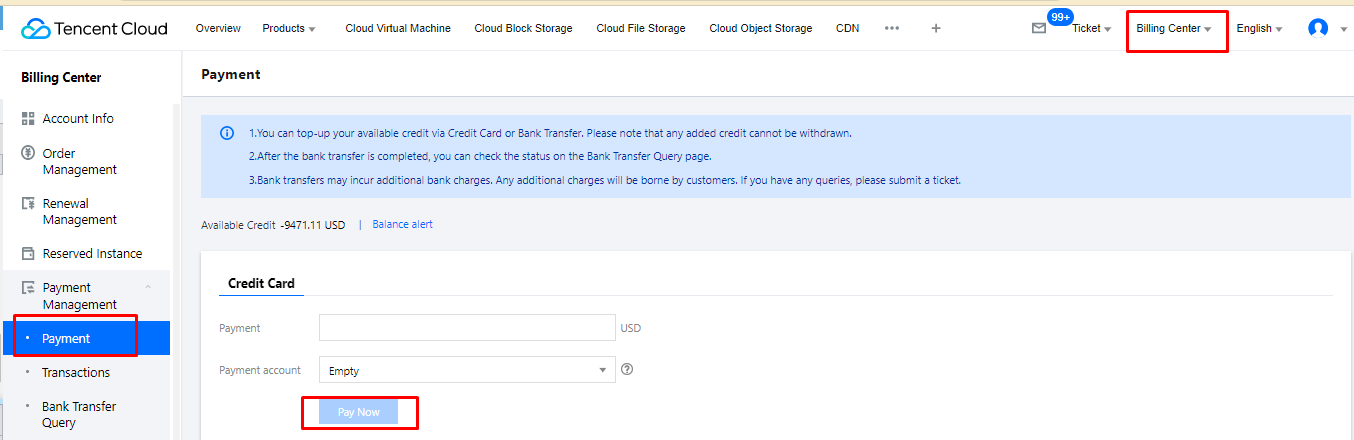
1. Log in to the Tencent Cloud console and click Billing Center in the top-right corner. Select Payment Management > Payment on the left sidebar.


2. Enter the top-up amount, and click Pay Now.

Monthly Pay-As-You-Go

For monthly pay-as-you-go, the unit prices specified in your contract with Tencent Cloud will apply. For more information, please contact your sales rep.

Prepaid Resource Packs

You can buy resource packs in the console.
1. Log in to the MPS console. On the overview page, click Buy resource pack to go to the purchase page.
2. Select the resource packs you want to buy.
Note:
You can buy multiple resource packs. The one that expires first will be used first.
Each resource pack has its own validity period. If you buy multiple packs, their validity periods will not be added up.
Each MPS resource pack can only deduct a specific type of MPS resources.
After all your resource packs are used up, you will be automatically switched to the pay-as-you-go mode.

Help and Support

Was this page helpful?

Help us improve! Rate your documentation experience in 5 mins.

Feedback