美颜调节面板(iOS)
Download
聚焦模式
字号
TUILiveKit 提供了两种美颜特效方案:基础美颜(内置)和 高级美颜(需额外集成和付费)。您可以根据自己的需求选择合适的方案。
基础美颜
基础美颜功能已默认集成在 TUILiveKit 中,无需任何额外配置。它提供了 美白、磨皮 和 红润 效果,并支持美颜强度调节。
高级美颜
高级美颜采用腾讯特效 SDK,提供了更加丰富和专业的美颜效果,例如 V 脸、眼距、瘦鼻、3D 贴纸等。
两种美颜面板的效果图:
基础美颜面板 | 高级美颜面板 |
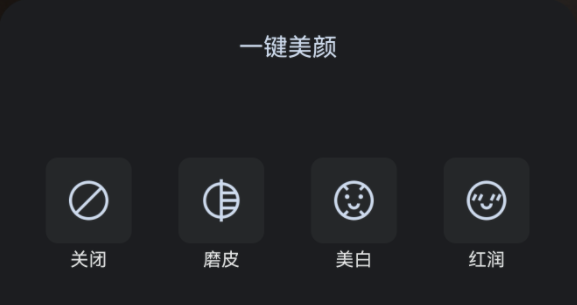 | 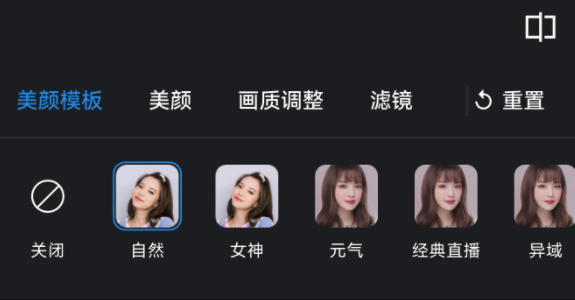 |
效果展示
V 脸 | 眼距 | 瘦鼻 | 3D 贴纸 |
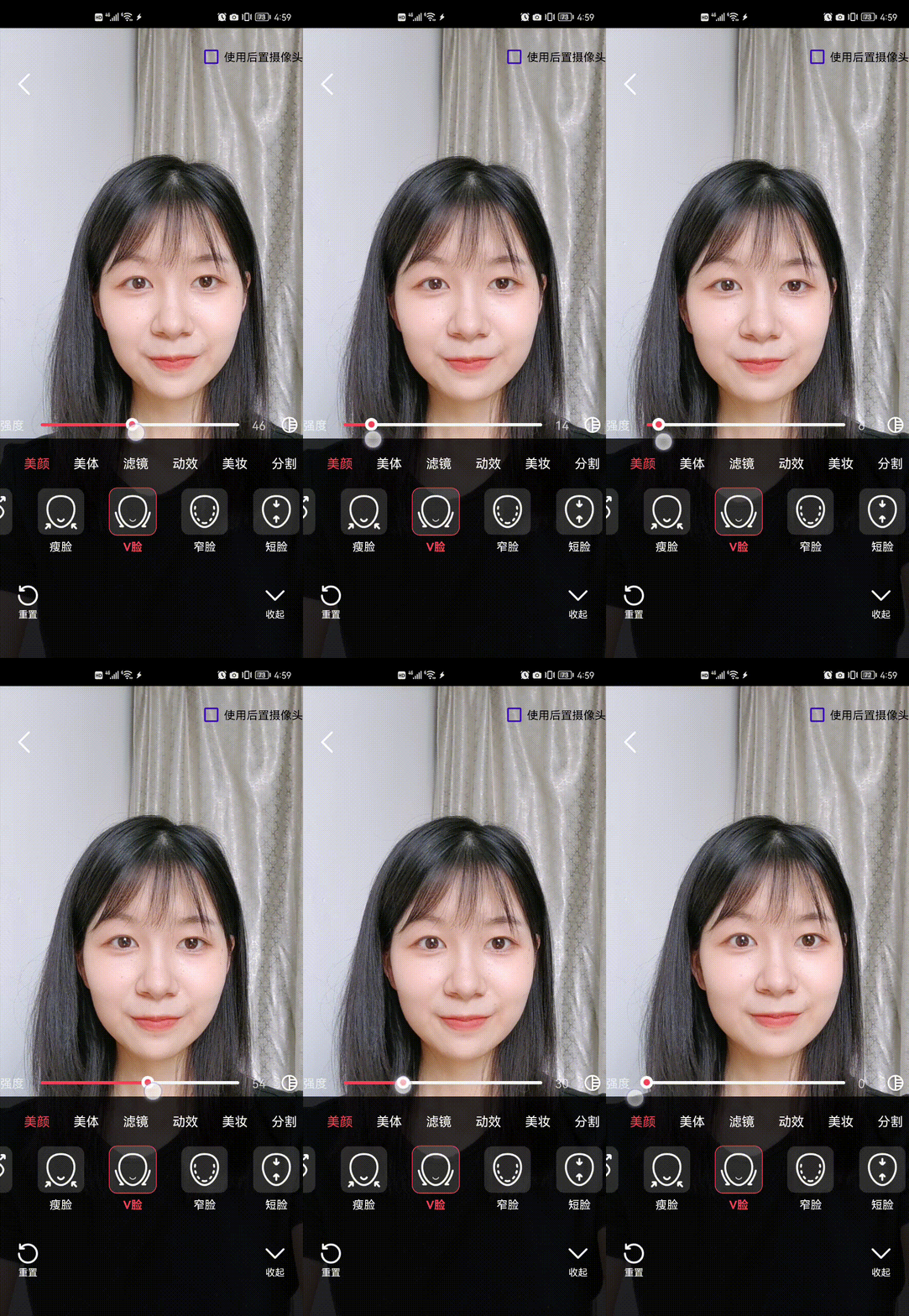 | 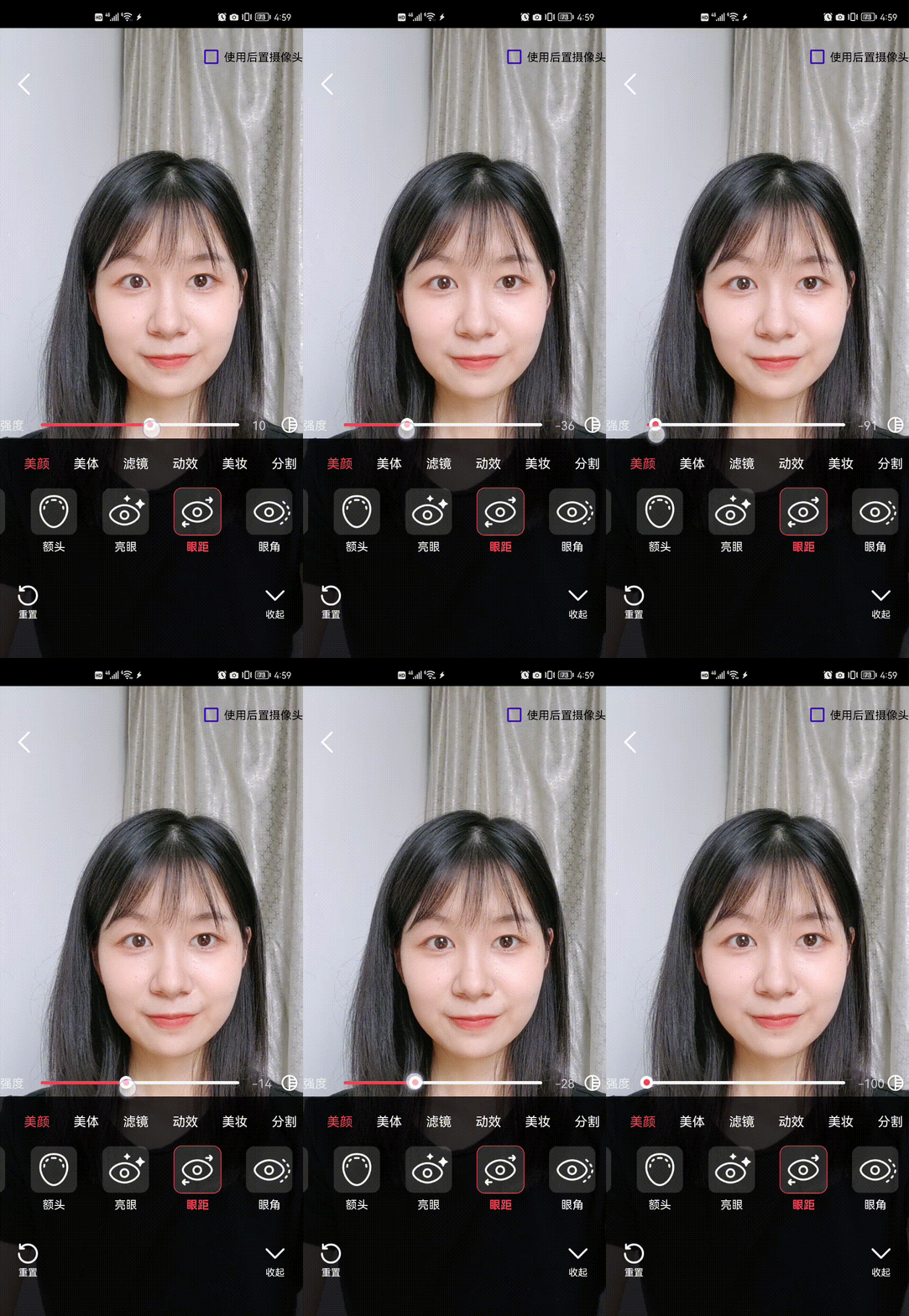 | 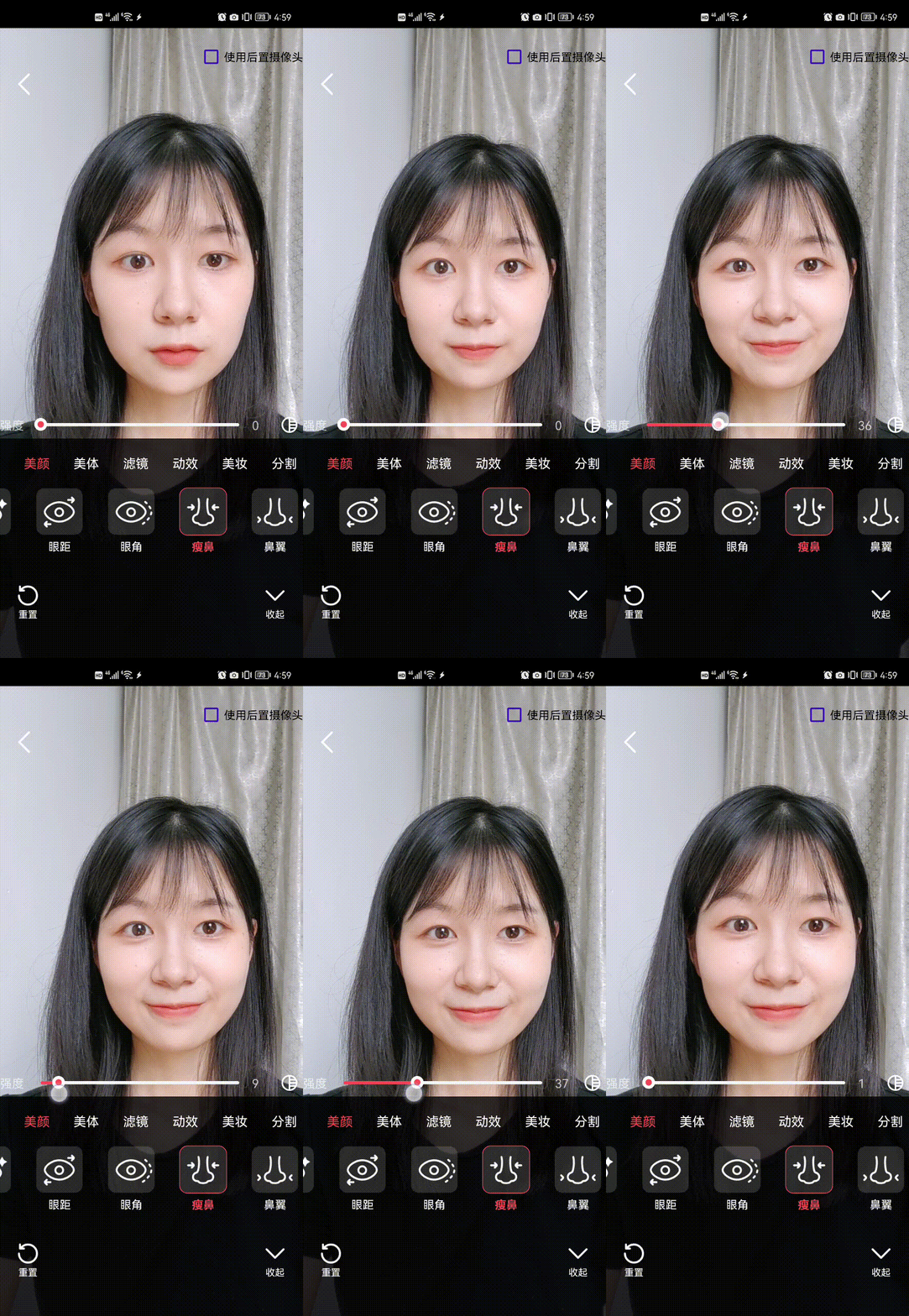 | 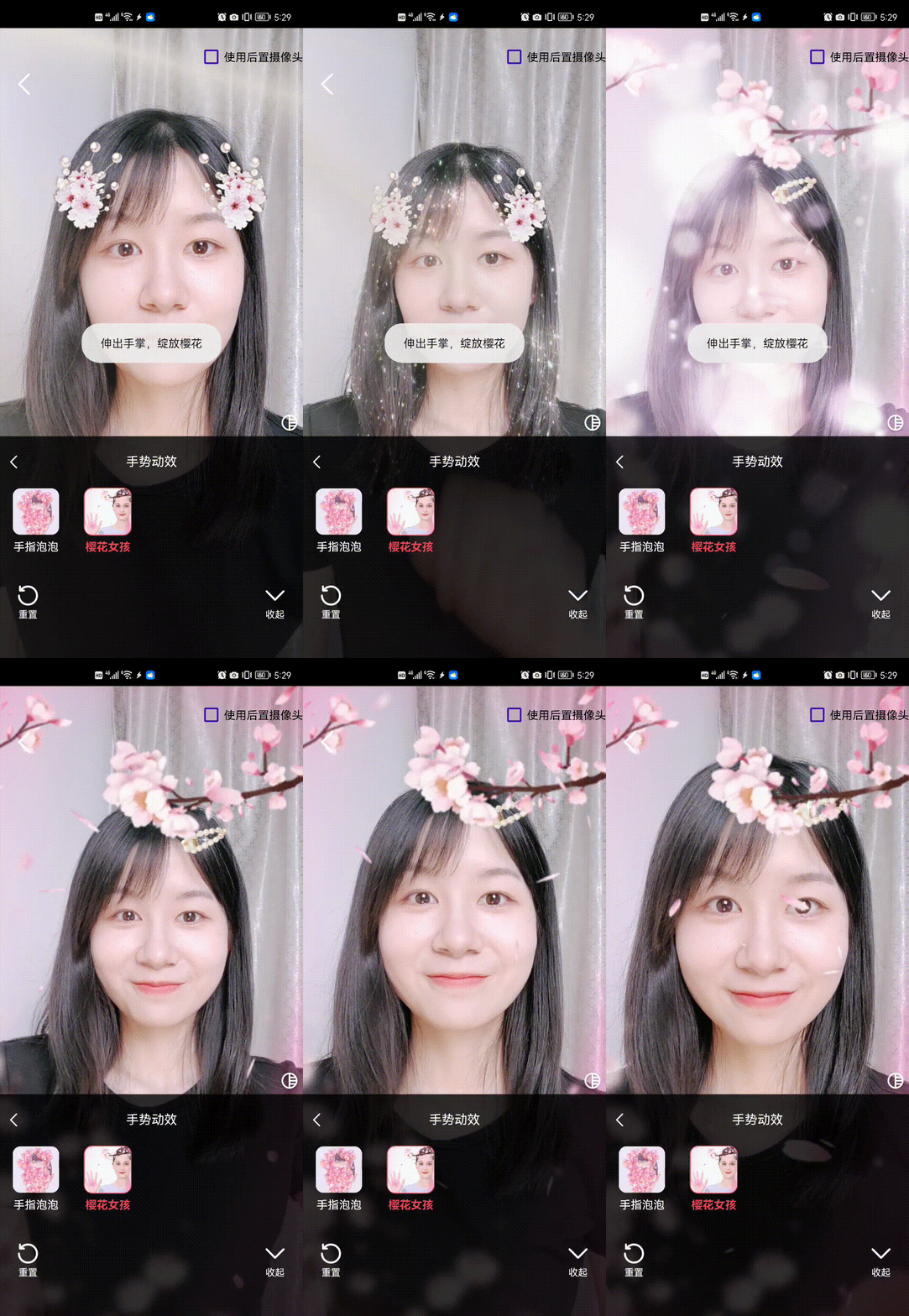 |
前提条件
注意:
组件接入
步骤 1:集成 TEBeautyKit 适配模块
下载并拷贝文件:下载并解压
TUILiveKit,把 iOS/TEBeautyKit 文件夹拷贝到自己的工程中,和 Podfile 同级目录。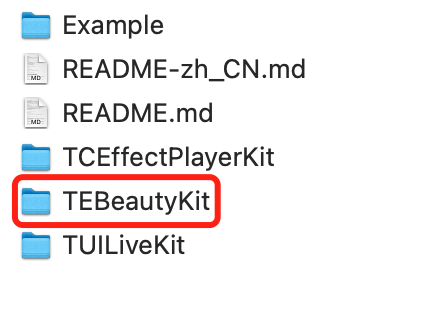
注意:
该文件夹是
TUILiveKit 与腾讯特效 SDK 之间的适配层,内部通过 TUICore 注册扩展和服务,TUILiveKit 检测到后会自动启用高级美颜面板与视频处理;未集成时则自动回退到基础美颜。步骤 2:下载并导入美颜面板资源(必做)
高级美颜面板的运行依赖两类资源:面板配置资源(描述 Tab、按钮、滑杆等 UI 结构的 JSON 与图标)与素材资源(滤镜 LUT、2D/3D 贴纸、美妆、人像分割等
.bundle)。两者来源不同,需要分别下载、合并到工程的同一个 Beauty/ 目录下。步骤 2.1:下载 Part A:面板配置资源
解压后会得到一个
beauty_panel/ 目录,里面包含以下内容(每个套餐用到的 JSON 不同,详见本步骤末的文件命名与套餐对应关系表):beauty_panel/├── beauty.json├── beauty_template.json├── beauty_template_ios.json├── beauty_image.json├── beauty_shape.json├── beauty_base_shape.json├── beauty_general_shape.json├── beauty_makeup.json├── beauty_body.json├── light_makeup.json├── makeup.json├── motion_2d.json├── motion_3d.json├── motion_gesture.json├── segmentation.json├── lut.json└── panel_icon/ # 面板按钮的 PNG 图标
步骤 2.2:下载 Part B:套餐对应的素材资源
素材资源(LUT、2D/3D 贴纸、美妆、人像分割等
*.bundle)随腾讯特效 SDK 套餐包一起发布,不同套餐包含的素材不同。我们需要从此处获取对应的美颜资源:1. 进入 腾讯特效 SDK 下载,在移动端 SDK 一栏,找到您购买的套餐编号(如 S1-07、A1-04 等)。如果暂未确定套餐,可先按页面提示下载 S1-07(全功能套餐)用于联调。
2. 点击对应套餐右侧 iOS 行的 DOWNLOAD 按钮,下载该套餐的 zip 包。
3. 解压 zip 包,在解压目录里找到以下
*.bundle 文件夹(实际包含哪些取决于套餐能力,详见后表):# 来自腾讯特效 SDK 套餐包├── lut.bundle/ # 滤镜 LUT 调色图├── 2dMotionRes.bundle/ # 2D 动效贴纸素材├── 3dMotionRes.bundle/ # 3D 动效贴纸素材├── makeupMotionRes.bundle/ # 美妆素材├── lightMakeupRes.bundle/ # 轻美妆素材└── segmentMotionRes.bundle/ # 人像分割 / 绿幕素材
注意:
套餐越高级,bundle 数量越多。例如 A1_00 只有
lut.bundle,而 S1_07 拥有以上全部 bundle。请以您下载的 zip 实际内容为准。步骤 2.3:合并资源并导入到 Xcode 工程
1. 把 Part A 解压得到的
beauty_panel/ 与 Part B 解压得到的所有 *.bundle,统一放进自己 App 工程的 Beauty/ 目录下,最终目录结构如下:YourApp/└── Beauty/├── beauty_panel/ # Part A:面板 JSON 配置 + 图标│ ├── beauty.json│ ├── beauty_template.json│ ├── beauty_template_ios.json│ ├── beauty_image.json│ ├── beauty_shape.json│ ├── beauty_base_shape.json│ ├── beauty_general_shape.json│ ├── beauty_makeup.json│ ├── beauty_body.json│ ├── light_makeup.json│ ├── makeup.json│ ├── motion_2d.json│ ├── motion_3d.json│ ├── motion_gesture.json│ ├── segmentation.json│ ├── lut.json│ └── panel_icon/ # 面板内的所有 PNG 图标├── lut.bundle/ # Part B:滤镜 LUT 调色图├── 2dMotionRes.bundle/ # Part B:2D 动效贴纸素材├── 3dMotionRes.bundle/ # Part B:3D 模型贴纸素材├── makeupMotionRes.bundle/ # Part B:美妆素材├── lightMakeupRes.bundle/ # Part B:轻美妆素材└── segmentMotionRes.bundle/ # Part B:人像分割 / 绿幕素材
2. 然后把整个
Beauty/ 目录拖入 Xcode 工程(建议与 AppDelegate.swift 同级)。导入时请务必:选择 Create folder references(蓝色文件夹),不要使用 group;
确保 Target Membership 勾选了主 App。
这样
beauty_panel/*.json 与各 *.bundle/ 才能被打包进 Bundle.main,运行时通过 Bundle.main.path(forResource:ofType:) 读取。步骤 2.4:各资源用途说明
资源 | 来源 | 用途 | 对应面板能力 |
beauty_panel/*.json | Part A | 面板 UI 配置(按钮、滑杆、分组) | 整体面板 |
beauty_panel/panel_icon/ | Part A | 面板按钮图标 PNG | 整体面板 |
lut.bundle/ | Part B | 滤镜调色查找表 | 滤镜 Tab |
2dMotionRes.bundle/ | Part B | 2D 动态贴纸 / 大头特效 | 贴纸 Tab |
3dMotionRes.bundle/ | Part B | 3D 模型贴纸 | 贴纸 Tab |
makeupMotionRes.bundle/ | Part B | 整妆套装(口红 + 眼影 + 腮红 等) | 美妆 Tab |
lightMakeupRes.bundle/ | Part B | 轻美妆素材 | 轻美妆 Tab |
segmentMotionRes.bundle/ | Part B | 人像分割(绿幕 / 抠图 / 背景虚化) | 分割 Tab |
步骤 2.5:文件命名与套餐对应关系
必须把所选
BeautyLevel 对应的 panel JSON 全部包含进来,否则该 Tab 会缺失或空白。下表列出各套餐需要的 panel JSON 资源清单(Part A 来源);对应的 *.bundle 素材(Part B 来源)已随该套餐 SDK 包一起下载,按上表关联导入即可。套餐 (BeautyLevel) | 需要导入的 panel JSON(全集) |
A1_00 | beauty_template, beauty, lut |
A1_01 | beauty_template, beauty, beauty_image, beauty_base_shape, lut |
A1_02 | beauty_template, beauty, beauty_image, beauty_base_shape, lut, motion_2d |
A1_03 | beauty_template, beauty, beauty_image, beauty_general_shape, lut, motion_2d |
A1_04 | beauty_template, beauty, beauty_image, beauty_general_shape, lut |
A1_05 | beauty_template, beauty, beauty_image, beauty_general_shape, lut, motion_2d, segmentation |
A1_06 | beauty_template, beauty, beauty_image, beauty_general_shape, lut, motion_2d, makeup |
S1_00 | beauty_template, beauty, beauty_image, beauty_shape, beauty_makeup, lut |
S1_01 | beauty_template, beauty, beauty_image, beauty_shape, beauty_makeup, lut, motion_2d, motion_3d, makeup, light_makeup |
S1_02 | beauty_template, beauty, beauty_image, beauty_shape, beauty_makeup, lut, motion_2d, motion_3d, motion_gesture, makeup, light_makeup |
S1_03 | beauty_template, beauty, beauty_image, beauty_shape, beauty_makeup, lut, motion_2d, motion_3d, makeup, light_makeup, segmentation |
S1_04 | beauty_template, beauty, beauty_image, beauty_shape, beauty_makeup, lut, motion_2d, motion_3d, motion_gesture, makeup, light_makeup, segmentation |
S1_05 | beauty_template, beauty, beauty_image, beauty_shape, beauty_makeup, lut, beauty_body, motion_2d, motion_3d, makeup, light_makeup, segmentation |
S1_06 | beauty_template, beauty, beauty_image, beauty_shape, beauty_makeup, lut, beauty_body, motion_2d, motion_3d, motion_gesture, makeup, light_makeup, segmentation |
S1_07 | beauty_template, beauty, beauty_image, beauty_shape, beauty_makeup, lut, beauty_body, motion_2d, motion_3d, motion_gesture, makeup, light_makeup, segmentation |
注意:
如果对应资源缺失,TUILiveKit 仍会启用高级美颜面板,但相关 Tab 会出现空白或图标缺失。请务必保证所选套餐对应的 panel JSON(Part A)、图标与
*.bundle 素材(Part B)都已加入 Bundle.main。Part A 的 ZIP 由 TUILiveKit 持续维护更新,建议接入或升级时重新下载最新版以获得最新的 UI 配置。
Part B 的
*.bundle 与所购腾讯特效 SDK 套餐绑定,务必下载与 BeautyLevel 一致的套餐包,否则会出现「面板能打开但 Tab 缺资源」的现象。YourApp/└── Beauty/├── beauty_panel/ # 面板 JSON 配置 + 图标│ ├── beauty.json│ ├── beauty_template.json│ ├── beauty_template_ios.json│ ├── beauty_image.json│ ├── beauty_shape.json│ ├── beauty_base_shape.json│ ├── beauty_general_shape.json│ ├── beauty_makeup.json│ ├── beauty_body.json│ ├── light_makeup.json│ ├── makeup.json│ ├── motion_2d.json│ ├── motion_3d.json│ ├── motion_gesture.json│ ├── segmentation.json│ ├── lut.json│ └── panel_icon/ # 面板内的所有 PNG 图标├── lut.bundle/ # 滤镜 LUT 调色图│ ├── baixi_lf.png│ ├── dongjing_lf.png│ ├── moren_lf.png│ ├── xindong_lf.png│ └── ziran_lf.png├── 2dMotionRes.bundle/ # 2D 动效贴纸素材├── 3dMotionRes.bundle/ # 3D 动效贴纸素材├── makeupMotionRes.bundle/ # 美妆素材├── lightMakeupRes.bundle/ # 轻美妆素材└── segmentMotionRes.bundle/ # 人像分割 / 绿幕素材
1. 各资源用途说明:
资源 | 用途 | 对应面板能力 |
beauty_panel/*.json | 面板 UI 配置(按钮、滑杆、分组) | 整体面板 |
beauty_panel/panel_icon/ | 面板按钮图标 PNG | 整体面板 |
lut.bundle/ | 滤镜调色查找表 | 滤镜 Tab |
2dMotionRes.bundle/ | 2D 动态贴纸 / 大头特效 | 贴纸 Tab |
3dMotionRes.bundle/ | 3D 模型贴纸 | 贴纸 Tab |
makeupMotionRes.bundle/ | 整妆套装(口红 + 眼影 + 腮红 等) | 美妆 Tab |
lightMakeupRes.bundle/ | 轻美妆素材 | 轻美妆 Tab |
segmentMotionRes.bundle/ | 人像分割(绿幕 / 抠图 / 背景虚化) | 分割 Tab |
2. 文件命名与套餐对应关系:必须把所选
BeautyLevel 对应的 panel JSON 全部包含进来,否则该 Tab 会缺失或空白。下表列出各套餐需要的 JSON 资源清单:套餐 ( BeautyLevel) | 需要导入的 panel JSON(全集) |
A1_00 | beauty_template, beauty, lut |
A1_01 | beauty_template, beauty, beauty_image, beauty_base_shape, lut |
A1_02 | beauty_template, beauty, beauty_image, beauty_base_shape, lut, motion_2d |
A1_03 | beauty_template, beauty, beauty_image, beauty_general_shape, lut, motion_2d |
A1_04 | beauty_template, beauty, beauty_image, beauty_general_shape, lut |
A1_05 | beauty_template, beauty, beauty_image, beauty_general_shape, lut, motion_2d, segmentation |
A1_06 | beauty_template, beauty, beauty_image, beauty_general_shape, lut, motion_2d, makeup |
S1_00 | beauty_template, beauty, beauty_image, beauty_shape, beauty_makeup, lut |
S1_01 | beauty_template, beauty, beauty_image, beauty_shape, beauty_makeup, lut, motion_2d, motion_3d, makeup, light_makeup |
S1_02 | beauty_template, beauty, beauty_image, beauty_shape, beauty_makeup, lut, motion_2d, motion_3d, motion_gesture, makeup, light_makeup |
S1_03 | beauty_template, beauty, beauty_image, beauty_shape, beauty_makeup, lut, motion_2d, motion_3d, makeup, light_makeup, segmentation |
S1_04 | beauty_template, beauty, beauty_image, beauty_shape, beauty_makeup, lut, motion_2d, motion_3d, motion_gesture, makeup, light_makeup, segmentation |
S1_05 | beauty_template, beauty, beauty_image, beauty_shape, beauty_makeup, lut, beauty_body, motion_2d, motion_3d, makeup, light_makeup, segmentation |
S1_06 | beauty_template, beauty, beauty_image, beauty_shape, beauty_makeup, lut, beauty_body, motion_2d, motion_3d, motion_gesture, makeup, light_makeup, segmentation |
S1_07 | beauty_template, beauty, beauty_image, beauty_shape, beauty_makeup, lut, beauty_body, motion_2d, motion_3d, motion_gesture, makeup, light_makeup, segmentation |
注意:
如果对应资源缺失,TUILiveKit 仍会启用高级美颜面板,但相关 Tab 会出现空白或图标缺失。请务必保证所选套餐对应的 JSON、图标与
*.bundle 素材都已加入 Bundle.main。步骤 3:配置 Podfile
编辑 Podfile,加入以下两行,然后执行 pod install:
platform :ios, '14.0'target 'YourApp' douse_frameworks!# 1) 腾讯特效 SDK(请按所购套餐替换 subspec,下例为 S1-07)pod 'TEBeautyKit/S1-07',:podspec => 'https://mediacloud-76607.gzc.vod.tencent-cloud.com/TencentEffect/iOS/TEBeautyKit/latest/TEBeautyKit.podspec'# 2) 仓库内的适配层 Wrapper(向 TUICore 暴露服务与扩展)pod 'TEBeautyKitWrapper', :path => './TEBeautyKit'end
注意:
不同套餐请把 S1-07 替换为对应套餐编号;版本号建议与 TUILiveKit 配套的腾讯特效 SDK 版本保持一致。
步骤 4:鉴权和初始化
在应用启动入口(
AppDelegate.application(_:didFinishLaunchingWithOptions:))中调用一行 API 即可完成 License 鉴权 + TUICore 注册 + 套餐与面板装配://// AppDelegate.swift//import UIKitimport TUILiveKit#if canImport(TEBeautyKitWrapper)import TEBeautyKitWrapper#endif@mainclass AppDelegate: UIResponder, UIApplicationDelegate {func application(_ application: UIApplication,didFinishLaunchingWithOptions launchOptions: [UIApplication.LaunchOptionsKey: Any]?) -> Bool {#if canImport(TEBeautyKitWrapper)// 一行完成:setTELicense + 注册 TUICore 服务 + 选择套餐(默认 .S1_07)TUIBeautyKit.initialize(licenseUrl: "YOUR_LICENSE_URL",licenseKey: "YOUR_LICENSE_KEY",beautyLevel: .S1_07 // 替换为您购买的套餐: .A1_00 ... .S1_07) { code, message in// 可选:License 校验结果回调print("TEBeauty license check: code=\\(code), msg=\\(message ?? "")")}#endifreturn true}}
BeautyLevel 可选值(与购买的腾讯特效 SDK 套餐一一对应):A1_00 A1_01 A1_02 A1_03 A1_04 A1_05 A1_06S1_00 S1_01 S1_02 S1_03 S1_04 S1_05 S1_06 S1_07
验证
完成以上步骤后,启动 App 进入开播页面或观众预览页,点击美颜按钮:
1. 看到 V 脸、瘦鼻、眼距、滤镜、贴纸、美妆、分割等多 Tab 面板,意味着高级美颜接入成功。
2. 仍是只有美白 / 磨皮 / 红润 的三项基础面板,代表高级美颜扩展未注册成功,请检查:
2.1
TEBeautyKitWrapper 是否已在 Podfile 中并已成功 pod install。2.2
AppDelegate 是否调用了 TUIBeautyKit.initialize(...)。2.3 License 校验是否通过(查看
setTELicense 的回调 code)。注意:
常见问题
美颜资源能否放到自定义 Bundle 中?
不可以,panel JSON 内部会引用一堆相对路径的子资源,相对路径最终是
腾讯特效 SDK 内部用 Bundle.main 去解析的License 鉴权失败怎么办?
请检查
licenseUrl / licenseKey 是否与套餐绑定、所选 BeautyLevel 是否与 License 匹配,并确认应用的 BundleIdentifier 与 License 申请时绑定的 BundleId 一致。如何动态切换套餐?
重新调用
TUIBeautyKit.initialize(licenseUrl:, licenseKey:, beautyLevel:) 即可。文档反馈