美颜调节面板(Android)
Download
聚焦模式
字号
TUILiveKit 提供了两种美颜特效方案:基础美颜(内置)和高级美颜(需额外集成和付费)。您可以根据自己的需求选择合适的方案。
基础美颜
基础美颜功能已默认集成在 TUILiveKit 中,无需任何额外配置。它提供了 美白、磨皮 和 红润 效果,并支持美颜强度调节。
高级美颜
高级美颜采用腾讯特效 SDK,提供了更加丰富和专业的美颜效果,例如 V 脸、眼距、瘦鼻、3D 贴纸等。
两种美颜面板的效果图:
基础美颜面板 | 高级美颜面板 |
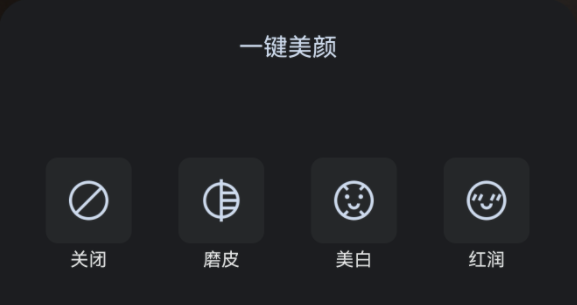 | 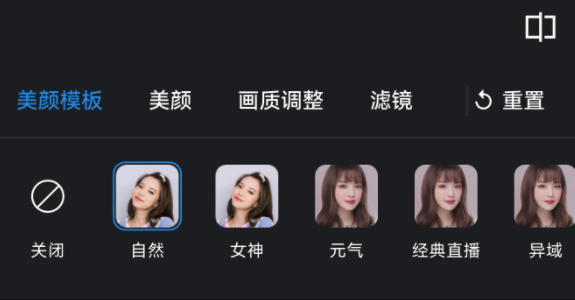 |
高级美颜效果展示
V 脸 | 眼距 | 瘦鼻 | 3D 贴纸 |
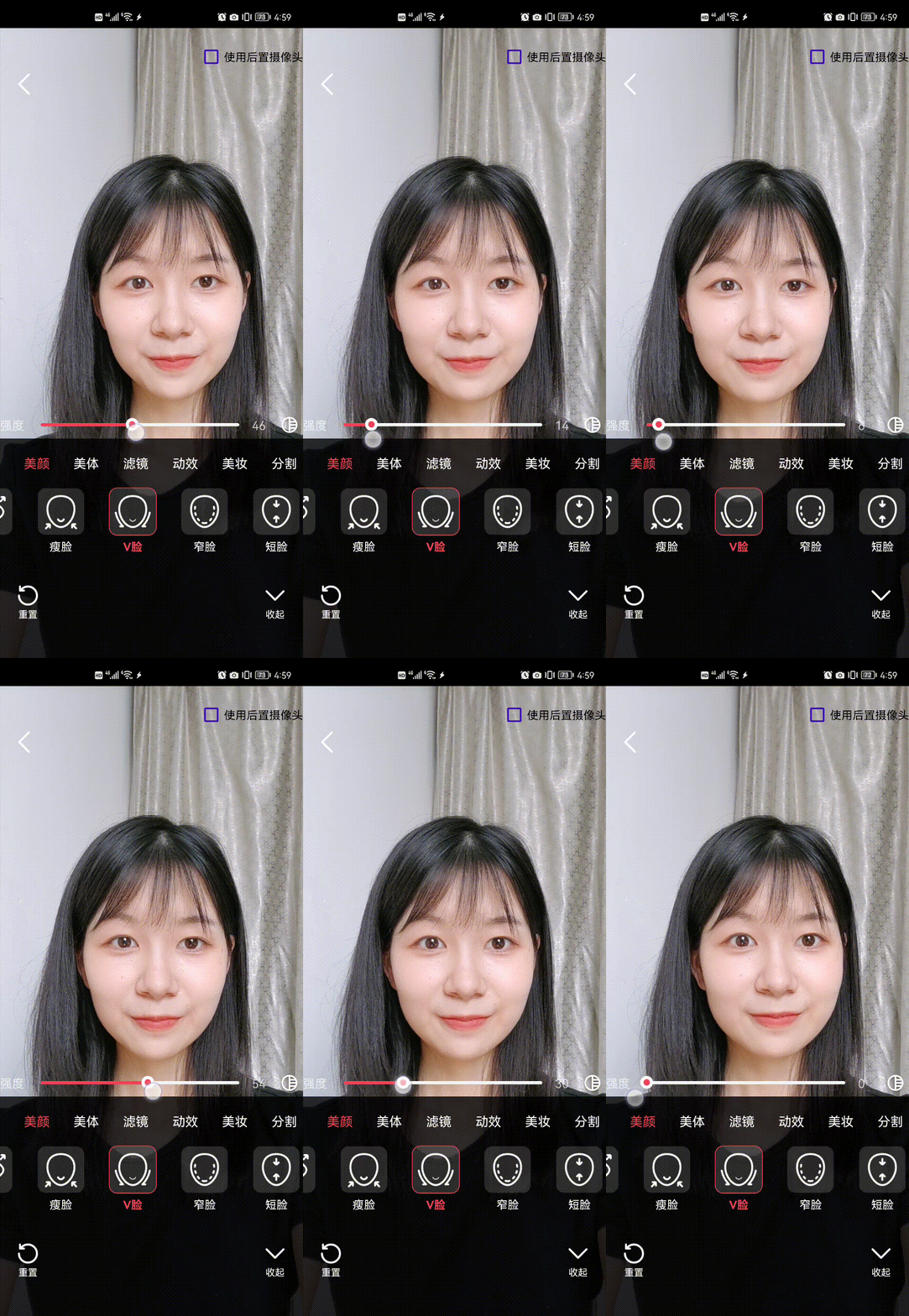 | 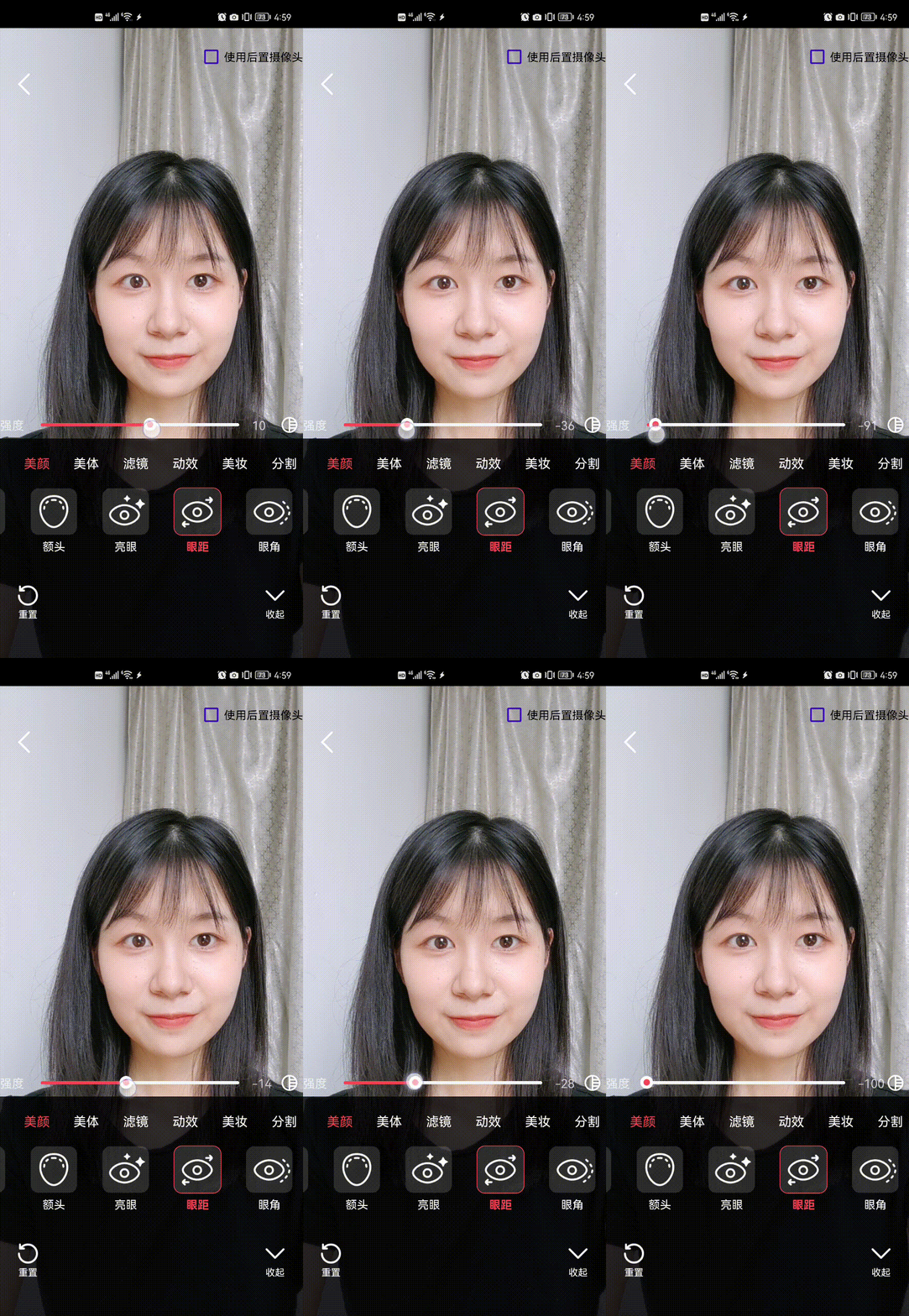 | 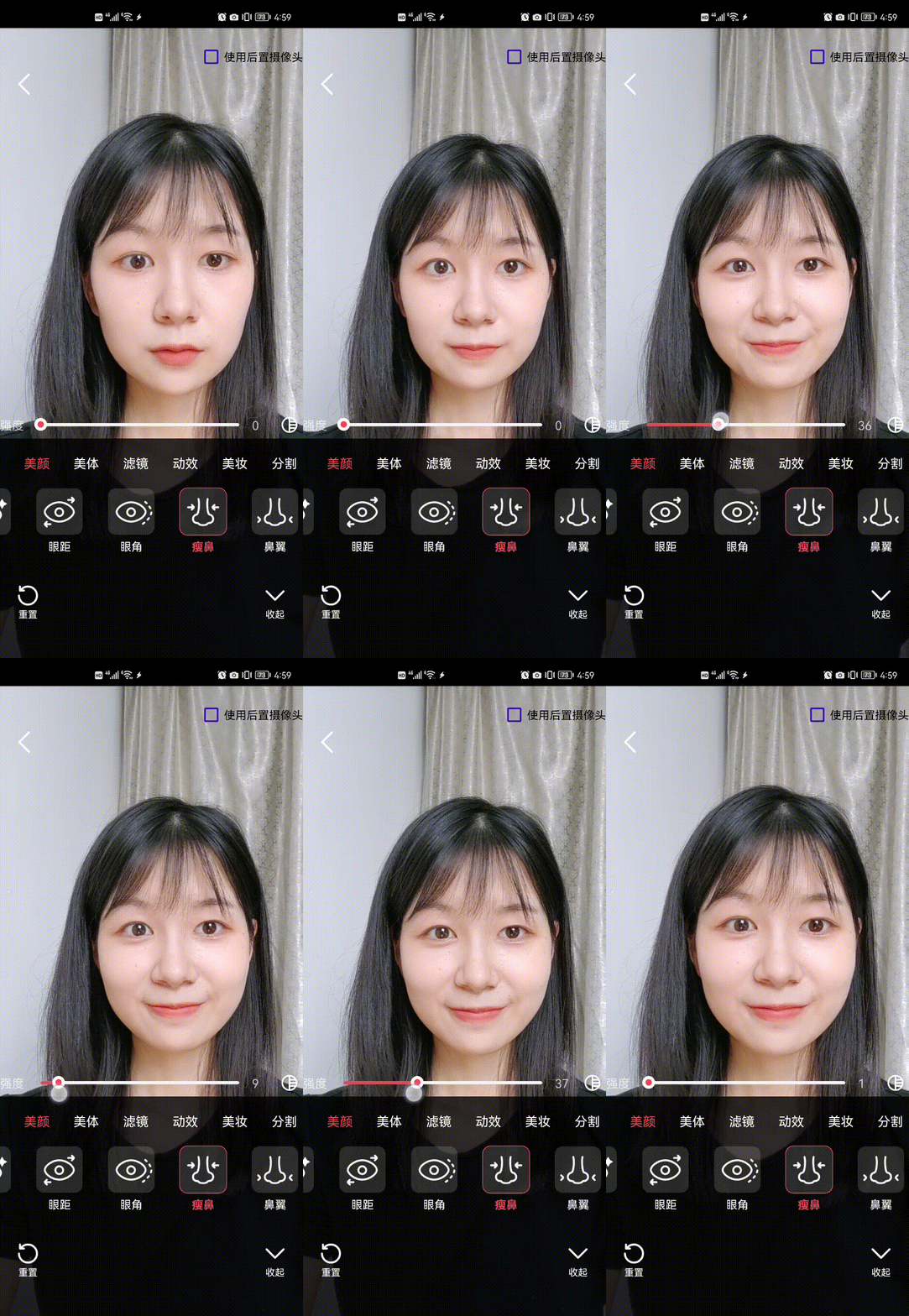 | 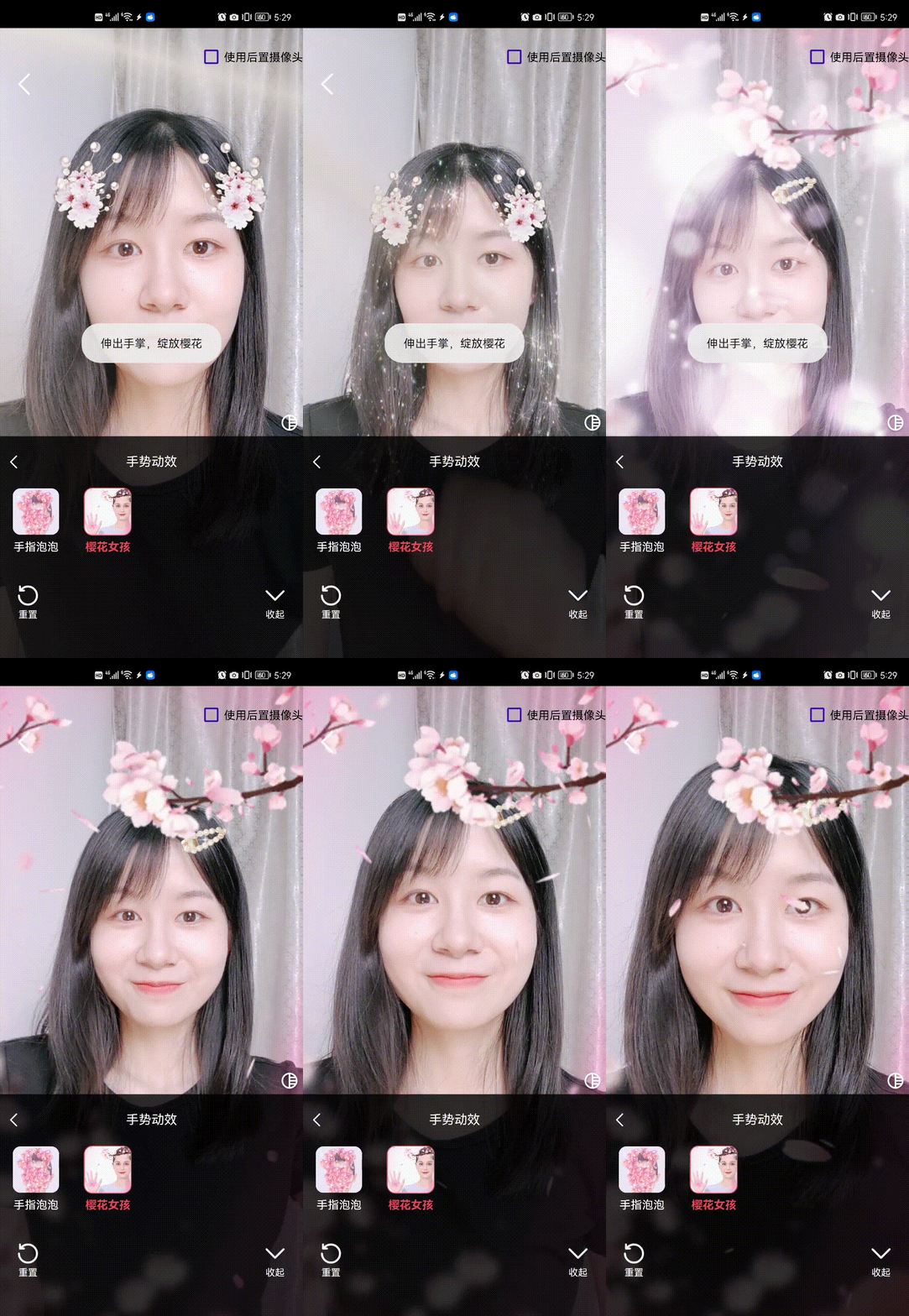 |
前提条件
组件接入
TUILiveKit 默认支持基础美颜,无需单独接入。如果您需要使用高级美颜,请按照以下流程完成接入工作。注意:
步骤 1:集成 te_beauty_kit 适配模块
1. 下载并解压 TUIKit_Android,把 TUIkit_Android/tebeautykit 文件夹拷贝到自己的工程中,和 app 同级目录。
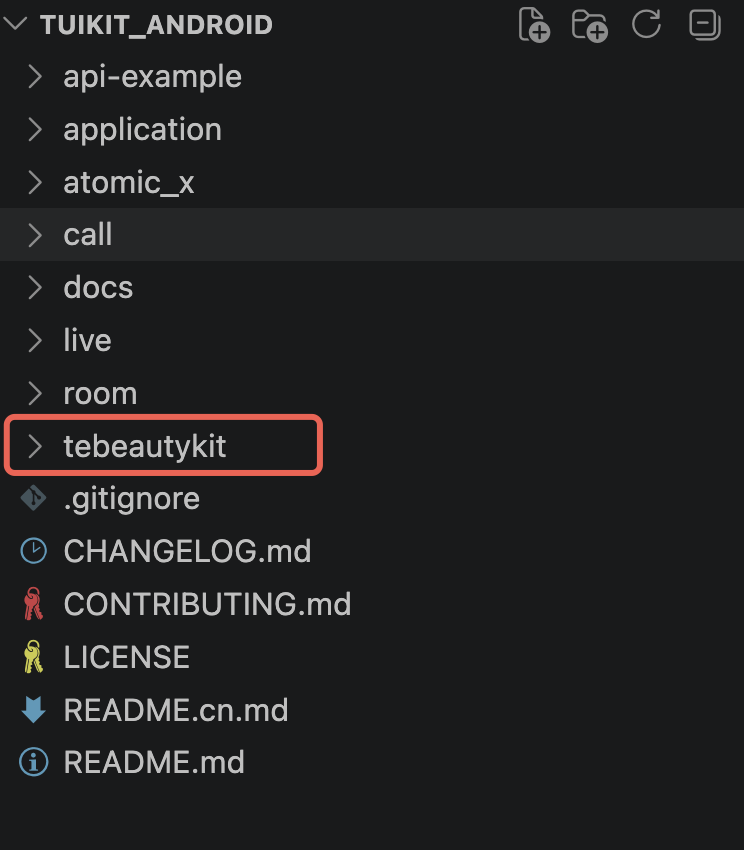
2. 编辑您自己工程的
settings.gradle 文件,添加下面的代码:include ':tebeautykit'
步骤2: 鉴权和设置美颜资源
1. 申请授权,得到
LicenseUrl 和 LicenseKey,请参见 License 指引。2. 在您的业务初始化的地方(默认可在登录的相同位置),添加如下鉴权代码,并替换您申请的
美颜套餐编号、LicenseUrl 和 LicenseKey:TUIBeautyKit.instance.init(context,"LicenseUrl", // 请替换 LicenseUrl"LicenseKey", // 请替换 LicenseKeyBeautyLevel.S1_07 // // 将S1_07替换为您购买的美颜套餐编号)
更换美颜套餐或者自定义美颜面板
您如果需要根据购买的美颜套餐编号更换套餐或者自定义美颜面板,可以按下面的步骤完成。
1. 首先您需要在 步骤2:鉴权和设置美颜资源 传入参数为您购买的美颜套餐编号。目前支持的美颜套餐编号如下:
enum class BeautyLevel {A1_00, A1_01, A1_02, A1_03, A1_04, A1_05, A1_06,S1_00, S1_01, S1_02, S1_03, S1_04, S1_07}
其中
美颜套餐标号与 panel JSON 对照表
:套餐 ( BeautyLevel) | 需要导入的 panel JSON(全集) |
A1_00 | beauty_template, beauty, lut |
A1_01 | beauty_template, beauty, beauty_image, beauty_base_shape, lut |
A1_02 | beauty_template, beauty, beauty_image, beauty_base_shape, lut, motion_2d |
A1_03 | beauty_template, beauty, beauty_image, beauty_general_shape, lut, motion_2d |
A1_04 | beauty_template, beauty, beauty_image, beauty_general_shape, lut |
A1_05 | beauty_template, beauty, beauty_image, beauty_general_shape, lut, motion_2d, segmentation |
A1_06 | beauty_template, beauty, beauty_image, beauty_general_shape, lut, motion_2d, makeup |
S1_00 | beauty_template, beauty, beauty_image, beauty_shape, beauty_makeup, lut |
S1_01 | beauty_template, beauty, beauty_image, beauty_shape, beauty_makeup, lut, motion_2d, motion_3d, makeup, light_makeup |
S1_02 | beauty_template, beauty, beauty_image, beauty_shape, beauty_makeup, lut, motion_2d, motion_3d, motion_gesture, makeup, light_makeup |
S1_03 | beauty_template, beauty, beauty_image, beauty_shape, beauty_makeup, lut, motion_2d, motion_3d, makeup, light_makeup, segmentation |
S1_04 | beauty_template, beauty, beauty_image, beauty_shape, beauty_makeup, lut, motion_2d, motion_3d, motion_gesture, makeup, light_makeup, segmentation |
S1_05 | beauty_template, beauty, beauty_image, beauty_shape, beauty_makeup, lut, beauty_body, motion_2d, motion_3d, makeup, light_makeup, segmentation |
S1_06 | beauty_template, beauty, beauty_image, beauty_shape, beauty_makeup, lut, beauty_body, motion_2d, motion_3d, motion_gesture, makeup, light_makeup, segmentation |
S1_07 | beauty_template, beauty, beauty_image, beauty_shape, beauty_makeup, lut, beauty_body, motion_2d, motion_3d, motion_gesture, makeup, light_makeup, segmentation |
2. 自定义高级美颜 UI 面板。
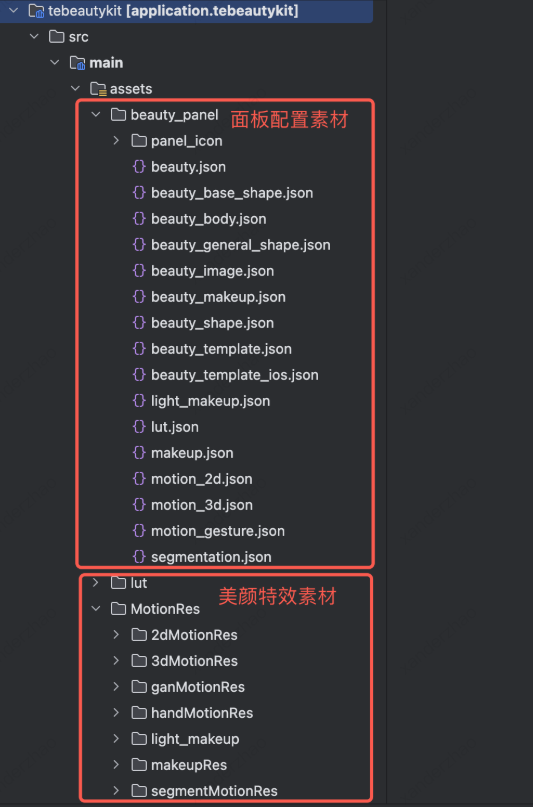
2.1 高级美颜 UI 面板都是通过 json 配置展示的,目前 默认配置资源就在 tebeautykit 模块的 assets 目录下。其中配置资源包含两种。
面板配置素材:面板配置 JSON,相关图片等,用于展示美颜特效功能项。
资源 | 用途 |
assets/beauty_panel/*.json | 面板 UI 配置(分组、按钮、滑杆)。 |
assets/beauty_panel/panel_icon/ | 面板按钮图标 PNG。 |
美颜特效素材:滤镜 LUT、2D/3D 动效贴纸等具体特效的素材。
资源 | 用途 | 对应面板能力 |
lut/ | 滤镜调色查找表。 | 滤镜 Tab |
MotionRes/2dMotionRes/ | 2D 动态贴纸 / 大头特效。 | 贴纸 Tab |
MotionRes/3dMotionRes/ | 3D 模型贴纸。 | 贴纸 Tab |
MotionRes/handMotionRes/ | 手势触发贴纸。 | 手势 Tab |
MotionRes/makeupRes/ | 整妆套装(口红 + 眼影 + 腮红 等)。 | 美妆 Tab |
MotionRes/light_makeup/ | 轻美妆素材。 | 轻美妆 Tab |
MotionRes/segmentMotionRes/ | 人像分割(绿幕 / 抠图 / 背景虚化)。 | 分割 Tab |
2.2 您可以通过配置下面面板配置素材中的 json 文件而动态控制美颜面板的 UI 。
常见问题
License 鉴权失败怎么办?
请检查
LicenseUrl / LicenseKey 是否与套餐绑定、所选 BeautyLevel 是否与 License 匹配,并确认应用的 BundleIdentifier 与 License 申请时绑定的 applicationId 一致。如何动态切换套餐?
重新调用
TUIBeautyKit.instance.init( this, LICENSE_URL, LICENSE_KEY) 即可。如果 License 不生效,偶现退出页面的时候会内存泄露。
你需要在使用美颜页面结束时,调用下面方法销毁美颜资源:
TUICore.callService("TEBeautyExtension", "destroyBeautyKit", null)。文档反馈