实现 LiveActivity(灵动岛)
Download
聚焦模式
字号
限制说明
iOS 16.1 及以上版本支持。
远程启动(push-to-start)需 iOS 17.2 及以上版本;iOS 17.1 及以下仅支持远程更新 / 结束。
App 应用在灵动岛上的实时活动显示时间最多保留八小时,在锁定屏幕上最多保留十二小时。
远端操作需要用户配置 p8 证书。
设备只支持 iPhone,并且是 iPhone 14 Pro 和 14 Pro Max 及以上版本。
接入指引
步骤1:增加 Live Activities 支持配置
需要在主程序的 Info.plist 中添加键值:Supports Live Activities 为 YES。
步骤2:创建 WidgetExtension
如果项目中已经存在,则可以跳过该步骤。
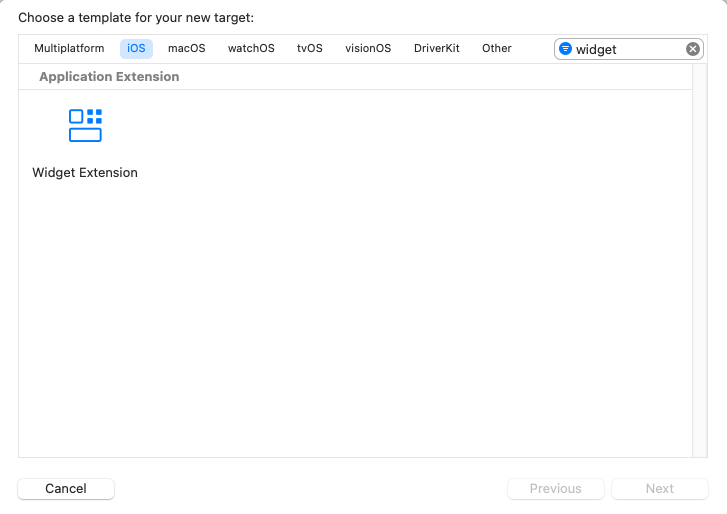
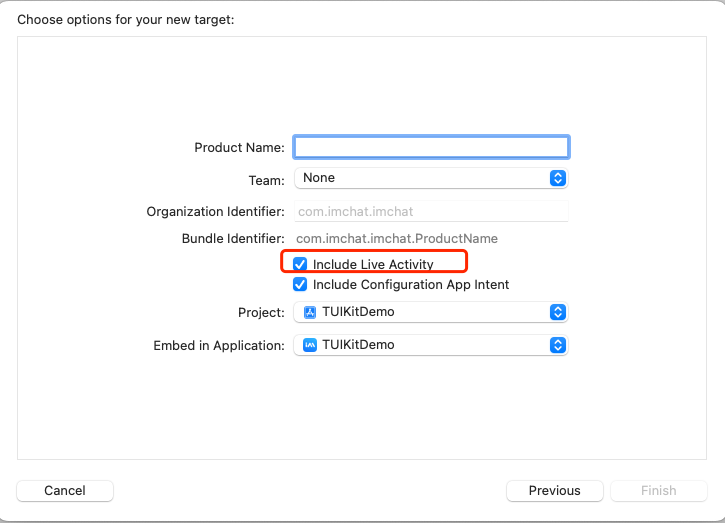
步骤3:代码实现
1.实现 Activity Attributes
以下实现需要按照自己的业务实现对应的数据模型,其中 ContentState 里为可以动态更新的数据,activityID 建议定义为 LiveActivity 的唯一标识 ID。
import Foundationimport ActivityKitstruct LiveActivityAttributes: ActivityAttributes {public struct ContentState: Codable, Hashable {// Dynamic stateful properties about your activity go here!var text: Stringvar pauseTime: Date?var endTime: Date?}// Fixed non-changing properties about your activity go here!// custom activityID when creating a LiveActivityvar activityID: String}
2.创建 UI
具体 UI 请按照自己的业务编写,包含了锁屏 UI 和灵动岛 UI 的定义:
import ActivityKitimport WidgetKitimport SwiftUIstruct LiveActivityLiveActivity: Widget {var body: some WidgetConfiguration {ActivityConfiguration(for: LiveActivityAttributes.self) { context in// Lock screen/banner UI goes hereVStack {Text("Hello \\(context.state.text)")}.activityBackgroundTint(Color.cyan).activitySystemActionForegroundColor(Color.black)} dynamicIsland: { context inDynamicIsland {// Expanded UI goes here. Compose the expanded UI through// various regions, like leading/trailing/center/bottomDynamicIslandExpandedRegion(.leading) {Text("Leading \\(context.attributes.activityID)\\(context.state.text)")}DynamicIslandExpandedRegion(.trailing) {Text("Trailing \\(context.state.text)")}DynamicIslandExpandedRegion(.center) {Text("Center \\(context.state.text)")}DynamicIslandExpandedRegion(.bottom) {Text("Bottom \\(context.state.text)")// more content}} compactLeading: {Text("CL \\(context.state.text)")} compactTrailing: {Text("CT \\(context.state.text)")} minimal: {Text("CB \\(context.state.text)")}.widgetURL(URL(string: "https://www.tencentcloud.com/document/product/269/100621?from_cn_redirect=1")).keylineTint(Color.red)}}}
灵动岛 UI 布局定义如下:
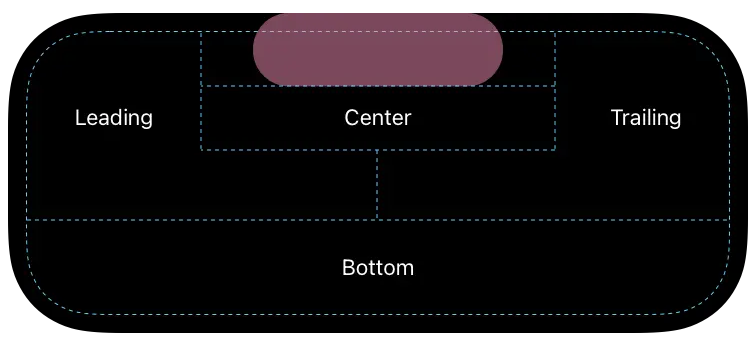
3.客户端操作,添加启动、更新和停止逻辑
// startlet activity = try Activity.request(attributes: adventure,content: .init(state: initialState, staleDate: nil),pushType: .token)// updateawait activity.update(ActivityContent<AdventureAttributes.ContentState>(state: contentState,staleDate: Date.now + 15,relevanceScore: alert ? 100 : 50),alertConfiguration: alertConfig)// endawait activity.end(ActivityContent(state: finalContent, staleDate: nil), dismissalPolicy: dismissalPolicy)
4.远端上报配置和更新操作
监听 token 更新和上报
Task {for await pushToken in activity.pushTokenUpdates {let pushTokenString = pushToken.hexadecimalStringLogger().debug("New push token: \\(pushTokenString)")try await self.setLiveActivity(activityID:activity.attributes.activityID, pushToken: pushToken)}}func setLiveActivity(activityID: String, pushToken: Data) async throws {var _apnsConfig = ImSDK_Plus.V2TIMLiveActivityConfig()_apnsConfig.businessID = xxxx_apnsConfig.token = pushToken_apnsConfig.activityID = activityIDos_log("%@", type: .debug, "setLiveActivity activityID: \\(activityID)\\ntoken:\\(pushToken.hexadecimalString)")ImSDK_Plus.V2TIMManager.sharedInstance().setLiveActivity(_apnsConfig, succ: {print("setLiveActivity succ")}, fail: {code, desc inprint("setLiveActivity fail, \\(code), \\(desc)")})}
上报清理 LiveActivity
func clearActivity(activityID: String) async throws {os_log("clearActivity ID: \\(activityID)")ImSDK_Plus.V2TIMManager.sharedInstance().setLiveActivity(nil, succ: {print("clearActivity succ")}, fail: {code, desc inprint("clearActivity fail, \\(code), \\(desc)")})}
通过服务端更新和停止 iOS 实时活动。
注意:
1. LiveActivity 推送限制 P8 证书,必须配置 P8 证书。
2. 如果接收方没有上报对应 activityID,将自动降级为普通通知推送。
ApnsInfo.LiveActivity 对应的 JSON Object 格式说明
字段名称 | 类型 | 选项 | 字段说明 |
Event | String | 必填 | |
AttributesType | String | 选填 | Event 为 start 时必填。实时活动的属性类型名称,需与客户端定义的实时活动属性类型结构体名称完全一致。 |
Attributes | JSON Object | 选填 | Event 为 start 时必填。自定义的 key:value 的 object,实时活动属性类型中声明的静态属性,用于初始化实时活动,需与客户端 SDK 值匹配。 |
LaId | String | 选填 | Event 为 update、end 时必填。实时活动标识,对应客户端 activityID,长度不超过64字节。 |
ContentState | JSON Object | 必填 | Event 为 start、update、end 时都必填。自定义的 key:value 的 object,实时活动属性类型中声明的动态属性,需与客户端 SDK 值匹配。 |
DismissalDate | Integer | 选填 | Event 为 end 时,锁屏实时活动结束展示的 Unix 时间,默认为当前时间,锁屏马上结束。 |
请求示例:
{// 其他参数..."OfflinePushInfo": {"Title": "离线推送标题","Desc": "离线推送内容","Ext": "{\\"entity\\":{\\"k1\\":\\"v1\\",\\"k2\\":\\"v2\\"}}", // 透传字段,建议长度不超过1k"ApnsInfo": {"LiveActivity": {"Event": "update", // 更新 LiveActivity 推送"LaId": "timpush", // 实时活动标识,对应客户端 activityID,长度不超过64字节"ContentState": {"k1": "v1","k2": "v2",...}}},"AndroidInfo": {... // 详情参见 AndroidInfo 字段说明}}}
{// 其他参数..."OfflinePushInfo": {"Title": "离线推送标题","Desc": "离线推送内容","Ext": "{\\"entity\\":{\\"k1\\":\\"v1\\",\\"k2\\":\\"v2\\"}}", // 透传字段,建议长度不超过1k"ApnsInfo": {"LiveActivity": {"LaId": "timpush","Event": "end", // 结束 LiveActivity 推送"ContentState": {"k1": "v1","k2": "v2",...},"DismissalDate": 1739502750}},"AndroidInfo": {... // 详情参见 AndroidInfo 字段说明}}}
5. 远端启动(push-to-start)配置和操作
远程启动(push-to-start)指 App 未打开(甚至已被终止进程)时,由服务端远程拉起一个全新的 LiveActivity。它与远程更新 / 结束是两套独立的 token 机制。
说明:
1. 远程启动需 iOS 17.2 及以上;iOS 17.1 及以下只支持远程更新 / 结束。
2. push-to-start token 是按 ActivityAttributes 类型(attributesType) 维度注册的,与具体 activityID 无关;每种活动类型各自一个 token。
3. App 未运行也能被远程拉起,前提是 WidgetExtension 中已为该类型实现了
ActivityConfiguration(for: XXXAttributes.self)监听 push-to-start token 更新并上报
与 update token 类似,使用
pushToStartTokenUpdates 异步序列监听,并通过 V2TIMLiveActivityConfig 上报。区别在于:上报时设置 attributesType(活动类型名),无需设置 activityID。// 远程启动监听的 ActivityAttributes 类型struct LiveActivityAttributes: ActivityAttributes {public struct ContentState: Codable, Hashable {var k1: String?var k2: String?}var activityID: Stringvar k1: String?var k2: String?}// 远程启动需 iOS 17.2 及以上if #available(iOS 17.2, *) {Task {for await tokenData in Activity<LiveActivityAttributes>.pushToStartTokenUpdates {Logger().debug("New push-to-start token: \\(tokenData.hexadecimalString)")try await self.setStartLiveActivity(attributesType: "LiveActivityAttributes", pushToken: tokenData)}}}@available(iOS 17.2, *)func setStartLiveActivity(attributesType: String, pushToken: Data) async throws {let config = ImSDK_Plus.V2TIMLiveActivityConfig()config.businessID = xxxx // 替换为您在 IM 控制台上传的 P8 证书 IDconfig.token = pushToken// 远程启动场景:设置 attributesType(必须与客户端 ActivityAttributes 类名完全一致),无需设置 activityIDconfig.attributesType = attributesTypeImSDK_Plus.V2TIMManager.sharedInstance().setLiveActivity(config, succ: {print("setStartLiveActivity succ")}, fail: { code, desc inprint("setStartLiveActivity fail, \\(code), \\(desc)")})}
说明:
需要测试 / 支持多个 ActivityAttributes 类型时,对每种类型分别监听其
pushToStartTokenUpdates,并各自上报对应的 attributesType。通过服务端远程启动 iOS 实时活动
注意:
必须配置 P8 证书。
attributes-type 必须与客户端 ActivityAttributes 的类名完全一致,否则系统找不到对应类型会直接丢弃。attributes / content-state 的字段必须能被客户端对应的 ActivityAttributes / ContentState 解码;任一必填(非可选)字段缺失都会导致整条 start 失败。start 事件必须包含 alert。APNs start 请求示例:
{// 其他参数..."OfflinePushInfo": {"Title": "离线推送标题","Desc": "离线推送内容","Ext": "{\\"entity\\":{\\"k1\\":\\"v1\\",\\"k2\\":\\"v2\\"}}", // 透传字段,建议长度不超过1k"ApnsInfo": {"LiveActivity": {"Event": "start", // 启动 LiveActivity 推送"AttributesType": "LiveActivityAttributes", // 实时活动属性类型名称,与客户端定义的类型结构体名称完全一致。"Attributes":{"k1": "v1","k2": "k2",...},"ContentState": {"k1": "v1","k2": "v2",...}}},"AndroidInfo": {... // 详情参见 AndroidInfo 字段说明}}}
文档反馈