iOS(UIKit)
下载
聚焦模式
字号
概述
TUIChat 表情面板内置了部分 emoji 小表情,您也可以按需添加自定义表情。本文重点讲解添加自定义表情。
内置小表情面板 | 自定义表情面板 |
 |  |
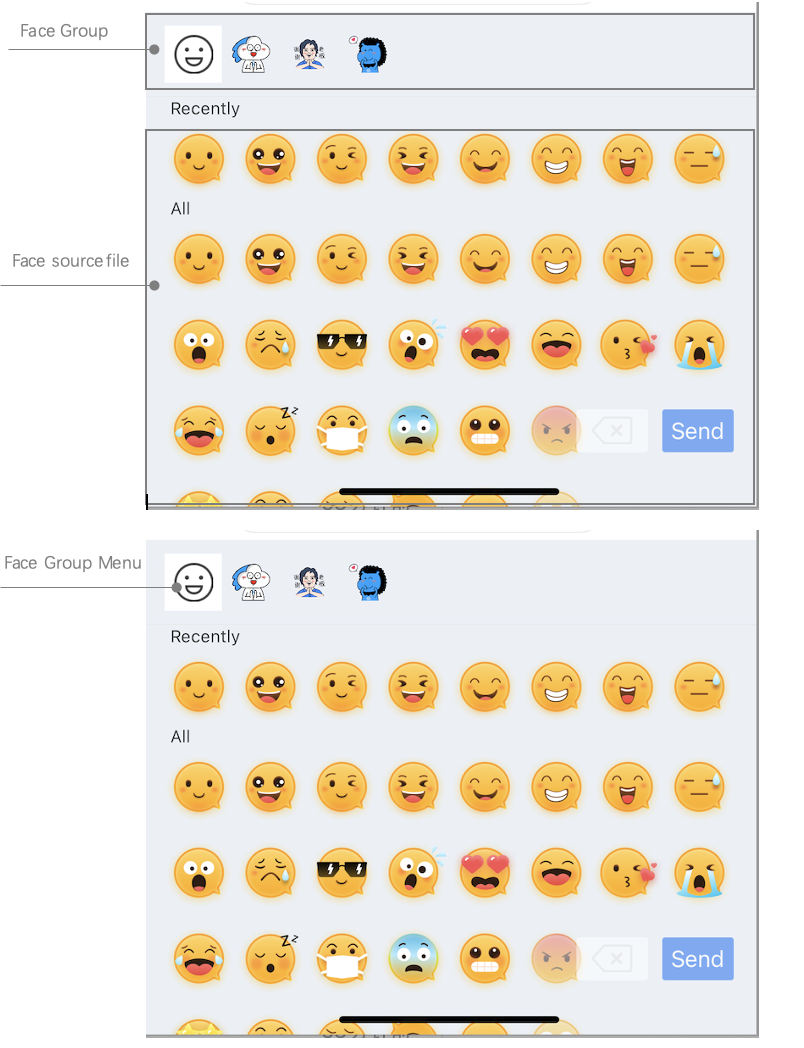
整个表情面板由两部分组成,如下图:
表情资源图片管理,包括:表情图片展示;
表情组管理,包括:表情组封面图,发送按钮。
新增自定义表情包
新增一套自定义表情包,您只需要按照如下两个步骤配置即可:
1. 准备表情资源
2. 启动 App 时加载表情包
需要说明的是,TUIChat 已经内置了表情包的发送和解析逻辑,您可以很轻松地实现自定义表情包的多端互通。
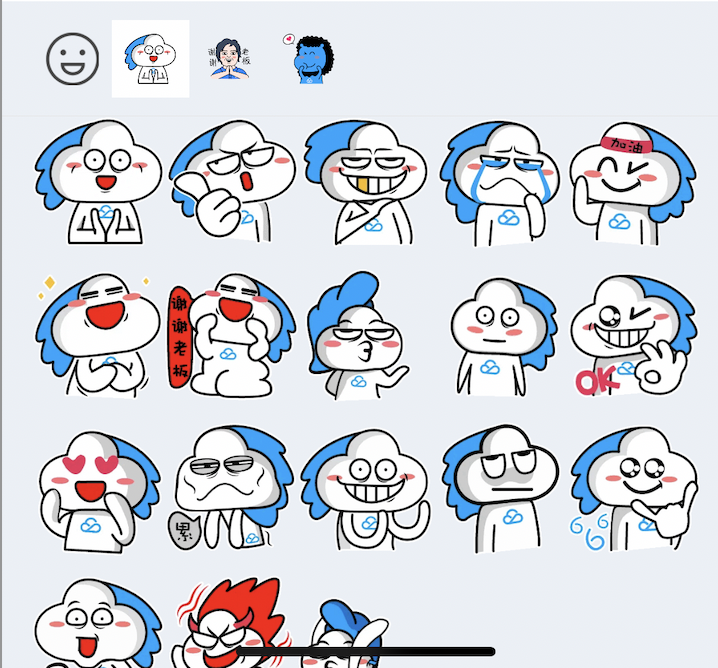
接下来以“programer” 这套自定义表情为例,演示如何添加自定义表情包,如下图:
准备表情资源
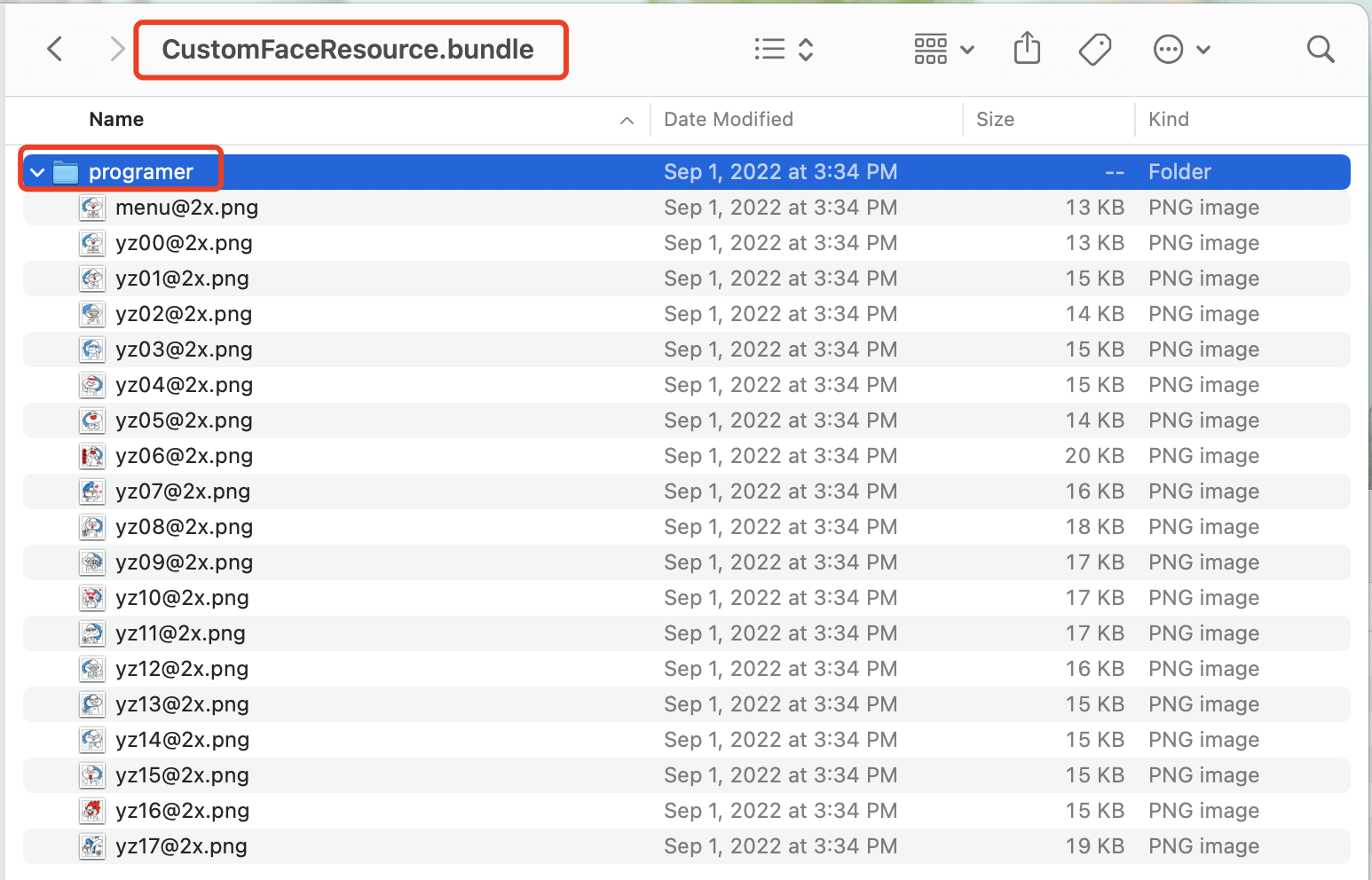
在添加表情包之前,您首先需要准备一套拥有版权的表情资源。如下图,只需要将您的表情图片打包成 bundle 文件即可。
加载表情包
如下图,将含有 “programer” 表情资源的自定义表情包
CustomFaceResource.bundle 拖到您的 xcode 工程中。然后在 App 启动时加载即可。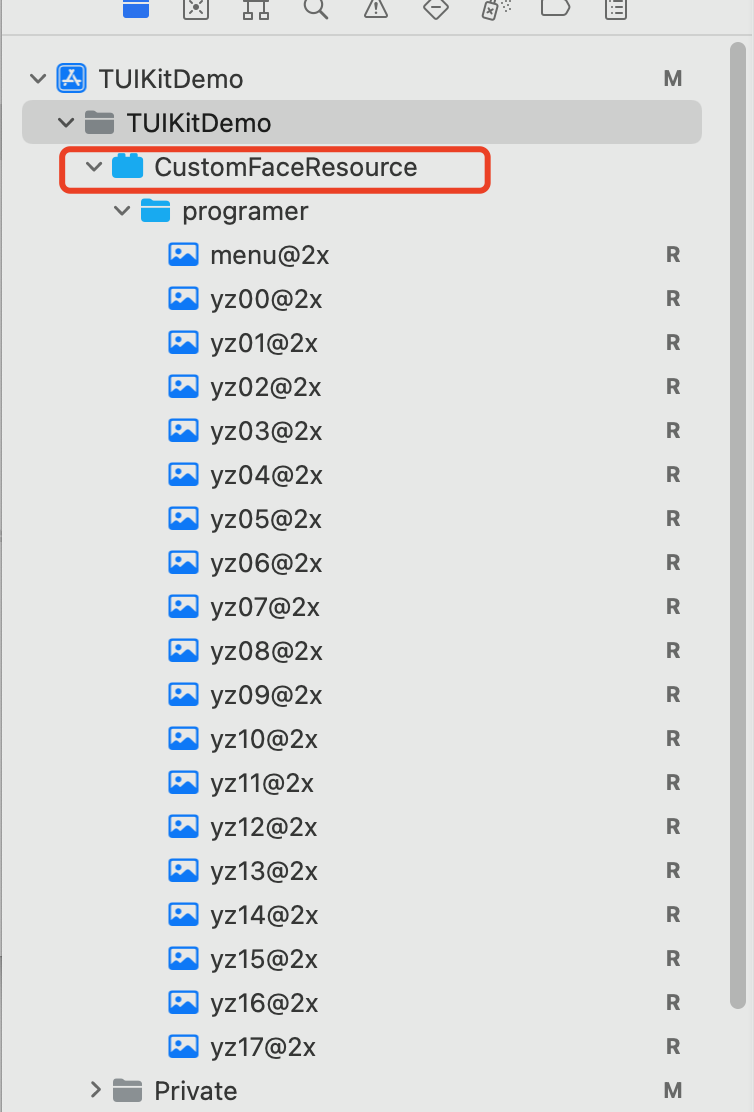
func application(_ application: UIApplication, didFinishLaunchingWithOptions launchOptions: [UIApplication.LaunchOptionsKey: Any]?) -> Bool {// ...self.setupCustomSticker()return YES}func setupCustomSticker() {guard let service = TIMCommonMediator.shared.getObject(for: TUIEmojiMeditorProtocol.self) else {assertionFailure("There's not any object implement TUIEmojiMeditorProtocol")return}let bundlePath = TUISwift.tuiBundlePath("CustomFaceResource", key: "TIMAppKit.TUIKit")// 4350 groupvar faces4350 = [TUIFaceCellData]()for i in 0...17 {let data = TUIFaceCellData()let name = String(format: "yz%02d", i)let path = "4350/\\(name)"data.name = namedata.path = bundlePath + "/" + pathfaces4350.append(data)}if faces4350.count > 0 {let group4350 = TUIFaceGroup()group4350.groupIndex = 1group4350.groupPath = bundlePath + "/4350/"group4350.faces = faces4350group4350.rowCount = 2group4350.itemCountPerRow = 5group4350.menuPath = bundlePath + "/4350/menu"service.appendFaceGroup(group4350)}// 4351 groupvar faces4351 = [TUIFaceCellData]()for i in 0...15 {let data = TUIFaceCellData()let name = String(format: "ys%02d", i)let path = "4351/\\(name)"data.name = namedata.path = bundlePath + "/" + pathfaces4351.append(data)}if faces4351.count > 0 {let group4351 = TUIFaceGroup()group4351.groupIndex = 2group4351.groupPath = bundlePath + "/4351/"group4351.faces = faces4351group4351.rowCount = 2group4351.itemCountPerRow = 5group4351.menuPath = bundlePath + "/4351/menu"service.appendFaceGroup(group4351)}// 4352 groupvar faces4352 = [TUIFaceCellData]()for i in 0...16 {let data = TUIFaceCellData()let name = String(format: "gcs%02d", i)let path = "4352/\\(name)"data.name = namedata.path = bundlePath + "/" + pathfaces4352.append(data)}if faces4352.count > 0 {let group4352 = TUIFaceGroup()group4352.groupIndex = 3group4352.groupPath = bundlePath + "/4352/"group4352.faces = faces4352group4352.rowCount = 2group4352.itemCountPerRow = 5group4352.menuPath = bundlePath + "/4352/menu"service.appendFaceGroup(group4352)}}
- (BOOL)application:(UIApplication *)application didFinishLaunchingWithOptions:(NSDictionary *)launchOptions {app = self;// Load the emoji resources when starting the app[self setupCustomSticker];return YES;}- (void)setupCustomSticker {// 1. Get the path of the bundle file of the custom sticker.NSString *customFaceBundlePath = [[NSBundle mainBundle] pathForResource:@"CustomFaceResource" ofType:@"bundle"];// 2. Load the custom emoji group// 2.1 Load the `programer` emoji resource images and parse them into `TUIFaceCellData`NSMutableArray<TUIFaceCellData *> *faceItems = [NSMutableArray array];for (int i = 0; i <= 17; i++) {TUIFaceCellData *data = [[TUIFaceCellData alloc] init];// The filename of the emoji resource images (the extension can be saved) for multi-terminal connection (which requires that filenames are consistent)data.name = [NSString stringWithFormat:@"yz%02d", i];// The path of the emoji resource images for local displaydata.path = [customFaceBundlePath stringByAppendingPathComponent:[NSString stringWithFormat:@"programer/%@", data.name]];[faceItems addObject:data];}// 2.2 Create the `programer` emoji group and parse it into `TUIFaceGroup`TUIFaceGroup *programGroup = [[TUIFaceGroup alloc] init];// Indicate the serial number of the current emoji group on the emoji panel for multi-terminal connection (which can be used together with the emoji name to find an image on the receiver's device)// Note that `groupIndex` starts from `0` and indicates the actual position of the current sticker on the emoji panel (`0` is the default value for the built-in `emoji` emoji group)programGroup.groupIndex = 1;// The root path of the current sticker in the bundle file of the custom emojisprogramGroup.groupPath = [customFaceBundlePath stringByAppendingPathComponent:@"programer/"];// The emoji resources in the current stickerprogramGroup.faces = faceItems;// The layout of the current stickerprogramGroup.rowCount = 2;programGroup.itemCountPerRow = 5;// The path of the thumbnail of the current sticker (without the extension)programGroup.menuPath = [customFaceBundlePath stringByAppendingPathComponent:@"programer/menu"];// 3. Add the `programer` emoji group to the emoji panelid<TUIEmojiMeditorProtocol> service = [[TIMCommonMediator share] getObject:@protocol(TUIEmojiMeditorProtocol)];[service appendFaceGroup:programGroup];}
多端互通
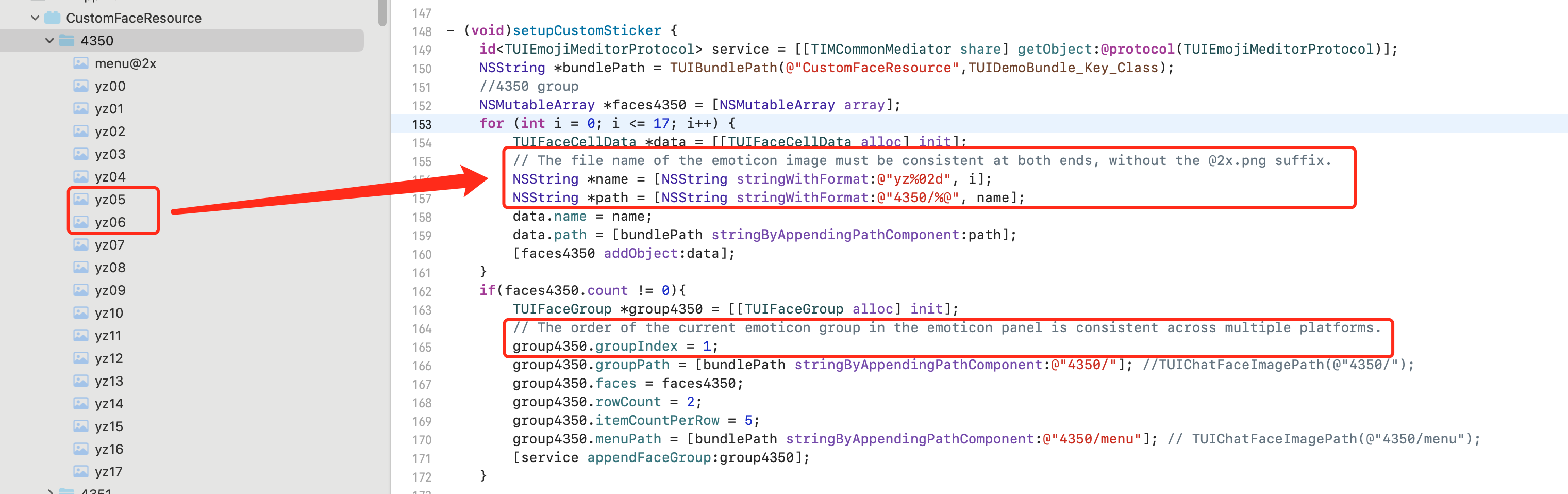
TUIChat 已经内置了表情包发送和解析逻辑,您只需要将如下两个属性在各个平台保持一致即可:
表情包中的图片文件名一致,也即 App 启动加载表情包时解析成
TUIFaceCellData 的 name 字段值需要多端一致;表情包在表情面板中的顺序一致,也即 App 启动加载表情包时解析成
TUIFaceGroup 的 groupIndex 字段值需要多端一致。当上述两个信息一致后,TUIChat 内置的表情包发送逻辑会将表情文件名和所属的表情包索引信息发给其他端,从而实现多端互通。
需要注意的是,groupIndex 是从 0 开始的,标识了当前表情包在表情面板中的实际位置(内置的 emoji 表情组默认是 0)。
表情面板高级配置
调整表情面板顺序
TUIChat 的表情面板支持调整表情组的顺序,您只需要按照实际顺序调用
TUIConfig 的 - appendFaceGroup: 方法即可。如果您想将内置 emoji 表情组调整到自定义表情后面,需要按照如下方式操作:
获取当前表情面板内置的表情组
TUIConfig.defaultConfig.faceGroups;重新排序;
将已经排好序的表情组列表赋值给表情面板。
func setupCustomSticker() {guard let service = TIMCommonMediator.shared.getObject(for: TUIEmojiMeditorProtocol.self) else {assertionFailure("There's not any object implement TUIEmojiMeditorProtocol")return}let bundlePath = TUISwift.tuiBundlePath("CustomFaceResource", key: "TIMAppKit.TUIKit")// 4350 groupvar faces4350 = [TUIFaceCellData]()for i in 0...17 {let data = TUIFaceCellData()let name = String(format: "yz%02d", i)let path = "4350/\\(name)"data.name = namedata.path = bundlePath + "/" + pathfaces4350.append(data)}if faces4350.count > 0 {let group4350 = TUIFaceGroup()group4350.groupIndex = 1group4350.groupPath = bundlePath + "/4350/"group4350.faces = faces4350group4350.rowCount = 2group4350.itemCountPerRow = 5group4350.menuPath = bundlePath + "/4350/menu"service.appendFaceGroup(group4350)}// 4351 groupvar faces4351 = [TUIFaceCellData]()for i in 0...15 {let data = TUIFaceCellData()let name = String(format: "ys%02d", i)let path = "4351/\\(name)"data.name = namedata.path = bundlePath + "/" + pathfaces4351.append(data)}if faces4351.count > 0 {let group4351 = TUIFaceGroup()group4351.groupIndex = 2group4351.groupPath = bundlePath + "/4351/"group4351.faces = faces4351group4351.rowCount = 2group4351.itemCountPerRow = 5group4351.menuPath = bundlePath + "/4351/menu"service.appendFaceGroup(group4351)}// 4352 groupvar faces4352 = [TUIFaceCellData]()for i in 0...16 {let data = TUIFaceCellData()let name = String(format: "gcs%02d", i)let path = "4352/\\(name)"data.name = namedata.path = bundlePath + "/" + pathfaces4352.append(data)}if faces4352.count > 0 {let group4352 = TUIFaceGroup()group4352.groupIndex = 3group4352.groupPath = bundlePath + "/4352/"group4352.faces = faces4352group4352.rowCount = 2group4352.itemCountPerRow = 5group4352.menuPath = bundlePath + "/4352/menu"service.appendFaceGroup(group4352)}}
- (void)setupCustomSticker {// 1. Get the path of the bundle file of the custom sticker.NSString *customFaceBundlePath = [[NSBundle mainBundle] pathForResource:@"CustomFaceResource" ofType:@"bundle"];// 2. Load the custom emoji group// 2.1 Load the `programer` emoji resource images and parse them into `TUIFaceCellData`NSMutableArray<TUIFaceCellData *> *faceItems = [NSMutableArray array];for (int i = 0; i <= 17; i++) {TUIFaceCellData *data = [[TUIFaceCellData alloc] init];// The filename of the emoji resource images (the extension can be saved) for multi-terminal connection (which requires that filenames are consistent)data.name = [NSString stringWithFormat:@"yz%02d", i];// The path of the emoji resource images for local displaydata.path = [customFaceBundlePath stringByAppendingPathComponent:[NSString stringWithFormat:@"programer/%@", data.name]];[faceItems addObject:data];}// 2.2 Create the `programer` emoji group and parse it into `TUIFaceGroup`TUIFaceGroup *programGroup = [[TUIFaceGroup alloc] init];// Indicate the serial number of the current emoji group on the emoji panel for multi-terminal connection (which can be used together with the emoji name to find an image on the receiver's device)// Note that `groupIndex` starts from `0` and indicates the actual position of the current sticker on the emoji panel (`0` is the default value for the built-in `emoji` emoji group)programGroup.groupIndex = 0;// The root path of the current sticker in the bundle file of the custom emojisprogramGroup.groupPath = [customFaceBundlePath stringByAppendingPathComponent:@"programer/"];// The emoji resources in the current stickerprogramGroup.faces = faceItems;// The layout of the current stickerprogramGroup.rowCount = 2;programGroup.itemCountPerRow = 5;// The path of the thumbnail of the current sticker (without the extension)programGroup.menuPath = [customFaceBundlePath stringByAppendingPathComponent:@"programer/menu"];// 3. Add the `programer` emoji group to the front of the emoji panelid<TUIEmojiMeditorProtocol> service = [[TIMCommonMediator share] getObject:@protocol(TUIEmojiMeditorProtocol)];[service appendFaceGroup:programGroup];}
说明:
由于表情包多端互通依赖于表情图片的名称和表情组所在面板的顺序,当您调整本地顺序之后,需要保证 groupIndex 与您实际顺序一致,方便各端互通。
修改表情组封面
您可以在加载自定义表情组时,给
TUIFaceGroup 的 menuPath 属性设置封面图的路径(无需 @2x.png 的扩展名)来自定义表情组封面。例如,将 "programer" 表情组中的
menu@2x.png 图片作为封面图片。func setupCustomSticker() {// ...// 4350 groupvar faces4350 = [TUIFaceCellData]()for i in 0...17 {let data = TUIFaceCellData()let name = String(format: "yz%02d", i)let path = "4350/\\(name)"data.name = namedata.path = bundlePath + "/" + pathfaces4350.append(data)}if faces4350.count > 0 {let group4350 = TUIFaceGroup()group4350.groupIndex = 1group4350.groupPath = bundlePath + "/4350/"group4350.faces = faces4350group4350.rowCount = 2group4350.itemCountPerRow = 5group4350.menuPath = bundlePath + "/4350/menu"service.appendFaceGroup(group4350)}// ...}
- (void)setupCustomSticker {....// 2.2 Create the `programer` emoji group and parse it into `TUIFaceGroup`TUIFaceGroup *programGroup = [[TUIFaceGroup alloc] init];....// The path of the thumbnail of the current sticker (without the extension)programGroup.menuPath = [customFaceBundlePath stringByAppendingPathComponent:@"programer/menu"];........}
调整表情图片的布局
目前 TUIChat 表情面板针对表情图片的布局,支持以下两个样式:
rowCount,当前表情组内图片显示的行数;
itemCountPerRow,每行展示的表情图片的个数。
例如,调整 “programer” 表情组中的表情图片排列规则是每页 2 行,每行最多 5 张图片。
func setupCustomSticker() {// ...// 4350 groupvar faces4350 = [TUIFaceCellData]()for i in 0...17 {let data = TUIFaceCellData()let name = String(format: "yz%02d", i)let path = "4350/\\(name)"data.name = namedata.path = bundlePath + "/" + pathfaces4350.append(data)}if faces4350.count > 0 {let group4350 = TUIFaceGroup()group4350.groupIndex = 1group4350.groupPath = bundlePath + "/4350/"group4350.faces = faces4350group4350.rowCount = 2group4350.itemCountPerRow = 5group4350.menuPath = bundlePath + "/4350/menu"service.appendFaceGroup(group4350)}// ...}
- (void)setupCustomSticker {...// 2.2 Create the `programer` emoji group and parse it into `TUIFaceGroup`TUIFaceGroup *programGroup = [[TUIFaceGroup alloc] init];// The layout of the current stickerprogramGroup.rowCount = 2;programGroup.itemCountPerRow = 5;...}
表情包渲染原理
TUIChat 内置了表情包的发送和渲染机制,您无需关注本部分内容。
如果您想修改源码,或者需要将自定义表情内容编码后直接透传,可以参考该部分。
发送表情
TUIChat 的表情面板由 UICollectionView 组成,当点击每个表情图片后会触发
TUIInputController 的 - faceView:didSelectItemAtIndexPath: 方法,并将您点选的表情名称和对应表情组在面板中的索引信息回调给您。您可以在回调中通过两个步骤将表情发送出去:
使用表情名称和表情组索引创建表情消息;
调用 TUIChat 的方法将表情消息发送出去。
public func faceVerticalView(_ faceView: TUIFaceVerticalView, didSelectItemAtIndexPath indexPath: IndexPath) {let group = faceView.faceGroups[indexPath.section]if let face = group.faces?[indexPath.row] as? TUIFaceCellData {if group.isNeedAddInInputBar {inputBar?.addEmoji(face)updateRecentMenuQueue(face.name ?? "")} else {let message = V2TIMManager.sharedInstance().createFaceMessage(index: Int32(group.groupIndex), data: face.name?.data(using: .utf8) ?? Data())!delegate?.inputController(self, didSendMessage: message)}}}
- (void)faceView:(TUIFaceView *)faceView didSelectItemAtIndexPath:(NSIndexPath *)indexPath{TUIFaceGroup *group = [TUIConfig defaultConfig].faceGroups[indexPath.section];TUIFaceCellData *face = group.faces[indexPath.row];if(indexPath.section == 0){// Built-in emojis need to be displayed in the input box.[_inputBar addEmoji:face];}else{// Custom emojis are directly sent to the receiver.if (face.name) {// Create an emoji messageV2TIMMessage *message = [[V2TIMManager sharedInstance] createFaceMessage:group.groupIndex data:[face.name dataUsingEncoding:NSUTF8StringEncoding]];// Send the message to receiverif(_delegate && [_delegate respondsToSelector:@selector(inputController:didSendMessage:)]){[_delegate inputController:self didSendMessage:message];}}}}
解析表情并渲染
当收到对端的表情消息后,TUIChat 会触发
TUIFaceMessageCellData 的 - getCellData: 方法,并在其中将表情消息解析成用于展示表情的 TUIFaceMessageCellData 。TUIChat 会将解析到的
TUIMessageCellData 赋值给 TUIFaceMessageCell 用于渲染。override class func getCellData(message: V2TIMMessage) -> TUIMessageCellData {guard let elem = message.faceElem else { return TUIFaceMessageCellData(direction: .incoming) }let faceData = TUIFaceMessageCellData(direction: message.isSelf ? .outgoing : .incoming)faceData.groupIndex = elem.indexif let data = elem.data {faceData.faceName = String(data: data, encoding: .utf8)}if let groups = TIMConfig.shared.faceGroups {for group in groups {if group.groupIndex == faceData.groupIndex {if let url = URL(string: group.groupPath ?? "") {let path = url.appendingPathComponent(faceData.faceName ?? "").pathfaceData.path = path}break}}}faceData.reuseId = "TFaceMessageCell"return faceData}
+ (TUIMessageCellData *)getCellData:(V2TIMMessage *)message{// Parse the emoji information after receiving the messageV2TIMFaceElem *elem = message.faceElem;// Create the `TUIFaceMessageCellData` for emoji displayTUIFaceMessageCellData *faceData = [[TUIFaceMessageCellData alloc] initWithDirection:(message.isSelf ? MsgDirectionOutgoing : MsgDirectionIncoming)];// Get the order information of the current emoji group on the emoji panelfaceData.groupIndex = elem.index;// Get the filename of the emoji imagefaceData.faceName = [[NSString alloc] initWithData:elem.data encoding:NSUTF8StringEncoding];// Get the specific path of the local sticker of the emoji image based on the name of the emoji image and the emoji groupfor (TUIFaceGroup *group in [TUIConfig defaultConfig].faceGroups) {if(group.groupIndex == faceData.groupIndex){NSString *path = [group.groupPath stringByAppendingPathComponent:faceData.faceName];faceData.path = path;break;}}faceData.reuseId = TFaceMessageCell_ReuseId;return faceData;}
文档反馈