Configuring Maintenance Time
Baixar
Modo Foco
Tamanho da Fonte
Overviews
The DTS system will regularly perform task upgrades to accommodate legacy tasks' use of newly launched features. Set a maintenance time window so that the system can perform the upgrade within the time window you have set.
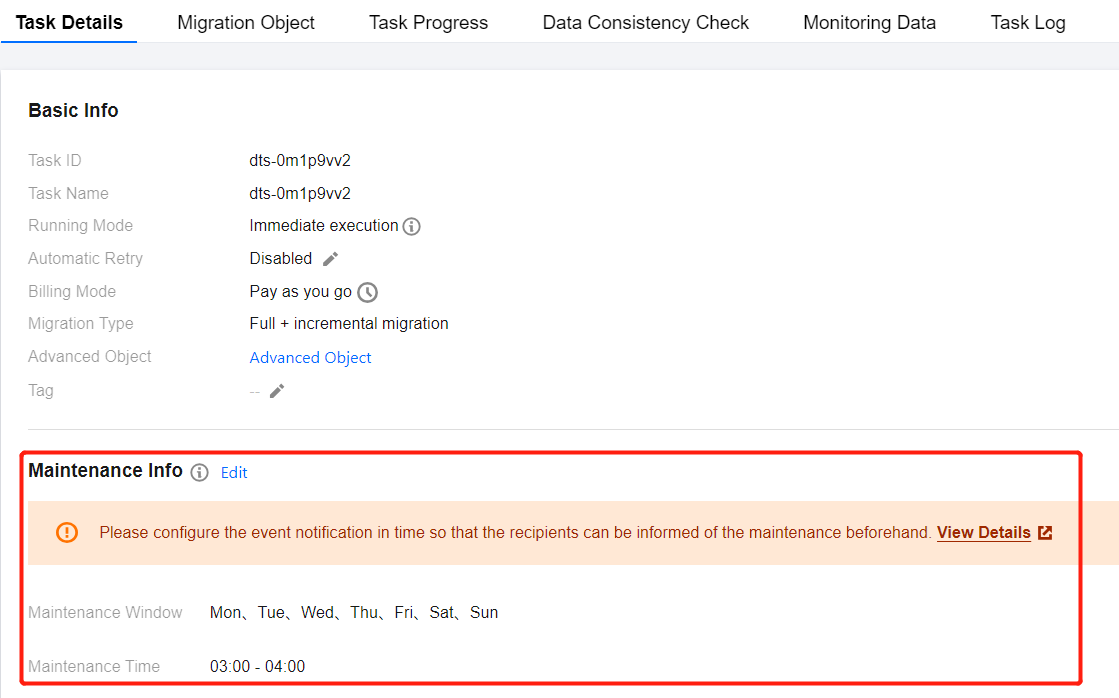
After a task is created, a default maintenance time is generated, which is 3:00 AM to 4:00 AM daily. Users can view and modify this on the Task Details page.
Application Scope
All tasks related to data migration, data synchronization, and data subscription.
Notes
The maintenance time window cannot be closed. Please choose off-peak business hours for maintenance, typically from 3:00 AM to 4:00 AM.
Ask users to [ Configure Event Alarm ] in advance (https://www.tencentcloud.com/document/product/571/90079?from_cn_redirect=1!1a380543dc68d16a5554181c18f6b7bf), so that they can receive notifications of task upgrades 24 hours before the system upgrade.
Service Impact
During the system upgrade, there will be a momentary disconnection lasting 1 second to 5 seconds. After the upgrade, the task will automatically restart, ensuring continuous data transmission.
Directions
1. Log in to the DTS console , choose the Data Migration/Data Sync/Data Subscription page in the left sidebar, then select the specified task, choose Operation column, and select More > View .
2. In Task Details > Maintenance Info, click Edit to modify the maintenance information.
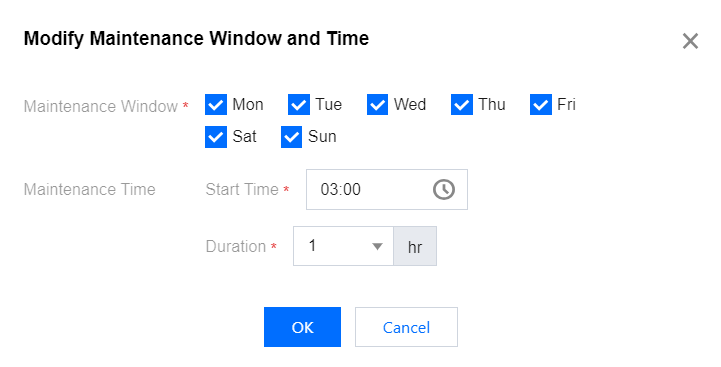
3. After modifying the maintenance time, click OK.
Configure the off-peak period of your business as the DTS maintenance time, selecting at least one day each week.
Ajuda e Suporte
Esta página foi útil?
Você também pode entrar em contato com a Equipe de vendas ou Enviar um tíquete em caso de ajuda.
comentários