In the configuration of the Data Transfer Service (DTS) data migration task or during task execution, you can dynamically adjust the task concurrency and requests per second (RPS) based on the write throughput of the source database and the resource configurations of both source and target databases.
Note:
This document only describes how to use DTS performance parameters. If you want to comprehensively improve DTS transfer performance, you need to conduct an analysis based on the workloads of both the source and target and the network conditions. For details, see DTS Performance Tuning Best Practices.
Applicable Scope
Links among MySQL, MariaDB, Percona, TDSQL-C for MySQL, and TDSQL for MySQL
Must-Knows
1. Speed limiting can only be configured during the task configuration process or when the task is in the Running status.
2. When reducing the task transfer speed, monitor both the amount of delayed data and the delay time. DTS caches intermediate data only for 7 days by default. Excessively high latency over an extended period may cause the cached intermediate data to expire, resulting in a complete task failure.
3. Adjusting the speed during the full export phase may cause the task to restart. In some cases, the restart may require resuming synchronization from the beginning, as detailed below:
For MySQL series data migration tasks, lock-free synchronization is enabled by default. In lock-free synchronization scenarios, if the restart occurs during the structure export phase or the export phase of tables without primary keys, synchronization needs to be restarted from the beginning; if the restart occurs during the export phase of tables with primary keys, the task will resume synchronization seamlessly without restarting from the beginning.
3.1 Restart during the full export phase.
During the structure export phase or the export phase of tables without primary keys, restarting a task requires resuming synchronization from the beginning.
During the export phase of tables with primary keys, if the interval between the original synchronization start time X and the retry time Y is less than or equal to 48 hours, resumable transfer is supported; if the interval exceeds 48 hours, synchronization restarts from the beginning. After a manual or automatic restart that triggers a full resynchronization, the start time X will be reset.
3.2 Restart during the full import or incremental synchronization phase: Resumable transfer is supported, and the data transfer will not be affected.
4. After speed limiting is disabled, DTS resets the speed parameters to their default values: the number of threads for full export and import is set to 8, the full export and import RPS is set to 50 million, and the number of threads for incremental import is set to 32.
Adjustment Principles
The default number of concurrent threads for full export in DTS tasks is 8, which generally requires no modification. If adjustments are needed, refer to the monitoring metrics and the configurations of the source and target databases, and maximize the DTS transfer speed without impacting the source and target database performance.
DTS transfer performance is related to the configurations of the source and target databases, DTS task specifications, network latency, and network bandwidth. Therefore, simply increasing the number of threads or RPS may not effectively improve DTS transfer performance. It is necessary to identify the bottleneck in the process and address the specific issues accordingly.
Task Phase
Adjustment Scenario
Adjustment Plan
Adjustment Result
Task configuration phase
The source database configuration is too low to handle the additional load imposed by DTS, causing the source database to crash after the DTS task starts.
Reduce the number of export threads of the source database and lower the export RPS.
Effective.
The target database configuration is too low to handle the additional load imposed by DTS, causing the target database to crash after the DTS task starts.
Reduce the number of import threads of the target database and lower the import RPS.
Effective.
Full migration phase
The source and target database configurations are high, but the DTS full data transfer speed is slow.
If the source database configuration is high, increase the number of export threads of the source database.
If the configuration of the target database is high, increase the number of import threads of the target database.
The default RPS in the full migration phase is very high, so it is generally unnecessary to adjust RPS when improving the transfer rate.
Not necessarily effective.
If the adjustment does not take effect, investigate factors such as network latency and bandwidth, as these may also affect transfer performance.
The target database configuration is low, and the speed of DTS writing data to the target database is too fast, which impacts the target database load (such as high CPU utilization).
Reduce the number of import threads of the target database and lower the target database import RPS.
Effective.
Incremental phase
The source database configuration is high, the amount of data written to the source database is large, and the network latency is high.
Check whether RPS has reached the upper limit. Different specifications of DTS tasks correspond to different RPS upper limits.
If RPS has reached the upper limit, upgrade the DTS task specification first (implemented through the specification change operation).
If the task upgrade does not take effect, investigate factors such as network latency and bandwidth, as these may also affect transfer performance.
The target database configuration is low, and the speed of DTS writing data to the target database is too fast, which impacts the target database load (such as high CPU utilization).
1. Lower the DTS task specification.
2. Reduce the number of concurrent import threads of the target database.
Effective.
The target database configuration is low, and the number of DTS connections is too large, causing the target database to reach the thread upper limit.
Reduce the number of import threads of the target database.
Effective.
DTS writing to the target database causes lock contention with the target database's own write operations (such as the Lock wait timeout error).
Reduce the number of import threads of the target database to decrease lock contention.
Effective.
Speed Limiting During Task Configuration
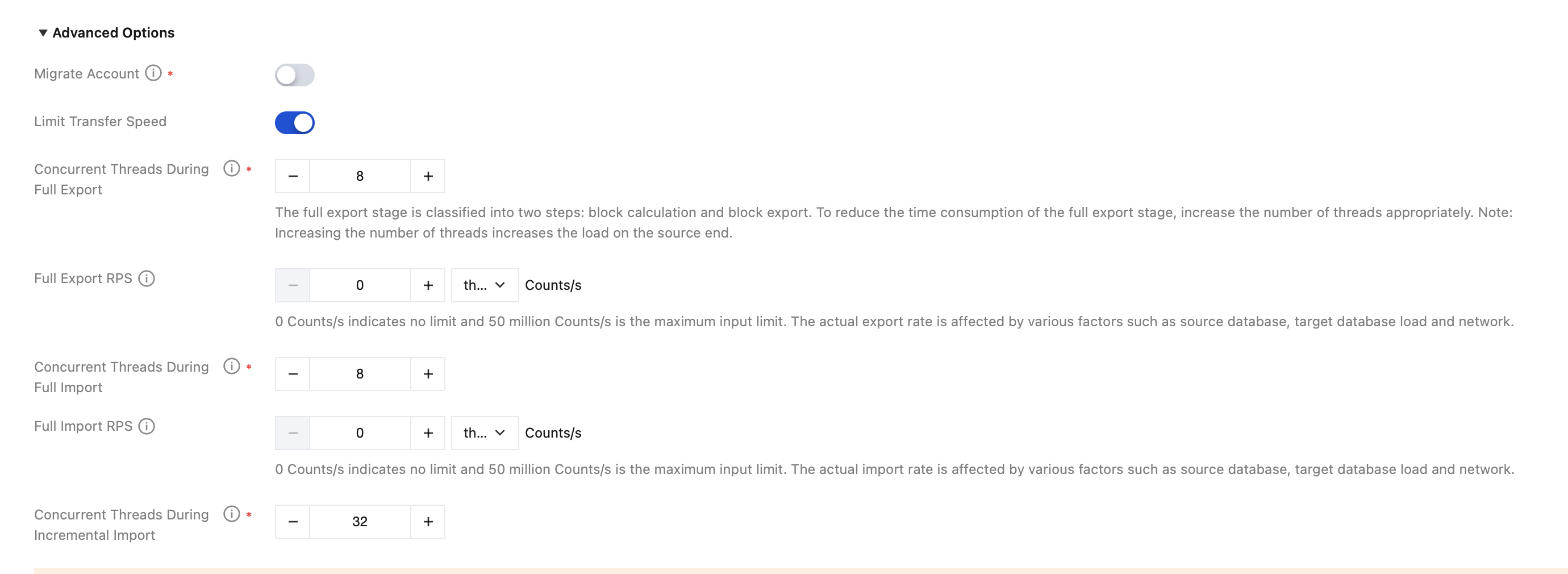
During the initial configuration of the data migration task, you can configure the transfer speed parameters in the advanced option section on the Set Up Source and Target Databases page.
The description of each parameter is as follows:
The number of concurrent threads for full export of the source database and the number of concurrent threads for full import of the target database range from 1 to 16, with a default value of 8.
Source database full export RPS and target database full import RPS: the values range from 0 to 50 million; 0 Counts/s indicates no limit. The RPS value in this example is only for reference. The actual RPS depends on various factors such as the source or target database load and network conditions.
The number of concurrent threads for incremental import of the target database ranges from 1 to 32, with a default value of 32.
Speed Limiting During Task Running
When performing speed limiting during the full data synchronization phase, you can modify speed parameters for both full and incremental synchronization (such as the number of full export threads and RPS, the number of full import threads and RPS, and the number of incremental import threads). When performing speed limiting during the incremental data synchronization phase, you can only adjust speed parameters for incremental synchronization (such as the number of incremental import threads). For details, see the following operations.
1. Log in to the DTS console, select Data Migration in the left sidebar, and select the specified migration task.
2. Perform speed limiting during the full data migration phase.
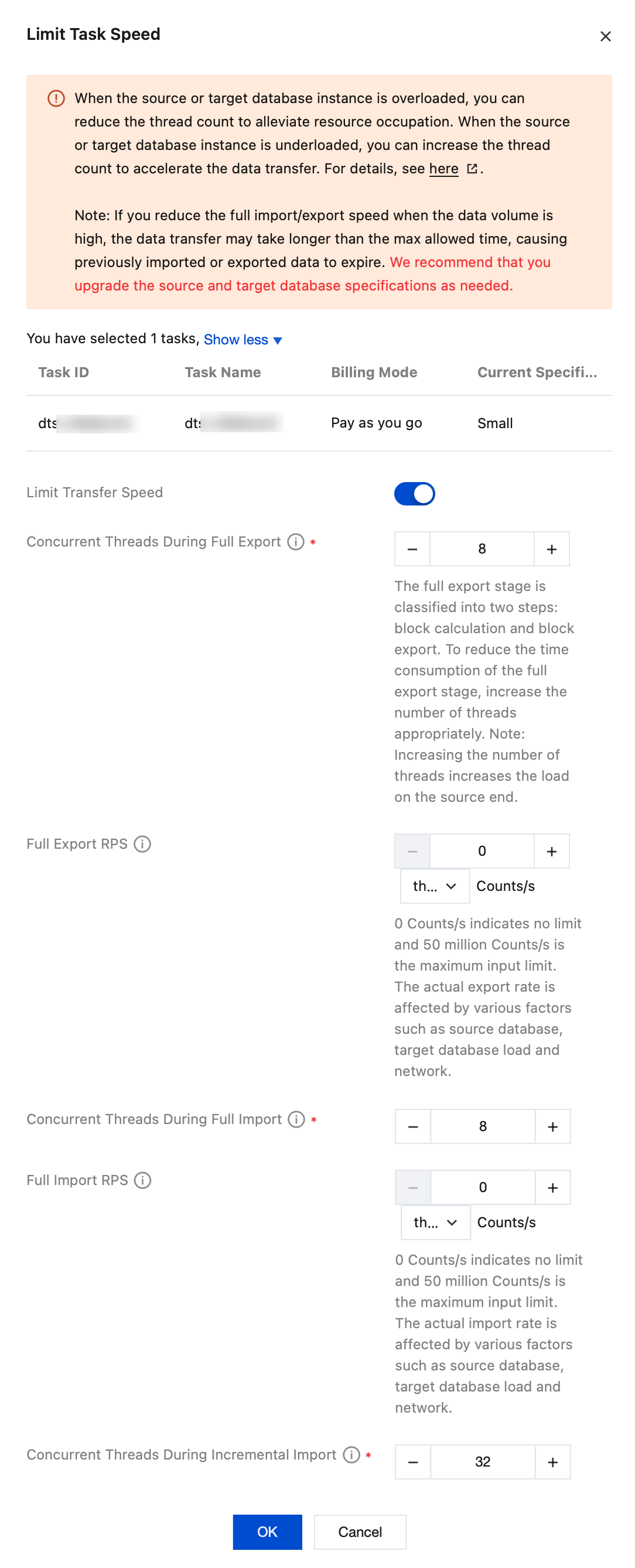
In the Operation column, choose More > Limit Speed.
In the pop-up window, select the switch for limiting the transfer speed, adjust the speed parameters, and then click OK.
The number of concurrent threads for full export of the source database and the number of concurrent threads for full import of the target database range from 1 to 16, with a default value of 8.
Source database full export RPS and target database full import RPS: the values range from 0 to 50 million; 0 Counts/s indicates no limit. The RPS value in this example is only for reference. The actual RPS depends on various factors such as the source or target database load and network conditions.
3. Perform speed limiting during the incremental data migration phase.
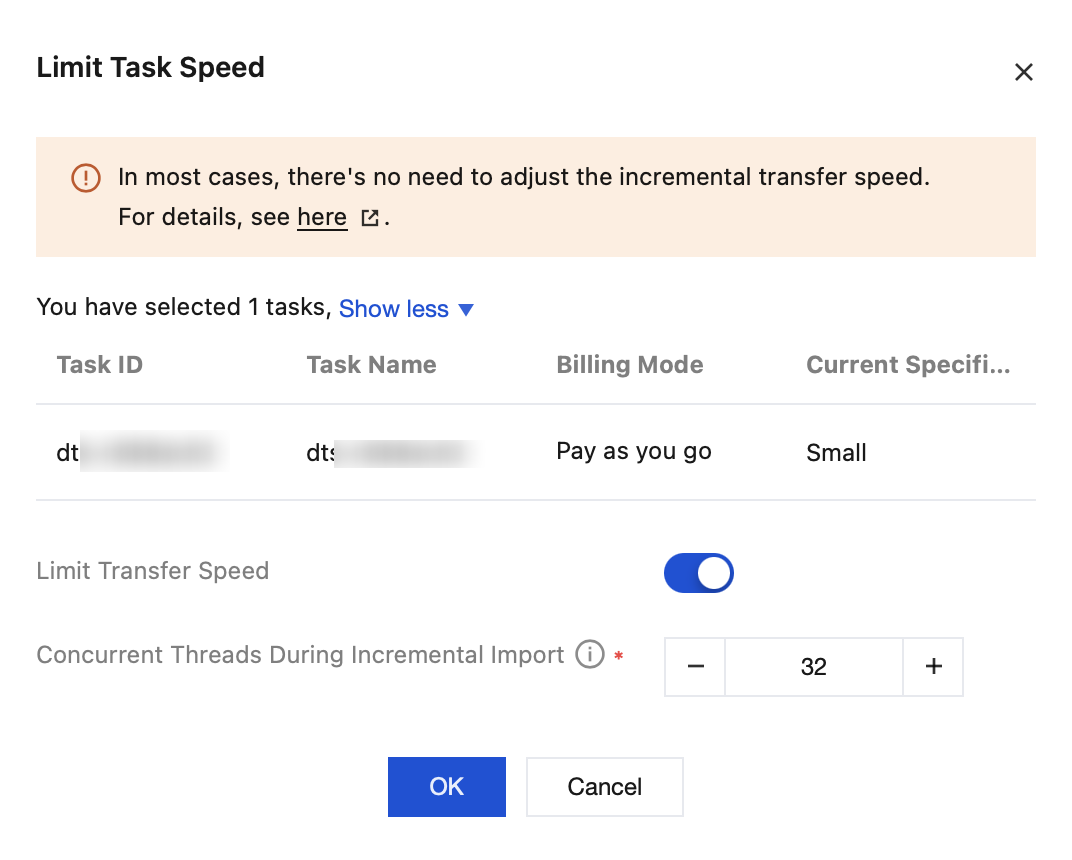
In the Operation column, choose More > Limit Speed.
After selecting the switch for limiting the transfer speed, adjust the number of concurrent threads.
The number of concurrent threads for incremental import of the target database ranges from 1 to 32, with a default value of 32.