Use Limits
Baixar
Modo Foco
Tamanho da Fonte
Resource limitations
Resource | Limit | can request for high quota | Description |
Connection/User | 10 | Yes | The number of physical connections accessible to each user does not exceed 10. |
DC Tunnel/Connection | 5 | Yes | The number of dedicated tunnels that can be created in each physical connection does not exceed 5. |
DC Gateway/VPC | 2 (1 Standard and 1 NAT) | No | The number of Direct Connect gateways configured in each VPC does not exceed 2. |
Local IP Translation/DC Gateway | 100 | Yes | The number of local IP translations configured for each Direct Connect gateway does not exceed 100. |
Peer IP Translation/DC Gateway | 100 | Yes | The number of peer IP translations configured for each Direct Connect gateway does not exceed 100. |
Quantity of IPs Translated at Local Source IP Port/DC Gateway | 20 | Yes | The number of local source IP address port translations configured for each Direct Connect gateway does not exceed 20. |
Local Destination IP Port Translation/DC Gateway | 100 | Yes | The number of local destination IP address port translations configured for each Direct Connect gateway does not exceed 100. |
quantity of DC tunnel static route entries | Dedicated Tunnel 1.0: 20 | No | The number of static routes for a dedicated tunnel does not exceed 20. |
| Dedicated Tunnel 2.0: 50 | Yes | The number of static routes for a dedicated tunnel does not exceed 50. If you need to adjust the quota, submit a ticket. |
quantity of DC tunnel BGP routing entries | Dedicated Tunnel 1.0: 100 | No | The number of BGP routes for a dedicated tunnel does not exceed 100. |
| Dedicated Tunnel 2.0: 200 | Yes | The number of BGP routes for a dedicated tunnel does not exceed 200. If you need to adjust the quota, submit a ticket. |
Connection Restrictions
Direct Connect
When you create a new DC gateway, the IP translation and IP port translation contents are empty by default, and both IP translation and IP port translation are ineffective.
The DC tunnel supports two routing methods: BGP routing and static routing.
Pay attention to the following restrictions when you publish routes:
127.0.0.0/8, 224.0.0.0/4,240.0.0.0/4,169.254.0.0/16,255.255.255.255/32,0.0.0.0/0-0.0.0.0/32.Subnets of the CIDR block where the peer IP address resides and IP addresses within that CIDR block. If mutual access is required, contact online customer service to enable 'interconnected IP redistribution'.
IP Address Translation
The IP address pool cannot be within the CIDR range of the VPC where the Direct Connect gateway resides.
ACL rules for multiple IP address pools cannot overlap; otherwise, NAT conflicts will occur.
IP addresses cannot overlap across multiple IP address pools.
An IP address pool supports only a single IP address or consecutive IP addresses. For consecutive IP addresses, the
/24 CIDR block must be consistent. For example, it supports 192.168.0.1 - 192.168.0.6 but does not support 192.168.0.1 - 192.168.1.2.Address pools do not support broadcast addresses (
255.255.255.255), Class D addresses 224.0.0.0 - 239.255.255.255, or Class E addresses 240.0.0.0 - 255.255.255.254.The local source IP port translation supports a maximum of 100 IP pools, and each address pool supports a maximum of 20 ACL rules (if required, you can submit a ticket to request for a quota increase).
When you need to switch from IP translation to IP port translation, clear the source IP translation rules. After you refresh the page, you can edit the IP port translation rules.
IP Port Translation
The source IP address must be within the CIDR range of the VPC where the Direct Connect gateway resides.
The source IP address port is unique, meaning that the same IP address port within a VPC can be mapped to only one IP address port.
The mapped IP port cannot be within the CIDR range of the VPC.
The mapped IP ports cannot be repeated, that is, one IP port cannot be mapped to multiple VPC IP ports.
Source IPs and mapped IPs do not support broadcast addresses (
255.255.255.255), Class D addresses 224.0.0.0 - 239.255.255.255, or Class E addresses 240.0.0.0 - 255.255.255.254.The local destination IP port translation supports up to 100 IP port mappings (if you have any needs, you can submit a ticket to request for a quota increase).
When you configure IP translation and IP port translation at the same time, if both are matched, IP translation is matched first.
Network Constraints
When you use a physical dedicated line to connect your on-premises IDC to Tencent Cloud, there are certain requirements for the MAC addresses at both ends. To ensure normal network connectivity, please note the following constraints.
MAC
The access switch on the Tencent Cloud side has a fixed MAC address of 3c:fd:fe:29:cb:c2. Do not configure this MAC address for the access device on your on-premises IDC side. This prevents MAC address conflicts, which can cause MAC address flapping (switch hopping) issues, leading to network problems such as unreachability, slow response, or no response.
Note:
MAC address flapping (switch hopping) refers to a phenomenon where two egress interfaces within the same VLAN on a device learn the same MAC address, and the subsequently learned MAC address overwrites the previously learned one, resulting in MAC address instability.
The following are scenarios that cause MAC address flapping:
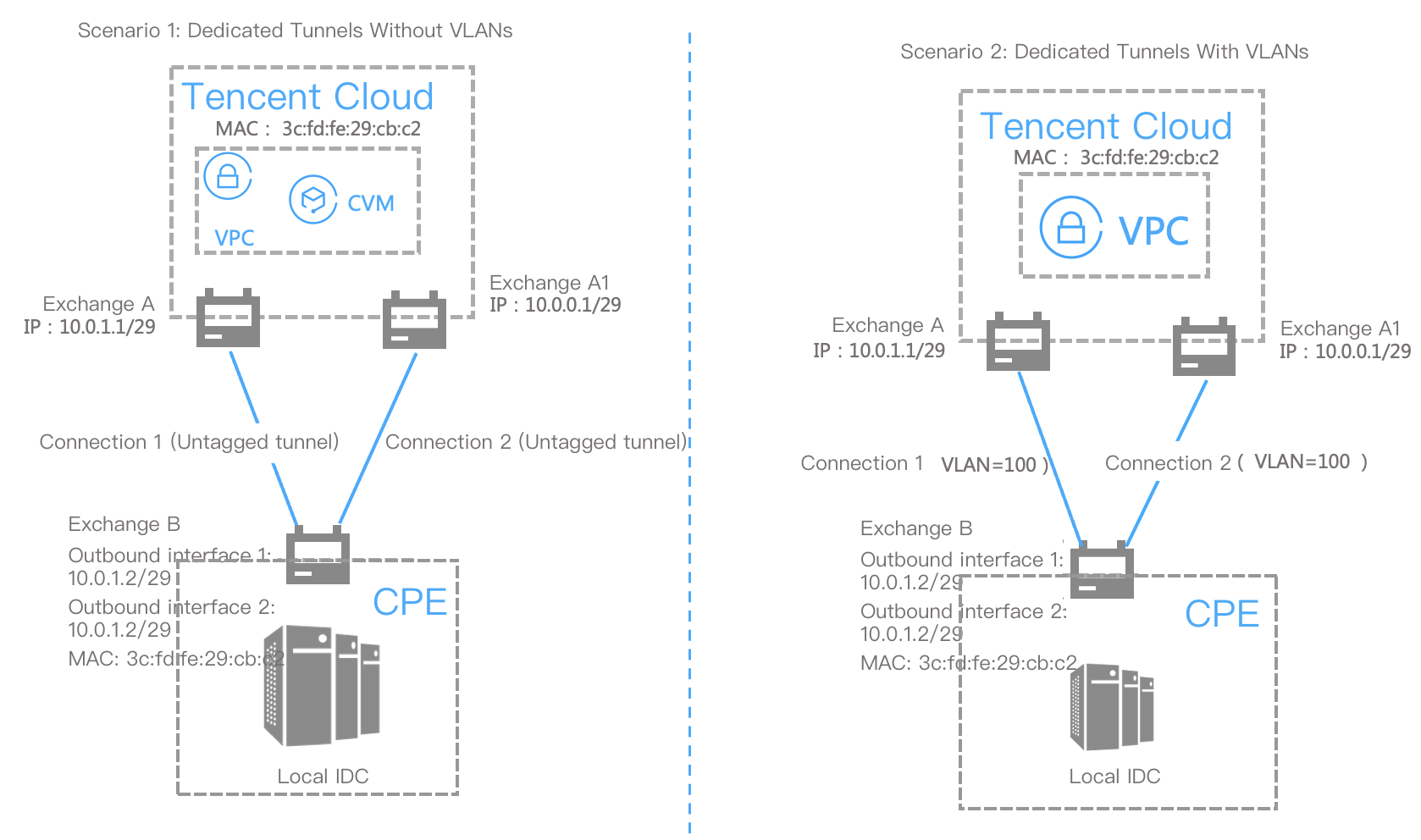
In the diagram, the user-side switch B connects to Tencent Cloud via two dedicated lines (Dedicated Line 1 and Dedicated Line 2), and is connected to the Tencent Cloud-side switches A and A1 respectively.
Packets returned from Tencent Cloud to your on-premises IDC experience MAC address flapping at Switch B.
Connection Constraints
To prevent network congestion caused by network loops, we recommend that you use Layer 3 network sub-interfaces to connect to Tencent Cloud dedicated line devices.
Ajuda e Suporte
Esta página foi útil?
Você também pode entrar em contato com a Equipe de vendas ou Enviar um tíquete em caso de ajuda.
comentários