Cline
Download
Modo Foco
Tamanho da Fonte
Cline is an AI coding assistant built into editors and terminals. It can read and write files, run terminal commands, use browsers, and help you build features through natural conversations. This article describes how to configure and use the Tencent Cloud Large Language Model Token Plan in Cline.
Prerequisites
Before starting the configuration, make sure you have completed the following preparatory work:
Install Cline
Open VSCode, search for and install Cline in the extension marketplace. For details, refer to Cline Official Installation Guide.
Configure Token Plan
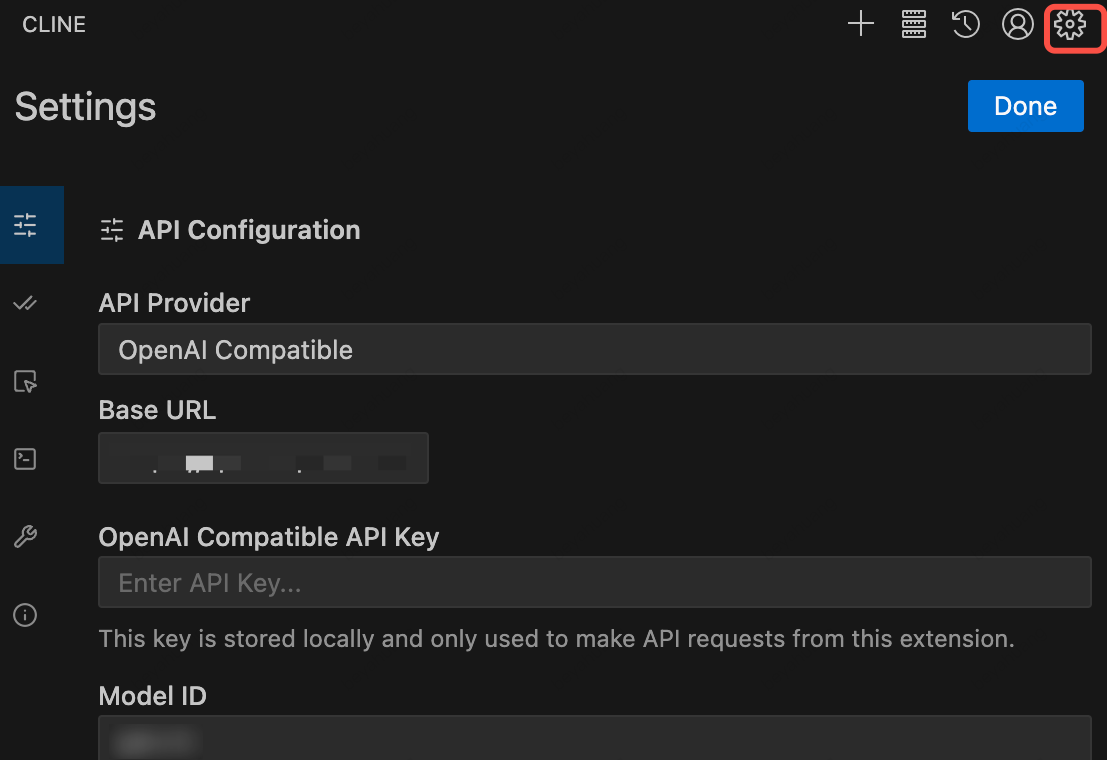
After the Cline plugin is installed, click the settings button in the upper-right corner to configure the following information:
API Provider: Select OpenAI Compatible (Token Plan API is compatible with the OpenAI standard).
Base URL:
https://tokenhub-intl.tencentcloudmaas.com/plan/v3.API Key: Enter the API Key dedicated to the Token Plan.
Model ID: Enter the Model ID supported by the Token Plan.
Use Cline
Once configured, you can see the corresponding model configuration displayed below the dialog box and interact with the model through the dialog.
Ajuda e Suporte
Esta página foi útil?
Você também pode entrar em contato com a Equipe de vendas ou Enviar um tíquete em caso de ajuda.
comentários