Codex
Download
Modo Foco
Tamanho da Fonte
Codex is a next-generation AI-powered coding assistant developed by OpenAI, built on the GPT architecture as a powerful code generation engine. Leveraging deep learning technology, Codex can comprehend natural language and convert it into high-quality code, supporting multiple programming languages including Python, JavaScript, and Java. This article explains how to configure and use Tencent Cloud Large Language Model Token Plan in Codex.
Prerequisites
Before starting the configuration, make sure you have completed the following preparatory work:
Install Codex
Because the Token Plan package is not currently compatible with the Responses protocol, please select and install a Codex edition that supports Chat.
Version Requirements (Required Reading):
Token Plan is only compatible with the Chat/Completions API, while the new version of Codex has switched to the Responses API and no longer supports the former. To use Token Plan in Codex, install version 0.80.0 or an older version. For details, refer to the Codex official documentation.
npm install -g @openai/codex@0.80.0
Run the following command in the terminal. If it outputs the version number, it indicates that the installation was successful.
codex --version
Configure Token Plan
Copy the entire following content and paste it into the Codex configuration file
~/.codex/config.toml.1. Locate the Codex configuration file at the following path. Create it if the configuration file does not exist.
macOS/Linux:
~/.codex/config.toml.Windows:
C:\\Users\\<username>\\.codex\\config.toml.2. Copy the following content and paste it into the config.toml configuration file, replacing $model_id with the Model ID supported by your package.
model_provider = "Tencent_Cloud_Token_Plan"model = "$model_id"[model_providers.Tencent_Cloud_Token_Plan]name = "Tencent_Cloud_Token_Plan"base_url = "https://tokenhub-intl.tencentcloudmaas.com/plan/v3"env_key = "Token_Plan_API_KEY"wire_api = "chat"# Note that Token Plan requires the "chat" mode.
Configure environment variables
Set the Token_Plan_API_KEY environment variable to the dedicated API Key for Token Plan in the command line.
Run the following command in the terminal to check the default Shell type.
echo $SHELL
Set environment variables based on the Shell type using the following commands:
echo 'export Token_Plan_API_KEY="USER_API_KEY"' >> ~/.zshrc# Configure to take effect.source ~/.zshrc
echo 'export Token_Plan_API_KEY="USER_API_KEY"' >> ~/.bash_profile# Configure to take effect.source ~/.bash_profile
# Replace USER_API_KEY with your Token Plan API Key.setx Token_Plan_API_KEY "USER_API_KEY"# Open a new CMD window to check whether it takes effect.echo %Token_Plan_API_KEY%
# Replace USER_API_KEY with Token Plan's API Key.[Environment]::SetEnvironmentVariable("Token_Plan_API_KEY", "USER_API_KEY", [EnvironmentVariableTarget]::User)# Open a new window to verify whether it takes effect.echo $env:Token_Plan_API_KEY
Use Codex
1. Run the following command in the terminal and press Enter to start the Codex tool.
codex
2. Select Skip to skip.
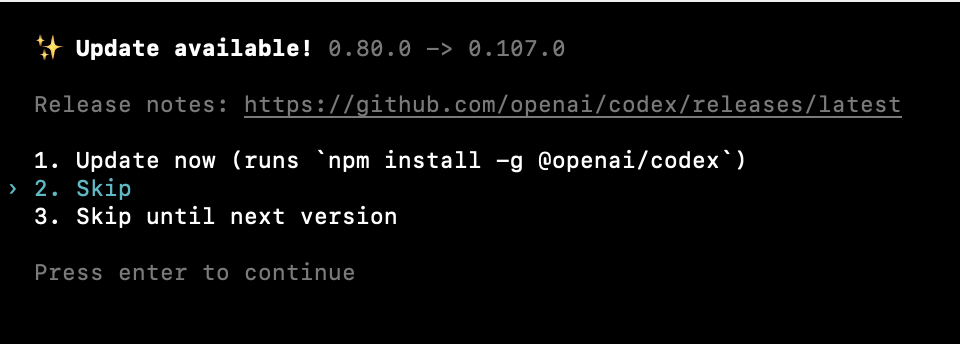
3. You can enter questions or instructions to start the conversation.
Ajuda e Suporte
Esta página foi útil?
Você também pode entrar em contato com a Equipe de vendas ou Enviar um tíquete em caso de ajuda.
comentários