Changing the Network
Download
Modo Foco
Tamanho da Fonte
Scenarios
You can change the VPC and subnet to which an instance belongs by using the network replacement feature when you need to adjust your business network plan or migrate the instance to a new VPC or subnet, while keeping other instance attributes unchanged. The system automatically migrates the instance's security group bindings and reissues certificates for instances with SSL enabled.
Limitations
Replacing the network changes the instance's IP address. The new IP address is retained for 24 hours by default. After this retention period, the old access IP address becomes invalid. Update your client programs promptly.
If you set the address retention period to 0 hours, the old IP address is reclaimed immediately after network replacement, which may impact your business. Choose this setting with caution.
Security group bindings are automatically migrated to the new network, so you do not need to reconfigure them manually.
After you replace the network, SSL certificates are reissued. The new certificates contain only the new IP address. Established TLS connections are not disconnected due to certificate reissuance. If your business client enables SSL certificate verification and requires verifying that the connection IP address matches the certificate IP address (that is,
--ssl-mode=VERIFY_IDENTITY), connections established using the old IP address after the network switch fail due to certificate verification failure. Switch new connections to the new IP address as soon as possible.Prerequisites
The instance status is running.
The target VPC and subnet have been created and are in the same region as the instance.
If the target VPC and subnet are identical to the instance's current network, you must specify a new IP address.
Steps
1. Log in to the TDSQL Boundless console and go to the Instance List page.
2. Click the target Instance ID to go to the Instance Details page.
3. In the Network Information section, click Change Network after the Network field.

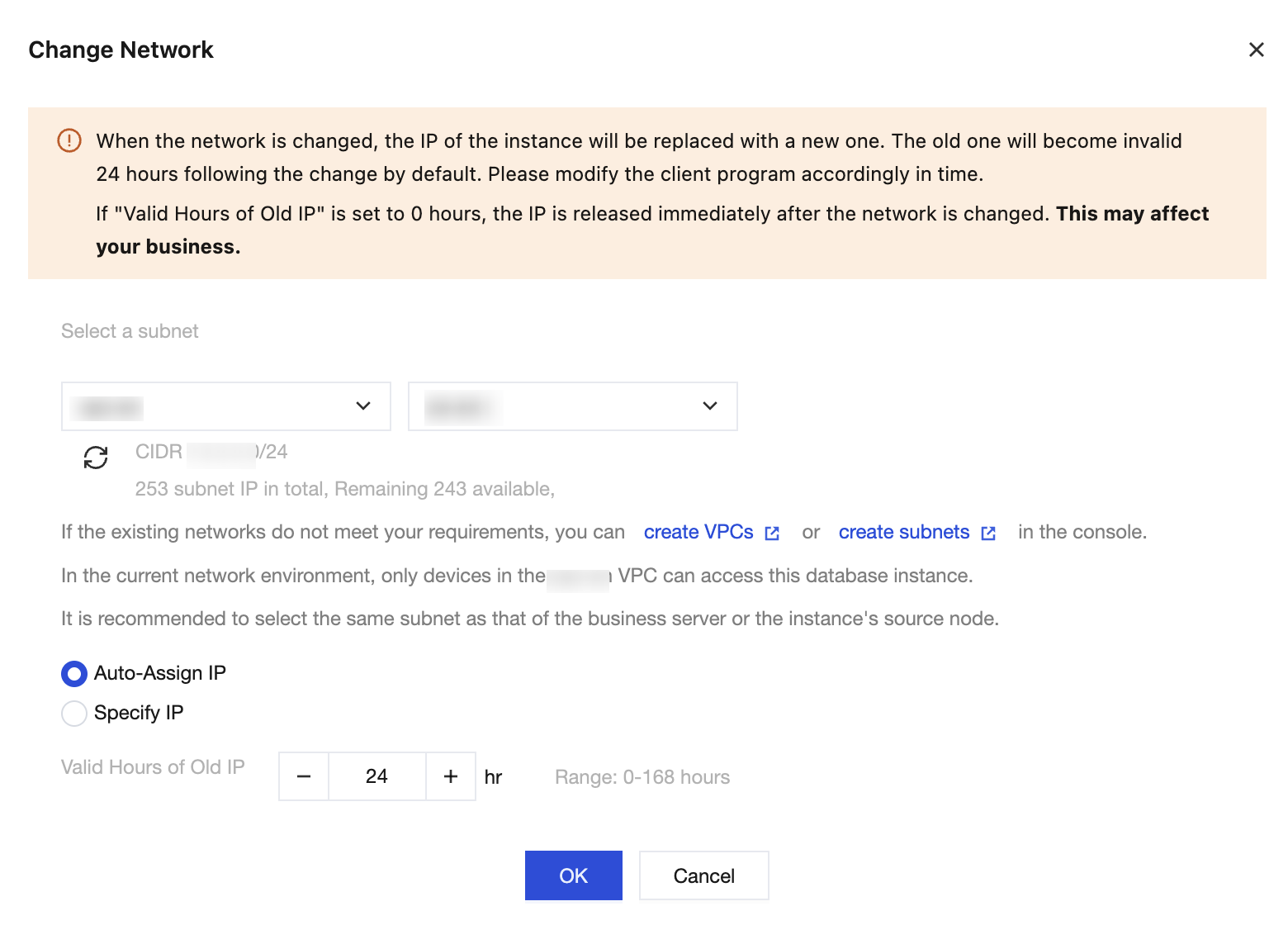
4. In the Change Network dialog box that appears, configure the following parameters and click OK.
Parameter | Description |
Select a subnet | Select the target VPC and subnet. The system displays the subnet's corresponding CIDR, total subnet IPs, and available IPs. It is recommended to select the same subnet as the business server to reduce cross-network access. |
IP address allocation method | Auto-Assign IP: The system automatically assigns an available IP address from the target subnet (default option). Specify IP: Manually specify the target IP address. The specified IP address must be within the target subnet's CIDR block and not in use. |
Valid Hours of Old IP | The retention period for the old IP address is measured in hours. You can set it to a value from 0-168 hours, with a default of 24 hours. Setting it to 0 hours means the old IP address is reclaimed immediately after network replacement. |
5. Return to the instance details page. After the instance status changes to running, the network in the Network Information section is updated to the new VPC and subnet, and the Private Network Address is displayed as the new IP address.
Operation Result
The instance's VPC, subnet, and private IP address have all been updated.
The old IP address enters a recycling wait state based on the configured address retention period and is automatically released upon expiration. If the period is set to -0 hours, the old IP address becomes inaccessible immediately.
The binding between the security group and the new IP address has been automatically established.
Subsequent Operation Steps
Update the IP address in the business-side connection string, or verify that the domain name resolution already points to the new IP address.
Verify business connectivity under the new network and confirm that the security group rules match the new IP address segment.
After you replace the network, SSL certificates are reissued. The new certificates contain only the new IP address. Established TLS connections are not disconnected due to certificate reissuance. If your business client enables SSL certificate verification and requires verifying that the connection IP address matches the certificate IP address (that is,
--ssl-mode=VERIFY_IDENTITY), connections established using the old IP address after the network switch fail due to certificate verification failure. Switch new connections to the new IP address as soon as possible.Ajuda e Suporte
Esta página foi útil?
Você também pode entrar em contato com a Equipe de vendas ou Enviar um tíquete em caso de ajuda.
comentários