Partition Table Practice Tutorial
Baixar
Modo Foco
Tamanho da Fonte
Starting from a Question: Why Does a Distributed Database Need Partitioning?
In a single-machine MySQL deployment, all data resides on one machine, and any SQL query directly accesses the local disk, eliminating the question of "where is the data?". However, when data volume exceeds the capacity of a single machine, we need to distribute the data across multiple nodes. This is the core challenge of a distributed database. A question then arises: when an SQL query arrives, how does the database know which machine to look for the data on? The answer is partitioning. Partitioning defines a set of rules that instruct the database on which node to place data during writes and which node to query for data during reads.
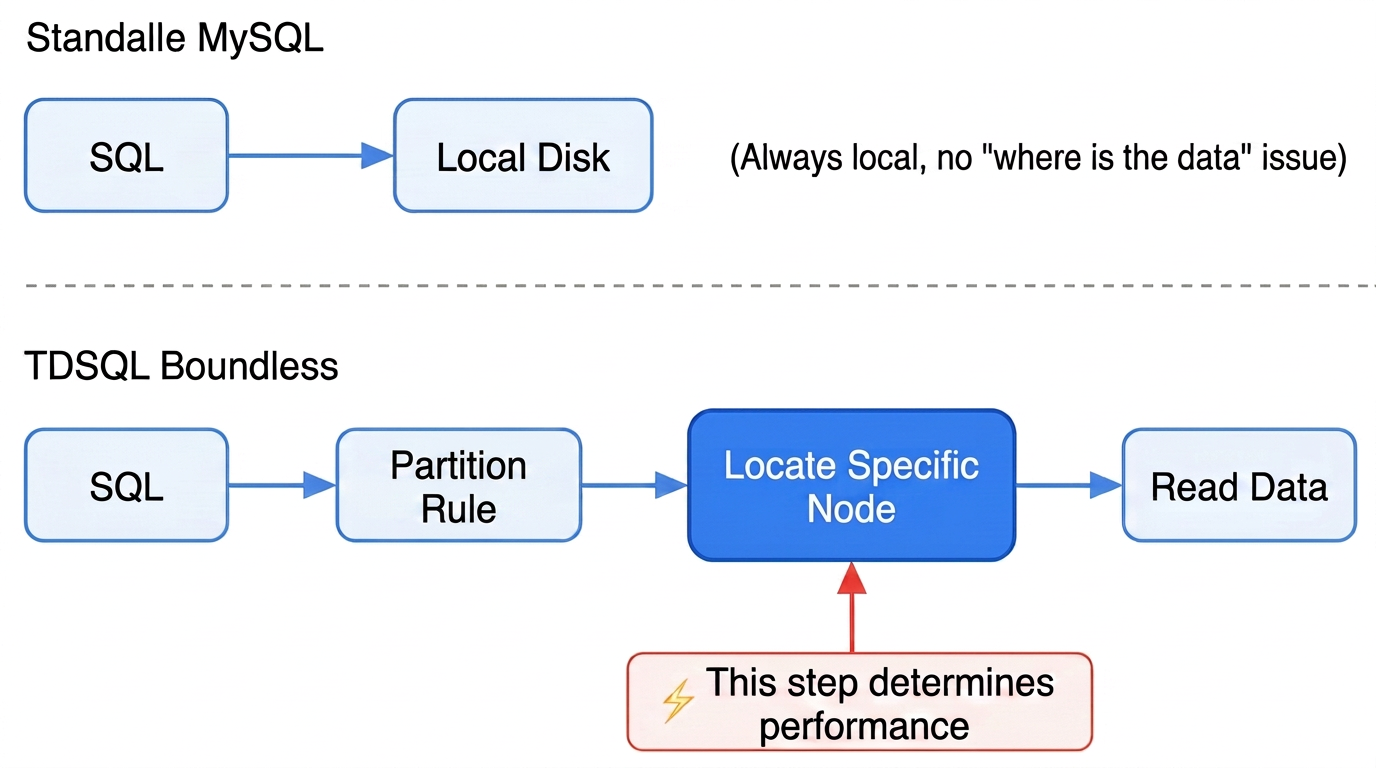
Three Core Problems Solved by Partitioning
Core Issue | Scenario Without Partitioning | How Partitioning Addresses the Issue |
Where is the data? | All data is piled up on a single node, while other nodes remain idle. | Evenly distributing to all nodes according to rules |
Where to route queries | Each SQL query must be sent to all nodes. | Queries with partition keys are directly routed to a single node. |
How to eliminate hotspots | New data is written to a single node in a centralized manner. | Hashing to scatter data and evenly distributing writes |
In summary: partitioning is the address rule for data. If chosen correctly, a single SQL query accesses only one node; if chosen incorrectly, every SQL query must query all nodes.
Data Organization in TDSQL Boundless
To understand the significance of partitioning, you must first understand how data is organized:
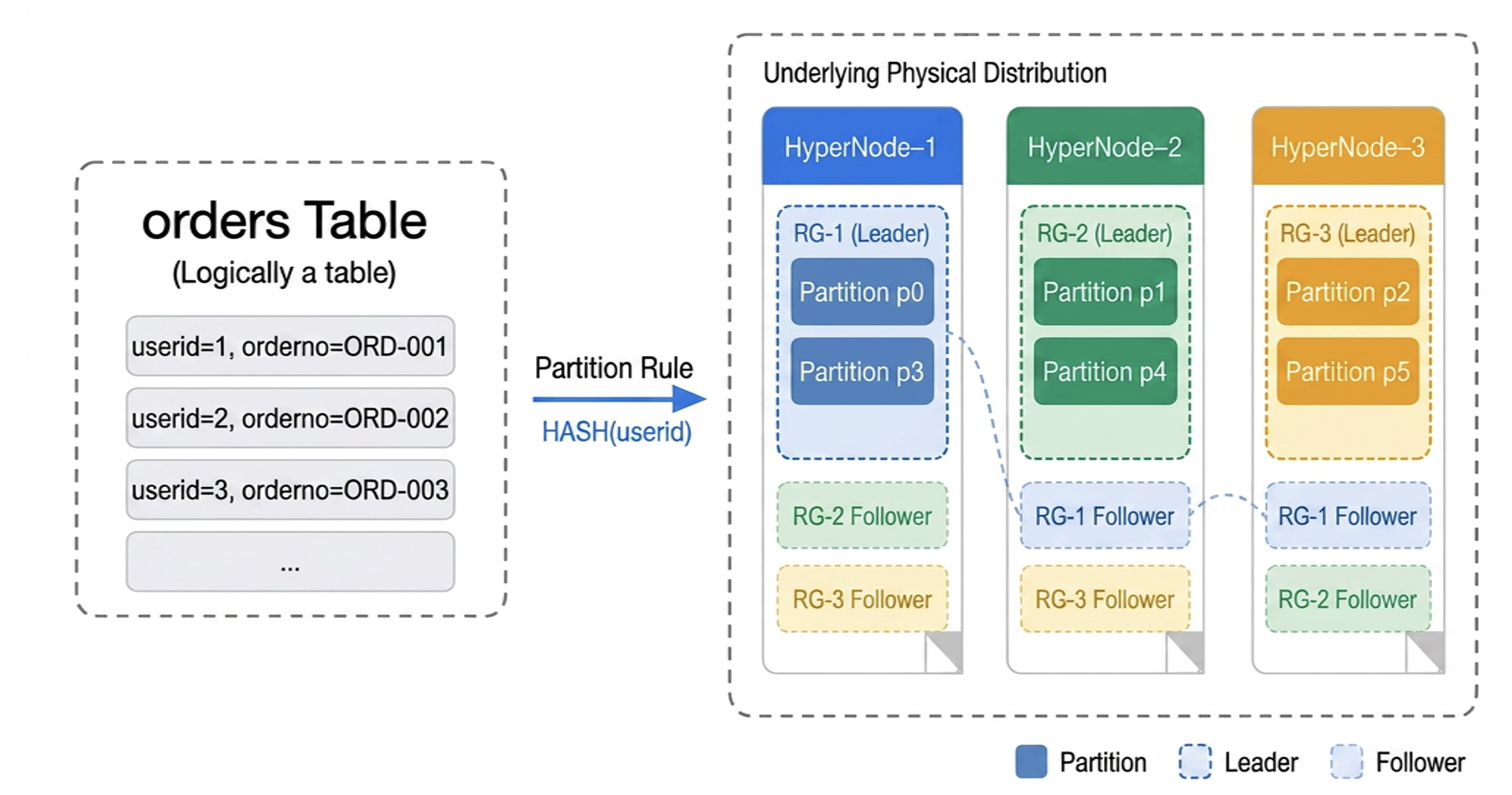
Partitioning: a user-defined rule for dividing data, for example, by taking the modulus of the userid.
RG (Replication Group): the fundamental unit for data replication and scheduling. Based on the Raft protocol, an RG can contain multiple partitions.
HyperNode (Peer Node): a HyperNode can host multiple RGs.
Partitioning determines how data is distributed, while the RG (Replication Group) serves as the underlying scheduling carrier. The two are automatically mapped through the intelligent scheduling of TDSQL Boundless.
Three Golden Rules
Golden Rule 1: The Partition Key Must Be Included in the Primary Key
Note:
The Global Secondary Index (GSI) is a new index independent of the base table's partition key. It enables fast queries on non-primary key columns, reduces full-table scans, and provides a global uniqueness constraint. A GSI cannot replace the primary key. The primary key in TDSQL Boundless must still include the partition key.
Because the uniqueness check for the primary key is performed within each partition, this check becomes invalid if the primary key does not contain all partition keys. To guarantee the uniqueness of the primary key/unique index, the partition key must be included in the primary key when a table is created. Failure to meet this requirement results in an immediate error:
-- ❌ Error: A PRIMARY KEY must include all columns in the table's partitioning functionCREATE TABLE users (id BIGINT PRIMARY KEY,userid BIGINT) PARTITION BY HASH(userid) PARTITIONS 16;-- ✅ Correct: The primary key includes the partition keyCREATE TABLE users (id BIGINT AUTO_INCREMENT,userid BIGINT NOT NULL,PRIMARY KEY (userid)) PARTITION BY HASH(userid) PARTITIONS 16;
Golden Rule 2: Avoid Using RANGE Partitioning Alone for Monotonically Increasing Columns; Combine RANGE and HASH Partitioning
Monotonically increasing fields such as auto-increment IDs and timestamps are not suitable for directly using them as RANGE partition keys. All newly written data will be concentrated on the node corresponding to the last partition--a single node bears all write pressure, creating a write hotspot. If RANGE partitioning is required (for example, for time-based archiving and cleanup), it is suitable to combine it with HASH secondary partitioning to distribute writes:
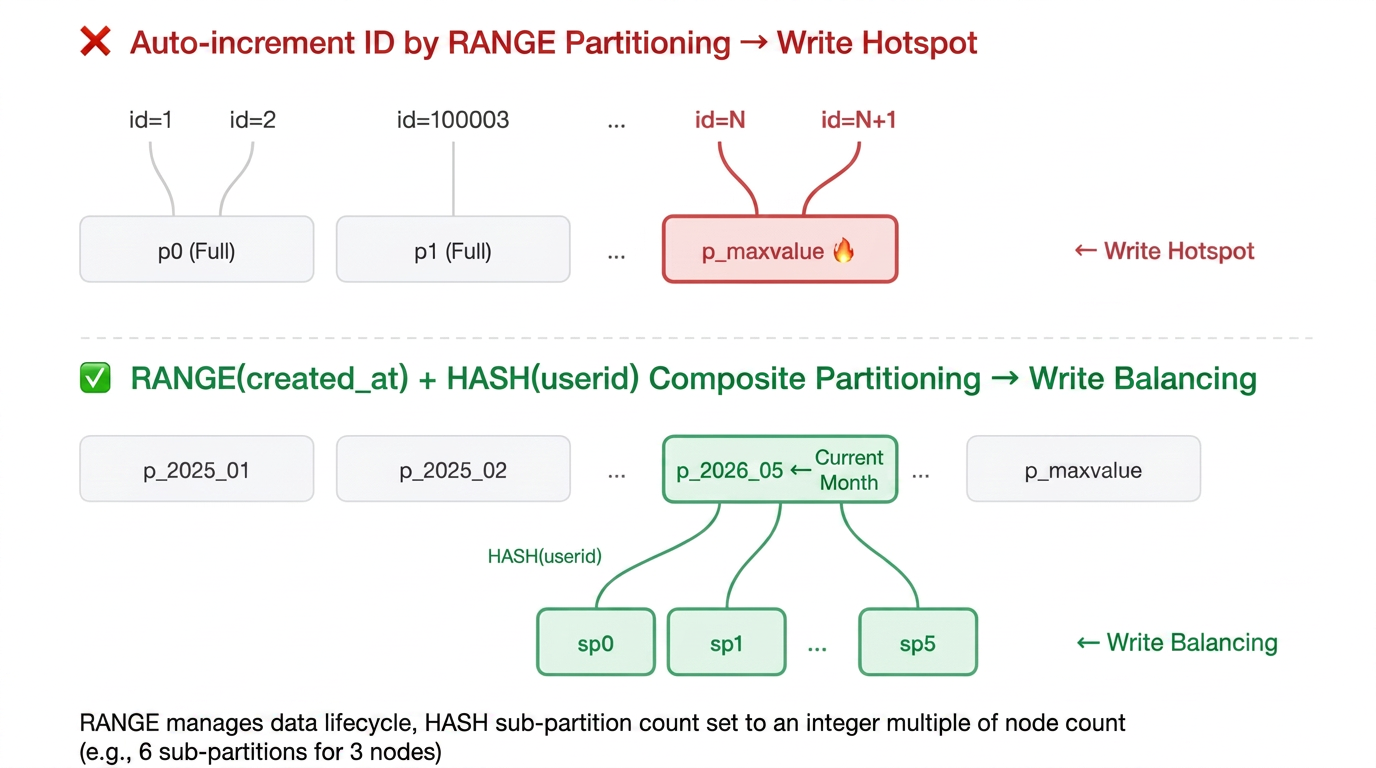
-- ❌ Write hotspot: new data is always written to the last partitionCREATE TABLE t (id BIGINT AUTO_INCREMENT,...PRIMARY KEY (id)) PARTITION BY RANGE(id) (PARTITION p0 VALUES LESS THAN (100000),PARTITION p1 VALUES LESS THAN (200000),PARTITION p_maxvalue VALUES LESS THAN MAXVALUE -- All new data resides here);-- ✅ RANGE manages the lifecycle by time + HASH distributes writesCREATE TABLE t (id BIGINT AUTO_INCREMENT,...PRIMARY KEY (id)) PARTITION BY RANGE COLUMNS(created_at)SUBPARTITION BY HASH(userid) SUBPARTITIONS 6 (...);
Golden Rule 3: Queries Must Include the Partition Key or Use a Global Secondary Index
Attention:
Select the partition key from fields frequently used in business queries. This prevents frequent queries from failing to leverage partition pruning and degrading into full partition scans. If a frequent query cannot include the partition key, consider adding a Global Secondary Index.
Why? Without a partition key, the database cannot determine which node the data resides on and must broadcast the query to all nodes. This is known as a "full partition scan", and performance typically degrades as the number of nodes increases.
-- ✅ Accesses only one node, with millisecond-level responseSELECT * FROM orders WHERE userid = 12345;-- ❌ Accesses all nodes, with each node being queried onceSELECT * FROM orders WHERE orderno = 'ORD-001';
How to Choose a Partition Type?
Note:
TDSQL Boundless is compatible with the partitioning syntax of MySQL 8.0, supporting both primary partitions and subpartitions (also known as composite partitions). Subpartitioning further divides each primary partition. Only HASH and KEY types are supported for subpartitioning.
In short, answer two questions:
Question 1: Is it necessary to periodically delete historical data? (For example, cleaning up logs monthly)
→ Yes: Use RANGE partitioning (partitioned by time, with partitions directly DROPPED upon expiration).
→ No: Go to Question 2.
Question 2: What type is the partition key?
→ Integer (INT/BIGINT): Partition using HASH
→ String (VARCHAR): Partition using KEY.
In real-world scenarios, HASH partitioning can solve most problems.
Quick Reference for Common Partition Types
Type | Principle | Scenarios | Example |
HASH | Evenly distributing data by performing modulo operations on integers | User tables, order tables, general business tables | PARTITION BY HASH(userid) |
KEY | Scattering data by performing internal hashing on any data type | Scenarios where the partition key is VARCHAR | PARTITION BY KEY(orderno) |
RANGE | Partitioning data based on value ranges | Log tables, transaction tables, tables that require time-based cleanup | PARTITION BY RANGE COLUMNS(created_at) |
RANGE + HASH | First partitioning by range, then scattering data at the second level | Large transaction tables: requiring time-based cleanup and distributed writes | |
How Many Partitions Should Be Set?
Note:
When creating a partition table, set the number of partitions = twice the expected maximum number of nodes. It is recommended to keep this number below 200.
If the number of partitions is set too low, some nodes will not receive data after the instance is scaled out, resulting in resource waste. If the number of partitions is set too high, the data volume per partition becomes too small, increasing management overhead. Therefore, it is generally recommended to set the number of partitions to twice the expected maximum number of nodes for the instance.
Current Number of Nodes | Number of Nodes After Expected Scale-Out | Recommended Number of Partitions |
3 nodes | 6 ~ 8 | 16 |
6 nodes | 12 | 24 |
What Happens to a Regular LOCAL Index Without a Partition Key?
This is one of the most frequently asked questions by customers:
CREATE TABLE orders (...KEY idx_order_no (orderno) -- A LOCAL index that does not include the partition key userid) PARTITION BY HASH(userid) PARTITIONS 16;
When a query uses only orderno and not userid:
SELECT * FROM orders WHERE orderno = 'ORD-2026-001';
TDSQL Boundless Execution Process:
1. The database cannot determine which partition this data resides in.
2. Index lookups can only be initiated against all 16 partitions.
3. Within each partition, a lookup is performed using the idx_order_no index.
4. 15 partitions missed, 1 partition hit.
5. Aggregate and return.
Conclusion: LOCAL indexes are not unusable, but you must understand the cost.
Query method | Number of Partitions Accessed | Network RPC | Applicable Scenarios |
WHERE userid = X | 1 | 1 time | High-frequency queries |
WHERE orderno = X (LOCAL index) | All | N times | Low-frequency queries, small result sets |
WHERE orderno = X (global secondary index) | 1 | 1 time | High-frequency non-partition-key queries |
Full table scan without index | All | N times | Never use. |
Optimization:
1. Optimal solution: Include the partition key in frequent queries.
-- From thisSELECT * FROM orders WHERE orderno = 'ORD-001';-- Change to this (if the business logic can obtain the userid)SELECT * FROM orders WHERE userid = 123 AND orderno = 'ORD-001';
2. Suboptimal solution: When frequent queries cannot include the partition key, add a Global Secondary Index (GSI) to avoid full-partition scans during queries.
Attention:
TDSQL Boundless version 21.2.X does not support Global Secondary Indexes. Support for Global Secondary Indexes begins with version 21.6.3.0. For details, see Global Secondary Index.
-- When a regular Local index is used on the orderno field, a full partition scan is required.ALTER TABLE orders ADD INDEX idx_local_order_no (orderno);EXPLAIN FORMAT=TREE SELECT * FROM orders WHERE orderno = 'ORD-001';+----------------------------------------------------------------------------------------------+| EXPLAIN |+----------------------------------------------------------------------------------------------+| -> Index lookup on orders using idx_local_order_no (orderno='ORD-001') (cost=5.94 rows=16)|+----------------------------------------------------------------------------------------------+-- After a Global Secondary Index is added to the orderno field, the query can directly hit the index data for a table lookup, avoiding a full partition scan.ALTER TABLE orders ADD INDEX idx_global_order_no (orderno) GLOBAL;EXPLAIN FORMAT=TREE SELECT * FROM orders WHERE orderno = 'ORD-001';+----------------------------------------------------------------------------------------------+| EXPLAIN |+----------------------------------------------------------------------------------------------+| -> Index lookup on orders using idx_global_order_no (orderno='ORD-001') (cost=0.35 rows=1)|+----------------------------------------------------------------------------------------------+
How to Modify for Migration from MySQL?
Step 1: Select a Partition Key for Each Table
This is the most critical decision during migration. The core principle: partition by the dimension with the highest frequency of "list queries", and use indexes as a fallback for other dimensions.
Taking the orders table as an example, both userid and orderno are high-frequency query fields. How do you choose?
| Partitioning by user_id | Partitioning by order_no |
Query user order list | Single partition, naturally aggregated | Scattered across partitions |
Query a single order by order number | Using a LOCAL index, the query fans out to all partitions (acceptable as each partition contains at most one row). | Single partition |
Write uniformity | The user_id is an integer, resulting in effective HASH distribution. | Order numbers often contain date prefixes, which may lead to uneven hash distribution. |
Partition Type | HASH (integer) | KEY (string, HASH does not support VARCHAR) |
Most order tables should be partitioned by userid, because:
The most frequent query is "all orders for a specific user".
For queries on a single order by orderno, an index can serve as a fallback. Since orderno is globally unique, even if a full partition scan occurs, each partition will match at most one row, keeping the overhead manageable. Alternatively, you can add a Global Secondary Index.
userid is typically an integer, making HASH partitioning the most effective.
Note:
Starting from TDSQL Boundless version V21.6.3.0, partition tables support the creation of globally unique indexes. For details, see Global Secondary Index.
Step 2: Modify Table Structures
Standalone MySQL | TDSQL Boundless | Reason for Change |
id BIGINT AUTO_INCREMENT PRIMARY KEY | Using business keys as the primary key instead of auto-increment IDs. | Avoid write hotspots |
No Partitioning | Adding PARTITION BY HASH(business_key1, business_key2) | Distributing data across multiple nodes |
Cleaning up historical data with DELETE WHERE date < '...' | Using DROP PARTITION instead | Millisecond completion vs. table locked for hours |
Creating indexes arbitrarily | The index for core queries must include the partition key. | Avoiding full-partition scans |
Transformation Comparison:
-- Orders table, before transformation (MySQL)CREATE TABLE orders (id BIGINT AUTO_INCREMENT PRIMARY KEY,userid BIGINT,orderno VARCHAR(64),amount DECIMAL(10,2),status TINYINT,created_at DATETIME,KEY idx_order_no (orderno),KEY idx_created (created_at));-- Orders table, after transformation (TDSQL Boundless)CREATE TABLE orders (id BIGINT AUTO_INCREMENT,userid BIGINT NOT NULL,orderno VARCHAR(64) NOT NULL,amount DECIMAL(10,2),status TINYINT,created_at DATETIME DEFAULT CURRENT_TIMESTAMP,PRIMARY KEY (userid, orderno), -- The partition key is the first column in the primary keyKEY idx_auto_id (id), -- Adds an index for the auto-increment keyKEY idx_order_no (orderno), -- The order number index handles search operations based on order numbers.KEY idx_user_created (userid, created_at) -- For user order list queries) PARTITION BY HASH(userid) PARTITIONS 16;
-- Orders table, before transformation (MySQL)CREATE TABLE orders (id BIGINT AUTO_INCREMENT PRIMARY KEY,userid BIGINT,orderno VARCHAR(64),amount DECIMAL(10,2),status TINYINT,created_at DATETIME,KEY idx_order_no (orderno),KEY idx_created (created_at));-- Orders table, after transformation (TDSQL Boundless)CREATE TABLE orders (id BIGINT AUTO_INCREMENT,userid BIGINT NOT NULL,orderno VARCHAR(64) NOT NULL,amount DECIMAL(10,2),status TINYINT,created_at DATETIME DEFAULT CURRENT_TIMESTAMP,PRIMARY KEY (userid, orderno), -- The partition key is the first column in the primary keyKEY idx_auto_id (id) GLOBAL, -- Adds a global index for the auto-increment keyKEY idx_global_order_no (orderno) GLOBAL, -- The order number index handles search operations based on order numbers.KEY idx_user_created (userid, created_at) -- For user order list queries) PARTITION BY HASH(userid) PARTITIONS 16;
Step 3: Modify Query Statements
Scenario 1: For user order list queries, whether sorted by creation time (created_at) or order number (orderno), no modification is required as they naturally hit the partition.
-- ✅ No modification required; it naturally hits the partition.SELECT * FROM orders WHERE userid = 123 ORDER BY created_at DESC LIMIT 20;SELECT * FROM orders WHERE userid = 123 ORDER BY orderno DESC LIMIT 20;
Scenario 2: To query a single order by order number, the optimal approach is to also include the user's userid as a query condition. If the userid cannot be obtained for the query, it is still acceptable.
-- Optimal scenario: Query the order number with the user's userid.SELECT * FROM orders WHERE userid = 123 AND orderno = 'ORD-001';-- Suboptimal scenario: Add a Global Secondary Index.ALTER TABLE orders ADD INDEX idx_global_order_no (orderno) GLOBAL;SELECT * FROM orders WHERE orderno = 'ORD-001';-- Acceptable (LOCAL index, 16 index lookups)ALTER TABLE orders ADD INDEX idx_local_order_no (orderno);SELECT * FROM orders WHERE orderno = 'ORD-001';
Step 4 (Optional): Further Optimization for High-Frequency orderno Queries
If queries by order number (orderno) are very frequent and latency-sensitive, you can introduce a KV cache mapping at the application layer, such as Redis.
Synchronized Tables: How to Handle Small Tables Frequently Used in JOINs?
JOIN operations on partition tables may span nodes, incurring network overhead. For small tables that are read-heavy and write-light, such as dictionary tables and configuration tables, use synchronized tables:
CREATE TABLE dim_city (city_id INT PRIMARY KEY,city_name VARCHAR(64)) sync_level = node(all) distribution = node(all);
Synchronized tables maintain a complete replica on each node, so the data is local during JOIN operations, resulting in zero network overhead.
Note:
TDSQL Boundless supports the following table types:
Table Type | Scenarios | Feature |
Regular Table (Single Table) | Small data volume, no distribution requirement | All data resides within a single RG. |
Partition Table | Large data volume, requires horizontal scaling | Data is distributed across multiple service groups according to rules. |
Synchronization table | System configurations, dimension tables, parameter tables, small tables with more reads than writes | Strongly synchronized replicas across all nodes. Write operations may experience latency under frequent writes, for example, a Lease may be blocked when a Follower fails. |
Verifying Your Partition Design
Execute the EXPLAIN statement to view the execution plan:
-- With partition keyEXPLAIN SELECT * FROM orders WHERE userid = 12345;*************************** 1. row ***************************id: 1select_type: SIMPLEtable: orderspartitions: p1type: refpossible_keys: PRIMARYkey: PRIMARYkey_len: 8ref: constrows: 2filtered: 100.00Extra: NULL-- Without partition keyEXPLAIN SELECT * FROM orders WHERE orderno = 'ORD-001';*************************** 1. row ***************************id: 1select_type: SIMPLEtable: orderspartitions: p0,p1,p2,p3,p4,p5,p6,p7type: refpossible_keys: idx_order_nokey: idx_order_nokey_len: 258ref: constrows: 9filtered: 100.00Extra: NULL
Explicit Partition Queries
In addition to automatic partition pruning by the database using the WHERE clause with the partition key, TDSQL Boundless fully supports the explicit partition selection syntax of MySQL 8.0--you can specify the partition to access directly with PARTITION (p_name) after FROM, achieving partition pruning even without the partition key.
-- Single partitionSELECT * FROM orders PARTITION (p1);-- Multiple partitionsSELECT * FROM orders PARTITION (p0, p2, p5);-- Combined with WHERE clause (intersection, not union)SELECT * FROM orders PARTITION (p1) WHERE status = 1;-- DML is also supportedDELETE FROM orders PARTITION (p_2025_01) WHERE created_at < '2025-01-15';UPDATE orders PARTITION (p3) SET status = 9 WHERE ...;INSERT INTO orders PARTITION (p0) (user_id, ...) VALUES (...);
Common Misconceptions
Incorrect Example | Impact | Correct Practices |
Using auto-increment ID as both primary key and partition key | Write hotspot | Use business fields as the partition key and primary key. When performing ORDER BY sorting operations, use business time or other naturally ordered fields. |
Query without partition key and missing GLOBAL index | Full-partition scan | Add the partition key to the WHERE clause. |
Using HASH partitioning for VARCHAR | Table creation error | Use KEY partitioning. |
Using RANGE partitioning by day and retaining data for multiple years | 1000+ partitions, metadata bloat | Change to monthly partitioning (36 partitions/3 years). |
Ajuda e Suporte
Esta página foi útil?
Você também pode entrar em contato com a Equipe de vendas ou Enviar um tíquete em caso de ajuda.
comentários