tencent cloud

Tencent Cloud Organization

  • Product Introduction
  • Purchase Guide
  • Operation Guide
    • Console Overview
    • Organization Settings
    • Department Management
    • Member Account Management
    • Member Finance Management
    • Member Access Management
    • Resource Management
    • Member Audit
    • Identity Center Management
  • API Documentation
    • History
    • Introduction
    • API Category
    • Making API Requests
    • Organization Settings APIs
    • Department and Member Management APIs
    • ListOrganizationIdentity
    • Unified Member Login APIs
    • Organization Service Management APIs
    • Organization Management Policy APIs
    • Resource Sharing APIs
    • Identity Center Management APIs
    • Identity Center User Management APIs
    • Identity Center User Group Management APIs
    • Identity Center Management SCIM Synchronization APIs
    • Identity Center Single Sign-On Management APIs
    • Identity Center Permission Configuration Management APIs
    • Identity Center Multi-Account Authorization Management APIs
    • Identity Center Sub-User Synchronization Management APIs
    • Data Types
    • Error Codes
    • TCO API 2018-12-25
  • Related Agreement
  • FAQs
  • Glossary

Editing a Shared Unit

PDF
Modo Foco
Tamanho da Fonte
Última atualização: 2024-12-09 15:15:13
After completing resource sharing, if you need to edit shared resources and shared account information under the shared unit, you can refer to this document for operation.

Operation Steps

1. Log in to the TCO console and select Resource Sharing > Share by Me on the left navigation bar.
2. Select the Shared group tab, and choose the region of the shared unit at the top of the page.
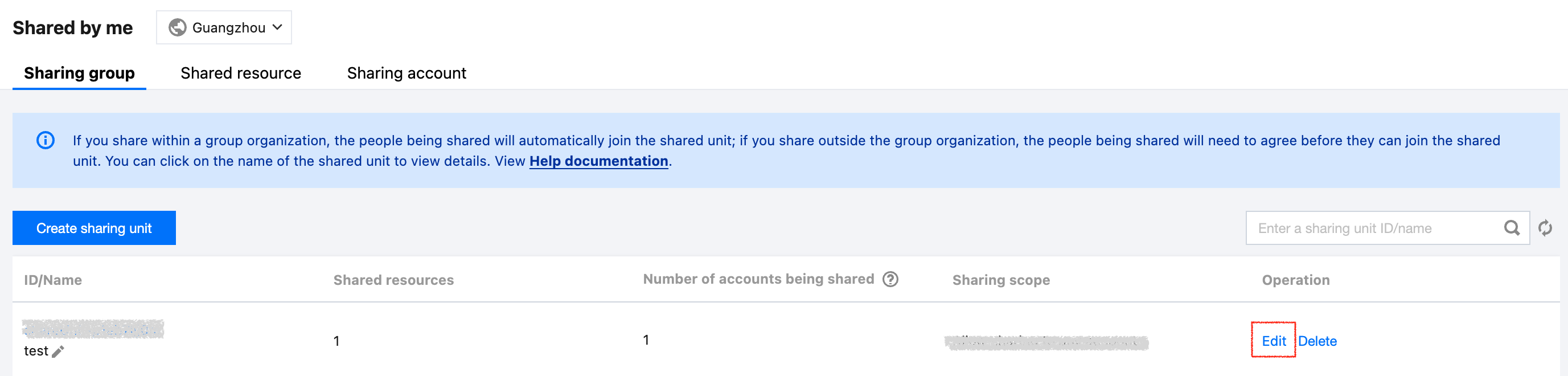
3. Click Edit on the right side of the row where the shared unit to be modified is located, as shown below:


4. On the Edit Shareing unit page, configure according to the following information.
4.1 Modify Shared Resources: in Shared Resource, check/uncheck resources to complete the modification.
4.2 Modify Shared Accounts:
Add Shared Accounts: click Add Shareing accounts, in the pop-up Add Shareing accounts window, check or manually add the account to be shared, then click Save. For details, refer to Create Shared Unit.


Remove Shared Accounts: click Remove on the right side of the row where the shared account to be deleted is located, as shown below:


5. Click Save to complete the editing.

Ajuda e Suporte

Esta página foi útil?

comentários